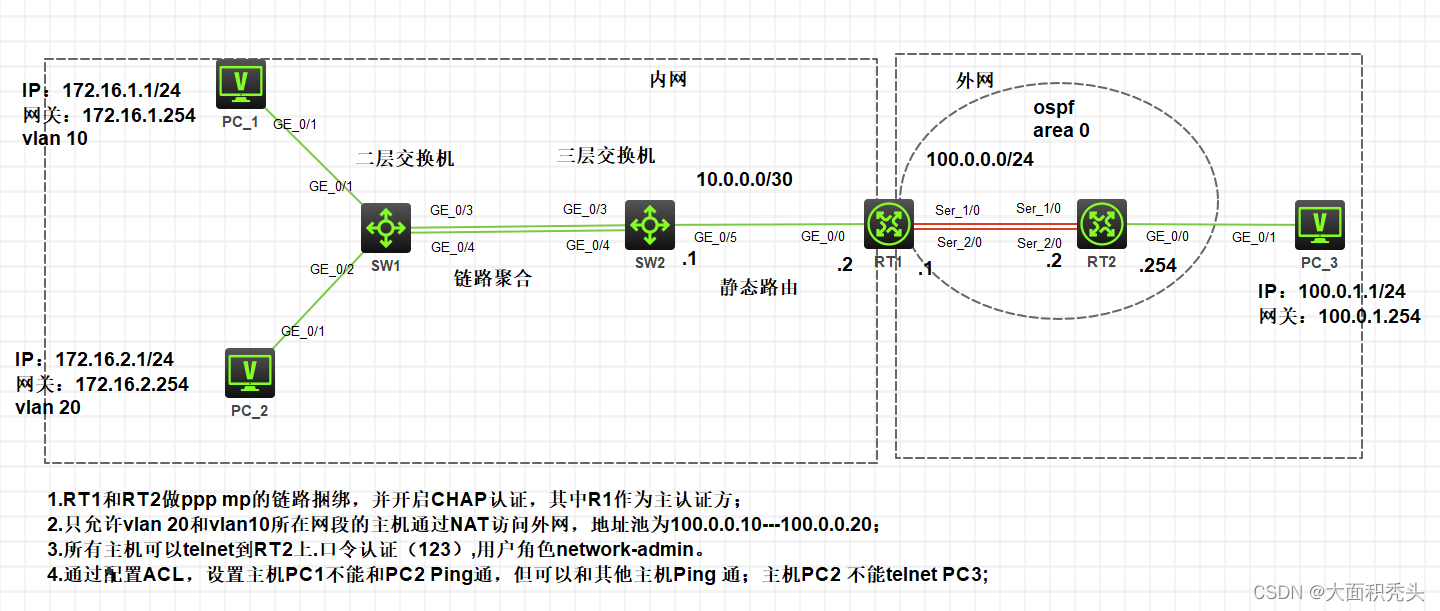
外网配置
配置主机

先认证再捆绑
使用CHAP认证进行
RT1主验证 (采用简单的接口验证
[RT1]local-user rt2 class network
New local user added.

[RT1-luser-network-rt2]password simple rt2

[RT1-luser-network-rt2]service-type ppp
[RT1-luser-network-rt2]quit

[RT1]inter s1/0
[RT1-Serial1/0]ppp authentication-mode chap

[RT1-Serial1/0]inter s2/0
[RT1-Serial2/0]ppp authentication-mode  chap
)
RT1配置完成后,RT2马上开启认证
[RT2]inter s1/0

[RT2-Serial1/0]ppp chap password simple rt2
[RT2-Serial1/0]dis inter s1/0
Serial1/0
Current state: UP
Line protocol state: UP
Description: Serial1/0 Interface
Bandwidth: 64 kbps
Maximum transmission unit: 1500
Hold timer: 10 seconds, retry times: 5
Internet protocol processing: Disabled
Link layer protocol: PPP
LCP: opened
Output queue - Urgent queuing: Size/Length/Discards 0/100/0
Output queue - Protocol queuing: Size/Length/Discards 0/500/0
Output queue - FIFO queuing: Size/Length/Discards 0/75/0
Last link flapping: 0 hours 42 minutes 4 seconds
Last clearing of counters: Never
此时接口处于open状态,所以我们需要重启接口进行验证
[RT2-Serial1/0]shut

[RT2-Serial1/0]undo shut

[RT2-Serial1/0]dis inter s1/0
Serial1/0
Current state: UP
Line protocol state: UP
Description: Serial1/0 Interface
Bandwidth: 64 kbps
Maximum transmission unit: 1500
Hold timer: 10 seconds, retry times: 5
Internet protocol processing: Disabled
Link layer protocol: PPP
LCP: opened
Output queue - Urgent queuing: Size/Length/Discards 0/100/0
Output queue - Protocol queuing: Size/Length/Discards 0/500/0
Output queue - FIFO queuing: Size/Length/Discards 0/75/0
Last link flapping: 0 hours 0 minutes 34 seconds
Last clearing of counters: Never
接口仍处于open状态则说明验证成功,进入接口S2/0验证
[RT2]inter s2/0
[RT2-Serial2/0]ppp chap user rt2
[RT2-Serial2/0]ppp chap password simple rt2
[RT2-Serial2/0]dis inter s2/0
Serial2/0
Current state: UP
Line protocol state: UP
Description: Serial2/0 Interface
Bandwidth: 64 kbps
Maximum transmission unit: 1500
Hold timer: 10 seconds, retry times: 5
Internet protocol processing: Disabled
Link layer protocol: PPP
LCP: opened
Output queue - Urgent queuing: Size/Length/Discards 0/100/0
Output queue - Protocol queuing: Size/Length/Discards 0/500/0
Output queue - FIFO queuing: Size/Length/Discards 0/75/0
Last link flapping: 0 hours 54 minutes 43 seconds
Last clearing of counters: Never

[RT2-Serial2/0]shut
[RT2-Serial2/0]%Dec 23 11:57:36:968 2021 RT2 IFNET/5/LINK_UPDOWN: Line protocol state on the interface Serial2/0 changed to down.
%Dec 23 11:57:36:968 2021 RT2 IFNET/3/PHY_UPDOWN: Physical state on the interface Serial2/0 changed to down.

[RT2-Serial2/0]undo shut
[RT2-Serial2/0]%Dec 23 11:57:44:464 2021 RT2 IFNET/3/PHY_UPDOWN: Physical state on the interface Serial2/0 changed to up.
%Dec 23 11:57:44:465 2021 RT2 IFNET/5/LINK_UPDOWN: Line protocol state on the interface Serial2/0 changed to up.

[RT2-Serial2/0]dis inter s2/0
Serial2/0
Current state: UP
Line protocol state: UP
Description: Serial2/0 Interface
Bandwidth: 64 kbps
Maximum transmission unit: 1500
Hold timer: 10 seconds, retry times: 5
Internet protocol processing: Disabled
Link layer protocol: PPP
LCP: opened
Output queue - Urgent queuing: Size/Length/Discards 0/100/0
Output queue - Protocol queuing: Size/Length/Discards 0/500/0
Output queue - FIFO queuing: Size/Length/Discards 0/75/0
Last link flapping: 0 hours 0 minutes 4 seconds
Last clearing of counters: Never
验证结束,下面开始进行捆绑,先建立捆绑组,给捆绑组配置IP地址,再进入接口,把接口加入捆绑组
[RT1]inter mp
[RT1]inter MP-group 1
[RT1-MP-group1]ip add 100.0.0.1 24
[RT1-MP-group1]quit
[RT1]inter s1/0
[RT1-Serial1/0]ppp mp mp
[RT1-Serial1/0]ppp mp MP-group 1
[RT1-Serial1/0]%Dec 23 12:03:58:777 2021 RT1 IFNET/5/LINK_UPDOWN: Line protocol state on the interface Serial1/0 changed to down.
%Dec 23 12:04:01:836 2021 RT1 IFNET/5/LINK_UPDOWN: Line protocol state on the interface Serial1/0 changed to up.

[RT1-Serial1/0]inter s2/0
[RT1-Serial2/0]ppp mp mp1
[RT1-Serial2/0]%Dec 23 12:04:56:494 2021 RT1 IFNET/5/LINK_UPDOWN: Line protocol state on the interface Serial2/0 changed to down.
%Dec 23 12:04:59:536 2021 RT1 IFNET/5/LINK_UPDOWN: Line protocol state on the interface Serial2/0 changed to up.
[RT2]inter MP-group 1

[RT2-MP-group1]ip add 100.0.0.2 24
[RT2-MP-group1]inter s1/0
[RT2-Serial1/0]ppp mp MP-group 1
[RT2-Serial1/0]inter s2/0
[RT2-Serial2/0]ppp mp MP-group 1
[RT2-Serial2/0]quit

//查看是否捆绑成功
[RT2]dis ppp mp
----------------------Slot0----------------------
Template: MP-group1
max-bind: 16, fragment: enabled, min-fragment: 128
  Master link: MP-group1, Active members: 2, Bundle Multilink
  Peer's endPoint descriptor: MP-group1
  Sequence format: long (rcv)/long (sent)
  Bundle Up Time: 2021/12/23  12:07:04:660
  0 lost fragments, 0 reordered, 0 unassigned, 0 interleaved
  Sequence: 0 (rcv)/0 (sent)
  Active member channels: 2 members
        Serial1/0                 Up-Time:2021/12/23  12:07:04:660
        Serial2/0                 Up-Time:2021/12/23  12:07:42:40
给RT2的g0/0接口配置ip地址
[RT2]inter g0/0

[RT2-GigabitEthernet0/0]ip add 100.0.1.254 24
[RT2-GigabitEthernet0/0]quit
查看RT2路由表是否出现100.0.0以及100.0.1两个字段
[RT2]dis ip routing-table

Destinations : 17       Routes : 17

Destination/Mask   Proto   Pre Cost        NextHop         Interface
0.0.0.0/32         Direct  0   0           127.0.0.1       InLoop0
100.0.0.0/24       Direct  0   0           100.0.0.2       MP1
100.0.0.0/32       Direct  0   0           100.0.0.2       MP1
100.0.0.1/32       Direct  0   0           100.0.0.1       MP1
100.0.0.2/32       Direct  0   0           127.0.0.1       InLoop0
100.0.0.255/32     Direct  0   0           100.0.0.2       MP1
100.0.1.0/24       Direct  0   0           100.0.1.254     GE0/0
100.0.1.0/32       Direct  0   0           100.0.1.254     GE0/0
100.0.1.254/32     Direct  0   0           127.0.0.1       InLoop0
100.0.1.255/32     Direct  0   0           100.0.1.254     GE0/0
127.0.0.0/8        Direct  0   0           127.0.0.1       InLoop0
127.0.0.0/32       Direct  0   0           127.0.0.1       InLoop0
127.0.0.1/32       Direct  0   0           127.0.0.1       InLoop0
127.255.255.255/32 Direct  0   0           127.0.0.1       InLoop0
224.0.0.0/4        Direct  0   0           0.0.0.0         NULL0
224.0.0.0/24       Direct  0   0           0.0.0.0         NULL0
255.255.255.255/32 Direct  0   0           127.0.0.1       InLoop0
用ospf配置路由
[RT1-ospf-1]ospf
[RT1-ospf-1]ar
[RT1-ospf-1]area 0
[RT1-ospf-1-area-0.0.0.0]net 100.0.0.0 0.0.0.255
[RT1-ospf-1-area-0.0.0.0]quit
[RT1-ospf-1]quit
[RT2]ospf
[RT2-ospf-1]ar
[RT2-ospf-1]area 0
[RT2-ospf-1-area-0.0.0.0]net 100.0.0.0 0.0.0.255
[RT2-ospf-1-area-0.0.0.0]%Dec 23 12:28:22:096 2021 RT2 OSPF/5/OSPF_NBR_CHG: OSPF 1 Neighbor 100.0.0.1(MP-group1) changed from LOADING to FULL.

[RT2-ospf-1-area-0.0.0.0]net 100.0.1.0 0.0.0.255
[RT2-ospf-1-area-0.0.0.0]quit
[RT2-ospf-1]quit
查看RT2,RT1路由表,RT2直连最优,RT1出现100.0.1字段说明能连通外网主机,并通过ping命令检查连通性
[RT2]dis ip routing-table

Destinations : 17       Routes : 17

Destination/Mask   Proto   Pre Cost        NextHop         Interface
0.0.0.0/32         Direct  0   0           127.0.0.1       InLoop0
100.0.0.0/24       Direct  0   0           100.0.0.2       MP1
100.0.0.0/32       Direct  0   0           100.0.0.2       MP1
100.0.0.1/32       Direct  0   0           100.0.0.1       MP1
100.0.0.2/32       Direct  0   0           127.0.0.1       InLoop0
100.0.0.255/32     Direct  0   0           100.0.0.2       MP1
100.0.1.0/24       Direct  0   0           100.0.1.254     GE0/0
100.0.1.0/32       Direct  0   0           100.0.1.254     GE0/0
100.0.1.254/32     Direct  0   0           127.0.0.1       InLoop0
100.0.1.255/32     Direct  0   0           100.0.1.254     GE0/0
127.0.0.0/8        Direct  0   0           127.0.0.1       InLoop0
127.0.0.0/32       Direct  0   0           127.0.0.1       InLoop0
127.0.0.1/32       Direct  0   0           127.0.0.1       InLoop0
127.255.255.255/32 Direct  0   0           127.0.0.1       InLoop0
224.0.0.0/4        Direct  0   0           0.0.0.0         NULL0
224.0.0.0/24       Direct  0   0           0.0.0.0         NULL0
255.255.255.255/32 Direct  0   0           127.0.0.1       InLoop0
[RT1]dis ip routing-table

Destinations : 20       Routes : 20

Destination/Mask   Proto   Pre Cost        NextHop         Interface
0.0.0.0/32         Direct  0   0           127.0.0.1       InLoop0
10.0.0.0/30        Direct  0   0           10.0.0.2        GE0/0
10.0.0.0/32        Direct  0   0           10.0.0.2        GE0/0
10.0.0.2/32        Direct  0   0           127.0.0.1       InLoop0
10.0.0.3/32        Direct  0   0           10.0.0.2        GE0/0
100.0.0.0/24       Direct  0   0           100.0.0.1       MP1
100.0.0.0/32       Direct  0   0           100.0.0.1       MP1
100.0.0.1/32       Direct  0   0           127.0.0.1       InLoop0
100.0.0.2/32       Direct  0   0           100.0.0.2       MP1
100.0.0.255/32     Direct  0   0           100.0.0.1       MP1
100.0.1.0/24       O_INTRA 10  782         100.0.0.2       MP1
127.0.0.0/8        Direct  0   0           127.0.0.1       InLoop0
127.0.0.0/32       Direct  0   0           127.0.0.1       InLoop0
127.0.0.1/32       Direct  0   0           127.0.0.1       InLoop0
127.255.255.255/32 Direct  0   0           127.0.0.1       InLoop0
172.16.1.0/24      Static  60  0           10.0.0.1        GE0/0
172.16.2.0/24      Static  60  0           10.0.0.1        GE0/0
224.0.0.0/4        Direct  0   0           0.0.0.0         NULL0
224.0.0.0/24       Direct  0   0           0.0.0.0         NULL0
255.255.255.255/32 Direct  0   0           127.0.0.1       InLoop0
[RT1]

[RT1]ping 100.0.1.1
Ping 100.0.1.1 (100.0.1.1): 56 data bytes, press CTRL_C to break
56 bytes from 100.0.1.1: icmp_seq=0 ttl=254 time=1.000 ms
56 bytes from 100.0.1.1: icmp_seq=1 ttl=254 time=1.000 ms
56 bytes from 100.0.1.1: icmp_seq=2 ttl=254 time=1.000 ms
56 bytes from 100.0.1.1: icmp_seq=3 ttl=254 time=1.000 ms
56 bytes from 100.0.1.1: icmp_seq=4 ttl=254 time=1.000 ms

--- Ping statistics for 100.0.1.1 ---
5 packet(s) transmitted, 5 packet(s) received, 0.0% packet loss
round-trip min/avg/max/std-dev = 1.000/1.000/1.000/0.000 ms
[RT1]%Dec 23 12:30:17:333 2021 RT1 PING/6/PING_STATISTICS: Ping statistics for 100.0.1.1: 5 packet(s) transmitted, 5 packet(s) received, 0.0% packet loss, round-trip min/avg/max/std-dev = 1.000/1.000/1.000/0.000 ms.
此时,整个外网均已连通
版权声明:本文为wode39原创文章,遵循CC 4.0 BY-SA版权协议,转载请附上原文出处链接和本声明。