SpringBoot-----Thymeleaf

?一、Thymeleaf入门
?1、Thymeleaf是一款用于渲染XML/HTML5内容的模板引擎,类似JSP。它可以轻易的与SpringMVC等Web框架进行集成作为Web应用的模板引擎。在SpringBoot中推荐使用Thymeleaf编写动态页面
?2、Thymeleaf最大的特点是能够直接在浏览器中打开并正确显示模板页面,而不需要启动整个Web应用。
?3、Thymeleaf在有网络和无网络的环境下皆可运行,它即可以让美工在浏览器查看页面的静态效果,也可以让程序员在服务器查看带数据的动态页面效果。没有数据时,Thymeleaf的模板可以静态地运行;当有数据返回到页面时,Thymeleaf标签会动态地替>换掉静态内容,使页面动态显示。
完成Thymeleaf入门
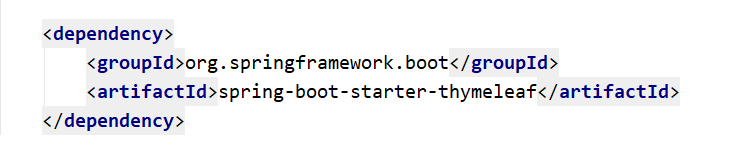
步骤1、添加thymeleaf的依赖
步骤2、创建一个控制类MyController
package com.example.demo.wr.oyc.controller;
import org.springframework.stereotype.Controller;
import org.springframework.ui.Model;
import org.springframework.web.bind.annotation.GetMapping;
@Controller
public class MyController {

    @GetMapping("/show")
    public String showPage (Model model){


        model.addAttribute("msg" , "Hello Thymeleaf");

        return "index";
    }
}
步骤3 创建一个html页面
<!DOCTYPE html>
<!-- 引入thymeleaf命名空间,方便使用thymeleaf属性 -->
<html lang="en" xmlns:th="http://www.thymeleaf.org">
<head>
        <meta charset="UTF-8">
        <title>thymeleaf入门</title>
    </head>
<body>

<h2 th:text="${msg}">首页</h2>
</body>
</html>


?二、变量输出
记得写在标签中哦!!!
| 语法 | 作用 |
|---|---|
| th:text | 将model中的值作为内容放入标签中 |
| th:value | 将model中的值放入input标签的value属性中 |


?三、操作字符串
?Thymeleaf提供了一些内置对象可以操作数据,内置对象可直接在模板中使用,这些对象是以#引用的,操作字符串的内置对象为strings。
| 方法 | 说明 |
|---|---|
| ${#strings.isEmpty(key)} | 判断字符串是否为空,如果为空返回true,否则返回false |
| ${#strings.contains(msg,‘T’)} | 判断字符串是否包含指定的子串,如果包含返回true,否则返回false |
| ${#strings.startsWith(msg,‘a’)} | 判断当前字符串是否以子串开头,如果是返回true,否则返回false |
| ${#strings.endsWith(msg,‘a’)} | 判断当前字符串是否以子串结尾,如果是返回true,否则返回false |
| ${#strings.length(msg)} | 返回字符串的长度 |
| ${#strings.indexOf(msg,‘h’)} | 查找子串的位置,并返回该子串的下标,如果没找到则返回-1 |
| ${#strings.substring(msg,2,5)} | 截取子串,用法与JDK的subString方法相同 |
| ${#strings.toUpperCase(msg)} | 字符串转大写 |
| ${#strings.toLowerCase(msg)} | 字符串转小写 |
?四、操作时间
操作时间的内置对象为dates
| 方法 | 说明 |
|---|---|
| ${#dates.format(key)} | 格式化日期,默认的以浏览器默认语言为格式化标准 |
| ${#dates.format(key,‘yyyy/MM/dd’)} | 按照自定义的格式做日期转换 |
| ${#dates.year(key)} | 取年 |
| ${#dates.month(key)} | 取月 |
| ${#dates.day(key)} | 取日 |



?五、条件判断
| 语法 | 作用 |
|---|---|
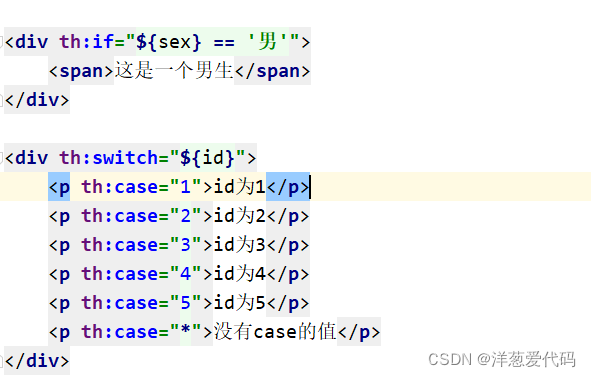
| th:if | 条件判断 |
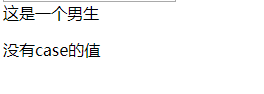
| th:switch/th:case | th:switch/th:case与Java中的switch语句等效。th:case="“表示Java中switch的default,即没有case的值为true时显示th:case=”"的内容。 |

?六、迭代遍历
1、基本用法
| 语法 | 作用 |
|---|---|
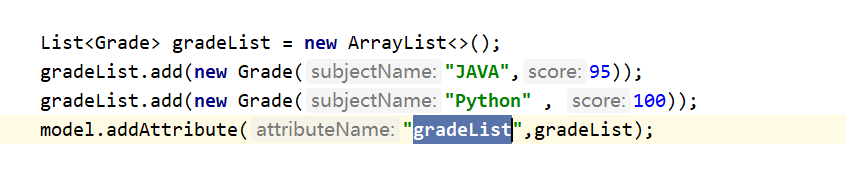
| th:each | 迭代器,用于循环迭代集合 |
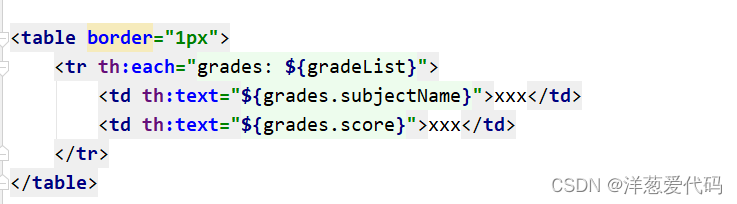
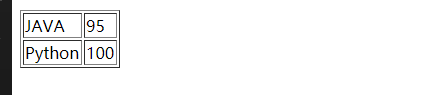
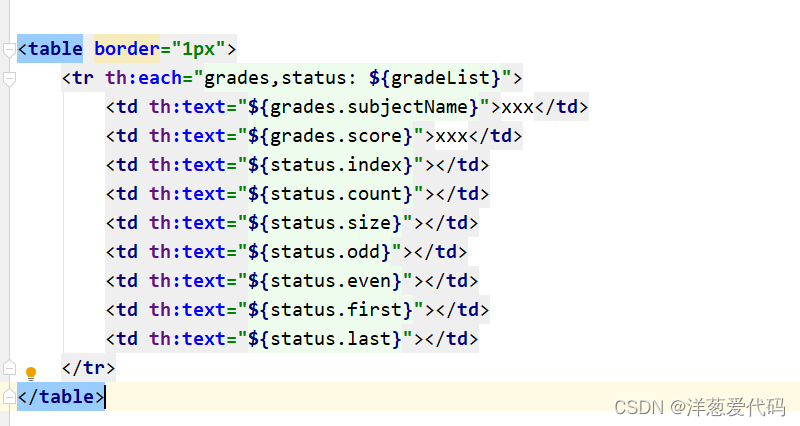
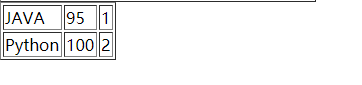
2、thymeleaf将遍历的状态变量封装到一个对象中,通过该对象的属性可以获取状态变量:
| 状态变量 | 含义 |
|---|---|
| index | 当前迭代器的索引,从0开始 |
| count | 当前迭代对象的计数,从1开始 |
| size | 被迭代对象的长度 |
| odd/even | 布尔值,当前循环是否是偶数/奇数,从0开始 |
| first | 布尔值,当前循环的是否是第一条,如果是返回true,否则返回false |
| last | 布尔值,当前循环的是否是最后一条,如果是则返回true,否则返回false |
3、遍历map:
在Thymeleaf中,遍历Map集合时,遍历出的每一项是键值对

遍历出的是一个键值对对象,key获取键,value获取值


?七、获取域中的数据
thymeleaf也可以获取request,session,application域中的数据,方法如下:
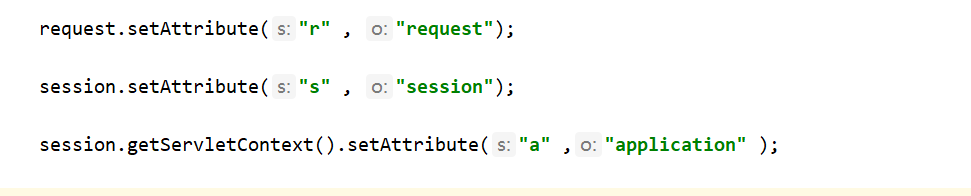
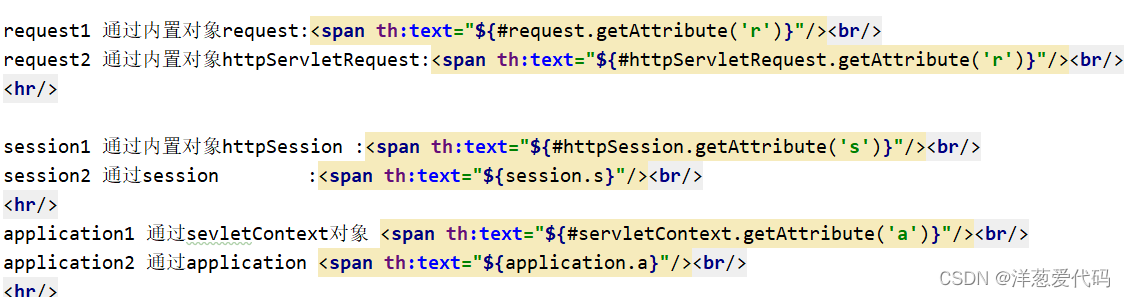

?八、URL写法
在Thymeleaf中路径的写法为@{路径}
1、输入http://localhost:8888/show , 将id 和 name传递给index页面
2、编写链接
3、进行跳转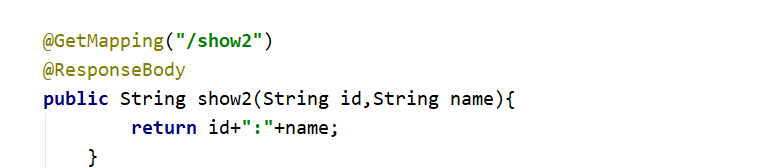
4、返回页面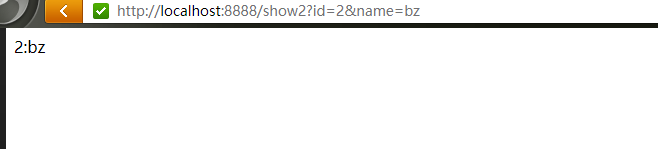
RESTful风格URL写法:
1、编写请求方法
    @GetMapping("/show3/{id}/{name}")
    @ResponseBody
    public String show3(@PathVariable String id,@PathVariable String name){
            return id+":"+name;
        }
2、resultful风格请求
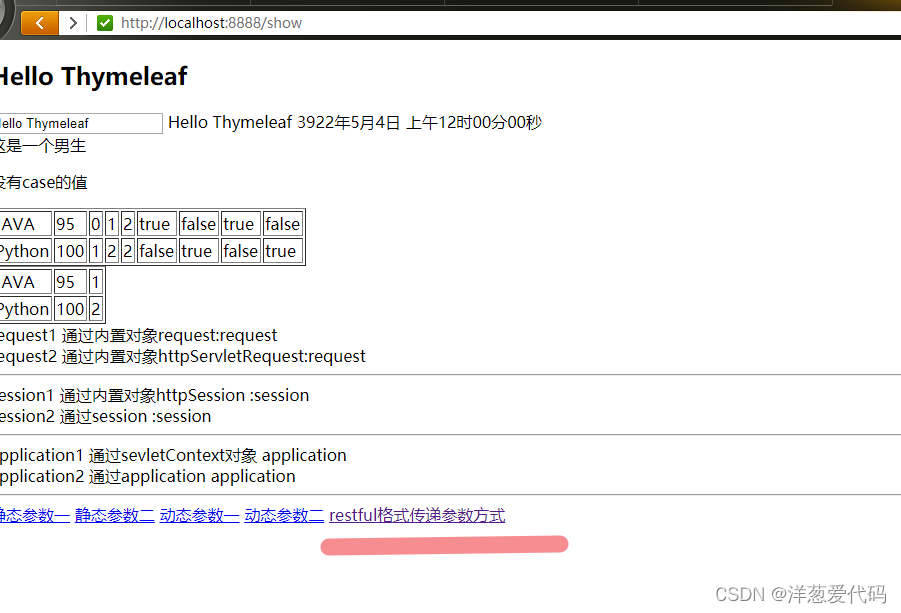
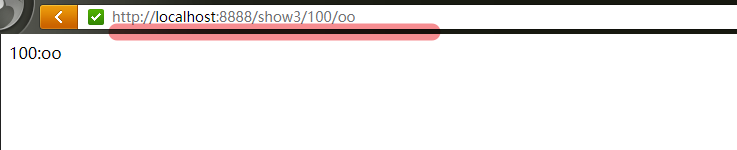
?九、相关配置
?在Springboot配置文件中可以进行Thymeleaf相关配置
| 配置项 | 含义 |
|---|---|
| spring.thymeleaf.prefix | 视图前缀 |
| spring.thymeleaf.suffix | 视图后缀 |
| spring.thymeleaf.encoding | 编码格式 |
| spring.thymeleaf.servlet.content-type | 响应类型 |
| spring.thymeleaf.cache=false | 页面缓存,配置为false则不启用页面缓存,方便测试 |
✨脚踏实地,一步一步,总能成功✨