多线程的实现方式:demo1、demo2
demo1:继承Thread类,重写run()方法
packagethread_test;public class ThreadDemo1 extendsThread {
ThreadDemo1(){
}
ThreadDemo1(String szName){super(szName);
}//重载run函数
public voidrun() {for(int count = 1 , row = 1 ; row < 10 ; row ++ , count ++) {for(int i = 0 ; i < count ; i ++) {
System.out.print("*");
}
System.out.println();
}
}public static voidmain(String[] args) {//线程赛跑
ThreadDemo1 td1 = newThreadDemo1();
ThreadDemo1 td2= newThreadDemo1();
ThreadDemo1 td3= newThreadDemo1();
td1.start();
td2.start();
td3.start();
}
}
demo2:实现runnable接口,实现run()方法
packagethread_test;public class ThreadDemo2 implementsRunnable{public voidrun() {for(int count = 1 , row = 1 ; row < 10 ; row ++ , count ++) {for(int i = 0 ; i < count ; i ++) {
System.out.print("*");
}
System.out.println();
}
}public static voidmain(String[] args) {//存在线程赛跑问题
Runnable rb1 = newThreadDemo2();
Runnable rb2= newThreadDemo2();
Runnable rb3= newThreadDemo2();
Thread td1= newThread(rb1);
Thread td2= newThread(rb2);
Thread td3= newThread(rb3);
td1.start();
td2.start();
td3.start();
}
}
demo3:两种方法解决进程赛跑问题
packagethread_test;//两种方法解决线程赛跑
class ThreadWait extendsThread{publicThreadWait() {
}publicThreadWait(String name) {super(name);
}
@Overridepublic voidrun() {for(int count = 1 , row = 1 ; row < 10 ; row ++ , count ++) {for(int i = 0 ; i < count ; i ++) {
System.out.print("*");
}
System.out.println();
}
}
}public classThreadDemo3{public static voidmain(String[] args) {
ThreadDemo3 td= newThreadDemo3();//td.Method1();
td.Method2();
}public voidMethod1() {
ThreadWait tw1= newThreadWait();
ThreadWait tw2= newThreadWait();
tw1.start();while(tw1.isAlive()) {try{
Thread.sleep(100);
}catch(Exception e){
e.getMessage();
}
}
tw2.start();
}public voidMethod2() {
ThreadWait tw1= newThreadWait();
ThreadWait tw2= newThreadWait();
tw1.start();try{
tw1.join(); // 等待该线程中止
}catch(Exception e){
e.toString();
}
tw2.start();
}
}
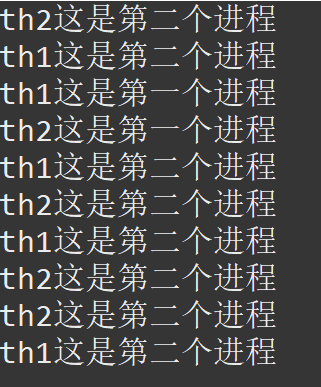
线程异步访问数据导致问题:
packagethread_test;//线程异步访问数据导致问题
classShareData{public static String szData = "";
}class ThreadDemo extendsThread{private staticShareData oShare;
ThreadDemo(){
}
ThreadDemo(String name, ShareData oShare){super(name);this.oShare =oShare;
}public voidrun() {for(int i = 0 ; i < 5 ; i ++) {if(this.getName().equals("th1")) {
oShare.szData= "这是第一个进程";try{
Thread.sleep(100);
}catch(Exception e) {
}
System.out.println(this.getName() +oShare.szData);
}else if(this.getName().equals("th2")) {
oShare.szData= "这是第二个进程";try{
Thread.sleep(100);
}catch(Exception e) {
}
System.out.println(this.getName() +oShare.szData);
}
}
}
}public classThreadDemo5 {public static voidmain(String[] args) {
ShareData oShare= newShareData();
ThreadDemo th1= new ThreadDemo("th1", oShare);
ThreadDemo th2= new ThreadDemo("th2", oShare);
th1.start();
th2.start();
}
}
得到的结果并不是我们想要的:
解决办法:
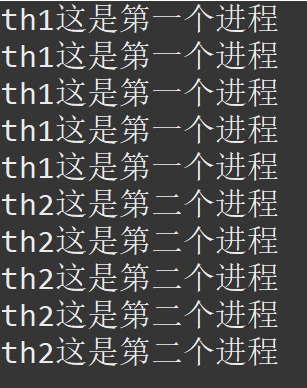
通过“锁”解决线程赛跑问题并实现多线程数据同步:
packagethread_test;classShareData0{public static String szData = "";
}class ThreadDemo0 extendsThread{private staticShareData0 oShare;
ThreadDemo0(){
}
ThreadDemo0(String name, ShareData0 oShare){super(name);this.oShare =oShare;
}public voidrun() {//同步快,并指出同步数据oShare
synchronized(oShare){for(int i = 0 ; i < 5 ; i ++) {if(this.getName().equals("th1")) {
oShare.szData= "这是第一个进程";try{
Thread.sleep(100);
}catch(Exception e) {
}
System.out.println(this.getName() +oShare.szData);
}else if(this.getName().equals("th2")) {
oShare.szData= "这是第二个进程";try{
Thread.sleep(100);
}catch(Exception e) {
}
System.out.println(this.getName() +oShare.szData);
}
}
}
}
}public classThreadDemo6 {public static voidmain(String[] args) {
ShareData0 oShare= newShareData0();
ThreadDemo0 th1= new ThreadDemo0("th1", oShare);
ThreadDemo0 th2= new ThreadDemo0("th2", oShare);
th1.start();
th2.start();
}
}
得到结果:
死锁:由于两个线程都在等待对方释放各自拥有的锁的现象称为死锁,这种现象往往是由于相互潜逃的synchronized代码段而造成的,所以少用synchronized嵌套。
下面是一个死锁的例子:
packagethread_test;public class LockedThread extendsThread{private static Object A = newObject();private static Object B = newObject();private static boolean flag = true;public static voidmain(String[] args) {
LockedThread th1= newLockedThread();
LockedThread th2= newLockedThread();
th1.start();
th2.start();
}public voidAccessA() {
flag= false;synchronized(A) {
System.out.println("th1获得了A的锁");try{
Thread.sleep(1000);
}catch(Exception e) {
}
System.out.println("th1还想要B的锁");synchronized(B) {
System.out.println("th1获得了B的锁");
}
}
}public voidAccessB() {
flag= true;synchronized(B) {
System.out.println("th2获得了B的锁");try{
Thread.sleep(1000);
}catch(Exception e) {
}
System.out.println("th2还想要A的锁");synchronized(A) {
System.out.println("th2获得了A的锁");
}
}
}public voidrun(){if(flag) {
AccessA();
}else{
AccessB();
}
}
}
显示结果:
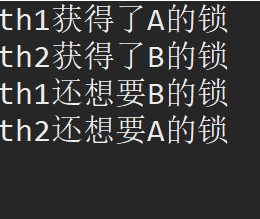
程序没有结束 而是停在了这里,这就是死锁。