实战:购物车
新手程序员最容易犯的错误就是拿到需求不管三七二十一,直接开搞。在开始写代码之前,理清思路,分析需求是十分重要的,一来可以提高书写代码的效率,二来可以避免错误带来的返工。
现在来看下购物车都需要实现哪些功能:
- 可以展示商品列表,每一条商品记录包含商品名称、商品单价、购买数量和操作。
- 可以对每个商品的数量进行增加和减少
- 可以删除商品
- 可以对商品的总价进行计算。
效果如下:
好,整理完需求之后,我们就可以着手写代码了。
首先咱们先把整体的HTML结构搭建出来,毕竟HTML是网页的骨架,没有骨架,css和js也就没有依附。
<!DOCTYPE html>
<html lang="en">

<head>
    <meta charset="UTF-8">
    <meta name="viewport" content="width=device-width, initial-scale=1.0">
    <title>简单购物车</title>
    <!-- 将css代码写在外链的css文件中 -->
    <link rel="stylesheet" href="./css/index.css">
</head>

<body>
    <div id="app">
    </div>
    <script src="./js/vue.js"></script>
    <script>

    </script>
</body>

</html>
接下来,创建vue实例对象
let app = new Vue({
    el:"#app",
    //存放数据
    data:{

    },
    //计算属性
    computed:{

    },
    //方法
    methods:{

    }
})
数据正常情况下,应该是从后端服务器获取的,不过现在我们做小案例,我们现在手动创建一些数据出来。我们需要的数据也非常简单,只需要商品的id,名称,单价和数量即可。注意,这里的id必须是唯一的。
data:{
    list:[
        {
            id:1,
            name:"小米12",
            price:3999,
            count:1
        },
        {
            id:2,
            name:"oppo",
            price:4999,
            count:1
        },
        {
            id:3,
            name:"HUAWEI mate 40",
            price:5399,
            count:1
        },
        {
            id:4,
            name:"iPhone 12",
            price:6999,
            count:1
        },
    ]
}
有了数据之后,我们就可以在页面上进行展示了。
<div id="app">
    <table>
        <thead>
            <tr>
                <th></th>
                <th>商品名称</th>
                <th>商品单价</th>
                <th>购买数量</th>
                <th>商品合计</th>
                <th>操作</th>
            </tr>
        </thead>
        <tbody>
            <tr v-for="item in list">
                <td>{{item.id}}</td>
                <td>{{item.name}}</td>
                <td>{{item.price}}</td>
                <td>{{item.count}}</td>
                <td>{{item.price*item.count}}</td>
                <td><button>删除</button></td>
            </tr>
        </tbody>
    </table>
</div>
效果如下: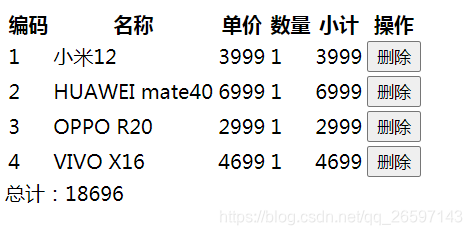
这里的话,还可以做一个小优化,那就是当购物车中的商品都被删除后,在页面显示一个“购物车为空”的提示更为友好。那怎么判断购物车为空呢,我们只需要判断list的长度即可。
<table v-if="list.length>0">
    <thead>
        <tr>
            <th></th>
            <th>商品名称</th>
            <th>商品单价</th>
            <th>购买数量</th>
            <th>商品合计</th>
            <th>操作</th>
        </tr>
    </thead>
    <tbody>
        <tr v-for="item in list">
            <td>{{item.id}}</td>
            <td>{{item.name}}</td>
            <td>{{item.price}}</td>
            <td>{{item.count}}</td>
            <td>{{item.price*item.count}}</td>
            <td><button>删除</button></td>
        </tr>
    </tbody>
</table>
<div v-else>购物车为空</div>
接下来,还要显示总价,我们可以将总价显示在table下面,但是因为v-if和v-else之间不能有别的内容存在,为了解决这个问题,我们可以将table和总价放在一个div下面。
<div v-if="list.length>0">
    <table >
        ......
    </table>
    <div>
        总价:¥{{totalPrice}}
    </div>
</div>

<div v-else>购物车为空</div>
这里的totalprice因为要计算每个商品的合计,所以我们可以使用计算属性来做,这样当商品的数量发生变化或者删除时,totalPrice的值也会随之变化。
computed:{
    totalPrice(){
        let total = 0;
        this.list.forEach(element => {
            total += (element.price*element.count)
        });
        return total;
    }
}
接下来实现删除方法。给button绑定一个点击事件,点击时触发remove方法。只需要将数据从当前数组中删除,vue会自动更新视图,总价也会随之变化。
methods:{
    itemRemove(index){
        this.list.splice(index,1)
    }
}
<tr v-for="item,index in list">
    ......
    <td><button @click="itemRemove(index)">删除</button></td>
</tr>
最后只需要把数量加减的方法补充上。在count单元格左右两边各加一个按钮,分别实现数量的减少和增加。
<td>
    <button @click="countMinus(index)">-</button>
    {{item.count}}
    <button @click="countAdd(index)">+</button>
</td>
在methods中实现方法
methods:{
    itemRemove(index){
        this.list.splice(index,1)
    },
    countMinus(index){
        if ( this.list[index].count>1) {
            this.list[index].count--;
        }
    },
    countAdd(index){
         this.list[index].count++;
    }
}
购物车中商品的数量不能小于1,所以我们可以给button添加一个动态的disable属性,同时在countMinus方法中进行判断。确保数量不会小于1.
接下来添加css样式即可
table{
    border: 1px solid #e9e9e9;
    border-collapse: collapse;
    border-spacing: 0;
}
th,td{
    padding: 8px 16px;
    border: solid 1px #e9e9e9;
}
th{
    background-color: #f7f7f7;
    color:#5c6b77;
    font-weight: bolder;
    white-space: nowrap;
}
button{
    margin: 0px 5px;
}
完整HTML与js代码
<!DOCTYPE html>
<html lang="en">

<head>
    <meta charset="UTF-8">
    <meta name="viewport" content="width=device-width, initial-scale=1.0">
    <title>简单购物车</title>
    <link rel="stylesheet" href="./css/index.css">
</head>

<body>
    <div id="app">
        <div v-if="list.length>0">
            <table >
                <thead>
                    <tr>
                        <th></th>
                        <th>商品名称</th>
                        <th>商品单价</th>
                        <th>购买数量</th>
                        <th>商品合计</th>
                        <th>操作</th>
                    </tr>
                </thead>
                <tbody>
                    <tr v-for="item,index in list">
                       <td>{{item.id}}</td>
                       <td>{{item.name}}</td>
                       <td>{{item.price}}</td>
                       <td><button @click="countMinus(index)" :disabled="item.count==1">-</button>{{item.count}}<button @click="countAdd(index)">+</button></td>
                       <td>{{item.price*item.count}}</td>
                       <td><button @click="itemRemove(index)">删除</button></td>
                    </tr>
                </tbody>
            </table>
            <div>
                总价:¥{{totalPrice}}
            </div>
        </div>

        <div v-else>购物车为空</div>
    </div>
    <script src="./js/vue.js"></script>
    <script>
        let app = new Vue({
            el:"#app",
            data:{
                list:[
                    {
                        id:1,
                        name:"小米12",
                        price:3999,
                        count:1
                    },
                    {
                        id:2,
                        name:"oppo",
                        price:4999,
                        count:1
                    },
                    {
                        id:3,
                        name:"HUAWEI mate 40",
                        price:5399,
                        count:1
                    },
                    {
                        id:4,
                        name:"iPhone 12",
                        price:6999,
                        count:1
                    }
                ]
            },
            computed:{
                totalPrice(){
                    let total = 0;
                    this.list.forEach(element => {
                        total += (element.price*element.count)
                    });
                    return total;
                }
            },
            methods:{
                itemRemove(index){
                    this.list.splice(index,1)
                },
                countMinus(index){
                    if ( this.list[index].count>1) {
                        this.list[index].count--;
                    }
                },
                countAdd(index){
                    this.list[index].count++;
                }
            }
        })
    </script>
</body>

</html>