前言
本文中搭建了一个简易的多人聊天室,使用了WebSocket的基础特性。
源代码来自老外的一篇好文:
https://www.callicoder.com/spring-boot-websocket-chat-example/
本文内容摘要:
- 初步理解WebSocket的前后端交互逻辑
- 手把手使用 SpringBoot + WebSocket 搭建一个多人聊天室Demo
- 代码源码及其解释
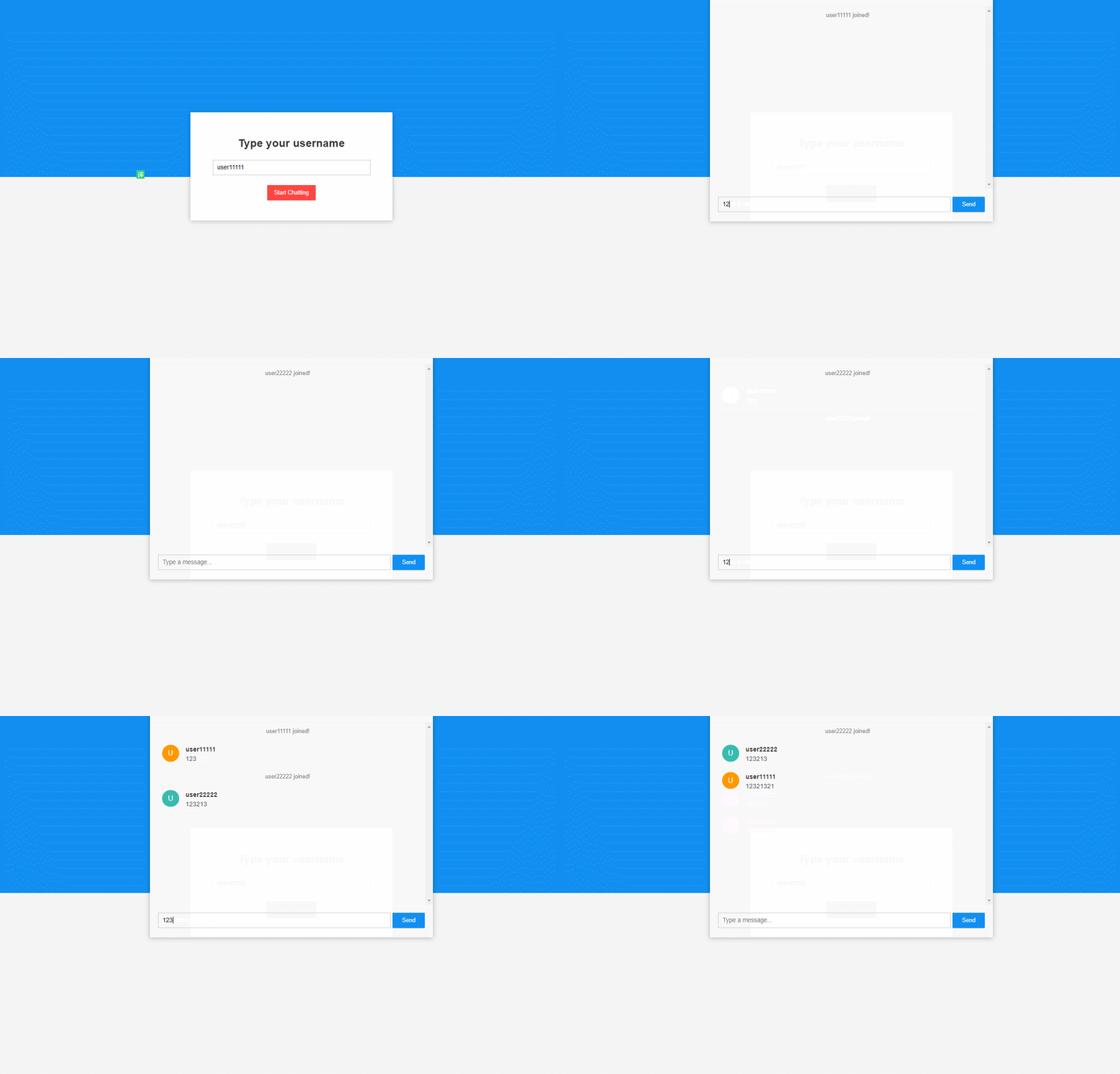
- 前端展示页面
此外,在下一篇文章中,我们将做到:
- 对该WebSocket聊天室进行分布式改造,同时部署多台机器来作为集群,支撑高并发。
- 保存用户session,并且在集群上实现session同步,比如实时展示当前在线的用户!
正文
WebSocket多人在线聊天室
本文工程源代码:
https://github.com/qqxx6661/springboot-websocket-demo
新建工程
我们新建一个SpringBoot2的项目工程,在默认依赖中,添加websocket依赖:
org.springframework.boot spring-boot-starter-websocketWebSocket 配置
我们先来设置websocket的配置,新建config文件夹,在里面新建类WebSocketConfig
import org.springframework.context.annotation.Configuration;import org.springframework.messaging.simp.config.MessageBrokerRegistry;import org.springframework.web.socket.config.annotation.*;@Configuration@EnableWebSocketMessageBrokerpublic class WebSocketConfig implements WebSocketMessageBrokerConfigurer { @Override public void registerStompEndpoints(StompEndpointRegistry registry) { registry.addEndpoint("/ws").withSockJS(); } @Override public void configureMessageBroker(MessageBrokerRegistry registry) { registry.setApplicationDestinationPrefixes("/app"); registry.enableSimpleBroker("/topic"); }}代码解释:
@EnableWebSocketMessageBroker用于启用我们的WebSocket服务器。
我们实现了WebSocketMessageBrokerConfigurer接口,并实现了其中的方法。
在第一种方法中,我们注册一个websocket端点,客户端将使用它连接到我们的websocket服务器。
withSockJS()是用来为不支持websocket的浏览器启用后备选项,使用了SockJS。
方法名中的STOMP是来自Spring框架STOMP实现。 STOMP代表简单文本导向的消息传递协议。它是一种消息传递协议,用于定义数据交换的格式和规则。为啥我们需要这个东西?因为WebSocket只是一种通信协议。它没有定义诸如以下内容:如何仅向订阅特定主题的用户发送消息,或者如何向特定用户发送消息。我们需要STOMP来实现这些功能。
在configureMessageBroker方法中,我们配置一个消息代理,用于将消息从一个客户端路由到另一个客户端。
第一行定义了以“/app”开头的消息应该路由到消息处理方法(之后会定义这个方法)。
第二行定义了以“/topic”开头的消息应该路由到消息代理。消息代理向订阅特定主题的所有连接客户端广播消息。
在上面的示例中,我们使用的是内存中的消息代理。
之后也可以使用RabbitMQ或ActiveMQ等其他消息代理。
创建 ChatMessage 实体
ChatMessage用来在客户端和服务端中交互
我们新建model文件夹,创建实体类ChatMessage。
public class ChatMessage { private MessageType type; private String content; private String sender; public enum MessageType { CHAT, JOIN, LEAVE } public MessageType getType() { return type; } public void setType(MessageType type) { this.type = type; } public String getContent() { return content; } public void setContent(String content) { this.content = content; } public String getSender() { return sender; } public void setSender(String sender) { this.sender = sender; }}实体中,有三个字段:
- type:消息类型
- content:消息内容
- sender:发送者
类型有三种:
- CHAT: 消息
- JOIN:加入
- LEAVE:离开
创建Controller来接收和发送消息
创建controller文件夹,在controller文件夹添加类ChatController
import com.example.websocketdemo.model.ChatMessage;import org.springframework.messaging.handler.annotation.MessageMapping;import org.springframework.messaging.handler.annotation.Payload;import org.springframework.messaging.handler.annotation.SendTo;import org.springframework.messaging.simp.SimpMessageHeaderAccessor;import org.springframework.stereotype.Controller;@Controllerpublic class ChatController { @MessageMapping("/chat.sendMessage") @SendTo("/topic/public") public ChatMessage sendMessage(@Payload ChatMessage chatMessage) { return chatMessage; } @MessageMapping("/chat.addUser") @SendTo("/topic/public") public ChatMessage addUser(@Payload ChatMessage chatMessage, SimpMessageHeaderAccessor headerAccessor) { // Add username in web socket session headerAccessor.getSessionAttributes().put("username