更新日期:
- 2020-11-10:发布
- 2020-11-11: add snakemake
- 2020-11-17: add bcftools, sambamba, deeptools; del git
比起臃肿的anaconda,我更推荐安装小巧的miniconda,mamba官方同样也是更推荐安装miniconda
下载安装脚本
wget https://repo.anaconda.com/miniconda/Miniconda3-latest-Linux-x86_64.sh先安装,自己指定位置即可
chmod +x Miniconda3-latest-Linux-x86_64.sh
./Miniconda3-latest-Linux-x86_64.sh

# 设置
Do you accept the license terms? [yes|no]
[no] >>> yes

Miniconda3 will now be installed into this location:
/home/zhaohuanan/miniconda3

  - Press ENTER to confirm the location
  - Press CTRL-C to abort the installation
  - Or specify a different location below

[/home/zhaohuanan/miniconda3] >>> /home/zhaohuanan/zhaohn_HD/miniconda3


Preparing transaction: done
Executing transaction: done
installation finished.
WARNING:
    You currently have a PYTHONPATH environment variable set. This may cause
    unexpected behavior when running the Python interpreter in Miniconda3.
    For best results, please verify that your PYTHONPATH only points to
    directories of packages that are compatible with the Python interpreter
    in Miniconda3: /home/zhaohuanan/zhaohn_HD/miniconda3
Do you wish the installer to initialize Miniconda3
by running conda init? [yes|no]
[no] >>> yes
初始化SHELL配置文件
# 首先将bashrc或者zshrc中 conda init的部分全部删掉!
# 然后

# if you use BASH: your_anaconda_path/bin/conda init bash
/home/zhaohuanan/zhaohn_HD/miniconda3/bin/conda init bash

# if you use zsh: your_anaconda_path/bin/conda init zsh
# 我喜欢用zsh所以会用下面的
/home/zhaohuanan/zhaohn_HD/miniconda3/bin/conda init zsh


# 如果遇到conda没有权限的问题
# zsh: permission denied: /home/zhaohuanan/zhaohn_HD/miniconda3/bin/conda
# 先执行
chmod -R +x /home/zhaohuanan/zhaohn_HD/miniconda3/bin
# 再执行
/home/zhaohuanan/zhaohn_HD/miniconda3/bin/conda init zsh


# state:

no change     /home/zhaohuanan/zhaohn_HD/miniconda3/condabin/conda
no change     /home/zhaohuanan/zhaohn_HD/miniconda3/bin/conda
no change     /home/zhaohuanan/zhaohn_HD/miniconda3/bin/conda-env
no change     /home/zhaohuanan/zhaohn_HD/miniconda3/bin/activate
no change     /home/zhaohuanan/zhaohn_HD/miniconda3/bin/deactivate
no change     /home/zhaohuanan/zhaohn_HD/miniconda3/etc/profile.d/conda.sh
no change     /home/zhaohuanan/zhaohn_HD/miniconda3/etc/fish/conf.d/conda.fish
no change     /home/zhaohuanan/zhaohn_HD/miniconda3/shell/condabin/Conda.psm1
no change     /home/zhaohuanan/zhaohn_HD/miniconda3/shell/condabin/conda-hook.ps1
no change     /home/zhaohuanan/zhaohn_HD/miniconda3/lib/python3.8/site-packages/xontrib/conda.xsh
no change     /home/zhaohuanan/zhaohn_HD/miniconda3/etc/profile.d/conda.csh
modified      /home/zhaohuanan/.zshrc

==> For changes to take effect, close and re-open your current shell. <==
然后退出当前shell重新登录服务器即可看到(base)字样的conda环境状态
接下来进行condarc的channels设置
# 清除之前残留的conda channels
rm -rf ~/.condarc

# 按顺序依次添加channel
conda config --add channels defaults
conda config --add channels conda-forge
conda config --add channels bioconda
conda config --add channels r
# 不喜欢清华源,常常挂掉;
# 使用mamba的话即使用官方源,速度也是ok的,省去了很多麻烦;

# 接下来查看自己已添加的源
conda config --get channels
# return
--add channels 'defaults'   # lowest priority
--add channels 'conda-forge'
--add channels 'bioconda'
--add channels 'r'   # highest priority


cat ~/.condarc
# return
channels:
  - r
  - bioconda
  - conda-forge
  - defaults
# 也就是说最后添加的channel会拥有最高优先级,在condarc中越靠前的channel优先级也就越高
接下来介绍一个好用的东西,叫mamba https://github.com/mamba-org/mamba
Mamba 是C ++中的conda软件包管理器的重新实现,比起慢的跟 似的conda,在安装应用的时候能节省很多时间。
在base环境下安装mamba并更新conda为最新版本
# (base)
conda install -c conda-forge mamba

mamba update -n base -c defaults conda
如果仍然出现permission denied的问题
# 执行
chown -R your_user_name your_anaconda_path
chmod -R +rX your_anaconda_path
# 如
chown -R zhaohuanan /home/zhaohuanan/zhaohn_HD/miniconda3
chmod -R +rxX /home/zhaohuanan/zhaohn_HD/miniconda3
接下来全部使用mamba接管conda命令
把我平时必备的软件安装在base环境下,指定安装R的4.0版本
# (base)
mamba install screen ncdu htop jupyterlab r=4.0
fastqc multiqc cutadapt
bwa bowtie bowtie2 hisat2
samtools sambamba bedtools vcftools bcftools deeptools subread
samclip parallel-fastq-dump
pandas numpy scipy biopython pysam matplotlib
snakemake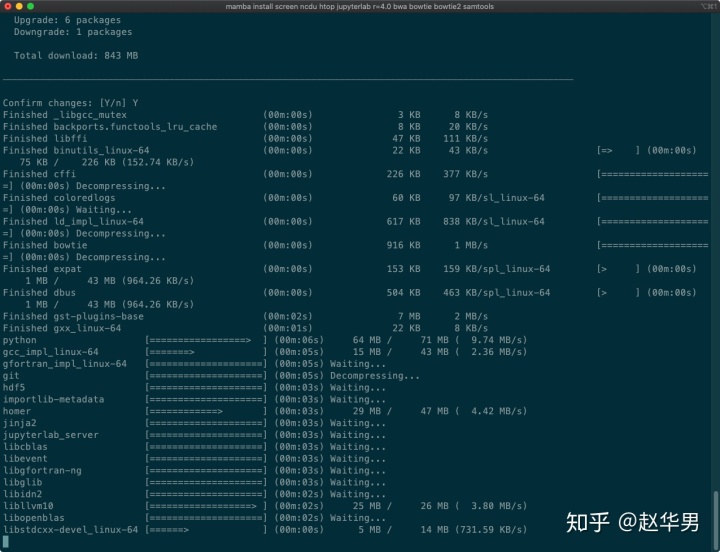
下载安装速度极快
接下来可以去配置Jupiter-lab的日常搬砖环境,可以参考我的知乎文章
赵华男:Jupyter-lab最靠谱的Python+Julia+R解释器环境(Kernel)配置方法zhuanlan.zhihu.com
我的博客
Herman's Blogzhaohuanan.cc关注下面的知乎专栏和我一起学生信吧!
生物信息学www.zhihu.com