建立一个线程池,并将某个线程放入进去
threadpool = []
th = threading.Thread(target=func_name, args=func_args)
threadpool.append(th)
批量加入线程
for i in range(10):
    th = threading.Thread(target=func_name, args=func_args)
    threadpool.append(th)
批量开始线程
for th in threadpool:
        th.start()
for th in threadpool:
    threading.Thread.join(th)
实例如下:
import time
import threading


def matter1(music, test):
    print test, music
    # 假设每一首歌曲的时间是2秒
    time.sleep(2)


if __name__ == '__main__':
    # 设定我要听的歌为
    musics = ["music1", "music2", "music3"]
    test = "122678"
    # 开始时间
    start = time.time()

    threadpool = []

    for music in musics:
        th = threading.Thread(target=matter1, args=(music, test))
        threadpool.append(th)
    for th in threadpool:
        th.start()
    for th in threadpool:
        threading.Thread.join(th)

    # 结束时间
    end = time.time()
    print("完成的时间为:" + str(end - start))
完成同时听三首歌线程,花费时间 2s:
限制线程数量可以使用Semaphore,实例如下:
import time
import threading

#Python学习交流群:711312441
#添加一个计数器
s1=threading.Semaphore(2)

def matter1(music, test):
    # 计数器获得锁
    s1.acquire()
    print(test, music)
    # 假设每一首歌曲的时间是2秒
    time.sleep(2)
    # 计数器释放锁
    s1.release()


if __name__ == '__main__':
    # 设定我要听的歌为
    musics = ["music1", "music2", "music3"]
    test = "122678"
    # 开始时间
    start = time.time()

    threadpool = []

    for music in musics:
        th = threading.Thread(target=matter1, args=(music, test))
        threadpool.append(th)
    for th in threadpool:
        th.start()
    for th in threadpool:
        threading.Thread.join(th)

    # 结束时间
    end = time.time()
    print("完成的时间为:" + str(end - start))
完成听前2首歌线程,花费时间 2s: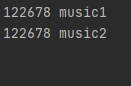
听第3首歌花费 2s,最后一共花费 4s: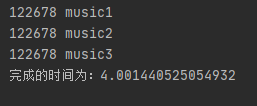
版权声明:本文为qdPython原创文章,遵循CC 4.0 BY-SA版权协议,转载请附上原文出处链接和本声明。