1.添加依赖
dependencies:
  flutter:
    sdk: flutter
  # https://pub.flutter-io.cn/packages/fluwx
  # https://github.com/OpenFlutter/fluwx
  fluwx: ^2.4.0
2.w_share.dart:
import 'package:flutter/material.dart';

/// 点击事件
typedef OnItemClickListener = void Function(int index);
typedef DoAction = void Function(ShareType shareType, ShareInfo shareInfo);
enum ShareType { SESSION, TIMELINE, COPY_LINK, DOWNLOAD }

/// 定义分享内容
class ShareInfo {
  /// 标题
  String title;

  /// 连接
  String url;

  /// 图片
  var img;

  /// 描述
  String describe;

  ShareInfo(this.title, this.url, {this.img, this.describe = ""});

  static ShareInfo fromJson(Map map) {
    return ShareInfo(map['title'], map['url'],
        img: map['img'], describe: map['describe']);
  }
}

/// 分享操作
class ShareOpt {
  final String title;
  final String img;
  final DoAction doAction;
  final ShareType shareType;

  const ShareOpt(
      {this.title = "",
      this.img = "",
      this.shareType = ShareType.SESSION,
      required this.doAction});
}

/// 弹出窗
class ShareWidget extends StatefulWidget {
  final List<ShareOpt> list;
  final ShareInfo shareInfo;

  const ShareWidget(this.shareInfo,
      {Key? key, required this.list})
      : super(key: key);

  @override
  _ShareWidgetState createState() => _ShareWidgetState();
}

class _ShareWidgetState extends State<ShareWidget> {

  @override
  void initState() {
    super.initState();
  }

  @override
  Widget build(BuildContext context) {
    return Container(
      height: 170,
      child: Column(
        children: <Widget>[
          Container(
            margin: EdgeInsets.only(
              left: 10,
              right: 10,
            ),
            //边框设置
            decoration: BoxDecoration(
              //背景
              color: Colors.white,
              //设置四周边框
              border: Border.all(
                width: 1,
                color: Colors.white,
              ),
              //设置四周圆角角度
              borderRadius: BorderRadius.all(
                Radius.circular(10.0),
              ),
            ),
            //设置 child 居中
            alignment: Alignment.center,
            height: 100.0,
            child: Padding(
              padding: EdgeInsets.fromLTRB(0.0, 10.0, 0.0, 0.0),
              child: new Container(
                height: 100.0,
                child: new GridView.builder(
                  gridDelegate: new SliverGridDelegateWithFixedCrossAxisCount(
                      crossAxisCount: 4,
                      mainAxisSpacing: 5.0,
                      childAspectRatio: 1.0),
                  itemBuilder: (BuildContext context, int index) {
                    return GestureDetector(
                      behavior: HitTestBehavior.opaque, // 空白地方也可以点击
                      onTap: () {
                        Navigator.pop(context);
                        widget.list[index].doAction(
                            widget.list[index].shareType, widget.shareInfo);
                      },
                      child: Column(
                        children: <Widget>[
                          Padding(
                            padding: EdgeInsets.fromLTRB(0.0, 6.0, 0.0, 6.0),
                            child: new Image.asset(
                              widget.list[index].img,
                              width: 50.0,
                              height: 50.0,
                              fit: BoxFit.fill,
                            ),
                          ),
                          Text(widget.list[index].title)
                        ],
                      ),
                    );
                  },
                  itemCount: widget.list.length,
                ),
              ),
            ),
          ),
          Container(
            margin: EdgeInsets.only(
              left: 10,
              right: 10,
              top: 10,
              bottom: 10,
            ),
            //边框设置
            decoration: BoxDecoration(
              //背景
              color: Colors.white,
              //设置四周边框
              border: Border.all(
                width: 1,
                color: Colors.white,
              ),
              //设置四周圆角角度
              borderRadius: BorderRadius.all(
                Radius.circular(10.0),
              ),
            ),
            //设置 child 居中
            alignment: Alignment.center,
            height: 50.0,
            child: GestureDetector(
              onTap: () => Navigator.pop(context),
              behavior: HitTestBehavior.opaque,
              // 在空白的范围内就都可以点击,否则只有点击children里的text 或者image才有效果
              child: Center(
                child: new Padding(
                  padding: EdgeInsets.fromLTRB(0.0, 8.0, 0.0, 8.0),
                  child: const Text(
                    '取消',
                  ),
                ),
              ),
            ),
          ),
        ],
      ),
    );
  }
}
3.main.dart
import 'package:flutter/material.dart';
import 'package:flutter/services.dart';
import 'dart:async';

import 'w_share.dart';
import 'package:fluwx/fluwx.dart' as fluwx;

void main() => runApp(MyApp());

class MyApp extends StatelessWidget {

  @override
  Widget build(BuildContext context) {
    return MaterialApp(
      /// [home]这个地方,不能直接写dialog的代码,否则你会得到 "Another exception was thrown: No MaterialLocalizations found."
      /// 也不能写showModalBottomSheet的代码,否则你会得到 Another exception was thrown: No MediaQuery widget found.
      /// 正确的做法就是把所有的内容都提取出去写。如下面这样把内容都提出来写到[HomePage]
      home: HomePage(),
    );
  }
}

class HomePage extends StatefulWidget {


  static dynamic _getShareModel(ShareType shareType,ShareInfo shareInfo){
    var scene = fluwx.WeChatScene.SESSION;
    switch(shareType){
      case ShareType.SESSION:
        scene = fluwx.WeChatScene.SESSION;
        break;
      case ShareType.TIMELINE:
        scene = fluwx.WeChatScene.TIMELINE;
        break;
      case ShareType.COPY_LINK:

        break;
      case ShareType.DOWNLOAD:

        break;
    }

    if(shareInfo.img != null) {
      return fluwx.WeChatShareWebPageModel(
        shareInfo.url,
        title: shareInfo.title,
        thumbnail: fluwx.WeChatImage.network(shareInfo.img),
        scene: scene,
      );
    }else{
      return fluwx.WeChatShareWebPageModel(
        shareInfo.url,
        title: shareInfo.title,
        scene: scene,
      );
    }
  }

  final List<ShareOpt> list = [
    ShareOpt(title:'微信', img:'images/icon_wechat.jpg',shareType:ShareType.SESSION,doAction:(shareType,shareInfo)async{
      var model = _getShareModel(shareType, shareInfo);
      fluwx.shareToWeChat(model);
    }),
    ShareOpt(title:'朋友圈', img:'images/icon_wechat_moments.jpg',shareType:ShareType.TIMELINE,doAction: (shareType,shareInfo){
      var model = _getShareModel(shareType, shareInfo);
      fluwx.shareToWeChat(model);
    }),
    ShareOpt(title:'复制', img:'images/icon_copy.png',shareType:ShareType.COPY_LINK,doAction: (shareType,shareInfo){}),
    ShareOpt(title:'链接', img:'images/icon_copylink.png',shareType:ShareType.COPY_LINK,doAction: (shareType,shareInfo){
      if(shareType == ShareType.COPY_LINK){
        ClipboardData data = new ClipboardData(text: shareInfo.url);
        Clipboard.setData(data);
      }
    }),
  ];

  @override
  _HomePageState createState() => _HomePageState();
}

class _HomePageState extends State<HomePage> {

  @override
  void initState() {
    super.initState();
    _initFluwx();
  }
  /// Platform messages are asynchronous, so we initialize in an async method.
  Future<void> initPlatformState() async {}

  _initFluwx() async {
    await fluwx.registerWxApi(
        appId: "wxd930ea5d5a258f4f",
        doOnAndroid: true,
        doOnIOS: true,
        universalLink: "https://your.univerallink.com/link/");
    var result = await fluwx.isWeChatInstalled;
    print("is installed $result");
  }
  @override
  Widget build(BuildContext context) {
    return Scaffold(
      appBar: AppBar(
        title: const Text('分享'),
        actions: <Widget>[
          IconButton(
            icon: Icon(Icons.share),
            onPressed: () {

              showModalBottomSheet(
                  /**
                 * showModalBottomSheet常用属性
                 * shape 设置形状
                 * isScrollControlled:全屏还是半屏
                 * isDismissible:外部是否可以点击,false不可以点击,true可以点击,点击后消失
                 * backgroundColor : 设置背景色
                 */
                  backgroundColor: Colors.transparent,
                  context: context,
                  builder: (BuildContext context) {
                    return ShareWidget(
                      ShareInfo('Hello world','http://www.baidu.com'),
                      list: widget.list,
                    );
                  });
            },
          ),
        ],
      ),
      body: Center(),
    );
  }
}
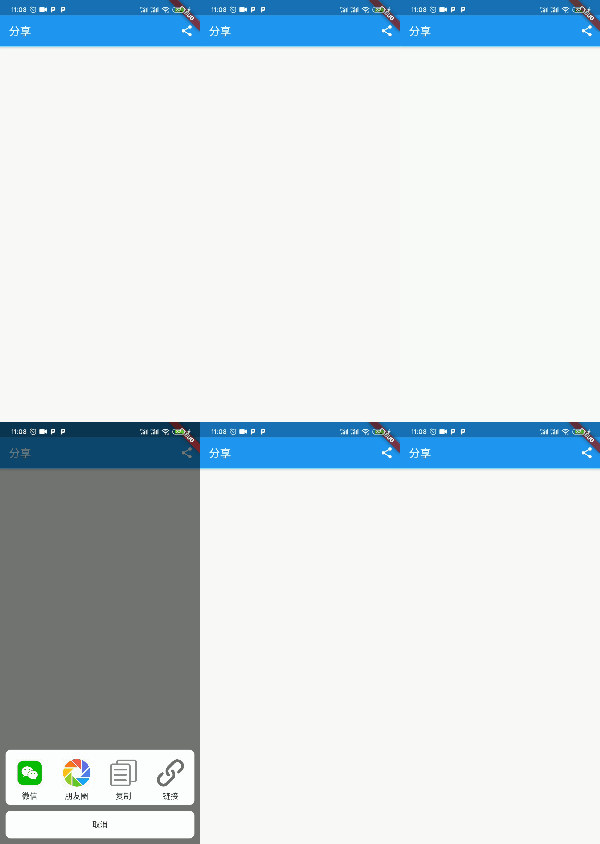
4.效果图
版权声明:本文为weixin_40763897原创文章,遵循CC 4.0 BY-SA版权协议,转载请附上原文出处链接和本声明。