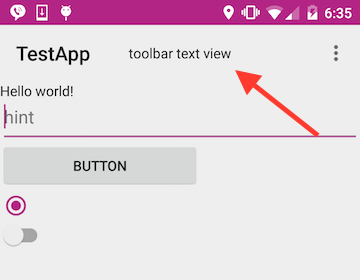
根据谷歌文档,我应该能够在主题中使用colorPrimary设置工具栏背景的颜色,但它不起作用 . 这就是我所拥有的:
styles.xml:
@color/light_purple
@color/dark_purple
@color/dark_purple
@color/light_purple
活动布局:
xmlns:tools="http://schemas.android.com/tools"
android:layout_width="match_parent"
android:layout_height="match_parent"
android:orientation="vertical"
tools:context=".MainActivity">
android:id="@+id/toolbar"
android:layout_width="match_parent"
android:layout_height="wrap_content"
android:minHeight="?attr/actionBarSize"
android:theme="@style/AppTheme"
tools:showIn="@layout/activity_main">
android:id="@+id/pivot_title_image"
android:layout_width="wrap_content"
android:layout_height="wrap_content"
android:layout_gravity="center"
android:text="toolbar text view" />
...
活动:
public class MainActivity extends AppCompatActivity {
@Override
protected void onCreate(Bundle savedInstanceState) {
super.onCreate(savedInstanceState);
setContentView(R.layout.activity_main);
Toolbar toolbar = (Toolbar) findViewById(R.id.toolbar);
setSupportActionBar(toolbar);
}
我在清单中将我的应用主题设置为AppTheme: android:theme="@style/AppTheme" > 我在build.gradle中设置了android支持appcompat
compile 'com.android.support:appcompat-v7:22.1.0'
但是我的工具栏仍然没有着色 . I know I can manually set the toolbar background color manually in the layout file ,但不应该从主题中获得它的颜色?正如你所看到的强调颜色正在起作用 .