Android实现登录,将用户信息保存、到.txt,并且读取数据的三种方式
文件目录
全部代码已经放上啦!!!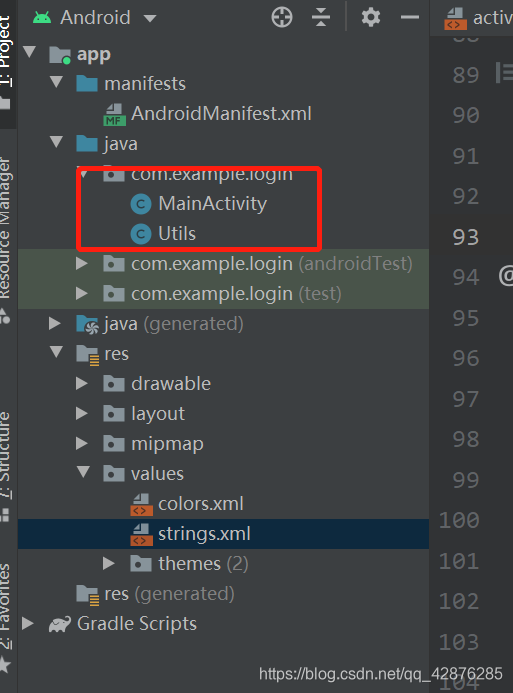
activity_main.xml布局文件
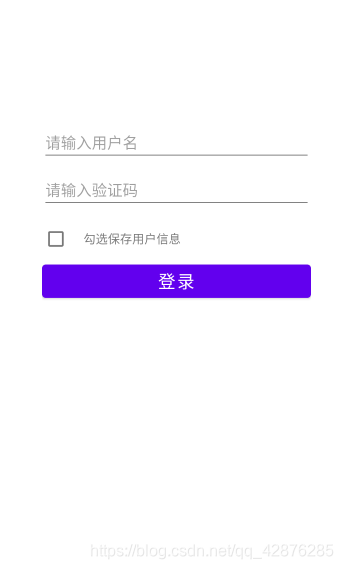
<?xml version="1.0" encoding="utf-8"?>
<LinearLayout xmlns:android="http://schemas.android.com/apk/res/android"
    xmlns:app="http://schemas.android.com/apk/res-auto"
    xmlns:tools="http://schemas.android.com/tools"
    android:layout_width="match_parent"
    android:layout_height="match_parent"
    android:layout_marginTop="200dp"
    android:layout_marginLeft="50dp"
    android:layout_marginRight="50dp"
    tools:context=".MainActivity"
    android:orientation="vertical">

    <EditText
        android:id="@+id/et_name"
        android:layout_width="match_parent"
        android:layout_height="wrap_content"
        android:layout_marginTop="10dp"
        android:hint="请输入用户名"/>

    <EditText
        android:id="@+id/et_pwd"
        android:layout_width="match_parent"
        android:layout_height="wrap_content"
        android:layout_marginTop="10dp"
        android:hint="请输入验证码"/>

    <LinearLayout
        android:layout_width="match_parent"
        android:layout_height="wrap_content"
        android:orientation="horizontal"
        android:layout_marginTop="10dp">
        <CheckBox
            android:id="@+id/checkbox"
            android:layout_width="wrap_content"
            android:layout_height="wrap_content"/>
        <TextView
            android:layout_width="wrap_content"
            android:layout_height="wrap_content"
            android:text="@string/checked"/>

    </LinearLayout>

    <Button
        android:id="@+id/btn_login"
        android:layout_width="match_parent"
        android:layout_height="50dp"
        android:text="@string/login"
        android:textSize="20sp"/>

</LinearLayout>
AndroidMain.xml文件
创建项目之后没有变动,只是添加了权限。
    <uses-permission android:name="android.permission.MOUNT_UNMOUNT_FILESYSTEMS"
        tools:ignore="ProtectedPermissions" />
    <uses-permission android:name="android.permission.READ_EXTERNAL_STORAGE"/>
    <uses-permission android:name="android.permission.WRITE_EXTERNAL_STORAGE"/>
MainActivity.java文件
最重要的来啦~~ 敲黑板!!敲黑板!!敲黑板!!
public class MainActivity extends AppCompatActivity {

    private EditText et_name,et_pwd;
    private CheckBox ch_checkbox;
    private Button btn_login;

    @Override
    protected void onCreate(Bundle savedInstanceState) {
        super.onCreate(savedInstanceState);
        setContentView(R.layout.activity_main);

        et_name = (EditText) findViewById(R.id.et_name);
        et_pwd = (EditText) findViewById(R.id.et_pwd);
        ch_checkbox =(CheckBox) findViewById(R.id.checkbox);
        btn_login = (Button) findViewById(R.id.btn_login);
		//添加点击事件
        btn_login.setOnClickListener(new onClick());

        //获取用户保存的信息
        //1.
        //String[] info = Utils.readInfo();
        //2.
        //String[] info = Utils.readInfoByContext(this);
        //3.
        String[] info = Utils.readInfoBySdcard();

        //判断是否为空,不为则显示用户名和密码
        if(info != null) {
            //显示用户上一次登录的信息
            et_name.setText(info[0]);
            et_pwd.setText(info[1]);
        }else {
        }
    }

private class onClick implements View.OnClickListener {
        @Override
        public void onClick(View v) {
            String pwd = et_pwd.getText().toString().trim();
            String username = et_name.getText().toString().trim();
            //判断用户、密码输入是否为空
            if(TextUtils.isEmpty(username)){
                Toast.makeText(MainActivity.this,"用户不能为空",Toast.LENGTH_SHORT).show();
            }else if(TextUtils.isEmpty(pwd)){
                Toast.makeText(MainActivity.this,"密码不能为空",Toast.LENGTH_SHORT).show();
            }else {
                boolean checked = ch_checkbox.isChecked();
                if(checked){
                    //1.
                    //boolean saveInfo = Utils.saveInfo(username,pwd);
                    //2.
                    //boolean saveInfo = Utils.saveInfoByContent(MainActivity.this,username,pwd);
                    //3.需要添加访问sdcard的权限
                    boolean saveInfo = Utils.saveInfoSdcard(username,pwd);
                    if(saveInfo) {
                        Toast.makeText(MainActivity.this,"保存成功!",Toast.LENGTH_SHORT).show();
                        Log.d("MainActivity","保存成功" + "\n");
                    } else {
                        Toast.makeText(MainActivity.this,"保存失败!",Toast.LENGTH_SHORT).show();
                        Log.d("MainActivity","保存失败" + "\n");
                    }
                    //勾选上了,保存用户名、密码
                    Log.d("MainActivity","保存用户名:" + username +" 密码:" + pwd);
                }
                //执行登陆逻辑
                Log.d("MainActivity","开始登陆。。。" + "\n");
            }
        }
    }
Utils.java文件
1.第一种方式:通过file文件
    /**
     * 1.
     * 通过file文件保存用户信息
     * @param username 用户名
     * @param pwd  密码
     * @return
     */
    public static boolean saveInfo(String username,String pwd){
        String info = username + "##" + pwd;
        File file =  new File("data/data/com.example.login/info.txt");
        try {
            FileOutputStream fos = new FileOutputStream(file);
            //将字符串写入到文件中
            fos.write(info.getBytes());
            //关闭数据流
            fos.close();
            return true;
        } catch (Exception e) {
            e.printStackTrace();
            return false;
        }
    }
 /**
     * 1.
     * 读取保存再.txt文件中的用户名、密码
     * @return
     */
    public static String[] readInfo() {
        File file =  new File("data/data/com.example.login/info.txt");

        try {
            FileInputStream fis = new FileInputStream(file);
            BufferedReader reader = new BufferedReader(new InputStreamReader(fis));

            String temp = reader.readLine();
            String[] result = temp.split("##");
            return result;
        }catch (Exception e) {
            e.printStackTrace();
            return null;
        }
    }
2.通过context上下文的方式
/**
     * 2.
     * 通过context上下文的方式保存用户信息
     * @param context 上下文
     * @param username 用户名
     * @param pwd 密码
     * @return
     */
    public static boolean saveInfoByContent(Context context,String username,String pwd) {
        String info = username + "##" + pwd;
        //2.1获取相关的私有路径
        //File file = new File(context.getFilesDir().getAbsolutePath()+"/info.txt");
        try {
            //2.1
            //FileOutputStream fos = new FileOutputStream(file);
            //2.2
            FileOutputStream fos = context.openFileOutput("info.txt",Context.MODE_PRIVATE);
            //将字符串写入到文件中
            fos.write(info.getBytes());
            //关闭数据流
            fos.close();
            return true;
        } catch (Exception e) {
            e.printStackTrace();
            return false;
        }
    }

    /**
     * 2.
     * 通过上下文的方式读取保存在.txt文件中的用户名、密码
     * @return
     */
    public static String[] readInfoByContext(Context context) {
        try {
            FileInputStream fis = context.openFileInput("info.txt");
            BufferedReader reader = new BufferedReader(new InputStreamReader(fis));

            String temp = reader.readLine();
            String[] result = temp.split("##");
            return result;
        }catch (Exception e) {
            e.printStackTrace();
            return null;
        }
    }
3.sdcard方式
/**
     * 3.
     * 保存在sdcard上
     * @param username 用户名
     * @param pwd  密码
     * @return
     */
    public static boolean saveInfoSdcard(String username,String pwd){
        String info = username + "##" + pwd;
        File file =  new File("mnt/sdcard/info.txt");
        try {
            FileOutputStream fos = new FileOutputStream(file);
            //将字符串写入到文件中
            fos.write(info.getBytes());
            //关闭数据流
            fos.close();
            return true;
        } catch (Exception e) {
            e.printStackTrace();
            return false;
        }
    }
    /**
     * 3.
     * 读取保存在SD卡.txt文件中的用户名、密码
     * @return
     */
    public static String[] readInfoBySdcard() {
        //3.1 两种方式
        //File file =  new File("mnt/sdcard/info.txt");

        //3.2
        File file =  new File(Environment.getExternalStorageDirectory().getAbsolutePath() + "mnt/sdcard/info.txt");
        try {
            FileInputStream fis = new FileInputStream(file);
            BufferedReader reader = new BufferedReader(new InputStreamReader(fis));
            String temp = reader.readLine();
            String[] result = temp.split("##");
            return result;
        }catch (Exception e) {
            e.printStackTrace();
            return null;
        }
    }
原创
于2020年12月16日 14:00
本人是一个女生android小白,希望大家多多支持,有不对的地方请及时指出,在学习Android的道路上大家一起进步!!
版权声明:本文为qq_42876285原创文章,遵循CC 4.0 BY-SA版权协议,转载请附上原文出处链接和本声明。