一、微信授权大致流程:
1 第一步:用户同意授权,获取code
2 第二步:通过code换取网页授权access_token
3 第三步:刷新access_token(如果需要)
4 第四步:拉取用户信息(需scope为 snsapi_userinfo)
二、不使用第三方sdk:
1.设置网页授权域名
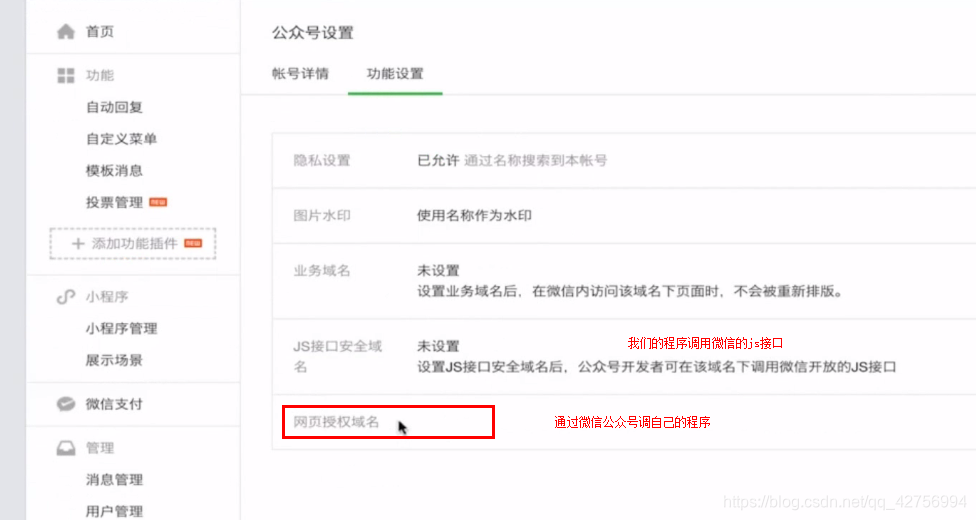
特别注意:个体不能开通微信认证也就无法进行微信授权,也就不能像服务号一样调用我们自己写的服务了
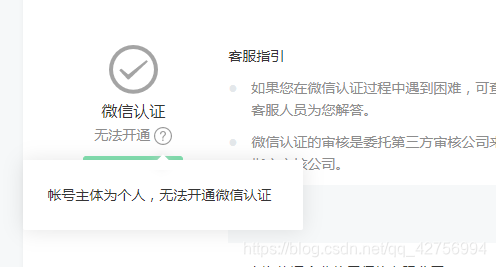
所以微信授权必须使用企业认证的服务号才可以实现做微信授权!!!!
2.用户同意授权,获取code
| 参数 | 是否必须 | 说明 |
|---|---|---|
| appid | 是 | 公众号的唯一标识 |
| redirect_uri | 是 | 授权后重定向的回调链接地址, 请使用 urlEncode 对链接进行处理 |
| response_type | 是 | 返回类型,请填写code |
| scope | 是 | 应用授权作用域,snsapi_base (不弹出授权页面,直接跳转,只能获取用户openid),snsapi_userinfo (弹出授权页面,可通过openid拿到昵称、性别、所在地。并且, 即使在未关注的情况下,只要用户授权,也能获取其信息 ) |
| state | 否 | 重定向后会带上state参数,开发者可以填写a-zA-Z0-9的参数值,最多128字节 |
| #wechat_redirect | 是 | 无论直接打开还是做页面302重定向时候,必须带此参数 |
https://open.weixin.qq.com/connect/oauth2/authorize?appid=APPID&redirect_uri=REDIRECT_URI&response_type=code&scope=SCOPE&state=STATE#wechat_redirect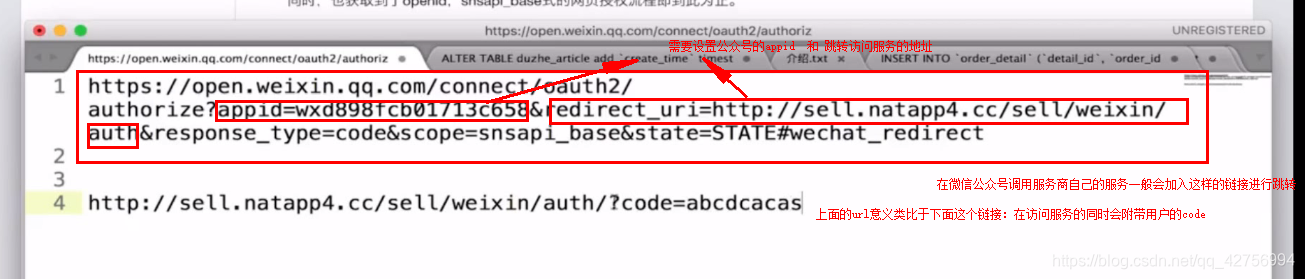
服务端的写法:
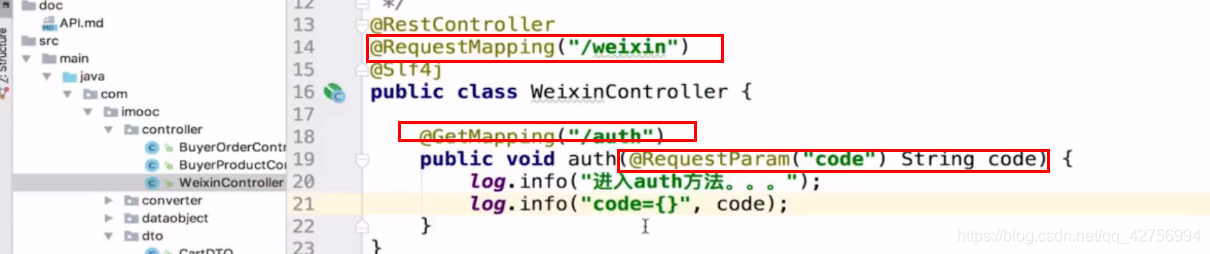
3.通过code换取网页授权access_token
获取code后,请求以下链接获取access_token:
https://api.weixin.qq.com/sns/oauth2/access_token?appid=APPID&secret=SECRET&code=CODE&grant_type=authorization_code| 参数 | 是否必须 | 说明 |
|---|---|---|
| appid | 是 | 公众号的唯一标识 |
| secret | 是 | 公众号的appsecret |
| code | 是 | 填写第一步获取的code参数 |
| grant_type | 是 | 填写为authorization_code |
服务端的写法:
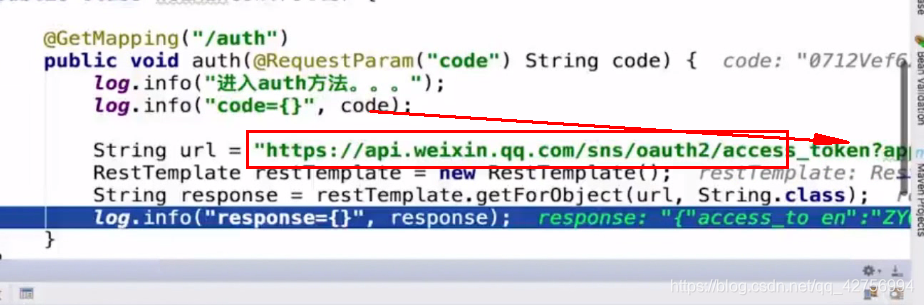
返回说明
正确时返回的JSON数据包如下:
{
  "access_token":"ACCESS_TOKEN",
  "expires_in":7200,
  "refresh_token":"REFRESH_TOKEN",
  "openid":"OPENID",
  "scope":"SCOPE"
}4.刷新access_token(如果需要)
由于access_token拥有较短的有效期,当access_token超时后,可以使用refresh_token进行刷新,refresh_token有效期为30天,当refresh_token失效之后,需要用户重新授权。
不刷新的话授权只能保持是2个小时,2小时候就需要重新授权了。而刷新了授权可以保持30天
请求方法
获取第二步的refresh_token后,请求以下链接获取access_token: https://api.weixin.qq.com/sns/oauth2/refresh_token?appid=APPID&grant_type=refresh_token&refresh_token=REFRESH_TOKEN
服务端代码:
就是在原来基础上在此放弃上面的请求。
请求的参数是:
| 参数 | 是否必须 | 说明 |
|---|---|---|
| appid | 是 | 公众号的唯一标识 |
| grant_type | 是 | 填写为refresh_token |
| refresh_token | 是 | 填写通过access_token获取到的refresh_token参数 |
特别说明
如果网页授权作用域为snsapi_userinfo,则此时开发者可以通过access_token和openid拉取用户信息了。
具体详细介绍可以参考微信官方文档:https://developers.weixin.qq.com/doc/offiaccount/OA_Web_Apps/Wechat_webpage_authorization.html
三、使用第三方sdk:(以springboot框架的项目为例)
1.在pom.xml文件中引入第三方sdk:
引入maven依赖
<!--sdk获取openid-->
        <dependency>
            <groupId>com.github.binarywang</groupId>
            <artifactId>weixin-java-mp</artifactId>
            <version>2.7.0</version>
        </dependency>
2.在配置文件中配置几个常量
我这里用的springboot,所以需要在配置文件application.yml中加入appid和secret,
3.然后再写一个类注入:
@Data
@Component
//注入application.yml中的属性,前缀为"wechat"
@ConfigurationProperties(prefix = "wechat")
public class WeChatAccountConfig {
    /**
     * 公众平台id
     */
    private String mpAppId;

    /**
     * 公众平台密钥
     */
    private String mpAppSecret;
}
4.然后再通过第三方sdk提供的方法获取这些属性:
@Component
public class WeChatMpConfig {
//    注入appid和AppSecret
    @Autowired
    private WeChatAccountConfig accountConfig;
//    @Bean主要用于方法上,表示将这个id注入到spring容器中
    @Bean
    public WxMpService wxMpService() {
        WxMpService wxMpService = new WxMpServiceImpl();
        //获取注入的WxMpInMemoryConfigStorage的属性
        wxMpService.setWxMpConfigStorage(wxMpConfigStorage());
        return wxMpService;
    }

    @Bean
    public WxMpConfigStorage wxMpConfigStorage() {
        WxMpInMemoryConfigStorage wxMpConfigStorage = new WxMpInMemoryConfigStorage();
        //获取注入的WeChatAccountConfig属性
        wxMpConfigStorage.setAppId(accountConfig.getMpAppId());
        wxMpConfigStorage.setSecret(accountConfig.getMpAppSecret());
        return wxMpConfigStorage;
    }
}
5.最后是controller实现:
前台访问:
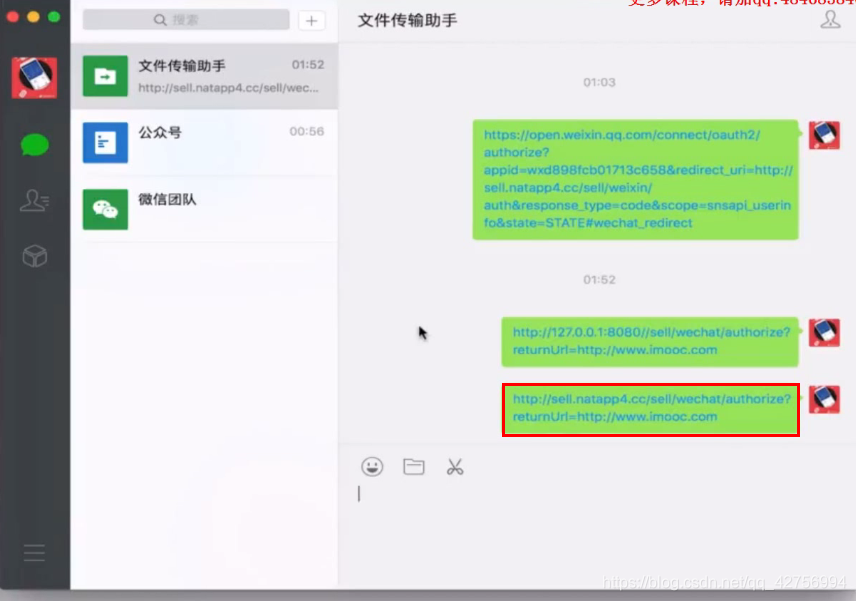
后台处理:
@Controller
@RequestMapping("/wechat")
@Slf4j
public class WeChatController {
    @Autowired
    private WxMpService wxMpService;

    @GetMapping("/authorize")
//    传入一个回调url,后面可以实现重定向
    public String authorize(@RequestParam("returnUrl") String returnUrl)  {
        //WxMpService wxMpService = new WxMpServiceImpl();
        //1.配置
        //2.调用方法
//        外网ip
        String url = 外网ip;
        // URLEncoder.encode设置转码,防止url乱码
        String redirectUrl = wxMpService.oauth2buildAuthorizationUrl(url, WxConsts.OAUTH2_SCOPE_BASE,
                URLEncoder.encode(returnUrl));
        log.info("【微信网页授权】获取code,result={}", redirectUrl);
        return "redirect:" + redirectUrl;
    }
//获取code,并交换AccessToken
    @GetMapping("/userInfo")
    public String userInfo(@RequestParam("code") String code,
                           @RequestParam("state") String returnUrl) {
        WxMpOAuth2AccessToken wxMpOAuth2AccessToken = new WxMpOAuth2AccessToken();
        try {
            wxMpOAuth2AccessToken = wxMpService.oauth2getAccessToken(code);
        } catch (WxErrorException e) {
            log.error("【微信网页授权】{}", e);
            throw new SellException(ResultEnum.WECHAT_MP_ERROR.getCode(), e.getError().getErrorMsg());
        }
        String openId = wxMpOAuth2AccessToken.getOpenId();
        return "redirect:" + returnUrl + "?openid=" + openId;
    }
}