前言
本文是参考尚学堂SpringSecurity精讲,仅作为学习记录使用。
这个系列设计到的技术点如下:
- SpringSecurity
- Oauth2
- SpringSecurity + Oauth2
- SpringSecurity +JWT
- SpringSecurity + Oauth2
- SpringSecurity + Oauth2 + JWT
背景
上一篇文章进行了快速入门的测试,但是有几个问题需要修复一下
- 进入的时候最先进入的是SpringSecurity内置的登录界面。
- 登录的账号密码也是内置的。
- 当什么也没有配置的时候,账号和密码是由 Spring Security 定义生成的。而在实际项目中账号和密码都是从数据库中查询出来的。所以我们要通过自定义逻辑控制认证逻辑。如果需要自定义逻辑时,只需要实现UserDetailsService 接口即可。
源码
UserDetailsService详解
首先我们进入到下面这个类
org.springframework.security.core.userdetails.UserDetailsService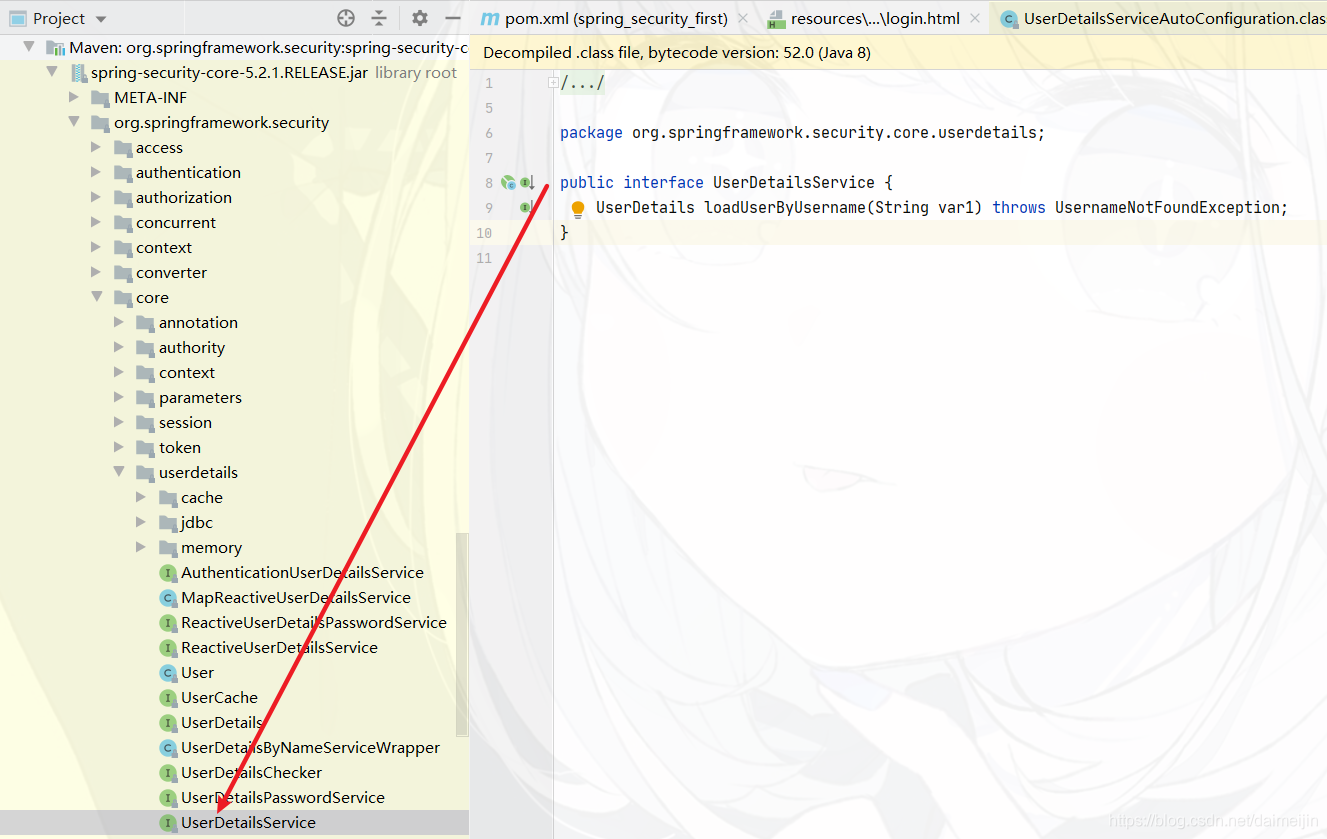
- 返回值
返回值 UserDetails 是一个接口,定义如下
package org.springframework.security.core.userdetails;

import java.io.Serializable;
import java.util.Collection;
import org.springframework.security.core.GrantedAuthority;

public interface UserDetails extends Serializable {

	// 获取所有的权限
    Collection<? extends GrantedAuthority> getAuthorities();

	// 获取密码
    String getPassword();

	// 获取用户名
    String getUsername();

	// 账号是否过期
    boolean isAccountNonExpired();

	// 账号是否被锁定
    boolean isAccountNonLocked();

	// 凭证是否过期
    boolean isCredentialsNonExpired();

	// 是否可用
    boolean isEnabled();
}
要想返回 UserDetails 的实例就只能返回接口的实现类。SpringSecurity 中提供了如下的实例。对于我们只需要使用里面的 User 类即可。注意 User 的全限定路径是:
org.springframework.security.core.userdetails.User 此处经常和系统中自己开发的 User 类弄混。
在 User 类中提供了很多方法和属性。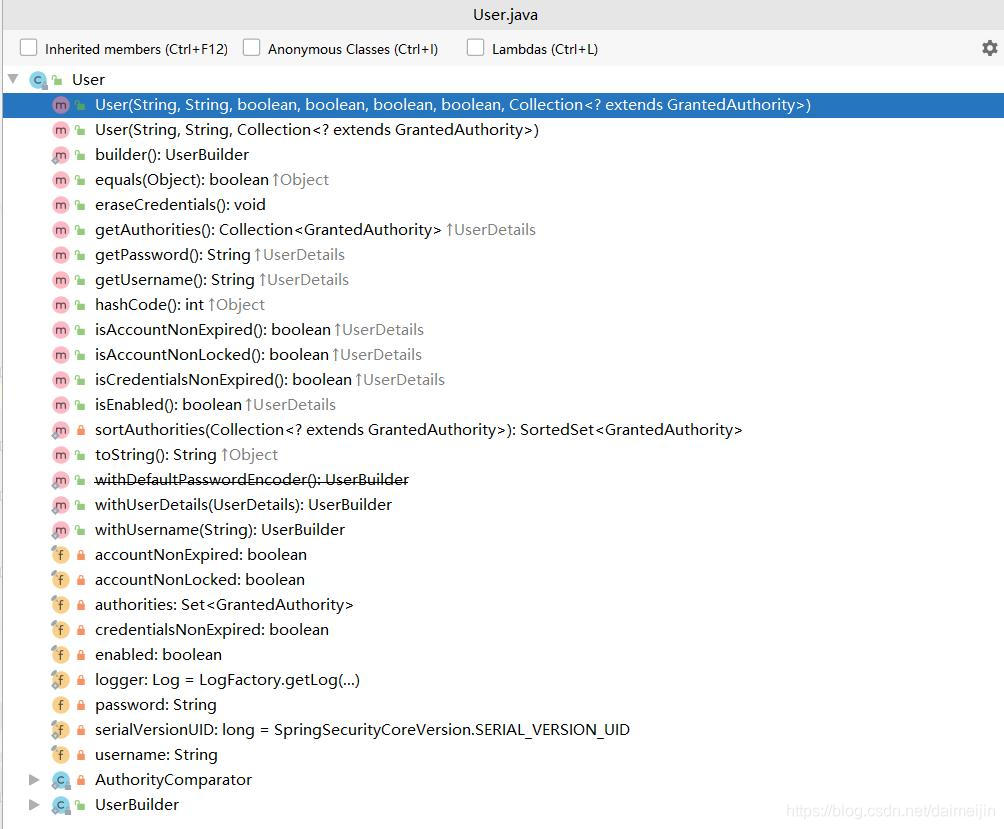
其中构造方法有两个,调用其中任何一个都可以实例化,UserDetails 实现类 User 类的实例。而三个参数的构造方法实际上也是调用 7 个参数的构造方法。
- username :用户名
- password :密码
- authorities :用户具有的权限。此处不允许为 null
public User(String username, String password,
			Collection<? extends GrantedAuthority> authorities) {
		this(username, password, true, true, true, true, authorities);
	}
这里的用户名应该是客户端传递过来的用户名。而密码应该是从数据库中查询出来的密码。Spring Security 会根据 User 中的 password 和客户端传递过来的 password 进行比较。如果相同则表示认证通过,如果不相同表示认证失败。
authorities 里面的权限对于后面学习授权是很有必要的,包含的所有内容为此用户具有的权限,如有里面没有包含某个权限,而在做某个事情时必须包含某个权限则会出现 403。通常都是通过
AuthorityUtils.commaSeparatedStringToAuthorityList(“”) 来创建 authorities 集合对象的。参数是一个字符串,多个权限使用逗号分隔。
- 方法参数
方法参数表示用户名。此值是客户端表单传递过来的数据。默认情况下必须叫 username ,否则无法接收。 - 异常
UsernameNotFoundException 用户名没有发现异常。在 loadUserByUsername 中是需要通过自己的逻辑从数据库中取值的。如果通过用户名没有查询到对应的数据,应该抛出UsernameNotFoundException ,系统就知道用户名没有查询到。
PasswordEncoder 密码解析器详解
Spring Security 要求容器中必须有 PasswordEncoder 实例。所以当自定义登录逻辑时要求必须给容器注入 PaswordEncoder 的bean对象。
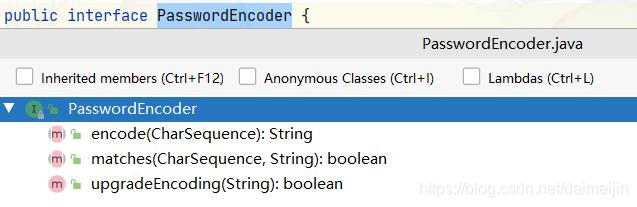
- 接口介绍
- encode() :把参数按照特定的解析规则进行解析。
- matches() :验证从存储中获取的编码密码与编码后提交的原始密码是否匹配。如果密码匹配,则返回 true;如果不匹配,则返回 false。第一个参数表示需要被解析的密码。第二个参数表示存储的密码。
- upgradeEncoding() :如果解析的密码能够再次进行解析且达到更安全的结果则返回 true,否则返回 false。默认返回 false。
public interface PasswordEncoder {

	/**
	 * Encode the raw password. Generally, a good encoding algorithm applies a SHA-1 or
	 * greater hash combined with an 8-byte or greater randomly generated salt.
	 */
	String encode(CharSequence rawPassword);

	/**
	 * Verify the encoded password obtained from storage matches the submitted raw
	 * password after it too is encoded. Returns true if the passwords match, false if
	 * they do not. The stored password itself is never decoded.
	 *
	 * @param rawPassword the raw password to encode and match
	 * @param encodedPassword the encoded password from storage to compare with
	 * @return true if the raw password, after encoding, matches the encoded password from
	 * storage
	 */
	boolean matches(CharSequence rawPassword, String encodedPassword);

	/**
	 * Returns true if the encoded password should be encoded again for better security,
	 * else false. The default implementation always returns false.
	 * @param encodedPassword the encoded password to check
	 * @return true if the encoded password should be encoded again for better security,
	 * else false.
	 */
	default boolean upgradeEncoding(String encodedPassword) {
		return false;
	}
}
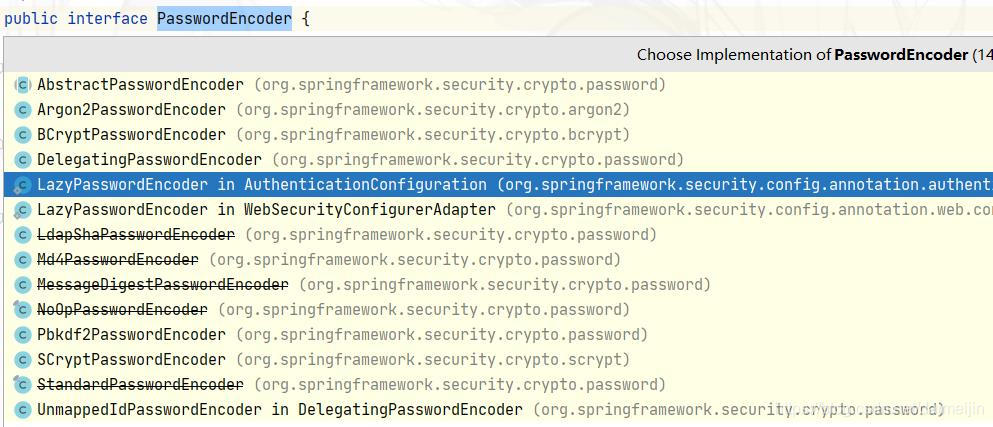
- 内置解析器介绍
- BCryptPasswordEncoder 简介
BCryptPasswordEncoder 是 Spring Security 官方推荐的密码解析器,平时多使用这个解析器。BCryptPasswordEncoder 是对 bcrypt 强散列方法的具体实现。是基于Hash算法实现的单向加密。可以通过strength控制加密强度,默认 10. - 代码演示 不匹配
@RunWith(SpringRunner.class)
@SpringBootTest(classes = MjdaiSpringSecurityApplication.class)
public class BCryptPasswordEncoderTest {
    @Test
    public void test(){
         //创建解析器
         PasswordEncoder pw = new BCryptPasswordEncoder();
         //对密码加密
         String encode = pw.encode("mjdai");
         System.out.println(encode);
         //判断原字符和加密后内容是否匹配
         boolean matches = pw.matches("mjdai123", encode);
         System.out.println("==================="+matches);
    }
}
$2a$10$B2OXW2x6SoHdgswk7BEIgOCi.A987wM2n9ZTl3GDPpyAx.ukYj34a
===================false
- 代码演示 匹配
@RunWith(SpringRunner.class)
@SpringBootTest(classes = MjdaiSpringSecurityApplication.class)
public class BCryptPasswordEncoderTest {
    @Test
    public void test(){
         //创建解析器
         PasswordEncoder pw = new BCryptPasswordEncoder();
         //对密码加密
         String encode = pw.encode("mjdai");
         System.out.println(encode);
         //判断原字符和加密后内容是否匹配
         boolean matches = pw.matches("mjdai", encode);
         System.out.println("==================="+matches);
    }
}
$2a$10$ipgHB16dmvGOMdjj6LCFb.6wANHlDNnUTWhjNX/v3Rhn2PFYDRvJ.
===================true
自定义登录逻辑
当 进 行 自 定 义 登 录 逻 辑 时 需 要 用 到 之 前 讲 解 的 UserDetailsService 和PasswordEncoder 。但是 Spring Security 要求:当进行自定义登录逻辑时容器内必须有PasswordEncoder 实例。所以不能直接new 对象。
- 编写配置类
com.mjdai.springsecurity.config.SecurityConfig
@Configuration
public class SecurityConfig {

    @Bean
    public PasswordEncoder getPw(){
        return new BCryptPasswordEncoder();
    }
}
- 自定义逻辑
com.mjdai.springsecurity.service.SpringSecurityUserServiceImpl
@Service
public class SpringSecurityUserServiceImpl implements UserDetailsService {

    @Autowired
    private PasswordEncoder pw;

    @Override
    public UserDetails loadUserByUsername(String username) throws UsernameNotFoundException {

        // 1.查询数据库判断用户名是否存在,如果不存在抛出UsernameNotFoundException异常
        if (!"admin".equals(username)) {
            throw new UsernameNotFoundException("用户名不存在");
        }

        // 2.把查询出来的密码(注册时已经加密过)进行解析,或直接把密码放入构造方法中
        String password = pw.encode("123");
        return new User(username, password,
                AuthorityUtils.commaSeparatedStringToAuthorityList("admin,normal"));
    }
}
- 查看效果
重启项目后,在浏览器中输入账号:admin,密码:mjdai。后可以正确进入到 login.html 页面。
自定义登录页面
虽然 Spring Security 给我们提供了登录页面,但是对于实际项目中,大多喜欢使用自己的登录页面。所以 Spring Security 中不仅仅提供了登录页面,还支持用户自定义登录页面。实现过程也比较简单,只需要修改配置类即可。
- 编写登录页面
<!DOCTYPE html>
<html lang="en">
<head>
    <meta charset="UTF-8">
    <title>Login</title>
    <link rel="stylesheet" type="text/css" href="Login.css"/>
</head>
<body>
<div id="login">
    <h1>Login</h1>
    <form method="post">
        <input type="text" required="required" placeholder="用户名" name="u"></input>
        <input type="password" required="required" placeholder="密码" name="p"></input>
        <button class="but" type="submit">登录</button>
    </form>
</div>
</body>
</html>
- 修改配置类
修改配置类中主要是设置哪个页面是登录页面。配置类需要继承WebSecurityConfigurerAdapte,并重写 configure 方法。
- successForwardUrl() :登录成功后跳转地址
- loginPage() :登录页面
- loginProcessingUrl :登录页面表单提交地址,此地址可以不真实存在。
- antMatchers() :匹配内容
- permitAll() :允许
package com.mjdai.springsecurity.config;

import org.springframework.context.annotation.Bean;
import org.springframework.context.annotation.Configuration;
import org.springframework.security.config.annotation.web.builders.HttpSecurity;
import org.springframework.security.config.annotation.web.configuration.WebSecurityConfigurerAdapter;
import org.springframework.security.crypto.bcrypt.BCryptPasswordEncoder;
import org.springframework.security.crypto.password.PasswordEncoder;

@Configuration
public class SecurityConfig extends WebSecurityConfigurerAdapter {

    @Override
    protected void configure(HttpSecurity http) throws Exception {
        // 表单提交
        http.formLogin()
                // 自定义登录页面
                .loginPage("/login.html")
                // 当发现/login时认为是登录,必须和表单提交的地址一样。去执行UserServiceImpl
                .loginProcessingUrl("/login")
                // 登录成功后跳转页面,POST请求
                .successForwardUrl("/toMain");
        http.authorizeRequests()
                // login.html不需要被认证
                .antMatchers("/login.html").permitAll()
                // 所有请求都必须被认证,必须登录后被访问
                .anyRequest().authenticated();
        // 关闭csrf防护
        http.csrf().disable();
    }

    @Bean
    public PasswordEncoder getPw(){
        return new BCryptPasswordEncoder();
    }
}
- 编写控制器
@Controller
public class LoginController {

     // 登录
//     @RequestMapping("/login")
//     public String login(){
//     	return "redirect:main.html";
//     }

    // 成功后跳转页面
    @RequestMapping(value = "/toMain",method = RequestMethod.POST)
   public String toMain(){
        System.out.println("到这里了吗?");
        return "redirect:main.html";
   }
}
认证过程其他常用配置
- 失败跳转
<!DOCTYPE html>
<html lang="en">
<head>
       <meta charset="UTF-8">
       <title>Title</title>
</head>
<body>
    操作失败,请重新登录 <a href= "/login.html">跳转</a>
</body>
</html>
- 修改表单配置
@Configuration
public class SecurityConfig extends WebSecurityConfigurerAdapter {

    @Override
    protected void configure(HttpSecurity http) throws Exception {
        // 表单提交
        http.formLogin()
                // 自定义登录页面
                .loginPage("/login.html")
                // 当发现/login时认为是登录,必须和表单提交的地址一样。去执行UserServiceImpl
                .loginProcessingUrl("/login")
                // 登录成功后跳转页面,POST请求
                .successForwardUrl("/toMain")
                // 登录失败后跳转页面,POST请求
                .failureForwardUrl("/toError");
        http.authorizeRequests()
                // login.html不需要被认证
                .antMatchers("/login.html").permitAll()
                // error.html不需要被认证
                .antMatchers("/error.html").permitAll()
                // 所有请求都必须被认证,必须登录后被访问
                .anyRequest().authenticated();
        // 关闭csrf防护
        http.csrf().disable();
    }

    @Bean
    public PasswordEncoder getPw(){
        return new BCryptPasswordEncoder();
    }
}
- 添加控制器的方法
在控制器类中添加控制器方法,方法映射路径/error。此处要注意:由于是 POST 请求访问/error。所以如果返回值直接转发到 error.html 中,即使有效果,控制台也会报警告,提示 error.html 不支持POST 访问方式。
package com.mjdai.springsecurity;


import org.springframework.stereotype.Controller;
import org.springframework.web.bind.annotation.PostMapping;
import org.springframework.web.bind.annotation.RequestMapping;
import org.springframework.web.bind.annotation.RequestMethod;

import java.lang.reflect.Method;

@Controller
public class LoginController {

     // 登录
//     @RequestMapping("/login")
//     public String login(){
//     	return "redirect:main.html";
//     }

    // 成功后跳转页面
    @RequestMapping(value = "/toMain",method = RequestMethod.POST)
   public String toMain(){
        System.out.println("到这里了吗?");
        return "redirect:main.html";
   }

    /**
     * 失败后跳转页面
     */
    @RequestMapping(value = "/toError",method = RequestMethod.POST)
    public String toError(){
        return "redirect:/error.html";
    }
}
设置请求账户和密码的参数名
- 源码简介
当进行登录时会执行 UsernamePasswordAuthenticationFilter 过滤器。
- usernamePasrameter :账户参数名
- passwordParameter :密码参数名
- postOnly=true :默认情况下只允许POST请求。

- 修改配置
//表单提交
http.formLogin()
      // 自定义登录页面
     .loginPage("/login.html")
      // 当发现/login时认为是登录,必须和表单提交的地址一样。去执行UserServiceImpl
     .loginProcessingUrl("/login")
      // 登录成功后跳转页面,POST请求
     .successForwardUrl("/toMain")
      // 登录失败后跳转页面,POST请求
     .failureForwardUrl("/toError")
     .usernameParameter("myusername")
     .passwordParameter("mypassword");
- 修改login.html
<form action="/login" method="post">
   用户名:<input type="text" name="myusername" /><br/>
   密码:<input type="password" name="mypassword" /><br/>
    <input type="submit" value="登录" />
</form>
自定义登录成功处理器
- 源码分析
使用successForwardUrl()时表示成功后转发请求到地址。内部是通过 successHandler() 方法进行控制成功后交给哪个类进行处理
    public FormLoginConfigurer<H> successForwardUrl(String forwardUrl) {
        this.successHandler(new ForwardAuthenticationSuccessHandler(forwardUrl));
        return this;
    }
ForwardAuthenticationSuccessHandler内部就是最简单的请求转发。由于是请求转发,当遇到需要跳转到站外或在前后端分离的项目中就无法使用了。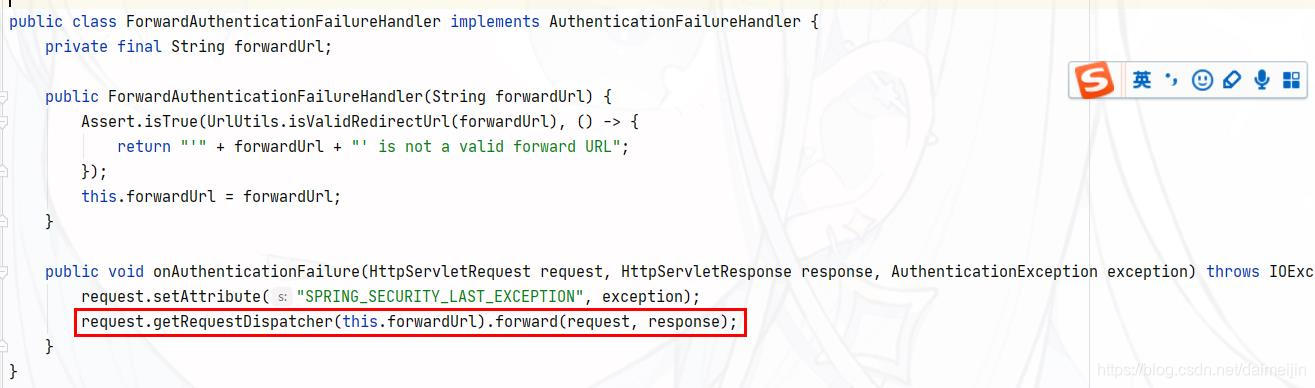
当需要控制登录成功后去做一些事情时,可以进行自定义认证成功控制器。
- 代码实现 自定义类
package com.mjdai.springsecurity.handler;

import org.springframework.security.core.Authentication;
import org.springframework.security.core.userdetails.User;
import org.springframework.security.web.authentication.AuthenticationSuccessHandler;

import javax.servlet.ServletException;
import javax.servlet.http.HttpServletRequest;
import javax.servlet.http.HttpServletResponse;
import java.io.IOException;

public class MyAuthenticationSuccessHandler implements AuthenticationSuccessHandler {
    private String url;

    public MyAuthenticationSuccessHandler(String url) {
         this.url = url;
    }

    @Override
    public void onAuthenticationSuccess(HttpServletRequest request,
                                        HttpServletResponse response, Authentication authentication) throws IOException,
            ServletException {
        // Principal 主体,存放了登录用户的信息
        User user = (User) authentication.getPrincipal();
        System.out.println(user.getUsername());
        // 输出null
        System.out.println(user.getPassword());
        System.out.println(user.getAuthorities());
        response.sendRedirect(url);
    }
}
- 修改配置项
使用 successHandler()方法设置成功后交给哪个对象进行处理
package com.mjdai.springsecurity.config;

import com.mjdai.springsecurity.handler.MyAuthenticationSuccessHandler;
import org.springframework.context.annotation.Bean;
import org.springframework.context.annotation.Configuration;
import org.springframework.security.config.annotation.web.builders.HttpSecurity;
import org.springframework.security.config.annotation.web.configuration.WebSecurityConfigurerAdapter;
import org.springframework.security.crypto.bcrypt.BCryptPasswordEncoder;
import org.springframework.security.crypto.password.PasswordEncoder;

@Configuration
public class SecurityConfig extends WebSecurityConfigurerAdapter {

    @Override
    protected void configure(HttpSecurity http) throws Exception {
        // 表单提交
        http.formLogin()
                // 自定义登录页面
                .loginPage("/login.html")
                // 当发现/login时认为是登录,必须和表单提交的地址一样。去执行UserServiceImpl
                .loginProcessingUrl("/login")
                // 登录成功后跳转页面,POST请求
                // .successForwardUrl("/toMain")
                // 和successForwardUrl不能共存
                .successHandler(new
                        MyAuthenticationSuccessHandler("http://www.baidu.com"))
                // 登录失败后跳转页面,POST请求
                .failureForwardUrl("/toError")
                .usernameParameter("myusername")
                .passwordParameter("mypassword");
        http.authorizeRequests()
                // login.html不需要被认证
                .antMatchers("/login.html").permitAll()
                // error.html不需要被认证
                .antMatchers("/error.html").permitAll()
                // 所有请求都必须被认证,必须登录后被访问
                .anyRequest().authenticated();
        // 关闭csrf防护
        http.csrf().disable();
    }

    @Bean
    public PasswordEncoder getPw(){
        return new BCryptPasswordEncoder();
    }
}
自定义登录失败处理器
- 源码分析
failureForwardUrl()内部调用的是 failureHandler() 方法
org.springframework.security.web.authentication.ForwardAuthenticationFailureHandler
public void onAuthenticationFailure(HttpServletRequest request, HttpServletResponse response, AuthenticationException exception) throws IOException, ServletException {
        request.setAttribute("SPRING_SECURITY_LAST_EXCEPTION", exception);
        request.getRequestDispatcher(this.forwardUrl).forward(request, response);
    }
ForwardAuthenticationFailureHandler 中也是一个请求转发,并在request 作用域中设置SPRING_SECURITY_LAST_EXCEPTION 的 key,内容为异常对象。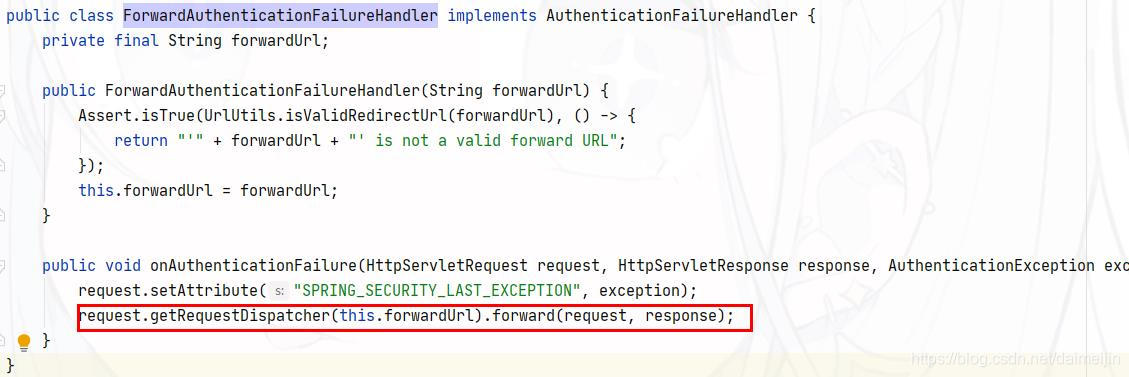
- 代码实现 新建控制器
package com.mjdai.springsecurity.handler;

import org.springframework.security.core.AuthenticationException;
import org.springframework.security.web.authentication.AuthenticationFailureHandler;

import javax.servlet.ServletException;
import javax.servlet.http.HttpServletRequest;
import javax.servlet.http.HttpServletResponse;
import java.io.IOException;

public class MyForwardAuthenticationFailureHandler implements AuthenticationFailureHandler {
     private String url;
     public MyForwardAuthenticationFailureHandler(String url) {
            this.url = url;
     }
     @Override
     public void onAuthenticationFailure(HttpServletRequest request,
                                         HttpServletResponse response, AuthenticationException exception) throws
             IOException, ServletException {
            response.sendRedirect(url);
     }
}
- 修改配置类
package com.mjdai.springsecurity.config;

import com.mjdai.springsecurity.handler.MyAuthenticationSuccessHandler;
import com.mjdai.springsecurity.handler.MyForwardAuthenticationFailureHandler;
import org.springframework.context.annotation.Bean;
import org.springframework.context.annotation.Configuration;
import org.springframework.security.config.annotation.web.builders.HttpSecurity;
import org.springframework.security.config.annotation.web.configuration.WebSecurityConfigurerAdapter;
import org.springframework.security.crypto.bcrypt.BCryptPasswordEncoder;
import org.springframework.security.crypto.password.PasswordEncoder;

@Configuration
public class SecurityConfig extends WebSecurityConfigurerAdapter {

    @Override
    protected void configure(HttpSecurity http) throws Exception {
        // 表单提交
        http.formLogin()
                // 自定义登录页面
                .loginPage("/login.html")
                // 当发现/login时认为是登录,必须和表单提交的地址一样。去执行UserServiceImpl
                .loginProcessingUrl("/login")
                // 登录成功后跳转页面,POST请求
                // .successForwardUrl("/toMain")
                // 和successForwardUrl不能共存
                .successHandler(new
                        MyAuthenticationSuccessHandler("http://www.baidu.com"))
                // 登录失败后跳转页面,POST请求
                // .failureForwardUrl("/toError")
                .failureHandler(new MyForwardAuthenticationFailureHandler("/error.html"))
                .usernameParameter("myusername")
                .passwordParameter("mypassword");
        http.authorizeRequests()
                // login.html不需要被认证
                .antMatchers("/login.html").permitAll()
                // error.html不需要被认证
                .antMatchers("/error.html").permitAll()
                // 所有请求都必须被认证,必须登录后被访问
                .anyRequest().authenticated();
        // 关闭csrf防护
        http.csrf().disable();
    }

    @Bean
    public PasswordEncoder getPw(){
        return new BCryptPasswordEncoder();
    }
}