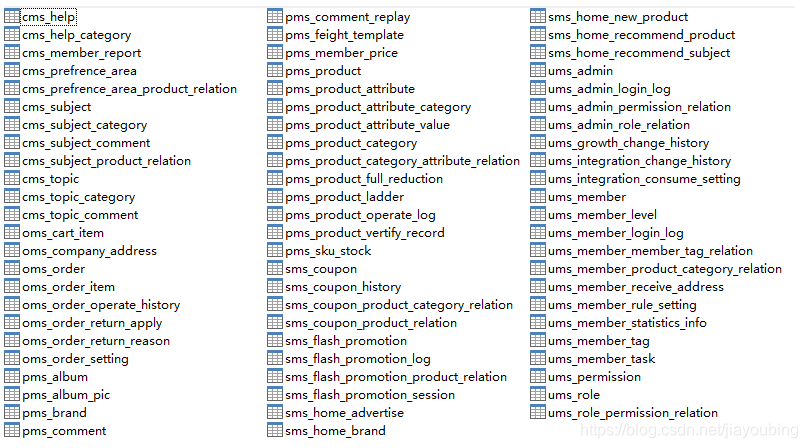
建立数据模型pdm,表结构前缀说明
- cms_*:内容管理模块相关表
- oms_*:订单管理模块相关表
- pms_*:商品模块相关表
- sms_*:营销模块相关表
- ums_*:会员模块相关表
新建pom工程如下:
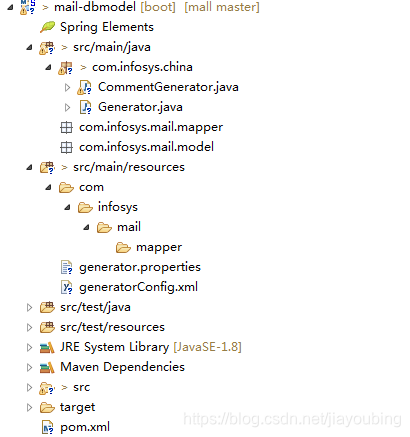
1.pom文件内容如下:
<dependencies>
		<!-- https://mvnrepository.com/artifact/org.mybatis.generator/mybatis-generator-core -->
		<dependency>
			<groupId>org.mybatis.generator</groupId>
			<artifactId>mybatis-generator-core</artifactId>
		</dependency>

		<!-- https://mvnrepository.com/artifact/mysql/mysql-connector-java -->
		<dependency>
			<groupId>mysql</groupId>
			<artifactId>mysql-connector-java</artifactId>
		</dependency>
		<dependency>
			<groupId>io.springfox</groupId>
			<artifactId>springfox-swagger2</artifactId>
		</dependency>
		<dependency>
			<groupId>io.springfox</groupId>
			<artifactId>springfox-swagger-ui</artifactId>
		</dependency>
2.generatorConfig.xml
<?xml version="1.0" encoding="UTF-8"?>
<!DOCTYPE generatorConfiguration
        PUBLIC "-//mybatis.org//DTD MyBatis Generator Configuration 1.0//EN"
        "http://mybatis.org/dtd/mybatis-generator-config_1_0.dtd">

<generatorConfiguration>
	<properties resource="generator.properties" />
	<context id="MySqlContext" targetRuntime="MyBatis3"
		defaultModelType="flat">
		<property name="beginningDelimiter" value="`" />
		<property name="endingDelimiter" value="`" />
		<property name="javaFileEncoding" value="UTF-8" />
		<!-- 为模型生成序列化方法 -->
		<plugin type="org.mybatis.generator.plugins.SerializablePlugin" />
		<!-- 为生成的Java模型创建一个toString方法 -->
		<plugin type="org.mybatis.generator.plugins.ToStringPlugin" />
		<!--生成mapper.xml时覆盖原文件 -->
		<plugin type="org.mybatis.generator.plugins.UnmergeableXmlMappersPlugin" />

		<!-- CommentGenerator这里主要是对数据库操作的处理 -->
		<commentGenerator type="com.infosys.china.CommentGenerator">
			<!-- 是否去除自动生成的注释 true:是 : false:否 -->
			<property name="suppressAllComments" value="true" />
			<property name="suppressDate" value="true" />
			<property name="addRemarkComments" value="true" />
		</commentGenerator>

		<jdbcConnection driverClass="${jdbc.driverClass}"
			connectionURL="${jdbc.connectionURL}" userId="${jdbc.userId}"
			password="${jdbc.password}">
			<!--解决mysql驱动升级到8.0后不生成指定数据库代码的问题 -->
			<property name="nullCatalogMeansCurrent" value="true" />
		</jdbcConnection>
		<!-- targetProject这里建议用绝对路径存放,以免存在子父工程会报错 -->
		<javaModelGenerator targetPackage="com.infosys.mail.model"
			targetProject="G:\Documents\GitHub\mall\mail-dbmodel\src\main\java" />

		<!-- targetProject这里建议用绝对路径存放,以免存在子父工程会报错 -->
		<sqlMapGenerator targetPackage="com.infosys.mail.mapper"
			targetProject="G:\Documents\GitHub\mall\mail-dbmodel\src\main\resources" />

		<javaClientGenerator type="XMLMAPPER"
			targetPackage="com.infosys.mail.mapper" targetProject="G:\Documents\GitHub\mall\mail-dbmodel\src\main\java" />
		<!--生成全部表tableName设为% -->
		<table tableName="%">
			<generatedKey column="id" sqlStatement="MySql" identity="true" />
		</table>
	</context>
</generatorConfiguration>
3.配置数据库连接信息 generator.properties
jdbc.driverClass=com.mysql.cj.jdbc.Driver
jdbc.connectionURL=jdbc:mysql://192.168.234.103:3306/mall?useUnicode=true&characterEncoding=utf-8&serverTimezone=Asia/Shanghai
jdbc.userId=root
jdbc.password=root
4.对生成的文件注释的处理 CommentGenerator.java
package com.infosys.china;

import java.util.Properties;

import org.mybatis.generator.api.IntrospectedColumn;
import org.mybatis.generator.api.IntrospectedTable;
import org.mybatis.generator.api.dom.java.CompilationUnit;
import org.mybatis.generator.api.dom.java.Field;
import org.mybatis.generator.api.dom.java.FullyQualifiedJavaType;
import org.mybatis.generator.internal.DefaultCommentGenerator;
import org.mybatis.generator.internal.util.StringUtility;

/**
 *
 * <一句话功能简述> <功能详细描述>
 *
 * @author Jiayoubing
 * @version [版本号,2020年5月5日]
 * @see [相关类/方法]
 * @since [产品/模块版本]
 */
public class CommentGenerator extends DefaultCommentGenerator
{
    private boolean addRemarkComments = false;

    private static final String EXAMPLE_SUFFIX = "Example";

    private static final String API_MODEL_PROPERTY_FULL_CLASS_NAME = "io.swagger.annotations.ApiModelProperty";

    /**
     * 设置用户配置的参数
     */
    @Override
    public void addConfigurationProperties(Properties properties)
    {
        super.addConfigurationProperties(properties);
        this.addRemarkComments = StringUtility.isTrue(properties.getProperty("addRemarkComments"));
    }

    /**
     * 给字段添加注释
     */
    @Override
    public void addFieldComment(Field field, IntrospectedTable introspectedTable, IntrospectedColumn introspectedColumn)
    {
        String remarks = introspectedColumn.getRemarks();
        // 根据参数和备注信息判断是否添加备注信息
        if (addRemarkComments && StringUtility.stringHasValue(remarks))
        {
            // addFieldJavaDoc(field, remarks);
            // 数据库中特殊字符需要转义
            if (remarks.contains("\""))
            {
                remarks = remarks.replace("\"", "'");
            }
            // 给model的字段添加swagger注解
            field.addJavaDocLine("@ApiModelProperty(value = \"" + remarks + "\")");
        }
    }

    /**
     * 给model的字段添加注释
     */
    private void addFieldJavaDoc(Field field, String remarks)
    {
        // 文档注释开始
        field.addJavaDocLine("/**");
        // 获取数据库字段的备注信息
        String[] remarkLines = remarks.split(System.getProperty("line.separator"));
        for (String remarkLine : remarkLines)
        {
            field.addJavaDocLine(" * " + remarkLine);
        }
        addJavadocTag(field, false);
        field.addJavaDocLine(" */");
    }

    @Override
    public void addJavaFileComment(CompilationUnit compilationUnit)
    {
        super.addJavaFileComment(compilationUnit);
        // 只在model中添加swagger注解类的导入
        if (!compilationUnit.isJavaInterface()
                && !compilationUnit.getType().getFullyQualifiedName().contains(EXAMPLE_SUFFIX))
        {
            compilationUnit.addImportedType(new FullyQualifiedJavaType(API_MODEL_PROPERTY_FULL_CLASS_NAME));
        }
    }
}
5.程序入口 Generator.java
package com.infosys.china;

import org.mybatis.generator.api.MyBatisGenerator;
import org.mybatis.generator.config.Configuration;
import org.mybatis.generator.config.xml.ConfigurationParser;
import org.mybatis.generator.internal.DefaultShellCallback;

import java.io.InputStream;
import java.util.ArrayList;
import java.util.List;

public class Generator
{
    public static void main(String[] args) throws Exception
    {
        // MBG 执行过程中的警告信息
        List<String> warnings = new ArrayList<String>();
        // 当生成的代码重复时,覆盖原代码
        boolean overwrite = true;
        // 读取我们的 MBG 配置文件
        InputStream is = Generator.class.getResourceAsStream("/generatorConfig.xml");
        ConfigurationParser cp = new ConfigurationParser(warnings);
        Configuration config = cp.parseConfiguration(is);
        is.close();

        DefaultShellCallback callback = new DefaultShellCallback(overwrite);
        // 创建 MBG
        MyBatisGenerator myBatisGenerator = new MyBatisGenerator(config, callback, warnings);
        // 执行生成代码
        myBatisGenerator.generate(null);
        // 输出警告信息
        for (String warning : warnings)
        {
            System.out.println(warning);
        }
    }
}
6.处理后的目录结构
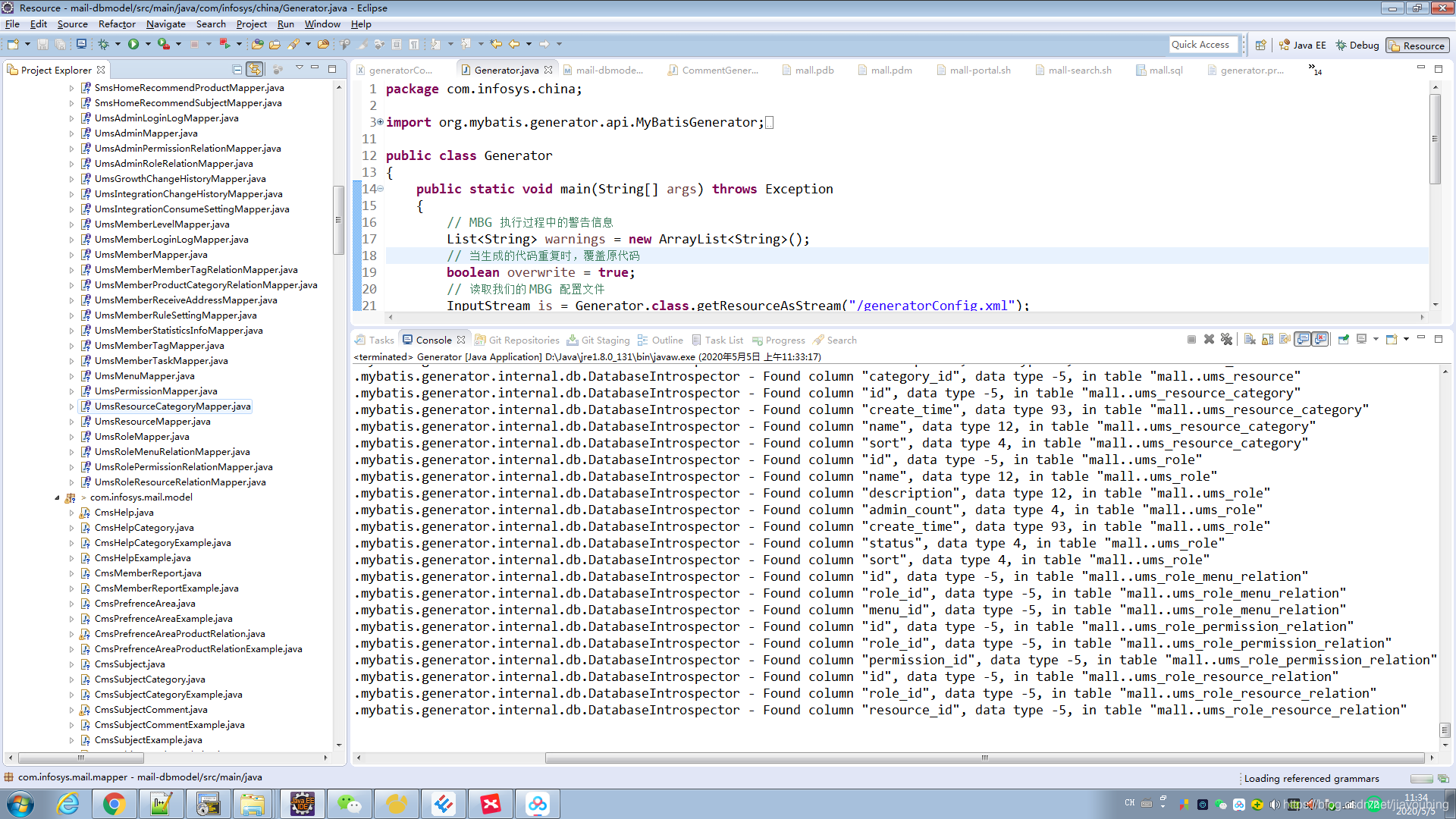
切记:数据库表结构和字段会发生变化,对于下面的目录的xml,model,mapper不用有任何改动,以免被覆盖
com.infosys.mail.mapper,com.infosys.mail.model
MyBatis的Mapper接口以及Example的实例函数及详解
一、mapper接口中的方法解析
mapper接口中的函数及方法
| 方法 | 功能说明 |
| int countByExample(UserExample example) thorws SQLException | 按条件计数 |
| int deleteByPrimaryKey(Integer id) thorws SQLException | 按主键删除 |
| int deleteByExample(UserExample example) thorws SQLException | 按条件查询 |
| String/Integer insert(User record) thorws SQLException | 插入数据(返回值为ID) |
| User selectByPrimaryKey(Integer id) thorws SQLException | 按主键查询 |
| ListselectByExample(UserExample example) thorws SQLException | 按条件查询 |
| ListselectByExampleWithBLOGs(UserExample example) thorws SQLException | 按条件查询(包括BLOB字段)。只有当数据表中的字段类型有为二进制的才会产生。 |
| int updateByPrimaryKey(User record) thorws SQLException | 按主键更新 |
| int updateByPrimaryKeySelective(User record) thorws SQLException | 按主键更新值不为null的字段 |
| int updateByExample(User record, UserExample example) thorws SQLException | 按条件更新 |
| int updateByExampleSelective(User record, UserExample example) thorws SQLException | 按条件更新值不为null的字段 |
二、example实例解析
mybatis的逆向工程中会生成实例及实例对应的example,example用于添加条件,相当where后面的部分
xxxExample example = new xxxExample();
Criteria criteria = new Example().createCriteria();
| 方法 | 说明 |
| example.setOrderByClause(“字段名 ASC”); | 添加升序排列条件,DESC为降序 |
| example.setDistinct(false) | 去除重复,boolean型,true为选择不重复的记录。 |
| criteria.andXxxIsNull | 添加字段xxx为null的条件 |
| criteria.andXxxIsNotNull | 添加字段xxx不为null的条件 |
| criteria.andXxxEqualTo(value) | 添加xxx字段等于value条件 |
| criteria.andXxxNotEqualTo(value) | 添加xxx字段不等于value条件 |
| criteria.andXxxGreaterThan(value) | 添加xxx字段大于value条件 |
| criteria.andXxxGreaterThanOrEqualTo(value) | 添加xxx字段大于等于value条件 |
| criteria.andXxxLessThan(value) | 添加xxx字段小于value条件 |
| criteria.andXxxLessThanOrEqualTo(value) | 添加xxx字段小于等于value条件 |
| criteria.andXxxIn(List<?>) | 添加xxx字段值在List<?>条件 |
| criteria.andXxxNotIn(List<?>) | 添加xxx字段值不在List<?>条件 |
| criteria.andXxxLike(“%”+value+”%”) | 添加xxx字段值为value的模糊查询条件 |
| criteria.andXxxNotLike(“%”+value+”%”) | 添加xxx字段值不为value的模糊查询条件 |
| criteria.andXxxBetween(value1,value2) | 添加xxx字段值在value1和value2之间条件 |
| criteria.andXxxNotBetween(value1,value2) | 添加xxx字段值不在value1和value2之间条件 |
三、应用举例
1.查询
① selectByPrimaryKey()
User user = XxxMapper.selectByPrimaryKey(100); //相当于select * from user where id = 100② selectByExample() 和 selectByExampleWithBLOGs()
UserExample example = new UserExample();
Criteria criteria = example.createCriteria();
criteria.andUsernameEqualTo("wyw");
criteria.andUsernameIsNull();
example.setOrderByClause("username asc,email desc");
List<?>list = XxxMapper.selectByExample(example);
//相当于:select * from user where username = 'wyw' and  username is null order by username asc,email desc
注:在ibatis逆向工程生成的文件XxxExample.java中包含一个static的内部类Criteria,Criteria中的方法是定义SQL 语句where后的查询条件。
2.插入数据
①insert()
User user = new User();
user.setId("dsfgsdfgdsfgds");
user.setUsername("admin");
user.setPassword("admin")
user.setEmail("wyw@163.com");
XxxMapper.insert(user);
//相当于:insert into user(ID,username,password,email) values ('dsfgsdfgdsfgds','admin','admin','wyw@126.com');
3.更新数据
①updateByPrimaryKey()
User user =new User();
user.setId("dsfgsdfgdsfgds");
user.setUsername("wyw");
user.setPassword("wyw");
user.setEmail("wyw@163.com");
XxxMapper.updateByPrimaryKey(user);
//相当于:update user set username='wyw', password='wyw', email='wyw@163.com' where id='dsfgsdfgdsfgds'
②updateByPrimaryKeySelective()
User user = new User();
user.setId("dsfgsdfgdsfgds");
user.setPassword("wyw");
XxxMapper.updateByPrimaryKey(user);
//相当于:update user set password='wyw' where id='dsfgsdfgdsfgds'
③ updateByExample() 和 updateByExampleSelective()
UserExample example = new UserExample();
Criteria criteria = example.createCriteria();
criteria.andUsernameEqualTo("admin");
User user = new User();
user.setPassword("wyw");
XxxMapper.updateByPrimaryKeySelective(user,example);
//相当于:update user set password='wyw' where username='admin'
updateByExample()更新所有的字段,包括字段为null的也更新,建议使用 updateByExampleSelective()更新想更新的字段
4.删除数据
①deleteByPrimaryKey()
XxxMapper.deleteByPrimaryKey(1); //相当于:delete from user where id=1②deleteByExample()
UserExample example = new UserExample();
Criteria criteria = example.createCriteria();
criteria.andUsernameEqualTo("admin");
XxxMapper.deleteByExample(example);
//相当于:delete from user where username='admin'
5.查询数据数量
①countByExample()
UserExample example = new UserExample();
Criteria criteria = example.createCriteria();
criteria.andUsernameEqualTo("wyw");
int count = XxxMapper.countByExample(example);
//相当于:select count(*) from user where username='wyw'
另一种是采用mybatis-plus,核心是mapper继承父类BaseMapper,就可以使用下面这些方法。
参考:https://blog.csdn.net/qq_35387940/article/details/103381713