JAVA Scanner 中 next() 和 nextLine() 的区别
1.1 next();
package Study;
import java.util.Scanner;
public class Demo09 {
public static void main(String[] args) {
//创建一个扫描器对象,用于接收键盘数据
Scanner scanner = new Scanner(System.in);//in 表示输入
System.out.println("使用NEXT方式接收:");
//判断用户是否有输入字符串
if (scanner.hasNext()){
//使用next方式接收
String str = scanner.next();
System.out.println("Message:"+str);
}
//凡是属于IO流的类不关闭会占用资源,用完就关
scanner.close();
}
}输出
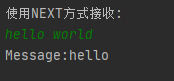 发现少了 world
接下来使用nextline()方法接收键盘输入
1.2 nextLine();
package Study;
import java.util.Scanner;
public class Demo10 {
public static void main(String[] args) {
//从键盘接收数据
Scanner scanner = new Scanner(System.in);
System.out.println("使用nextline方式接收: ");
//判断用户是否有输入字符串
if (scanner.hasNextLine()){
String str = scanner.nextLine();
System.out.println("Message: " + str);
}
scanner.close();
}
}输出
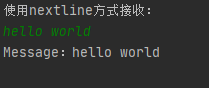 可以看到结果输出完整
1.3 next() 和 nextLine() 的区别
next():
一定要读取到有效字符后才可以结束输入
对输入的有效字符之前遇到的空白,next()方法会自动将其去掉.
只有输入有效字符后才将其后面输入的空白作为分隔符或者结束符
next()不能得到带有空格的字符串
nextLine():
以ENTER(回车)为结束符,nextLine()方法输出的结果是回车前输入的所有字符
也可以获得空白
总结:Scanner类中的next()和nextLine(),前者遇到空格就会丢弃空格后的数据输出之前内容,后者可完整输出回车前输入的内容. scanner使用完之后需及时关闭节约系统资源 scanner.close().
版权声明:本文为xmj818719原创文章,遵循CC 4.0 BY-SA版权协议,转载请附上原文出处链接和本声明。