1. springboot介绍
- springboot是什么
- springboot的特点
- springboot目前的最新版本
- 开发一个springboot入门程序 - Hello World
1.1 springboot是什么
springboot是Pivotal公司在2014年推出的全新框架(不是全新的mvc框架),它的设计目的是用来快速创建spring应用程序,简化spring应用的开发过程;
1.2 springboot的特点
- 可以创建独立的spring应用程序;
- 内置Tomcat、Jetty、Undertow容器,不需要部署war包;
- 提供starter依赖简化构建配置;
- 可以按需自动配置spring和第三方框架;
- 提供了生产级功能如:监控、健康检查、外部化配置;
- 没有代码生成,不需要xml配置;
1.3 springboot目前的版本
截止到今天(2020-10-13)最新版本
- 2020年9月17日发布的2.4.0.M3;
- 2020年9月17日发布的2.3.4;
- 2020年9月17日发布的2.2.10;
springboot 2.2.0正式版于2019年10月16日发布,目前最新版是2.2.x的最新版是2.2.10;
springboot 2.1.X版本将在2020年11月1日结束生命周期(EOF - End Of Life);
这次课程使用springboot 2.2.6.RELEASE;
1.4 开发springboot入门程序
springboot官方开发入门程序:https://spring.io/guides/gs/rest-service
软件要求:
JDK1.8+
Maven3.2+
Eclipse、STS、IDEA
内置Tomcat启动日志如下:
Tomcat started on port(s): 8080 (http) with context path ''修改默认端口号和默认ContextPath:
springboot启动时会加载classpath的application.properties(.yml)文件,可以直接在这个文件中修改tomcat端口号和contextPath;
server.port=9090
server.servlet.context-path=/boot
2. springboot对静态资源处理
2.1 spring mvc对静态资源的处理
将静态文件交给Servlet容器处理
<mvc:default-servlet-handler />定制静态文件
<mvc:resources location="" mapping="" />
2.2 springboot的默认处理方式 - 静态默认存放位置
springboot处理方式
在
WebMvcAutoConfiguration中进行了自动配置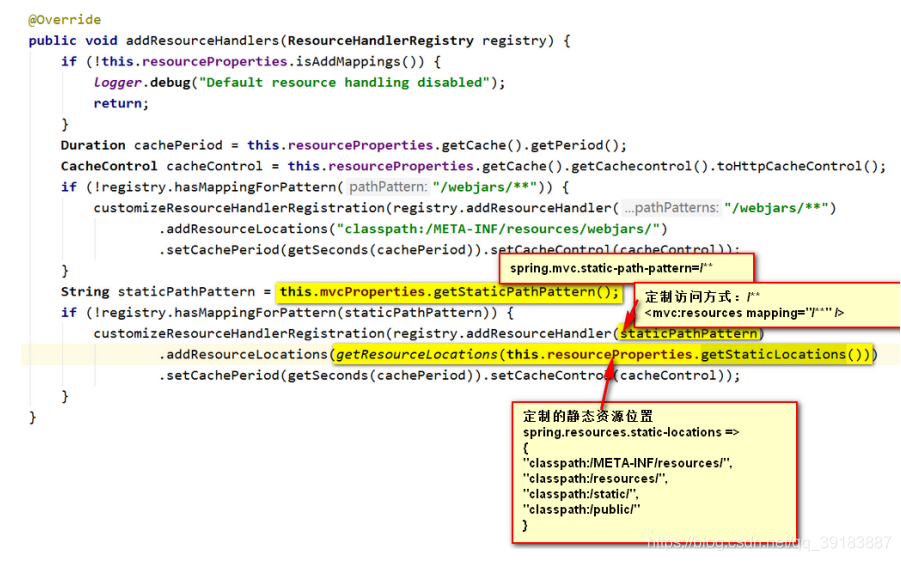
默认请求地址
spring.mvc.static-path-pattern=/**<mvc:resource mapping="/**" />默认访问位置
spring.resources.static-locations=classpath:/META-INF/resources/,classpath:/resources/,classpath:/static/, classpath:/public/<mvc:resources location="classpath:/static/" />默认路径的访问优先级
classpath:/META-INF/resources/
classpath:/resources/
classpath:/static/
classpath:/public/
springboot在默认的基础上增加静态资源访问地址和位置
@Configuration
 public class MvcConfig implements WebMvcConfigurer {

   @Override
   public void addResourceHandlers(ResourceHandlerRegistry registry) {
     // <mvc:resources mapping="" />
     registry.addResourceHandler("/pics/**")
       // <mvc:resources location="" />
       .addResourceLocations("file:d:/upload/");
   }

 }
0.基础依赖&配置文件
首先我们要引入springboot官方管理好的一套依赖
<parent>
    <groupId>org.springframework.boot</groupId>
    <artifactId>spring-boot-starter-parent</artifactId>
    <version>2.2.6.RELEASE</version>
</parent>
spring-boot-starter-web
<dependency>
    <groupId>org.springframework.boot</groupId>
    <artifactId>spring-boot-starter-web</artifactId>
</dependency>
spring-boot-starter-web默认为我们提供一些SpringMVC必要的组件:
必要的ViewResolver,比如ContentNegotiatingViewResolver和BeanNameViewResolver。
将必要的Converter,GenericConverter和Formatter等bean注册到IOC容器。
添加一系列的HttpMessageConverter以便支持对web请求和相应的类型转换。
自动配置MessageCodesResolver。
如果默认的SpringMVC组件并不能满足我们的需求,都可以在IOC容器中注册新的同类型的bean来替换,或者直接提供一个基于WebMvcConfigurerAdapter类型的ben来定制,甚至直接提供一个标注了@EnableWebMvc的@configuration配置类完全接管所有SpringMVC的相关配置,自己完全重新配置。
spring-boot-starter-web默认使用嵌入式的tomcat作为web容器对外提供HTTP服务。
spring-boot-starter-web提供了很多以server.为前缀的配置项用于对嵌入式Web容器提供配置,比如:
server.port,server.address,server.ssl.,server.tomcat.
YAML格式配置文件
名词解析:YAML(Yet Another Markup Language)
YAML语法要求:
- 大小写敏感;
- 使用缩进表示层级关系;
- 缩进时
不允许使用Tab键,只允许使用空格; - 缩进的空格数目不重要,只要相同层级的元素左侧对齐即可;
YAML的优点
- YAML是一个类似 XML、JSON 的标记性语言,YAML 强调以数据为中心;
- 容易阅读;
- 可用于不同程序间的数据交换;
- 适合描述程序所使用的数据结构,特别是脚本语言;
- 丰富的表达能力与可扩展性;
- 易于使用;
我们使用application.yml文件来对springboot进行配置
基础配置
server:
  port: 8000  ## 端口号
  servlet:
    context-path: /car-app ## 项目路径
1. springboot整合Thymeleaf
SpringResourceTemplateResolver
属性:prefix、suffix、templateMode、characterEncoding、cacheable
SpringTempalteEngine
属性:templateResolver
ThyemleafViewResolver
属性:templateEngine、characterEncoding
1.1 引入spring官方提供的starter依赖
<dependency>
  <groupId>org.springframework.boot</groupId>
  <artifactId>spring-boot-starter-thymeleaf</artifactId>
</dependency>
1.2 自动配置Thymeleaf的默认值
页面位置:
classpath:/templates/页面后缀名:
.html页面编码:
UTF-8templateMode:
HTMLcacheable:
true(在开发阶段,可以手动修改为false)spring: thymeleaf: cache: false
3. 整合默认数据源、MySQL
springboot1.x默认数据源是tomcat-jdbc
springboot2.0默认使用HikariCP作为默认数据源
<dependency>
  <groupId>org.springframework.boot</groupId>
  <artifactId>spring-boot-starter-jdbc</artifactId>
</dependency>
spring:
  datasource:
    driver-class-name: com.mysql.jdbc.Driver
    url: jdbc:mysql://127.0.0.1:3306/XXX?serverTimezone=GMT
    username: root
    password: XXXX
问题
Loading class com.mysql.jdbc.Driver. This is deprecated. The new driver class iscom.mysql.cj.jdbc.Driver.
出现的原因:mysql驱动jar包版本比较高
解决方式:
spring:
  datasource:
    driver-class-name: com.mysql.cj.jdbc.Driver
3.整合阿里数据源druid、MySQL
maven依赖
<dependency>
    <groupId>com.alibaba</groupId>
    <artifactId>druid</artifactId>
    <version>1.1.10</version>
</dependency>
配置application.yml
spring:
  datasource:
    type: com.alibaba.druid.pool.DruidDataSource
    driver-class-name: com.mysql.cj.jdbc.Driver
    url: jdbc:mysql://127.0.0.1:3306/XXX?serverTimezone=UTC
    username: root
    password: XXXX
问题
nested exception is java.sql.SQLException: The server time zone value ‘�й���ʱ��’ is unrecognized or represents more than one time zone.
出现原因:未设置数据库时区
解决方法:在url后加上时区设置的参数 ?serverTimezone=UTC
4. springboot整合mybatis
springboot并没有提供整合mybatis的starter依赖,而是由mybatis官方提供的starter依赖;
<!-- mybatis整合springboot -->
<dependency>
    <groupId>org.mybatis.spring.boot</groupId>
    <artifactId>mybatis-spring-boot-starter</artifactId>
    <version>2.0.1</version>
</dependency>
application.yml
mybatis:
  type-aliases-package: com.etoak.bean
  mapper-locations: classpath:/mappers/*.xml
5. springboot整合pagehelper
springboot并没有提供整合pagehelper的starter依赖,而是由pagehelper官方提供的starter依赖;
<!-- pageHelper整合springboot -->
<dependency>
    <groupId>com.github.pagehelper</groupId>
    <artifactId>pagehelper-spring-boot-starter</artifactId>
    <version>1.2.10</version>
</dependency>
application.yml
pagehelper:
  reasonable: true  ##启动合理化(小于1查1)