文章目录
python环境配置
一、下载和安装python
1.1.阿里云盘下载
- 安装一个阿里云盘,并注册账号
- 阿里云盘特点
- 免费
- 容量大
- 下载不限速
- 上传基本上可以10M/s
- 下载python3.9请点击下一行
- 64位python安装包
1.2.官网下载
下载请点击下一行
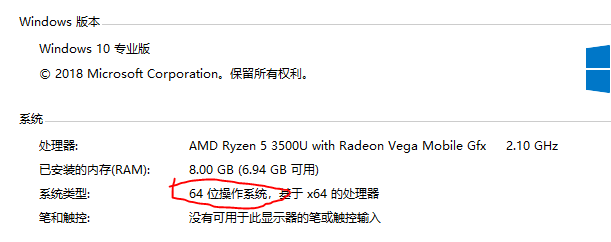
操作系统位数:此电脑-右击-属性
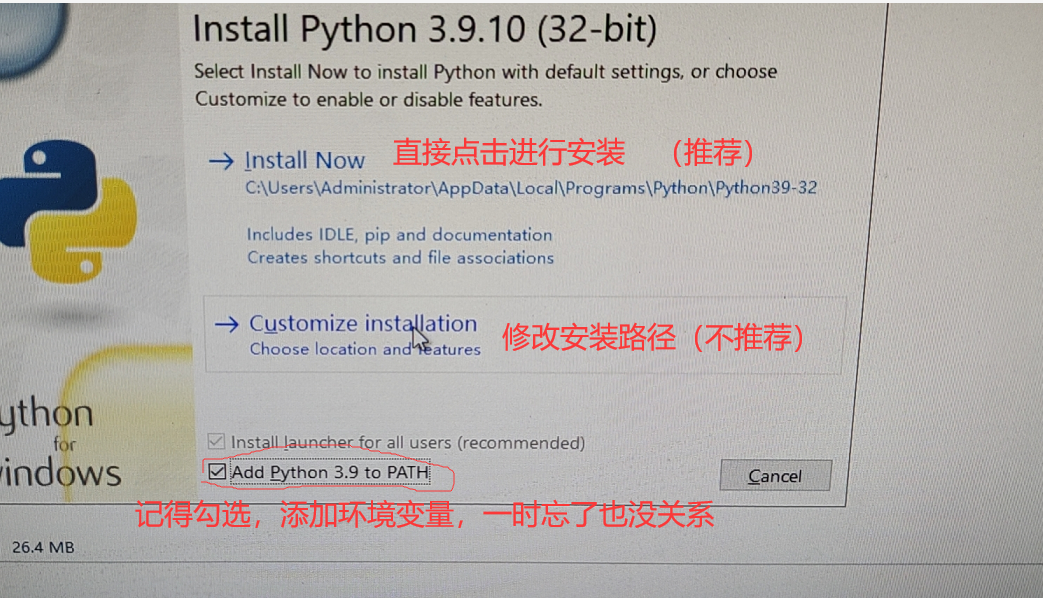
1.3.安装

右击—以管理员身份运行
二、检测安装python是否成功
2.1检测
win+R
输入 cmd
enter
在cmd界面输入
python+ 回车键
如上图,显示出python的版本信息,则说明安装成功并且python的环境变量配置成功了
问题:如果无法显示如上图的版本信息,那就是没有配置环境变量
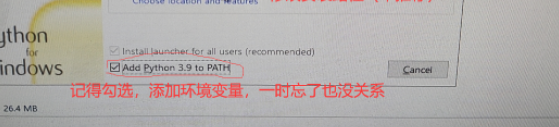
也就是没有勾选
add python 3.9.10 to path解决:手动配置环境变量(配置环境变量的通用手法,如java,MySQL等都是这样配置)要求:必须掌握
点击左下角开始键(按下键盘win键)
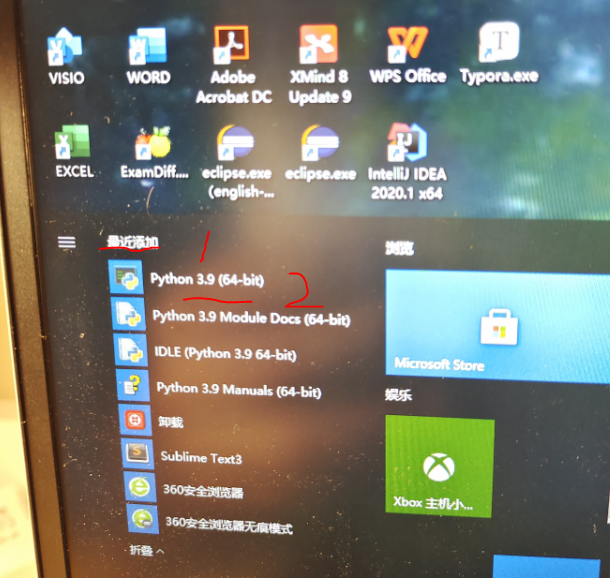
右击—更多—打开文件位置(此时打开的只是python开始快捷方式的路径)
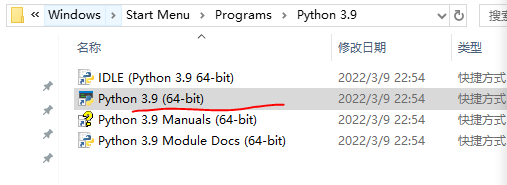
选中python3.9(64-bit)—右击—打开文件所属位置(现在才是python的安装路径)
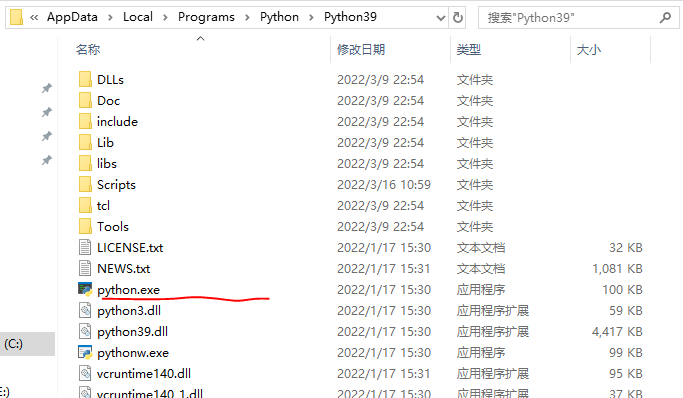
右击发送到桌面

选中路径----ctrl+c
2.2操作
win+R
输入 cmd
enter
在cmd界面输入
python+ 回车键如上图,显示出python的版本信息,则说明安装成功并且python的环境变量配置成功了
三、安装或者升级python的包管理工具
3.1.背景
在桌面双机python3.9(64-bit),输入以下内容:
 from numpy import *
     eye(4)
问题:无法打印出以下矩阵
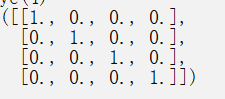
3.2.解决
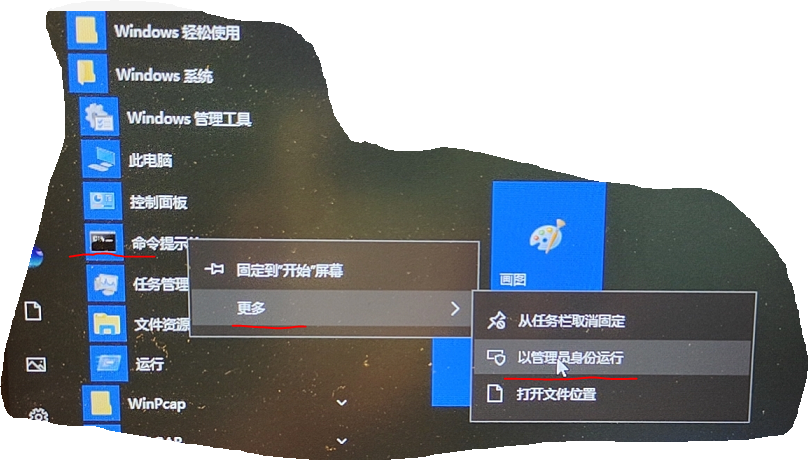
pip config set global.index-url https://pypi.tuna.tsing.edu.cn/simple输入以上命令,结果:不是内部或外部命令……
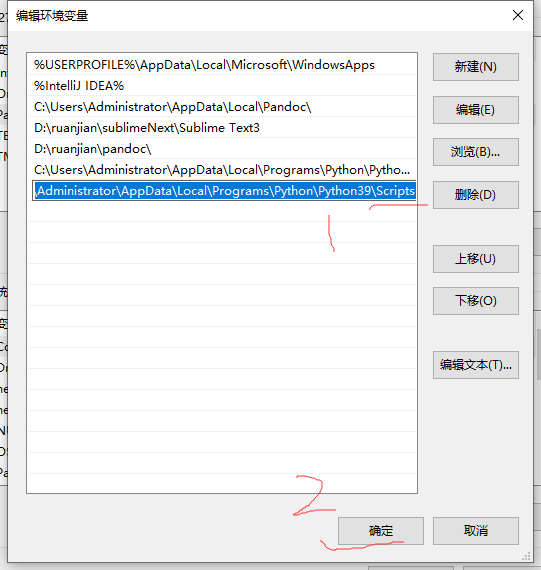
原因:没有将pip.exe的路径未添加到环境变量中,导致命令使用时,系统找不到pip.exe执行程序解决桌面上右击python3.9----打开文件所在位置
进入
Scripts目录,复制该路径博主的是:
C:\Users\Administrator\AppData\Local\Programs\Python\Python39\Scripts每个人安装的路径不一定相同,根据自己的来定
将该路径粘贴到`XXXX的用户变量的一个新建路径中
3.3.升级
输入以下命令
pip config set global.index-url https://pypi.tuna.tsing.edu.cn/simple

输入以下命令
2. ```text
pip3 install --user numpy scipy matplotlib
```sql
Looking in indexes: https://pypi.tuna.tsinghua.edu.cn/simple
Collecting numpy
  Downloading https://pypi.tuna.tsinghua.edu.cn/packages/d8/0c/429d18873843ac368fae6647fca04bf76cc4683560338c76260d8964a00d/numpy-1.22.3-cp39-cp39-win_amd64.whl (14.7 MB)
     ---------------------------------------- 14.7/14.7 MB 2.3 MB/s eta 0:00:00
Collecting scipy
  Downloading https://pypi.tuna.tsinghua.edu.cn/packages/5d/43/79af04bf5eef99cedb068148a1a0bb04567d958c872c85b02c8bc65021e7/scipy-1.8.0-cp39-cp39-win_amd64.whl (36.9 MB)
     ---------------------------------------- 36.9/36.9 MB 3.0 MB/s eta 0:00:00
Collecting matplotlib
  Downloading https://pypi.tuna.tsinghua.edu.cn/packages/86/cd/619a45613393293117297f2f0e5086a619e1ea98c5e2ce6d0f554ddc97c3/matplotlib-3.5.1-cp39-cp39-win_amd64.whl (7.2 MB)
     ---------------------------------------- 7.2/7.2 MB 1.6 MB/s eta 0:00:00
Collecting pillow>=6.2.0
  Downloading https://pypi.tuna.tsinghua.edu.cn/packages/6c/96/e905dd0ffa0f9599187d57eba08bc9b911817f35a4dfd6345bceb991261d/Pillow-9.0.1-cp39-cp39-win_amd64.whl (3.2 MB)
     ---------------------------------------- 3.2/3.2 MB 2.1 MB/s eta 0:00:00
Collecting python-dateutil>=2.7
  Downloading https://pypi.tuna.tsinghua.edu.cn/packages/36/7a/87837f39d0296e723bb9b62bbb257d0355c7f6128853c78955f57342a56d/python_dateutil-2.8.2-py2.py3-none-any.whl (247 kB)
     ---------------------------------------- 247.7/247.7 KB 1.7 MB/s eta 0:00:00
Collecting fonttools>=4.22.0
  Downloading https://pypi.tuna.tsinghua.edu.cn/packages/2d/b3/b359bb3e247bbdaa18892a5d0bc14c24cc3a49166c25622128b6e033b58a/fonttools-4.30.0-py3-none-any.whl (898 kB)
     ---------------------------------------- 898.1/898.1 KB 1.4 MB/s eta 0:00:00
Collecting pyparsing>=2.2.1
  Downloading https://pypi.tuna.tsinghua.edu.cn/packages/80/c1/23fd82ad3121656b585351aba6c19761926bb0db2ebed9e4ff09a43a3fcc/pyparsing-3.0.7-py3-none-any.whl (98 kB)
     ---------------------------------------- 98.0/98.0 KB 1.1 MB/s eta 0:00:00
Collecting kiwisolver>=1.0.1
  Downloading https://pypi.tuna.tsinghua.edu.cn/packages/ed/c7/e78950509a1d1caa8bca2398737c983708cd374767042aa0d211725e9610/kiwisolver-1.4.0-cp39-cp39-win_amd64.whl (51 kB)
     ---------------------------------------- 51.5/51.5 KB 529.4 kB/s eta 0:00:00
Collecting cycler>=0.10
  Downloading https://pypi.tuna.tsinghua.edu.cn/packages/5c/f9/695d6bedebd747e5eb0fe8fad57b72fdf25411273a39791cde838d5a8f51/cycler-0.11.0-py3-none-any.whl (6.4 kB)
Collecting packaging>=20.0
  Downloading https://pypi.tuna.tsinghua.edu.cn/packages/05/8e/8de486cbd03baba4deef4142bd643a3e7bbe954a784dc1bb17142572d127/packaging-21.3-py3-none-any.whl (40 kB)
     ---------------------------------------- 40.8/40.8 KB 391.2 kB/s eta 0:00:00
Collecting six>=1.5
  Downloading https://pypi.tuna.tsinghua.edu.cn/packages/d9/5a/e7c31adbe875f2abbb91bd84cf2dc52d792b5a01506781dbcf25c91daf11/six-1.16.0-py2.py3-none-any.whl (11 kB)
Installing collected packages: six, pyparsing, pillow, numpy, kiwisolver, fonttools, cycler, scipy, python-dateutil, packaging, matplotlib
  WARNING: The script f2py.exe is installed in 'C:\Users\Administrator\AppData\Roaming\Python\Python39\Scripts' which is not on PATH.
  Consider adding this directory to PATH or, if you prefer to suppress this warning, use --no-warn-script-location.
  WARNING: The scripts fonttools.exe, pyftmerge.exe, pyftsubset.exe and ttx.exe are installed in 'C:\Users\Administrator\AppData\Roaming\Python\Python39\Scripts' which is not on PATH.
  Consider adding this directory to PATH or, if you prefer to suppress this warning, use --no-warn-script-location.
Successfully installed cycler-0.11.0 fonttools-4.30.0 kiwisolver-1.4.0 matplotlib-3.5.1 numpy-1.22.3 packaging-21.3 pillow-9.0.1 pyparsing-3.0.7 python-dateutil-2.8.2 scipy-1.8.0 six-1.16.0
Successfully installed cycler-0.11.0 fonttools-4.30.0 kiwisolver-1.4.0 matplotlib-3.5.1 numpy-1.22.3 packaging-21.3 pillow-9.0.1 pyparsing-3.0.7 python-dateutil-2.8.2 scipy-1.8.0 six-1.16.0
升级理论上成功
检验:
 from numpy import *
     eye(4)
成功打印出矩阵就成功