在实际程序中,有时需要从服务器获取一些信息,例如,读取服务器发出信息的首部,读取首部而忽略内容。通过读取首部信息,可以获取到Content-Type(内容类型)、Content-Length(内容长度),甚至Last-Modify(最后一次修改)的日期。
如果只关注响应信息的首部,一般来说应该是使用HEAD请求。当服务器对HEAD请求作出响应时,只返回响应信息的首部而忽略内容。由于HEAD请求忽略内容,所以其响应比对GET或POST响应小很多。代码18.1显示了获取响应头信息的方法。
代码18.1 获取相应头信息
/p>
"http://www.w3.org/TR/xhtml1/DTD/xhtml1-strict.dtd">
获取HTTP头信息var xmlHttp=false;
var headType = "";
//创建XMLHttpRequest对象
function createXMLHttpRequest() {
if(window.ActiveXObject) { //IE
try {
xmlHttp = new ActiveXObject("Msxml2.XMLHTTP");
} catch(e) {
try {
xmlHttp = new ActiveXObject("Microsoft.XMLHTTP");
} catch(e) {
window.alert("创建XMLHttpRequest对象错误"+e);
}
}
} else if(window.XMLHttpRequest) { //非IE
xmlHttp = new XMLHttpRequest();
}
if(!(xmlHttp)) {
window.alert("创建XMLHttpRequest异常!");
}
}
function HeadRequest(request) {
createXMLHttpRequest();
headType= request;
xmlHttp.onreadystatechange = getHeadInfo;
xmlHttp.open("HEAD", "http://www.rzchina.net/", false);
xmlHttp.send(null);
}function getHeadInfo() {
if(xmlHttp.readyState == 4) {
if(headType == "Content-Type") {
window.alert("Content-Type: " + xmlHttp.
getResponseHeader("Content-Type"));
} else if(headType == "Content-Length") {
window.alert("Content-Length: " + xmlHttp.
getResponseHeader("Content-Length"));
} else if(headType == "Last Modified") {
window.alert("Last Modified: " + xmlHttp.
getResponseHeader("Last-Modified"));
}
}
}
获取HTTP头信息
οnclick="HeadRequest('Content-Type')">
οnclick="HeadRequest('Content-Length')">
οnclick="HeadRequest('Last-Modified')">
代码18.1的运行效果如图18.1~图18.3所示。从图18.1可以看出,获取目标网站的HTTP头中的Content-Type信息为text/html。图18.2显示了服务器返回的Content-Length信息。
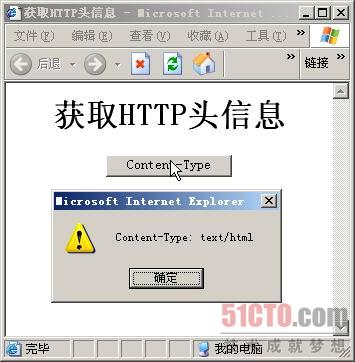
图18.1 获取Content-Type信息
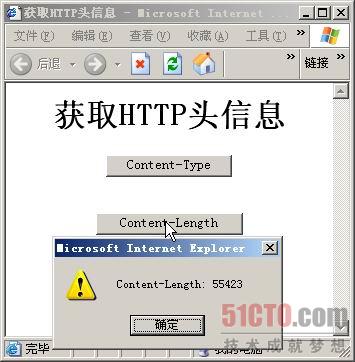
图18.2 获取Content-Length信息
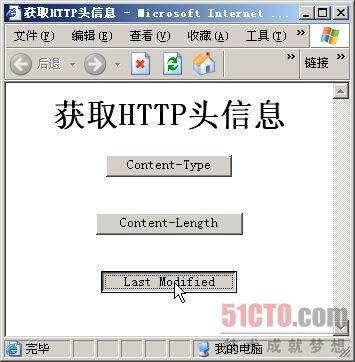
图18.3 未获取Last Modified信息
在获取Response头信息时,并不是所有的信息都能够获取,例如在代码18.1中获取Last Modified信息时,服务器并没有返回相应的信息。
来源:http://book.51cto.com/art/200810/91498.htm
加支付宝好友偷能量挖...
2011-8-19网络