安装依赖
npm install vue-i18n
在main.js中引用
import VueI18n from 'vue-i18n'
Vue.use(VueI18n)
创建js文件
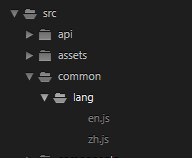
在main.js中设置路径
const i18n = new VueI18n({
    locale: 'zh-CN',    // 语言标识
    //this.$i18n.locale // 通过切换locale的值来实现语言切换
    messages: {
      'zh-CN': require('./common/lang/zh'),   // 中文语言包
      'en-US': require('./common/lang/en')    // 英文语言包
    }
})
给大家看一看zh.js与en.js中具体内容
zh.js中的代码
export const m = {
  snwd:'室内温度', //index页面室内温度
  xdwd:'相对湿度', //index页面相对湿度

}
en.js中的代码
export const m = {
  snwd:'Temp.', //index页面室内温度
  xdwd:'RH.', //index页面相对湿度

}
具体想要实现语言切换的页面,如何调用
template中如下:
<div class="Language" @click="setLanguage">English</div>
	<div class ="one">
		<div class="temp" >
			<span>{{$t('m.snwd')}}</span><br/>
			<span style="font-size:20px">{{this.temp}}</span><span>℃</span>
		</div>
			</div>

			<div class="two">
		<div class="temp">
			<span>{{$t('m.xdwd')}}</span><br/>
			<span style="font-size:20px">{{this.rh}}</span><span>%</span>
		</div>
			</div>
script中如下
	setLanguage(){
				this.yuyanShow=false;
				this.$confirm('确定切换语言吗?', '提示', {
       confirmButtonText: '确定',
       cancelButtonText: '取消',
       type: 'warning'
    }).then(() => {
       if ( this.lang === 'zh-CN' ) {
          this.lang = 'en-US';
          this.$i18n.locale = this.lang;//关键语句
       }else {
          this.lang = 'zh-CN';
          this.$i18n.locale = this.lang;//关键语句
       }
    }).catch(() => {
       this.$message({
           type: 'info',
       });
    });
			},
具体实现效果
中文界面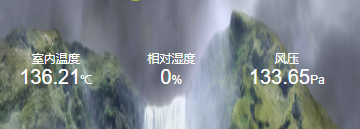
英文界面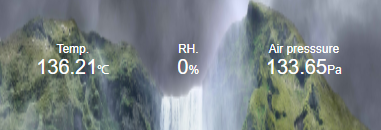
版权声明:本文为weixin_45481265原创文章,遵循CC 4.0 BY-SA版权协议,转载请附上原文出处链接和本声明。