代码目录结构
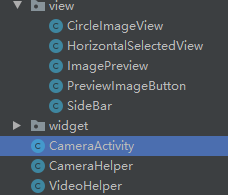
LAUNCHER activity:CameraActivity :
onCreate()方法中创建Camera工具类CameraHelper的实例并初始化:
mCameraHelper = new CameraHelper(mActivity, textureView, btnImagePreview);
重写onClick方法监听拍照点击事件:
mCameraHelper.takePicture();
CameraHelper类中实现相机的预览与拍照,流程如下:
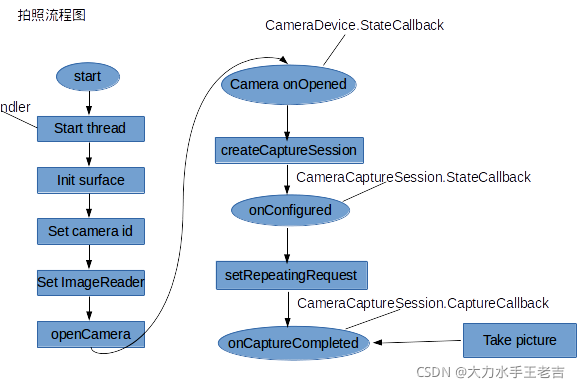
大致流程如下:
- 用CameraManager的openCamera(String cameraId, CameraDevice.StateCallback callback, Handler handler)方法打开指定摄像头。该方法的第一个参数代表要打开的摄像头ID;第二个参数用于监听摄像头的状态;第三个参数代表执行callback的Handler,如果程序希望直接在当前线程中执行callback,则可将handler参数设为null。
- 当摄像头被打开之后会回调接口mStateCallback.onOpened,程序即可获取CameraDevice —— 即根据摄像头ID获取了指定摄像头设备,然后调用CameraDevice的createCaptureSession(List outputs, CameraCaptureSession. StateCallback callback,Handler handler)方法来创建CameraCaptureSession。该方法的第一个参数是一个List集合,封装了所有需要从该摄像头获取图片的Surface,第二个参数用于监听CameraCaptureSession的创建过程;第三个参数代表执行callback的Handler,如果程序希望直接在当前线程中执行callback,则可将handler参数设为null。
- 不管预览还是拍照,程序都调用CameraDevice的createCaptureRequest(int templateType)方法创建CaptureRequest.Builder,该方法支持TEMPLATE_PREVIEW(预览)、TEMPLATE_RECORD(拍摄视频)、TEMPLATE_STILL_CAPTURE(拍照)等参数。
- 通过第3步所调用方法返回的CaptureRequest.Builder设置拍照的各种参数,比如对焦模式、曝光模式等。
- 调用CaptureRequest.Builder的build()方法即可得到CaptureRequest对象,接下来程序可通过CameraCaptureSession的setRepeatingRequest()方法开始预览,或调用capture()方法拍照。
相机的预览与拍照流程我们基本了解了。
- 调用CaptureRequest.Builder的build()方法即可得到CaptureRequest对象,接下来程序可通过CameraCaptureSession的setRepeatingRequest()方法开始预览,或调用capture()方法拍照。
- 预览时,是将mSurfaceHolder.getSurface()作为目标,使用setRepeatingRequest()方法,
显示拍照结果时,是将mImageReader.getSurface()作为目标,使用capture()方法
- 预览时,是将mSurfaceHolder.getSurface()作为目标,使用setRepeatingRequest()方法,
layout布局如下:
<?xml version="1.0" encoding="utf-8"?>
<RelativeLayout xmlns:android="http://schemas.android.com/apk/res/android"
    xmlns:app="http://schemas.android.com/apk/res-auto"
    xmlns:tools="http://schemas.android.com/tools"
    android:layout_width="wrap_content"
    android:layout_height="wrap_content"
    android:id="@+id/relativeLayout"
    android:orientation="vertical"
    android:background="#000">

    <ImageView
        android:id="@+id/imageView"
        android:layout_width="match_parent"
        android:layout_height="112dp"
        android:background="@color/black"/>

    <LinearLayout
        android:id="@+id/linearLayout"
        android:layout_width="match_parent"
        android:layout_height="208dp"
        android:layout_alignParentBottom="true"
        android:orientation="vertical">

        <com.bilibili.camera2.view.SideBar
            android:id="@+id/sideBar"
            android:layout_width="300dp"
            android:layout_height="60dp"
            android:visibility="gone"
            android:layout_marginTop="10dp"
            android:layout_gravity="center_horizontal"/>

        <com.bilibili.camera2.view.HorizontalSelectedView
            android:id="@+id/selectedView"
            android:layout_width="match_parent"
            android:layout_marginTop="10dp"
            android:layout_height="60dp"
            android:layout_gravity="center_horizontal"
            app:HorizontalSelectedViewSeeSize="5"
            android:visibility="visible"
            app:HorizontalSelectedViewSelectedTextColor="@color/white"
            app:HorizontalSelectedViewSelectedTextSize="40"
            app:HorizontalSelectedViewTextColor="@color/gray"
            app:HorizontalSelectedViewTextSize="30" />

        <RelativeLayout

            android:layout_width="match_parent"
            android:layout_height="wrap_content">

            <!-- 拍照按钮 -->
            <ImageButton
                android:id="@+id/btnTakePicture"
                android:layout_width="80dp"
                android:layout_height="80dp"
                android:layout_centerHorizontal="true"
                android:background="@drawable/ic_camera_main_btn_01_auto"
                android:layout_gravity="center"
                tools:ignore="ContentDescription" />

            <ImageView
                android:id="@+id/faceBackCameraChange"
                android:layout_width="70dp"
                android:layout_height="70dp"
                android:layout_marginStart="280dp"
                android:layout_centerVertical="true"
                android:background="@drawable/ic_camera_main_btn_02_switch"

                android:clickable="true"
                tools:ignore="ContentDescription" />
        </RelativeLayout>

    </LinearLayout>
    <LinearLayout
        android:id="@+id/linearLayoutBottom"
        android:layout_width="match_parent"
        android:layout_height="48dp"
        android:background="@color/black"
        android:layout_alignParentBottom="true"
        android:orientation="horizontal" />

</RelativeLayout>
CameraHelper主要逻辑代码如下:
class CameraHelper {

    private final Activity mActivity;
    private final TextureView mTextureView;
    private static final String TAG = "CameraHelper";

    private static final int PREVIEW_WIDTH = 1080;       //预览的宽度
    private static final int PREVIEW_HEIGHT = 2340;     //预览的高度
    private static final int SAVE_WIDTH = 1080;          //保存图片的宽度
    private static final int SAVE_HEIGHT = 23400;        //保存图片的高度

    private static final int PREVIEW_FIRST_GET_IMAGE = 0;

    private CameraManager mCameraManager;
    private ImageReader mImageReader;
    private CameraDevice mCameraDevice;
    private CameraCaptureSession mCameraCaptureSession;
    private CircleImageView imageButton;

    private String mCameraId = "0";
    private CameraCharacteristics mCameraCharacteristics;

    private int mCameraSensorOrientation = 0;           //摄像头方向
    private int mCameraFacing = CameraCharacteristics.LENS_FACING_BACK;      //默认使用后置摄像头
    //private int mDisplayRotation = mActivity.getWindowManager().getDefaultDisplay().getRotation();      //手机方向

    private boolean canTakePicture = true;              //是否可以拍照
    private boolean canExchangeCamera = false;          //是否可以切换摄像头

    private Handler mCameraHandler;
    private HandlerThread handlerThread = new HandlerThread("CameraThread");

    private Size mPreviewSize = new Size(PREVIEW_WIDTH, PREVIEW_HEIGHT);                      //预览大小
    private Size mSavePicSize = new Size(SAVE_WIDTH, SAVE_HEIGHT);                       //保存图片大小
    private CoordinateTransformer mTransformer;

    private int i = 0;

    public CameraHelper(Activity mActivity, TextureView mTextureView, CircleImageView imageButton) {
        this.mActivity = mActivity;
        this.mTextureView = mTextureView;
        this.imageButton = imageButton;

        init();
    }

    private void init() {
        handlerThread.start();
        mCameraHandler = new Handler(Looper.myLooper());
        mTextureView.setSurfaceTextureListener(new TextureView.SurfaceTextureListener() {
            @Override
            public void onSurfaceTextureAvailable(@NonNull SurfaceTexture surface, int width, int height) {
                initCameraInfo();
            }

            @Override
            public boolean onSurfaceTextureDestroyed(@NonNull SurfaceTexture surface) {
                releaseCamera();
                return true;
            }

            @Override
            public void onSurfaceTextureSizeChanged(@NonNull SurfaceTexture surface, int width, int height) {

            }

            @Override
            public void onSurfaceTextureUpdated(@NonNull SurfaceTexture surface) {

            }
        });
    }

    public CameraDevice getCameraDevice(){
        Log.d(TAG, "getCameraDevice: mCameraDevice : " + mCameraDevice);
        return mCameraDevice;
    }

    public void releaseCamera() {
        if (mCameraCaptureSession != null) {
            mCameraCaptureSession.close();
            mCameraCaptureSession = null;
        }
        if (mCameraDevice != null){
            mCameraDevice.close();
            mCameraDevice = null;
        }
        if (mImageReader != null){
            mImageReader.close();
            mImageReader = null;
        }
        canExchangeCamera = false;

    }

    public void releaseThread() {
        handlerThread.quitSafely();
        mCameraHandler = null;
    }

    /**
     * 拍照
     */
    public void takePicture(){
        Log.i(TAG, "takePicture: 进行拍照  1");
        if (mCameraDevice == null || !canTakePicture || ! mTextureView.isAvailable()) {
            Log.d(TAG, "takePicture: 进行拍照 error 退出");
            return;
        }
        try {
            CaptureRequest.Builder captureBuilder = mCameraDevice.createCaptureRequest(CameraDevice.TEMPLATE_STILL_CAPTURE);
            captureBuilder.addTarget(mImageReader.getSurface());
            captureBuilder.set(CaptureRequest.CONTROL_AF_MODE, CaptureRequest.CONTROL_AF_MODE_CONTINUOUS_PICTURE);
            captureBuilder.set(CaptureRequest.CONTROL_AE_MODE, CaptureRequest.CONTROL_AE_MODE_ON_AUTO_FLASH);
            captureBuilder.set(CaptureRequest.JPEG_ORIENTATION, mCameraSensorOrientation);
            mCameraCaptureSession.capture(captureBuilder.build(),null, mCameraHandler);
            Thread.sleep(200);
            Log.i(TAG, "takePicture: picture capture finish");
        } catch (CameraAccessException | InterruptedException e) {
            e.printStackTrace();
        }
    }

    /**
     * 切换摄像头
     */
    public void exchangeCamera(){
        if (mCameraDevice == null || !canExchangeCamera || !mTextureView.isAvailable()) return;

        mCameraFacing = (mCameraFacing == CameraCharacteristics.LENS_FACING_FRONT)
                ? CameraCharacteristics.LENS_FACING_BACK : CameraCharacteristics.LENS_FACING_FRONT;

        mPreviewSize = new Size(PREVIEW_WIDTH, PREVIEW_HEIGHT);     //重置预览大小
        releaseCamera();
        initCameraInfo();
    }

    /**
     * 初始化
     */
    @SuppressLint("ShowToast")
    private void initCameraInfo() {
        try {
            mCameraManager = (CameraManager) mActivity.getSystemService(Context.CAMERA_SERVICE);
            String[] cameraIdList = mCameraManager.getCameraIdList();
            if (cameraIdList == null) {
                Toast.makeText(mActivity, "没有相机可用", Toast.LENGTH_SHORT);
                return;
            }

            for (String id : cameraIdList) {
                CameraCharacteristics cameraCharacteristics = mCameraManager.getCameraCharacteristics(id);
                //+Type add focus
                RectF mPreviewRect = new RectF(0,0,1080, 1440);
                mTransformer = new CoordinateTransformer(cameraCharacteristics, mPreviewRect);
                Rect mFocusRect = new Rect();
                RectF rectF = mTransformer.toCameraSpace(mPreviewRect);
                mFocusRect.left = Math.round(rectF.left);
                mFocusRect.top = Math.round(rectF.top);
                mFocusRect.right = Math.round(rectF.right);
                mFocusRect.bottom = Math.round(rectF.bottom);
                //MeteringRectangle meteringRectangle = new MeteringRectangle(mFocusRect,1000);
                //-Type add focus
                Integer facing = cameraCharacteristics.get(CameraCharacteristics.LENS_FACING);
                if (facing == mCameraFacing) {
                    mCameraId = id;
                    mCameraCharacteristics = cameraCharacteristics;
                }
                Log.i(TAG, "initCameraInfo: 设备中的摄像头:   " + id);
            }


            Integer supportLevel = mCameraCharacteristics.get(CameraCharacteristics.INFO_SUPPORTED_HARDWARE_LEVEL);
            if (supportLevel == CameraCharacteristics.INFO_SUPPORTED_HARDWARE_LEVEL_LEGACY) {
                Toast.makeText(mActivity, "相机硬件不支持新特性", Toast.LENGTH_SHORT);
            }

            //获取摄像头方向
            mCameraSensorOrientation = mCameraCharacteristics.get(CameraCharacteristics.SENSOR_ORIENTATION);

            //获取StreamConfigurationMap,它是管理摄像头支持的所有输出格式和尺寸
            StreamConfigurationMap configurationMap = mCameraCharacteristics.get(CameraCharacteristics.SCALER_STREAM_CONFIGURATION_MAP);

            Size[] savePicSizes = configurationMap.getOutputSizes(ImageFormat.JPEG);        //保存照片尺寸
            if (savePicSizes == null) {
                Log.d(TAG, "initCameraInfo: savePicSizes为空");
                return;
            }
            Size[] previewSizes = configurationMap.getOutputSizes(SurfaceTexture.class);        //预览尺寸
            if (previewSizes == null) {
                Log.d(TAG, "initCameraInfo: previewSizes为空");
                return;
            }

            int mDisplayRotation = mActivity.getWindowManager().getDefaultDisplay().getRotation();      //手机方向
            boolean exchange = exchangeWidthAndHeight(mDisplayRotation, mCameraSensorOrientation);

            if (exchange) {
                mSavePicSize = getBestSize(mSavePicSize.getHeight(),
                        mSavePicSize.getWidth(),
                        mSavePicSize.getHeight(),
                        mSavePicSize.getWidth(),
                        Arrays.asList(savePicSizes));
            } else {
                mSavePicSize = getBestSize(mSavePicSize.getWidth(),
                        mSavePicSize.getHeight(),
                        mSavePicSize.getWidth(),
                        mSavePicSize.getHeight(),
                        Arrays.asList(savePicSizes));
            }

            if (exchange) {
                mPreviewSize = getBestSize(mPreviewSize.getHeight(),
                        mPreviewSize.getWidth(),
                        mTextureView.getHeight(),
                        mTextureView.getWidth(),
                        Arrays.asList(previewSizes));
            } else {
                mPreviewSize = getBestSize(mPreviewSize.getWidth(),
                        mPreviewSize.getHeight(),
                        mTextureView.getWidth(),
                        mTextureView.getHeight(),
                        Arrays.asList(previewSizes));
            }

            mPreviewSize = new Size(1080,1440);


            if (mTextureView.getSurfaceTexture() == null){
                Log.i(TAG, "initCameraInfo: mTextureView.getSurfaceTexture()  执行了*******************");

                SurfaceTexture surfaceTexture = mTextureView.getSurfaceTexture();
                surfaceTexture.setDefaultBufferSize(mPreviewSize.getWidth(), mPreviewSize.getHeight());
                mTextureView.setSurfaceTexture(surfaceTexture);

            }


            Log.d(TAG, "预览最优尺寸: " + mPreviewSize.getWidth() + "   " + mPreviewSize.getHeight() +
                    "比例  " + mPreviewSize.getWidth() / mPreviewSize.getHeight());
            Log.d(TAG, "保存图片最优尺寸: " + mSavePicSize.getWidth() + "   " + mSavePicSize.getHeight() +
                    "比例  " + mSavePicSize.getWidth() / mSavePicSize.getHeight());


            mImageReader = ImageReader.newInstance(mSavePicSize.getWidth(), mSavePicSize.getHeight(), ImageFormat.JPEG, 1);
            mImageReader.setOnImageAvailableListener(onImageAvailableListener, mCameraHandler);
            Log.d(TAG, "initCameraInfo: mTextureView-----------5");

            openCamera();
        } catch (CameraAccessException e) {
            e.printStackTrace();
        }
    }


    /**
     * 打开相机
     */
    private void openCamera() {
        if (ActivityCompat.checkSelfPermission(mActivity, Manifest.permission.CAMERA) != PackageManager.PERMISSION_GRANTED) {
            // TODO: Consider calling
            //    ActivityCompat#requestPermissions
            // here to request the missing permissions, and then overriding
            //   public void onRequestPermissionsResult(int requestCode, String[] permissions,
            //                                          int[] grantResults)
            // to handle the case where the user grants the permission. See the documentation
            // for ActivityCompat#requestPermissions for more details.
            Log.d(TAG, "initCameraInfo: mTextureView-----------没有相机权限");
            List<String> permissionList = new ArrayList<>();
            permissionList.add(Manifest.permission.READ_EXTERNAL_STORAGE);
            permissionList.add(Manifest.permission.CAMERA);
            permissionList.add(Manifest.permission.CALL_PHONE);
            permissionList.add(Manifest.permission.MODIFY_AUDIO_SETTINGS);
            permissionList.add(Manifest.permission.ACCESS_BACKGROUND_LOCATION);
            permissionList.add(Manifest.permission.READ_PHONE_STATE);
            permissionList.add(Manifest.permission.INTERNET);
            permissionList.add(Manifest.permission.VIBRATE);
            permissionList.add(Manifest.permission.ACCESS_WIFI_STATE);
            ActivityCompat.requestPermissions(mActivity, permissionList.toArray(new String[permissionList.size()]),1002);

        }else {
            try {
                Log.d(TAG, "initCameraInfo: mTextureView-----------6准备打开相机");
                mCameraManager.openCamera(mCameraId, mStateCallback, mCameraHandler);
                Log.d(TAG, "openCamera: 打开相机");
            } catch (CameraAccessException e) {
                e.printStackTrace();
            }
        }

    }

    private final CameraDevice.StateCallback mStateCallback = new CameraDevice.StateCallback() {
        @Override
        public void onOpened(@NonNull CameraDevice camera) {
            Log.i(TAG, "onOpened: ");
            mCameraDevice = camera;
            createCaptureSession(mCameraDevice);
        }

        @Override
        public void onDisconnected(@NonNull CameraDevice camera) {
            Log.i(TAG, "onDisconnected: ");
        }

        @Override
        public void onError(@NonNull CameraDevice camera, int error) {
            Log.i(TAG, "onError: ");
            Toast.makeText(mActivity, "打开相机失败!error: " + error, Toast.LENGTH_SHORT);
        }
    };

    private void createCaptureSession(CameraDevice cameraDevice){
        try {
            Log.d(TAG, "createCaptureSession的CameraDevice :" + cameraDevice);
            CaptureRequest.Builder builder = cameraDevice.createCaptureRequest(CameraDevice.TEMPLATE_PREVIEW);
            @SuppressLint("Recycle")
            Surface surface = new Surface(mTextureView.getSurfaceTexture());
            builder.addTarget(surface);
            builder.set(CaptureRequest.CONTROL_AE_MODE, CaptureRequest.CONTROL_AE_MODE_ON_AUTO_FLASH);
            builder.set(CaptureRequest.CONTROL_AF_MODE, CaptureRequest.CONTROL_AF_MODE_CONTINUOUS_PICTURE);

            List<Surface> list = new ArrayList<>();
            list.add(surface);
            list.add(mImageReader.getSurface());
            cameraDevice.createCaptureSession(list, new CameraCaptureSession.StateCallback() {
                @Override
                public void onConfigured(@NonNull CameraCaptureSession session) {
                    mCameraCaptureSession = session;
                    try {
                        session.setRepeatingRequest(builder.build(), mCaptureCallback, mCameraHandler );
                    } catch (CameraAccessException e) {
                        e.printStackTrace();
                    }
                }

                @Override
                public void onConfigureFailed(@NonNull CameraCaptureSession session) {
                    Log.d(TAG, "onConfigureFailed: 开启预览会话失败");
                }
            }, mCameraHandler);
        } catch (CameraAccessException e) {
            e.printStackTrace();
        }
    }

    private CameraCaptureSession.CaptureCallback mCaptureCallback = new CameraCaptureSession.CaptureCallback() {
        @Override
        public void onCaptureCompleted(@NonNull CameraCaptureSession session, @NonNull CaptureRequest request, @NonNull TotalCaptureResult result) {
            super.onCaptureCompleted(session, request, result);
            canExchangeCamera = true;
            canTakePicture = true;
        }

        @SuppressLint("ShowToast")
        @Override
        public void onCaptureFailed(@NonNull CameraCaptureSession session, @NonNull CaptureRequest request, @NonNull CaptureFailure failure) {
            super.onCaptureFailed(session, request, failure);
            Log.d(TAG, "onCaptureFailed");
            Toast.makeText(mActivity,"开启预览失败",Toast.LENGTH_SHORT);
        }
    };


    private final ImageReader.OnImageAvailableListener onImageAvailableListener = reader -> {
        Image image = reader.acquireLatestImage();
        ByteBuffer byteBuffer = image.getPlanes()[0].getBuffer();
        byte[] bytesArray = new byte[byteBuffer.remaining()];
        byteBuffer.get(bytesArray);

        image.close();

        String localPicturePath = BitmapUtils.savePicture(bytesArray, "Camera");

        if (localPicturePath.equals("")){
            Log.d(TAG, "没有获取到最后一张图片的路径!!!!!: " + localPicturePath);
            imageButton.setImageResource(PREVIEW_FIRST_GET_IMAGE);
        }else {
            Bitmap bitmap = BitmapFactory.decodeFile(localPicturePath);
            int width = bitmap.getWidth();
            int height = bitmap.getHeight();
            float w = (float) 256 / width;
            //float h = (float) 256 / height;
            Matrix matrix = new Matrix();
            matrix.postScale(w, w);

            Bitmap newBitmap1 = Bitmap.createBitmap(bitmap, 0, 0, width, height, matrix, true);
            Matrix matrix1 = new Matrix();
            matrix1.setRotate(90f);
            Bitmap resultBitmap = Bitmap.createBitmap(newBitmap1, 0, 0, newBitmap1.getWidth(), newBitmap1.getHeight(), matrix1, true);
            imageButton.setImageBitmap(resultBitmap);
            Log.d(TAG, "onImageAvailable: ------------------------------------------------------------图片保存");
        }
    };

    private class CompareSizeByArea implements Comparator<Size> {
        @Override
        public int compare(Size size1, Size size2) {
            return (int) Math.signum( size1.getWidth() * size1.getHeight() - size2.getWidth() * size2.getHeight());
        }
    }

    /**
     * 根据提供的屏幕方向 [displayRotation] 和相机方向 [sensorOrientation] 返回是否需要交换宽高
     */
    private boolean exchangeWidthAndHeight(int displayRotation, int sensorOrientation){
        boolean exchange = false;
        switch (displayRotation){
            case Surface.ROTATION_0:

            case Surface.ROTATION_180:
                if (sensorOrientation == 90 || sensorOrientation == 270){
                    exchange = true;
                }
                break;
            case Surface.ROTATION_90:

            case Surface.ROTATION_270:
                if (sensorOrientation == 0 || sensorOrientation == 180){
                    exchange = true;
                }
                break;
        }
        Log.i(TAG, "屏幕方向: " + displayRotation);
        Log.i(TAG, "相机方向: " + sensorOrientation);
        return exchange;
    }
}
TION_180:
if (sensorOrientation == 90 || sensorOrientation == 270){
exchange = true;
}
break;
case Surface.ROTATION_90:
        case Surface.ROTATION_270:
            if (sensorOrientation == 0 || sensorOrientation == 180){
                exchange = true;
            }
            break;
    }
    Log.i(TAG, "屏幕方向: " + displayRotation);
    Log.i(TAG, "相机方向: " + sensorOrientation);
    return exchange;
}
}
版权声明:本文为qq_35090026原创文章,遵循CC 4.0 BY-SA版权协议,转载请附上原文出处链接和本声明。