SpringBoot 整合 SpringSecurity——入门
0、 环境搭建
新建一个 SpringBoot 项目
导入依赖:
<dependency>
    <groupId>org.springframework.boot</groupId>
    <artifactId>spring-boot-starter-security</artifactId>
</dependency>
<dependency>
    <groupId>org.springframework.boot</groupId>
    <artifactId>spring-boot-starter-web</artifactId>
</dependency>
<dependency>
    <groupId>org.projectlombok</groupId>
    <artifactId>lombok</artifactId>
    <optional>true</optional>
</dependency>
<dependency>
    <groupId>org.springframework.boot</groupId>
    <artifactId>spring-boot-starter-test</artifactId>
    <scope>test</scope>
</dependency>
<dependency>
    <groupId>org.springframework.security</groupId>
    <artifactId>spring-security-test</artifactId>
    <scope>test</scope>
</dependency>
在 static 包下新建一个 index.html
<!DOCTYPE html>
<html lang="en">
    <head>
        <meta charset="UTF-8">
        <meta http-equiv="X-UA-Compatible" content="IE=edge">
        <meta name="viewport" content="width=device-width, initial-scale=1.0">
        <title>Document</title>
    </head>
    <body>
        <h1>首页</h1>
    </body>
</html>
启动工程
在控制台得到一串字符串
Using generated security password: fa3865d2-b254-4d23-b43f-91cc55a3b4c6此为 SpringSecurity 自动生成的登录页面的密码
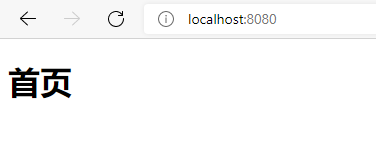
运行效果

1、Spring Security 原理
Spring Security本质是一个过滤器链有很多过滤器
- FilterSecurityInterceptor :是一个方法级的权限过滤器,基本位于过滤链的最底部
- ExceptionTranslationFilter :是个异常过滤器,用来处理在认证授权过程中轮出的异常
- UsernamePesswordAuthenticationFilter : 对/login的POST请求做拦截,校验表单中用户名,密码。
1.1、权限管理中的相关概念
主体
英文单词:principal
使用系统的用户或设备或从其他系统远程登录的用户等等。简单说就是谁使用系统谁就是主体。
认证
英文单词:authentication
权限管理系统确认一个主体的身份,允许主体进入系统。简单说就是“主体”证明自己是谁。
笼统的认为就是以前所做的登录操作。
授权
英文单词:authorization
将操作系统的“权力”“授予”“主体”,这样主体就具备了操作系统中特定功能的能力。
所以简单来说,授权就是给用户分配权限。
2、UserDetails
package org.springframework.security.core.userdetails;

import java.io.Serializable;
import java.util.Collection;

import org.springframework.security.core.Authentication;
import org.springframework.security.core.GrantedAuthority;

/**
 * Provides core user information.
 *
 * <p>
 * Implementations are not used directly by Spring Security for security purposes. They
 * simply store user information which is later encapsulated into {@link Authentication}
 * objects. This allows non-security related user information (such as email addresses,
 * telephone numbers etc) to be stored in a convenient location.
 * <p>
 * Concrete implementations must take particular care to ensure the non-null contract
 * detailed for each method is enforced. See
 * {@link org.springframework.security.core.userdetails.User} for a reference
 * implementation (which you might like to extend or use in your code).
 *
 * @author Ben Alex
 * @see UserDetailsService
 * @see UserCache
 */
public interface UserDetails extends Serializable {

	// 表示获取登录用户所有权限
	Collection<? extends GrantedAuthority> getAuthorities();

	// 表示获取密码
	String getPassword();

	// 表示获取用户名
	String getUsername();

	// 表示判断账户是否过期
	boolean isAccountNonExpired();

	// 表示判断账户是否被锁定
	boolean isAccountNonLocked();

	// 表示凭证{密码}是否过期
	boolean isCredentialsNonExpired();

	// 表示当前用户是否可用
	boolean isEnabled();

}
这个类是系统默认的用户“主体”
3、UserDetailsService

当什么也没有配置的时候,账号和密码是由 Spring Security定义生成的。而在实际项目中账号和密码都是从数据库中查询出来的。所以我们要通过自定义逻辑控制认证逻辑。如果需要自定义逻辑时,只需要实现UserDetailService 接口即可。UserDetailService 接口定义如下:
package org.springframework.security.core.userdetails;

/**
 * Core interface which loads user-specific data.
 * <p>
 * It is used throughout the framework as a user DAO and is the strategy used by the
 * {@link org.springframework.security.authentication.dao.DaoAuthenticationProvider
 * DaoAuthenticationProvider}.
 *
 * <p>
 * The interface requires only one read-only method, which simplifies support for new
 * data-access strategies.
 *
 * @author Ben Alex
 * @see org.springframework.security.authentication.dao.DaoAuthenticationProvider
 * @see UserDetails
 */
public interface UserDetailsService {

	/**
	 * Locates the user based on the username. In the actual implementation, the search
	 * may possibly be case sensitive, or case insensitive depending on how the
	 * implementation instance is configured. In this case, the <code>UserDetails</code>
	 * object that comes back may have a username that is of a different case than what
	 * was actually requested..
	 * @param username the username identifying the user whose data is required.
	 * @return a fully populated user record (never <code>null</code>)
	 * @throws UsernameNotFoundException if the user could not be found or the user has no
	 * GrantedAuthority
	 */
	UserDetails loadUserByUsername(String username) throws UsernameNotFoundException;

}
loadUserByUsername:根据用户名定位用户。在实际实现中,搜索可能区分大小写,也可能不区分大小写,具体取决于实现实例的配置方式。在这种情况下,返回的 UserDetails 对象的用户名可能与实际请求的用户名不同
方法参数 username(表示用户名。此值是客户端表单传递过来的数据。默认情况下必须叫 username,否则无
法接收)
返回值 UserDetails
4、PasswordEncoder 密码解析器
SpringSecurity 要求容器中必须有PasswordEncoder实例。所以当自定义登录逻辑时要求必须给容器注入PaswordEncoder的bean对象。
4.1、接口介绍
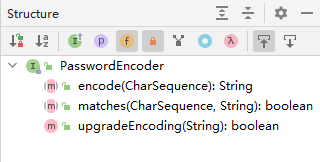
- encode():把参数按照特定的解析规则进行解析。
- matches():验证从存储中获取的编码密码与编码后提交的原始密码是否匹配。如果密码匹配,则返回true;如果不匹配,则返回false。第一个参数表示需要被解析的密码。第二个参数表示存储的密码。
- upgradeEncoding():如果解析的密码能够再次进行解析且达到更安全的结果则返回true,否则返回false。默认返回false.
4.2、PaswordEncoder 实现类
在 PaswordEncoder 中内置了很多的实现类
4.3、BCryptPasswordEncoder
BCryptPasswordEncoder 是 Spring Security官方推荐的密码解析器,平时多使用这个解析器。
BCryptPasswordEncoder是对 berypt 强散列方法的具体实现。是基于Hash算法实现的单向加密。可以通过strength控制加密强度,默认10.
4.4、代码演示
新建测试 BCryptPasswordEncoder 用法
加密密码:
@Test
public void testPasswordEncoder(){
    PasswordEncoder passwordEncoder = new BCryptPasswordEncoder();
    String beEncodePassword = passwordEncoder.encode("WuYufan");
    System.out.println("beEncodePassword = " + beEncodePassword);
}
运行结果:
beEncodePassword = $2a$10$Nm26wey7CCxhbzuXfpgO4.UmVpJxfiekX2B2YNNfbn7hmJo3OKc4K密码比对
@Test
public void testPasswordMatches(){
    PasswordEncoder passwordEncoder = new BCryptPasswordEncoder();
    boolean isMatches = passwordEncoder.matches("WuYufan","$2a$10$Nm26wey7CCxhbzuXfpgO4.UmVpJxfiekX2B2YNNfbn7hmJo3OKc4K");
    System.out.println("isMatches = " + isMatches);
}
运行结果:
isMatches = true
5、设置用户名和密码
5.1、方式一:通过配置文件
在 application.yml 中增加配置
spring:
  security:
    user:
      name: wuyufan
      password: 123465
5.2、方式二:通过配置类实现
package cn.edu.hziee.config;

import org.springframework.context.annotation.Bean;
import org.springframework.context.annotation.Configuration;
import org.springframework.security.config.annotation.authentication.builders.AuthenticationManagerBuilder;
import org.springframework.security.config.annotation.web.configuration.WebSecurityConfigurerAdapter;
import org.springframework.security.crypto.bcrypt.BCryptPasswordEncoder;
import org.springframework.security.crypto.password.PasswordEncoder;

@Configuration
public class SpringSecurityConfig extends WebSecurityConfigurerAdapter {

    @Bean
    public PasswordEncoder passwordEncoder(){
        return new BCryptPasswordEncoder();
    }

    @Override
    protected void configure(AuthenticationManagerBuilder auth) throws Exception {
        String password = passwordEncoder().encode("123456");
        auth.inMemoryAuthentication().withUser("wuyufan").password(password).roles("admin");
    }
}
5.3、方式三:自定义实现类设置(推荐)
创建配置类,设置使用哪个 UserDetailsService 实现类
package cn.edu.hziee.config;

import org.springframework.context.annotation.Bean;
import org.springframework.context.annotation.Configuration;
import org.springframework.security.config.annotation.web.configuration.WebSecurityConfigurerAdapter;
import org.springframework.security.crypto.bcrypt.BCryptPasswordEncoder;
import org.springframework.security.crypto.password.PasswordEncoder;

@Configuration
public class SpringSecurityConfig extends WebSecurityConfigurerAdapter {

    @Bean
    public PasswordEncoder passwordEncoder(){
        return new BCryptPasswordEncoder();
    }
}
编写实现类,返回 User 对象,User 对象有用户名、密码和操作权限
package cn.edu.hziee.service.impl;

import org.springframework.beans.factory.annotation.Autowired;
import org.springframework.security.core.GrantedAuthority;
import org.springframework.security.core.authority.AuthorityUtils;
import org.springframework.security.core.userdetails.User;
import org.springframework.security.core.userdetails.UserDetails;
import org.springframework.security.core.userdetails.UserDetailsService;
import org.springframework.security.core.userdetails.UsernameNotFoundException;
import org.springframework.security.crypto.password.PasswordEncoder;
import org.springframework.stereotype.Service;

import java.util.List;

@Service("userDetailsService")
public class UserServiceImpl implements UserDetailsService {
    @Autowired
    private PasswordEncoder passwordEncoder;
    @Override
    public UserDetails loadUserByUsername(String username) throws UsernameNotFoundException {
        if(!("wuyufan".equals(username))){
            System.out.println("用户名不存在!");
            return null;
        }

        String password = passwordEncoder.encode("123456");
        List<GrantedAuthority> authorities = AuthorityUtils.commaSeparatedStringToAuthorityList("admin,normal");
        return new User(username, password, authorities);
    }
}
上一篇:Spring Security 概述
下一篇:SpringBoot 整合 SpringSecurity——数据库实现