摘要
随着业务拓展,项目越来越多,并且多人使用服务器,需要时刻注意清理存储,一不小心就容易满。今天整理几个命令,说一下我日常清理存储的方法。
基本命令
第一个就是df命令,这个命令常用来查看磁盘存储情况:
(base) [yangxin@genomic2 ~]$ df --help

用法:df [选项]... [文件]...
Show information about the file system on which each FILE resides,
or all file systems by default.

Mandatory arguments to long options are mandatory for short options too.
  -a, --all             include pseudo, duplicate, inaccessible file systems
  -B, --block-size=SIZE  scale sizes by SIZE before printing them; e.g.,
                           '-BM' prints sizes in units of 1,048,576 bytes;
                           see SIZE format below
      --direct          show statistics for a file instead of mount point
      --total           produce a grand total
  -h, --human-readable  print sizes in human readable format (e.g., 1K 234M 2G)
  -H, --si              likewise, but use powers of 1000 not 1024
  -i, --inodes		显示inode 信息而非块使用量
  -k			即--block-size=1K
  -l, --local		只显示本机的文件系统
      --no-sync		取得使用量数据前不进行同步动作(默认)
      --output[=FIELD_LIST]  use the output format defined by FIELD_LIST,
                               or print all fields if FIELD_LIST is omitted.
  -P, --portability     use the POSIX output format
      --sync            invoke sync before getting usage info
  -t, --type=TYPE       limit listing to file systems of type TYPE
  -T, --print-type      print file system type
  -x, --exclude-type=TYPE   limit listing to file systems not of type TYPE
  -v                    (ignored)
      --help		显示此帮助信息并退出
      --version		显示版本信息并退出
可以得到服务器的大致存储情况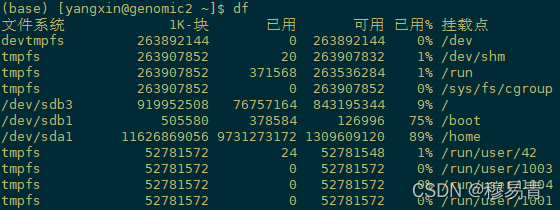
在部署服务器前一般会把系统盘和存储盘分开部署(类似windows的C盘和其他盘)。我们想要继续确定哪些项目存储占用比较多,就要用到du命令。
du --help
用法:du [选项]... [文件]...
 或:du [选项]... --files0-from=F
Summarize disk usage of each FILE, recursively for directories.

Mandatory arguments to long options are mandatory for short options too.
  -0, --null            end each output line with 0 byte rather than newline
  -a, --all             write counts for all files, not just directories
      --apparent-size   print apparent sizes, rather than disk usage; although
                          the apparent size is usually smaller, it may be
                          larger due to holes in ('sparse') files, internal
                          fragmentation, indirect blocks, and the like
  -B, --block-size=SIZE  scale sizes by SIZE before printing them; e.g.,
                           '-BM' prints sizes in units of 1,048,576 bytes;
                           see SIZE format below
  -b, --bytes           equivalent to '--apparent-size --block-size=1'
  -c, --total           produce a grand total
  -D, --dereference-args  dereference only symlinks that are listed on the
                          command line
  -d, --max-depth=N     print the total for a directory (or file, with --all)
                          only if it is N or fewer levels below the command
                          line argument;  --max-depth=0 is the same as
                          --summarize
      --files0-from=F   summarize disk usage of the
                          NUL-terminated file names specified in file F;
                          if F is -, then read names from standard input
  -H                    equivalent to --dereference-args (-D)
  -h, --human-readable  print sizes in human readable format (e.g., 1K 234M 2G)
      --inodes          list inode usage information instead of block usage
  -k                    like --block-size=1K
  -L, --dereference     dereference all symbolic links
  -l, --count-links     count sizes many times if hard linked
  -m                    like --block-size=1M
  -P, --no-dereference  don't follow any symbolic links (this is the default)
  -S, --separate-dirs   for directories do not include size of subdirectories
      --si              like -h, but use powers of 1000 not 1024
  -s, --summarize       display only a total for each argument
  -t, --threshold=SIZE  exclude entries smaller than SIZE if positive,
                          or entries greater than SIZE if negative
      --time            show time of the last modification of any file in the
                          directory, or any of its subdirectories
      --time=WORD       show time as WORD instead of modification time:
                          atime, access, use, ctime or status
      --time-style=STYLE  show times using STYLE, which can be:
                            full-iso, long-iso, iso, or +FORMAT;
                            FORMAT is interpreted like in 'date'
  -X, --exclude-from=FILE  exclude files that match any pattern in FILE
      --exclude=PATTERN    exclude files that match PATTERN
  -x, --one-file-system    skip directories on different file systems
      --help		显示此帮助信息并退出
      --version		显示版本信息并退出
我常用的执行命令
du -d 1 -m -t 50000m
-d指定显示子目录层级,我这里只显示一级,多了看着乱
-m代表按MB显示,默认是byte字节
-t 是设置显示的最低存储,低于该存储就不显示,便于我们只找存储量大的项目.注意后面要带单位m,不带单位按字节计算。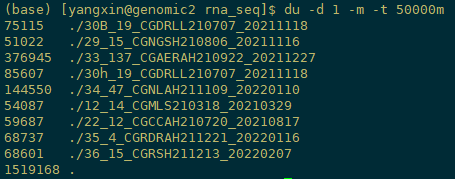
结尾
除了定期清理外,在流程中删除中间文件也是必要的。如质控的fastq,fa文件以及比对后的sam, bam等等,都需要选择进行删除,仅保留节点文件。这样可以有效避免服务器存储压力。
版权声明:本文为yangl7原创文章,遵循CC 4.0 BY-SA版权协议,转载请附上原文出处链接和本声明。