1、显示表头(列名)
set hive.cli.print.header=true2、生成重复字符串函数:repeat
语法: repeat(string str, int n)
返回值: string
说明:返回重复 n 次后的str 字符串
举例:
select repeat('123',3); --1231231233、清洗联系方式
case
  when phone rlike('\\d{3,4}-\\d{7,8}') then regexp_extract(phone ,'\\d{3,4}-\\d{7,8}',0) --座机
  when phone rlike('^\\d{7,8}$|^\\d{7,8}\\D|\\D\\d{7,8}$|\\D\\d{7,8}\\D') then regexp_extract(phone ,'\\d{7,8}',0)  --不带区号的座机
  else regexp_extract(phone , '1\\d{10}',0) end  --手机号
4、手机号脱敏方法对比
select
    phone,
    concat(substr(phone, 1, 3), '****', substr(phone, 8))  as phone1,
	regexp_replace(phone, "(?<=\\w{3})\\w(?=\\w{4})", "*") as phone2,
	concat(substr(phone, 1, cast(length(phone)/3 as int)),
        repeat("*", if(length(phone)>0, cast(length(phone)/3 as int)+1, 0)),
        substr(phone, cast(length(phone)/3 as int)*2+2)
    )                                                      as phone3
from
(
    select cast(null as string) as phone union all
    select ""            as phone union all
    select "1"           as phone union all
    select "12"          as phone union all
    select "123"         as phone union all
    select "1234"        as phone union all
    select "12345"       as phone union all
    select "123456"      as phone union all
    select "1234567"     as phone union all
    select "12345678"    as phone union all
    select "123456789"   as phone union all
    select "1234567890"  as phone union all
    select "12345678901" as phone
) a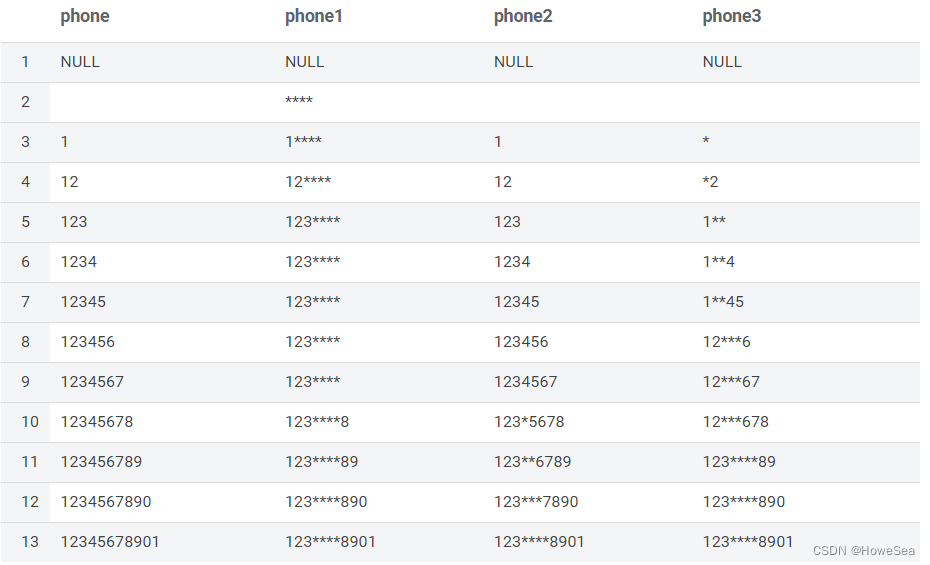
5、修改hive表的编码
alter table tb1 set SERDEPROPERTIES ('serialization.encoding'='GBK')6、每天统计最近7天、30天的pv
select
  id, dtime,
  sum(pv) over (partition by id order by dtime ROWS BETWEEN 6  PRECEDING AND CURRENT ROW) as cnt7
  sum(pv) over (partition by id order by dtime ROWS BETWEEN 30 PRECEDING AND CURRENT ROW) as cnt30
from (
   select "a" as id, "2022-03-01" as dtime, 1 as pv union all
   select "a" as id, "2022-03-02" as dtime, 2 as pv union all
   select "a" as id, "2022-03-03" as dtime, 3 as pv union all
   select "a" as id, "2022-03-04" as dtime, 4 as pv union all
   select "a" as id, "2022-03-05" as dtime, 5 as pv union all
   select "a" as id, "2022-03-06" as dtime, 6 as pv union all
   select "a" as id, "2022-03-07" as dtime, 7 as pv union all
   select "a" as id, "2022-03-08" as dtime, 8 as pv union all
   select "b" as id, "2022-03-08" as dtime, 8 as pv union all
   select "b" as id, "2022-03-09" as dtime, 9 as pv
) a
7、正则小技巧
Hive 0.13.0之后,select列表支持正则表达式了。
对于如下的应用场景
create table tb2 like tb1;

insert overwrite table tb2 partition(dt=xx, hr=xx) select from tb1;
-- 报错,因为后者是N个列,前者是N-2个列
之前只能
insert overwrite table tb2 partition(dt=xx, hr=xx) select c1, c2, c3, c4... from tb1现在可以使用正则表达式(匹配除了dt和hr外的所有列)
set hive.support.quoted.identifiers=none;
insert overwrite table tb2 partition(dt=xx, hr=xx) select `(dt|hr)+.+` from tb1;
注意:
- 语句:select `(id|id_no)+.+` from tb1;
结果:出现id_no字段
原因:id是id_no的前缀,前面的id匹配失败,则后面的id_no就不会匹配
解决:id_no放在id之前
2. 语句:select name from (select `(id)+.+` from tb1 );
结果:cannot recognize input near '(' 'select' 'ID' in joinSource
解决:select name from ( select `(id)+.+` from tb1 ) a;
8、补全
--hive和impala
select concat(repeat("0", 5-length(col)), col);

--oracle
select lpad(col, 5, '0') from dual;
9、转义
在执行脚本时,使用 hive -e $sql 将sql语句当做参数传入,如果sql语句使用了正则,\\会被转义,但是hive不会报错,很难发现问题
10、判断是否包含中文字符
select 'ab汉字c' rlike '[\u4e00-\u9fa5]'11、日期加减计算
select data_time + interval 8 hour; --增加8个小时12、去重合并
select t.cust, count(1), concat_ws('/', sort_array(collect_set(t.car)))
from (
select 'A' as cust, '奔驰' as car union all
select 'A' as cust, '奥迪' as car union all
select 'A' as cust, '奔驰' as car union all
select 'A' as cust, cast(null as string) as car union all
select 'B' as cust, cast(null as string) as car
) t
group by t.cust;


+---------+------+------------+
| t.cust  | _c1  |    _c2     |
+---------+------+------------+
| A       | 3    | 奔驰/奥迪  |
| B       | 1    |            |
+---------+------+------------+
13、计算星期
--hive
select
case pmod(datediff(to_date('2022-06-29'), '1920-01-01') - 3, 7)
    when 1 then '星期一'
    when 2 then '星期二'
    when 3 then '星期三'
    when 4 then '星期四'
    when 5 then '星期五'
    when 6 then '星期六'
    when 0 then '星期日'
    else null end as week_date;


+------------+
| week_date  |
+------------+
| 星期三     |
+------------+


--Impala

select
	case dayname(to_date('2022-06-29'))
        when 'Monday'    then '星期一'
        when 'Tuesday'   then '星期二'
        when 'Wednesday' then '星期三'
        when 'Thursday'  then '星期四'
        when 'Friday'    then '星期五'
        when 'Saturday'  then '星期六'
        when 'Sunday'    then '星期日'
        else null end  as week_date;

+-----------+
| week_date |
+-----------+
| 星期三    |
+-----------+
14、按照零件需求量,计算等分到工作日每日生产的数量
select
    name, work_date, if(RN>demand%cnt,0,1)+floor(demand/cnt)
from
(
    select
        a.name, a.work_date, b.demand,
        row_number() over (partition by a.name order by a.work_date) as RN,
        count(1) over (partition by a.name) as cnt
    from
    (
         select '零件1' as name, date_sub(current_date(),5) as work_date union all
         select '零件1' as name, date_sub(current_date(),4) as work_date union all
         select '零件1' as name, date_sub(current_date(),3) as work_date union all
         select '零件1' as name, date_sub(current_date(),2) as work_date union all
         select '零件1' as name, date_sub(current_date(),1) as work_date union all
         select '零件1' as name, date_sub(current_date(),0) as work_date union all
         select '零件2' as name, date_sub(current_date(),1) as work_date union all
         select '零件2' as name, date_sub(current_date(),0) as work_date
    ) a
    inner join
   (
        select '零件1' as name, 100 as demand union all
        select '零件2' as name, 15  as demand
    ) b on a.name = b.name
) c
order by name, work_date;


+---------+-------------+------+
| name    |  work_date  | _c2  |
+---------+-------------+------+
| 零件1   | 2022-07-15  | 17   |
| 零件1   | 2022-07-16  | 17   |
| 零件1   | 2022-07-17  | 17   |
| 零件1   | 2022-07-18  | 17   |
| 零件1   | 2022-07-19  | 16   |
| 零件1   | 2022-07-20  | 16   |
| 零件2   | 2022-07-19  | 8    |
| 零件2   | 2022-07-20  | 7    |
+---------+-------------+------+
15、hdfs同步hive数据
hadoop distcp -overwrite -delete hdfs://192.168.1.1:8020/tmp/howe/ hdfs://192.168.1.2:8020/tmp/howe/16、开启本地化MR
--开启本地mr
set hive.exec.mode.local.auto=true;

--设置local mr的最大输入数据量,当输入数据量小于这个值的时候会采用local  mr的方式
set hive.exec.mode.local.auto.inputbytes.max=50000000;

--设置local mr的最大输入文件个数,当输入文件个数小于这个值的时候会采用local mr的方式
set hive.exec.mode.local.auto.tasks.max=10;

--当这三个参数同时成立时候,才会采用本地mr