最近在做一个跑步的APP,需要用到百度地图的SDK。然后在写UI布局的时候需要在地图上面浮动显示控件按钮。
用了很多方法,也不如意,最后发现原来直接用RelativeLayout就可以做出这种效果。
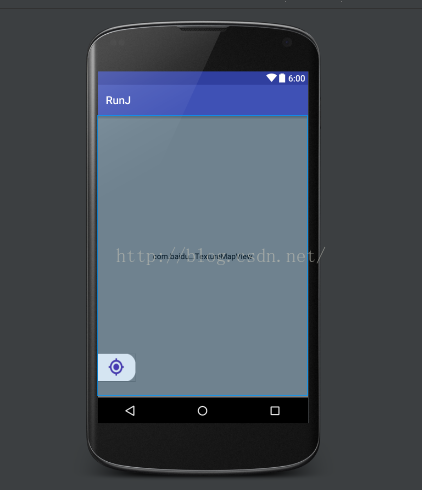
代码:
<RelativeLayout xmlns:android="http://schemas.android.com/apk/res/android"
                android:layout_width="match_parent"
                android:layout_height="match_parent"
                >


    <com.baidu.mapapi.map.TextureMapView
        android:id="@+id/bmapView"
        android:layout_width="match_parent"
        android:layout_height="match_parent"
        android:clickable="true"/>

    <Button
        android:layout_width="70dp"
        android:layout_height="50dp"
        android:layout_alignParentBottom="true"
        android:layout_alignParentLeft="true"
        android:layout_marginBottom="30dp"
        android:background="@mipmap/bt_icon_location"
        />

</RelativeLayout>版权声明:本文为rentalphang原创文章,遵循CC 4.0 BY-SA版权协议,转载请附上原文出处链接和本声明。