prometheus监控mysql
参考:使用exporter监控mysql,mysql预警指标,mysql预警指标2
安装及展示
主机配置
下载:https://prometheus.io/download/#mysqld_exporter
安装
# 解压
tar xf mysqld_exporter-0.12.1.linux-amd64.tar.gz -C /opt/apm/exporter/
cd /opt/apm/exporter/
# 整成软链接是为了方便后续升级软件
ln -sv mysqld_exporter-0.12.1.linux-amd64/ mysqld_exporter
mysql授权
# 先生成一个随机密码
[root@p1 ~]# openssl rand -base64 10
tJmCRGczaLFaaw==		# 密码不要特殊字符

# 登陆mariadb控制台
MariaDB [(none)]> grant select,replication client,process ON *.* to 'mysql_monitor'@'127.0.0.1' identified by 'test';
(注意:授权ip为localhost,因为不是prometheus服务器来直接找mariadb获取数据,而是prometheus服务器找mysql_exporter,mysql_exporter再找mariadb。所以这个localhost是指的mysql_exporter的IP)

MariaDB [(none)]> flush privileges;
Query OK, 0 rows affected (0.09 sec)
mysql_exporter配置文件
mysqld_exporter]# vim .my.cnf
[client]
hosts=127.0.0.1
port=3306
user=mysql_monitor
password=test

mysqld_exporter]# chmod 600 .mysql.cnf
启动脚本
]# cat mysql_exporter_script.sh
#!/bin/bash
#
# Name: mysqld_exporter_start.sh
# Version Number:1.01
# Type: 用于启动mysqld_exporter
# Language:bash shell
# Date: 2021.06.10
# Author: 梁正雄

server_path=/opt/apm/exporter/mysqld_exporter

start() {
    check_port=`ss -tnlp|grep 9104`
    [ $? -eq 0 ] && echo "alreadry start" && exit 0
    ${server_path}/mysqld_exporter --config.my-cnf=${server_path}/.mysql.cnf > ${server_path}/mysqld_exporter.log 2>&1
}

stop(){
    check_port=`ss -tnlp|grep 9104`
    [ $? -eq 0 ] && pkill mysqld_exporter && echo "mysqld_exporter stop" && exit 0
    echo "无操作,服务没有启动"
}

case $1 in
    start)
        start ;;
    stop)
        stop ;;
    *)
        echo "Inputs error";;
esac
systemctl脚本
]# cat mysqld-exporter.service
[Unit]
Description=mysqld_exporter
# 这些服务必须在下面服务之后启动
After=network.target

[Service]
Type=simple
ExecStart=/opt/apm/exporter/mysqld_exporter/mysql_exporter_script.sh start
ExecStop=/opt/apm/exporter/mysqld_exporter/mysql_exporter_script.sh stop

[Install]
WantedBy=multi-user.target

##########################################################
# 自启目录
cp mysqld-exporter.service /usr/lib/systemd/system/
systemctl restart mysqld-exporter
检查启动状态
mysqld_exporter]# tailf mysqld_exporter.log
# 出现这行说明启动成功
time="2021-06-10T10:00:25+08:00" level=info msg="Listening on :9104" source="mysqld_exporter.go:283"

]# ss -tnlp|grep 9104
LISTEN 0 128 :::9104 :::* users:(("mysqld_exporter",pid=66688,fd=3))
prometheus
直接配置
prometheus]# vim prometheus.yml

  - job_name: 'mariadb'
    # 多久采集一次数据
    scrape_interval: 15s
    # 采集时的超时时间
    scrape_timeout: 10s
    static_configs:
    - targets: ['192.168.0.163:9104']

prometheus]# systemctl restart prometheus

grafana
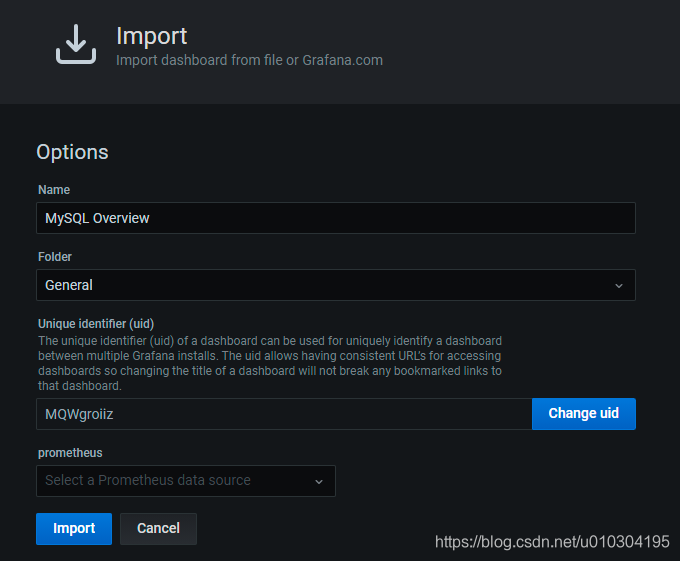
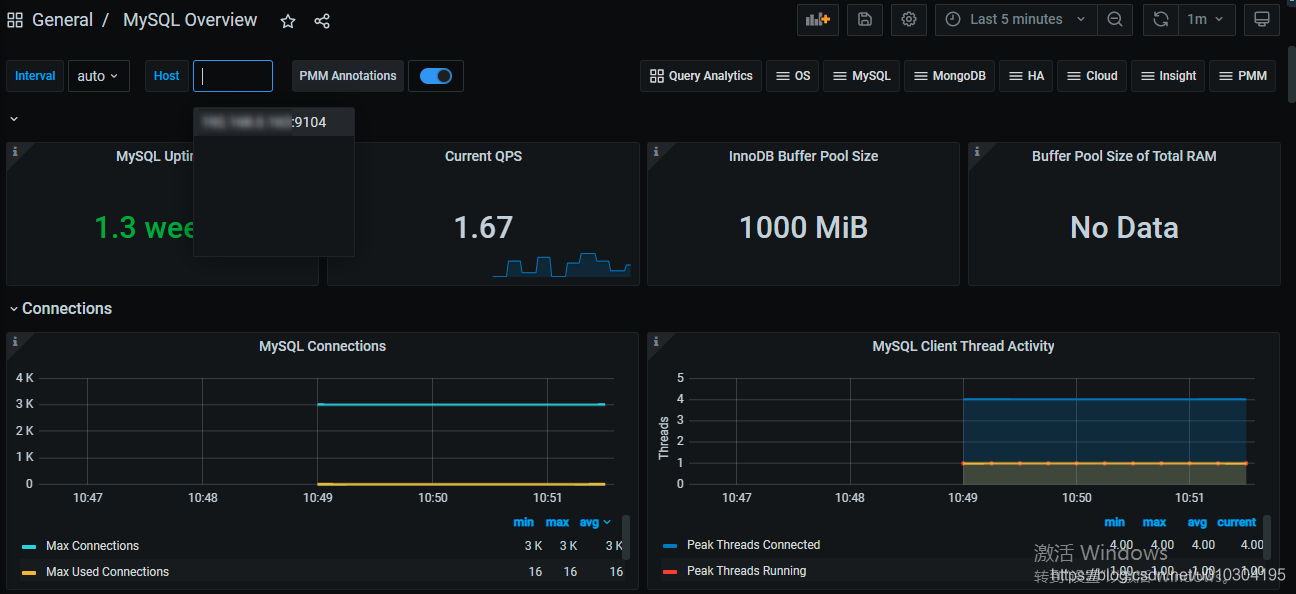
导入json文件
预警
MySQL报警规则
| 报警名称 | 表达式 | 采集数据时间(分钟) | 报警触发条件 |
|---|---|---|---|
| MySQL is down | mysql_up == 0 | 1 | MySQL下线。 |
| open files high | mysql_global_status_innodb_num_open_files > (mysql_global_variables_open_files_limit) * 0.75 | 1 | 打开文件数量偏高。 |
| Read buffer size is bigger than max. allowed packet size | mysql_global_variables_read_buffer_size > mysql_global_variables_slave_max_allowed_packet | 1 | 读取缓存区超过数据包最大限制。 |
| Thread stack size is too small | mysql_global_variables_thread_stack <196608 | 1 | 线程堆栈太小。 |
| Used more than 80% of max connections limited | mysql_global_status_max_used_connections > mysql_global_variables_max_connections * 0.8 | 1 | 使用超过80%连接限制。 |
| InnoDB Force Recovery is enabled | mysql_global_variables_innodb_force_recovery != 0 | 1 | 启用强制恢复。 |
| InnoDB Log File size is too small | mysql_global_variables_innodb_log_file_size < 16777216 | 1 | 日志文件过小。 |
| InnoDB Flush Log at Transaction Commit | mysql_global_variables_innodb_flush_log_at_trx_commit != 1 | 1 | 在事务提交时刷新日志。 |
| Table definition cache too small | mysql_global_status_open_table_definitions > mysql_global_variables_table_definition_cache | 1 | 表定义缓存过小。 |
| Table open cache too small | mysql_global_status_open_tables >mysql_global_variables_table_open_cache * 99/100 | 1 | 表打开缓存过小。 |
| Thread stack size is possibly too small | mysql_global_variables_thread_stack < 262144 | 1 | 线程堆栈可能过小。 |
| InnoDB Buffer Pool Instances is too small | mysql_global_variables_innodb_buffer_pool_instances == 1 | 1 | 缓冲池实例过小。 |
| InnoDB Plugin is enabled | mysql_global_variables_ignore_builtin_innodb == 1 | 1 | 插件启用。 |
| Binary Log is disabled | mysql_global_variables_log_bin != 1 | 1 | 二进制日志禁用。 |
| Binlog Cache size too small | mysql_global_variables_binlog_cache_size < 1048576 | 1 | 缓存过小。 |
| Binlog Statement Cache size too small | mysql_global_variables_binlog_stmt_cache_size <1048576 and mysql_global_variables_binlog_stmt_cache_size > 0 | 1 | 声明缓存过小。 |
| Binlog Transaction Cache size too small | mysql_global_variables_binlog_cache_size <1048576 | 1 | 交易缓存过小。 |
| Sync Binlog is enabled | mysql_global_variables_sync_binlog == 1 | 1 | 二进制日志启用。 |
| IO thread stopped | mysql_slave_status_slave_io_running != 1 | 1 | IO线程停止。 |
| SQL thread stopped | mysql_slave_status_slave_sql_running == 0 | 1 | SQL线程停止。 |
| Mysql_Too_Many_Connections | rate(mysql_global_status_threads_connected[5m])>200 | 5 | 连接过多。 |
| Mysql_Too_Many_slow_queries | rate(mysql_global_status_slow_queries[5m])>3 | 5 | 慢查询过多。 |
| Slave lagging behind Master | rate(mysql_slave_status_seconds_behind_master[1m]) >30 | 1 | 从机表现落后于主机。 |
| Slave is NOT read only(Please ignore this warning indicator.) | mysql_global_variables_read_only != 0 | 1 | 从机权限不是只读。 |
mysql_global_variables_max_connections: 允许的最大连接数;
mysql_global_status_threads_connected: 当前开放的连接;
mysql_global_status_threads_running:当前开放的连接;
mysql_global_status_aborted_connects:当前开放的连接;
mysql_global_status_connection_errors_total{error=”max_connections”}:由于超出最大连接数导致的错误;
mysql_global_status_connection_errors_total{error=”internal”}:由于系统内部导致的错误;
策略
groups:
- name: 数据库预警
  rules:
  - alert: "mysql下线"
    expr: mysql_up == 0
    for: 5m
    labels:
      severity: ERROR
      alert_host: "{{ reReplaceAll \":(.*)\" \"\" $labels.instance }}"
    annotations:
      description: "{{ $labels.alert_host }} 服务:mysql 已下线, 请立即处理"

  - alert: "打开文件数量偏高"
    expr: mysql_global_status_open_files > mysql_global_variables_open_files_limit * 0.95
    for: 5m
    labels:
      severity: WARN
    annotations:
      description: "{{ $labels.instance }} mysql服务打开文件数偏高"

  - alert: "缓冲区超过数据包最大限制"
    expr: mysql_global_variables_read_buffer_size > mysql_global_variables_slave_max_allowed_packet
    for: 5m
    labels:
      severity: WARN
    annotations:
      description: "{{ $labels.instance }} mysql服务读取缓存区超过数据包最大限制"

  - alert: "缓冲区配置错误"
    expr: mysql_global_variables_innodb_sort_buffer_size <256*1024 or mysql_global_variables_read_buffer_size > 4*1024*1024
    for: 5m
    labels:
      severity: WARN
    annotations:
      description: "{{ $labels.instance }} mysql服务排序缓冲区可能存在配置错误"

  - alert: "mysql连接数异常"
    expr: mysql_global_status_max_used_connections > mysql_global_variables_max_connections * 0.85
    for: 5m
    labels:
      severity: WARN
    annotations:
      description: "{{ $labels.instance }} mysql连接数已超过 85%"

  - alert: "mysql连接数异常"
    expr: mysql_global_status_max_used_connections > mysql_global_variables_max_connections * 0.95
    for: 5m
    labels:
      severity: ERROR
    annotations:
      description: "{{ $labels.instance }} mysql连接数已超过 95% 紧急请立即处理"

  - alert: "mysql流量预警"
    expr: rate(mysql_global_status_slow_queries[5m]) > 10
    for: 5m
    labels:
      severity: WARN
      alert_host: "{{ reReplaceAll \":(.*)\" \"\" $labels.instance }}"
    annotations:
      description: "节点 {{ $labels.instance }} mysql 5分钟内慢查询大于10秒"

  - alert: "mysql写入流量预警"
    expr: round(rate(mysql_global_status_bytes_received{job=~".*db"}[5m]) / 1024/1024*100)/100 > 200
    for: 5m
    labels:
      severity: WARN
    annotations:
      description: "{{ $labels.instance }} 流量5分钟内写入 平均值大于200MB"

  - alert: "mysql读查询预警"
    expr: round(rate(mysql_global_status_bytes_sent{job=~".*db"}[5m]) /1024/1024*100)/100 > 200
    for: 5m
    labels:
      severity: WARN
    annotations:
      description: "Mysql出口: {{ $labels.instance }}流量5分钟内平均值大于200MB, "

  - alert: "mysql事务CRUD预警"
    expr: sum(rate(mysql_global_status_commands_total{command=~"insert|update|delete",job=~".*db"}[5m])) without (command) > 200
    for: 5m
    labels:
      severity: WARN
    annotations:
      description: "{{ $labels.instance }} MySQL 写入提交速率,5分钟内平均大于200M, 当前: {{ $value }}M"

  - alert: "mysql查询预警"
    expr: rate(mysql_global_status_questions{job=~".*db"}[5m]) > 500
    for: 5m
    labels:
      severity: WARN
    annotations:
      description: "{{ $labels.instance }} MySQL 5分钟内查询速率大于500,当前 {{ $value }}M"
版权声明:本文为u010304195原创文章,遵循CC 4.0 BY-SA版权协议,转载请附上原文出处链接和本声明。