标题
总结:fileList中url属性保证是全路径即可回显,所以上传之后赋值url 和 半截路径url1,回显也一样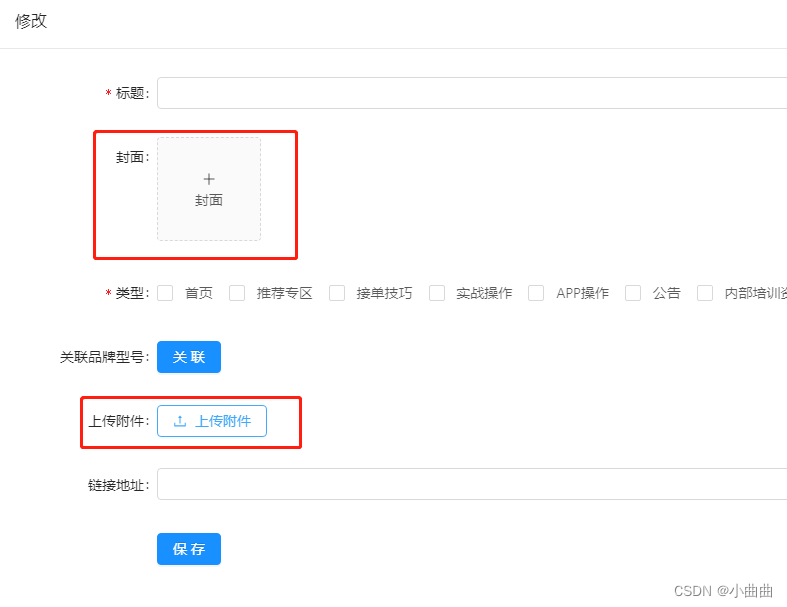
封面
  <a-form-item label="封面" :labelCol="labelCol" :wrapperCol="wrapperCol">
          <a-upload :headers="headers" :action="uploadUrl" list-type="picture-card" :file-list="fileList"
            @preview="handlePreview" @change="handleChange">
            <div v-if="fileList.length < 1">
              <a-icon type="plus" />
              <div class="ant-upload-text">
                封面
              </div>
            </div>
          </a-upload>
          <a-modal :visible="previewVisible" :footer="null" @cancel="handleCancel">
            <img alt="example" style="width: 100%" :src="previewImage" />
          </a-modal>
        </a-form-item>
 	// 封面
      uploadUrl: process.env.VUE_APP_API_BASE_URL + '/dfs/upload?type=train',
      headers: {
        token: Vue.ls.get(ACCESS_TOKEN)
      },
      previewVisible: false,
      previewImage: '',
      fileList: [
        // {
        // uid: '-1',
        // name: 'image.png',
        // status: 'done',
        // url: 'https://zos.alipayobjects.com/rmsportal/jkjgkEfvpUPVyRjUImniVslZfWPnJuuZ.png',
        // },
      ],
 	// 封面
    handleChange({ fileList }) {
      fileList = fileList.map(file => {
        if (file.response) {
          file.url = imgUrl + file.response.url;
          file.url1 = file.response.url;
        }
        return file;
      });
      this.fileList = fileList;
    },
 	// 预览
    async handlePreview(file) {
      console.log(file)
      this.previewImage = file.url || file.preview;
      this.previewVisible = true;
    },
     handleCancel() {
      this.previewVisible = false;
    },
上传附件
	<a-form-item label="上传附件" :labelCol="labelCol" :wrapperCol="wrapperCol">
          <a-upload :action="uploadUrl" :headers="headers" :multiple="true" :file-list="imgList"
            @change="handleChange1">
            <a-button>
              <a-icon type="upload" /> 上传附件
            </a-button>
          </a-upload>
        </a-form-item>
	imgList: [
        // {
        //   uid: '-1',
        //   name: 'xxx.png',
        //   status: 'done',
        //   url: 'http://www.baidu.com/xxx.png',
        // },
      ],
 // 上传附件
    handleChange1(info) {
      let fileList = [...info.fileList];
      fileList = fileList.map(file => {
        if (file.response) {
          file.url = imgUrl + file.response.url;
          file.url1 = file.response.url;
        }
        return file;
      });
      this.imgList = fileList;
    },
提交时候直接取数组中url1传递即可
		let trainInfos = this.imgList.length ? this.imgList.map(item => {
            return  item.url1
          }) : []
详情回显的时候将接口的url赋值给数组的url和url1
		if (res.data.trainInfos.length) {
            this.imgList = res.data.trainInfos.map(item => {
              return {
                uid: '-1',
                name: item.matterUrl.split('/')[item.matterUrl.split('/').length - 1],
                status: 'done',
                url: imgUrl + item.matterUrl,
                url1: item.matterUrl,
              }
            })
          }
设置可上传文件类型
不符合的文件不会上传接口,但是fileList中依然存在,只是没有response返回值,可过滤
    // 上传附件
    beforeUpload(file) {
      let arr = ["doc", "docx", "pdf", "xls", "xlsx", "ppt", "pptx", "jpg", "png", "mp4", "avi", "wmv"]
      let type = file.name.split('.')[file.name.split('.').length - 1]
      if (!arr.includes(type)) {
        this.$message.error('不支持上传 .' + type + '格式');
      }
      return arr.includes(type);
    },

	handleChange1(info) {
      let fileList = [...info.fileList];
      fileList = fileList.map(file => {
        if (file.response) {
          file.url = imgUrl + file.response.url;
          file.url1 = file.response.url;
        }
        return file;
      });
      this.imgList = fileList;
    },
版权声明:本文为weixin_43848576原创文章,遵循CC 4.0 BY-SA版权协议,转载请附上原文出处链接和本声明。