百度地图分不同色块显示某个城市的行政区划,并添加城市(区)名,包括在不同的zoom缩放范围下标签的显示隐藏
效果如下:
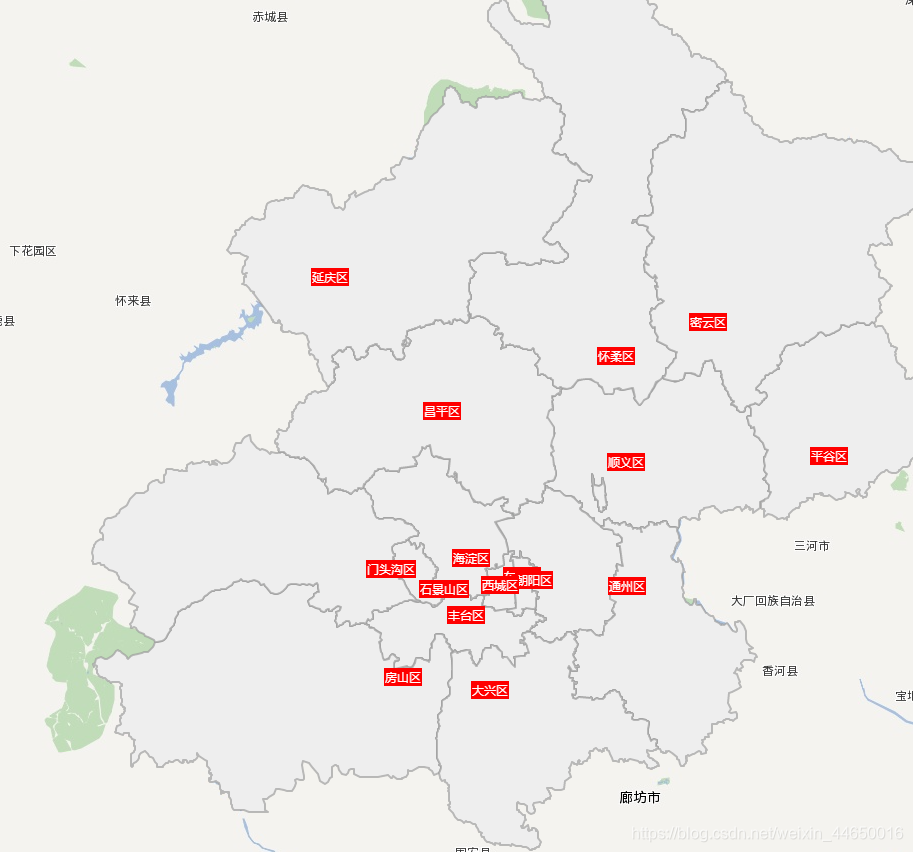
先拉代码跑一跑
<!DOCTYPE html>
<html>
<head>
  <meta http-equiv="Content-Type" content="text/html; charset=utf-8" />
  <meta name="viewport" content="initial-scale=1.0, user-scalable=no" />
  <script src="https://cdn.staticfile.org/jquery/1.10.2/jquery.min.js"></script>
  <script type="text/javascript" src="http://api.map.baidu.com/getscript?v=2.0&ak=你的ak"></script>
  </script>
  <title>添加行政区划</title>
  <style type="text/css">
    body,
    html,
    #allmap {
      width: 100%;
      height: 100%;
      overflow: hidden;
      margin: 0;
    }

    .btn {
      position: absolute;
      top: 10px;
      left: 50%;
      transform: translateX(-50%);
    }
  </style>
</head>

<body>
  <div id="allmap"></div>
  <div class="btn">
    <button onclick="selectCity(0)">北京</button>
    <button onclick="selectCity(1)">上海</button>
  </div>
</body>

</html>
<script type="text/javascript">
  // 百度地图API功能
  var map = new BMap.Map("allmap");
  map.enableScrollWheelZoom();

  map.setMapStyle({
    styleJson: [{
        "featureType": "poi",
        "elementType": "all",
        "stylers": {
          "color": "#ffffff",
          "visibility": "off"
        }
      },
      { //路网
        "featureType": "road",
        "elementType": "all",
        "stylers": {
          "color": "#ffffff",
          "visibility": "off"
        }
      },
      // {//背景颜色(水域、绿地)
      //   "featureType": "background",
      //   "elementType": "all",
      //   "stylers": {
      //     "color": "#ffffff"
      //   }
      // },
      // { //行政区域
      //   "featureType": "administrative",
      //   "elementType": "all",
      //   "stylers": {
      //     "color": "#ffffff",
      //     "visibility": "off"
      //   }
      // }
    ]
  });

  var blist = [];
  var districtLoading = 0;

  selectCity(1)

  function selectCity(index) {
    blist = [];
    setTimeout(() => {
      var arr = [{
        name: '北京市',
        cityArr: [
          "顺义区", "昌平区", "西城区", "朝阳区", "东城区", "丰台区", "石景山区", "海淀区", "门头沟区", "房山区", "通州区", "大兴区", "怀柔区", "平谷区",
          "密云区", "延庆区"
        ]
      }, {
        name: '上海市',
        cityArr: [
          "黄浦区", "徐汇区", "长宁区", "静安区", "普陀区 ", "虹口区", "杨浦区", "浦东新区", "闵行区", "宝山区", "嘉定区", "金山区", "松江区", "青浦区",
          "奉贤区", "崇明区"
        ]
      }]
      getBoundary(arr[index].name, arr[index].cityArr);
    }, 100);
  }

  function getBoundary(cityName, cityArr) {
    map.centerAndZoom(cityName, 11);
    var bdary = new BMap.Boundary();
    bdary.get(cityName, function (rs) { //获取行政区域
      map.clearOverlays(); //清除地图覆盖物
      var count = rs.boundaries.length; //行政区域的点有多少个
      for (var i = 0; i < count; i++) {
        var ply = new BMap.Polygon(rs.boundaries[i], {
          strokeWeight: 0.01,
          strokeColor: "#ffffff"
        }); //建立多边形覆盖物
        map.addOverlay(ply); //添加覆盖物
        map.setViewport(ply.getPath()); //调整视野
      }
    });
    cityArr.forEach(element => {
      addDistrict(element);
    });
  }
  // 随机生成颜色
  function RandomColor() {
    let r, g, b;
    r = Math.floor((Math.random() > 0 ? Math.random() : (Math.random() + 0.1)) * 256);
    g = Math.floor((Math.random() > 0 ? Math.random() : (Math.random() + 0.1)) * 256);
    b = Math.floor((Math.random() > 0 ? Math.random() : (Math.random() + 0.1)) * 256);
    return "rgb(" + r + ',' + g + ',' + b + ")";
  }
  /**
   * 添加行政区划
   * @param {} districtName 行政区划名
   * @returns  无返回值
   */
  function addDistrict(districtName) {
    //使用计数器来控制加载过程
    districtLoading++;
    var bdary = new BMap.Boundary();
    bdary.get(districtName, function (rs) { //获取行政区域
      var count = rs.boundaries.length; //行政区域的点有多少个
      if (count === 0) {
        alert('未能获取当前输入行政区域');
        return;
      }
      for (var i = 0; i < count; i++) {
        blist.push({
          points: rs.boundaries[i],
          name: districtName,
          color: RandomColor()
        });
      };
      //加载完成区域点后计数器-1
      districtLoading--;
      if (districtLoading == 0) {
        //全加载完成后画端点
        drawBoundary();
      }
    });
  }

  function drawBoundary() {
    //包含所有区域的点数组
    var pointArray = [];

    /*画遮蔽层的相关方法
     *首先在中国地图最外画一圈,圈住理论上所有的中国领土,然后再将每个闭合区域合并进来,并全部连到西北角。
     *      这样就做出了一个经过多次西北角的闭合多边形*/
    //定义中国东南西北端点,作为第一层
    var pNW = {
      lat: 59.0,
      lng: 73.0
    }
    var pNE = {
      lat: 59.0,
      lng: 136.0
    }
    var pSE = {
      lat: 3.0,
      lng: 136.0
    }
    var pSW = {
      lat: 3.0,
      lng: 73.0
    }
    //向数组中添加一次闭合多边形,并将西北角再加一次作为之后画闭合区域的起点
    var pArray = [];
    pArray.push(pNW);
    pArray.push(pSW);
    pArray.push(pSE);
    pArray.push(pNE);
    pArray.push(pNW);
    //循环添加各闭合区域
    map.clearOverlays(); //清除地图覆盖物
    for (var i = 0; i < blist.length; i++) {
      //调用添加标签方法
      citySetLabel(blist[i].name);
      //添加多边形层并显示
      var ply;
      if (blist[i].name === '朝阳区') {
        ply = new BMap.Polygon(blist[i].points, {
          strokeWeight: 2,
          strokeColor: "#999",
          fillOpacity: 1,
          fillColor: '#eee'
        });
      } else {
        ply = new BMap.Polygon(blist[i].points, {
          strokeWeight: 2,
          strokeColor: "#999",
          fillOpacity: 1,
          fillColor: blist[i].color
        });
      }
      map.addOverlay(ply);
      //将点增加到视野范围内
      var path = ply.getPath();
      pointArray = pointArray.concat(path);
      //将闭合区域加到遮蔽层上,每次添加完后要再加一次西北角作为下次添加的起点和最后一次的终点
      pArray = pArray.concat(path);
      pArray.push(pArray[0]);
    }
  }

  // 地名标签
  function citySetLabel(cityName) {
    var local = new BMap.LocalSearch(map, {
      onSearchComplete: function () {
        var cityCenter = local.getResults().getPoi(0).point; //获取搜索的结果
        var label = new BMap.Label(cityName, {
          offset: new BMap.Size(-20, -10),
          position: cityCenter
        });
        label.setStyle({
          border: 'red',
          background: 'red',
          'font-size': '0.25rem',
          color: '#fff',
        });
        map.addOverlay(label);
      },
    });
    local.search(cityName);//搜索
  }

  // 监听鼠标滑轮滚动
  //因为鼠标左右键也可以放大缩小地图,所以这个方法弃用了
 /* var mouseScroll = function (e) {
    e = e || window.event;
    if (map.getZoom() >= 8 && e.deltaY < 0) {
      showLabel()
      return
    }
    if (map.getZoom() < 11 && e.deltaY > 0) {
      hideLabel()
      return
    }
  }

  if (document.addEventListener) {
    document.addEventListener('DOMMouseScroll', mouseScroll, false);
  }
  window.onmousewheel = document.onmousewheel = mouseScroll;//浏览器兼容
  */
//监听zoom改变完成回调
  map.addEventListener("zoomend", function (evt) {
    console.log(map.getZoom())
    if (map.getZoom() < 10) {
      hideLabel()
    } else {
      showLabel()
    }
  });

  // label标注的显示、隐藏
  function showLabel() {
    var markers = map.getOverlays();
    for (var i = 0; i < markers.length; i++) {
      if (markers[i].toString() == "[object Label]") {
        markers[i].show();
      }
    }
  }

  function hideLabel() {
    var markers = map.getOverlays();
    for (var i = 0; i < markers.length; i++) {
      if (markers[i].toString() == "[object Label]") {
        markers[i].hide();
      }
    }
  }
</script>
版权声明:本文为weixin_44650016原创文章,遵循CC 4.0 BY-SA版权协议,转载请附上原文出处链接和本声明。