apache beam
Apache Beam is an advanced unified programming model that implements batch and streaming data processing jobs that run on any execution engine. At this time of writing, you can implement it in languages Java, Python, and Go. If you need to process large datasets or data stream processing Apache beam is the tool that can process with a unified, portable, and extensible programming model. You can get a lot of flexibility and advanced functionality that you need for data processing jobs. There are so many runners you can choose from, for example, If you want to run the whole thing on GCP you have Google Dataflow that you use as a runner.
Apache Beam是一种高级的统一编程模型,该模型可实现在任何执行引擎上运行的批处理和流数据处理作业。 在撰写本文时,您可以使用Java,Python和Go语言来实现它。 如果您需要处理大型数据集或数据流,则Apache Beam是可以使用统一,可移植且可扩展的编程模型进行处理的工具。 您可以获得数据处理作业所需的大量灵活性和高级功能。 您可以选择许多运行程序,例如,如果要在GCP上运行整个程序,则可以使用Google Dataflow作为运行程序。
In this post, we will see how we can get started with Apache Beam and Spring Boot. We will start with a simple Spring Boot application and see how to integrate with Apache Beam and run it on your local machine with Direct Runner.
在这篇文章中,我们将看到如何开始使用Apache Beam和Spring Boot。 我们将从一个简单的Spring Boot应用程序开始,并了解如何与Apache Beam集成并使用Direct Runner在本地计算机上运行它。
Prerequisites
先决条件
What is Apache Beam
什么是Apache Beam
Concepts
概念
Example Project
示例项目
Implementation with Spring Boot
使用Spring Boot实施
Demo
演示版
Summary
概要
Conclusion
结论
先决条件(Prerequisites)
There are some prerequisites for this project such as Apache Maven, Java SDK, and some IDE. You need to install all these on your machine if you want to run this example project on your machine.
此项目有一些先决条件,例如Apache Maven,Java SDK和某些IDE。 如果要在计算机上运行此示例项目,则需要在计算机上安装所有这些工具。
Make sure you install Java and Maven on your machine by testing with these commands. You need to add these to your path so that you can run these commands.
通过使用以下命令进行测试,确保在计算机上安装Java和Maven。 您需要将它们添加到路径中,以便您可以运行这些命令。
java --version
mvn --version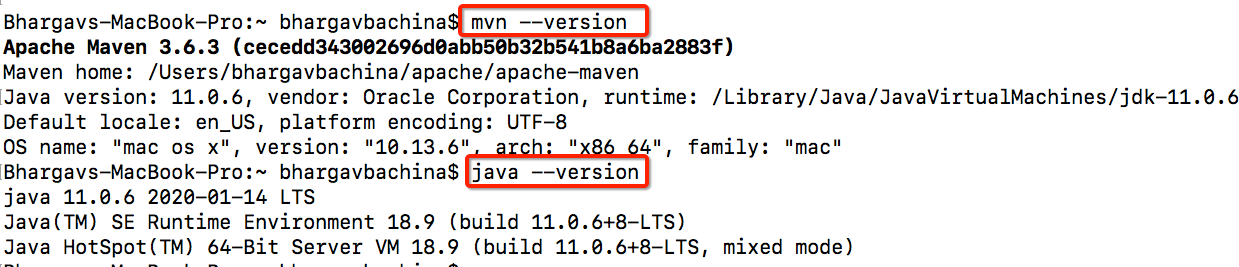
什么是Apache Beam(What is Apache Beam)
As stated in their website, Apache Beam is an advanced unified programming model that implements batch and streaming data processing jobs that run on any execution engine. Beam is particularly useful for parallel data processing tasks, in which the tasks are divided into smaller bundles of data that can be processed independently or in parallel. You can also use Beam for Extract, Transform, and Load (ETL) tasks and pure data integration.
如其网站上所述,Apache Beam是一种高级统一编程模型,可实现在任何执行引擎上运行的批处理和流数据处理作业。 Beam对于并行数据处理任务特别有用,在并行数据处理任务中,任务被分成可独立或并行处理的较小数据束。 您还可以将Beam用于提取,转换和加载(ETL)任务以及纯数据集成。
Apache Beam currently supports three SDKs Java, Python, and Go. All these SDKs provide a unified programming model that takes input from several sources. These sources can be finite data set from a batch data source or an infinite data set from a streaming data source.
Apache Beam当前支持Java,Python和Go这三个SDK。 所有这些SDK都提供了一个统一的编程模型,该模型从多个来源获取输入。 这些源可以是批处理数据源中的有限数据集,也可以是流数据源中的无限数据集。
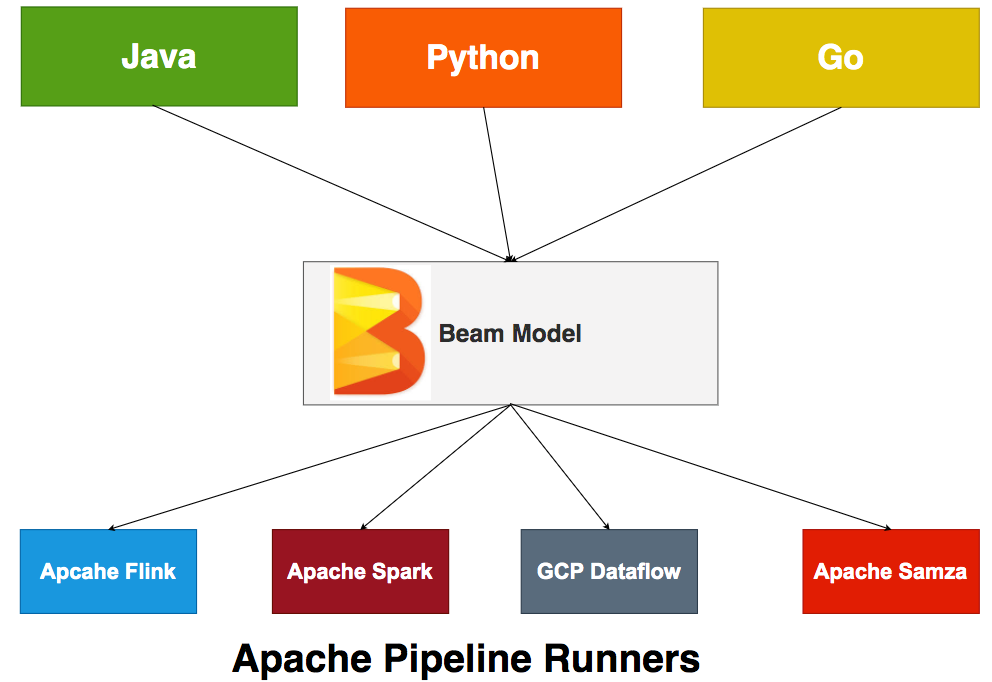
You define the pipeline for data processing, The Apache Beam pipeline Runners translate this pipeline with your Beam program into API compatible with the distributed processing back-end of your choice. It supports multiple Runners as shown in the above figure. You have to define an appropriate Runner when you run your Beam program so that the Runner executes your pipeline.
您定义了用于数据处理的管道,Apache Beam管道运行器将此Beam管道与您的Beam程序一起转换为与您选择的分布式处理后端兼容的API。 如上图所示,它支持多个跑步者。 在运行Beam程序时,必须定义一个适当的Runner,以便Runner执行管道。
概念 (Concepts)
There are so many concepts that you should know before getting your hands dirty. It’s very difficult to go through each and every concept here, instead, we go through important concepts that are necessary to implement the basic example.
在弄脏手之前,您应该了解很多概念。 这里很难遍历每个概念,相反,我们经历了实现基本示例所必需的重要概念。
管道 (Pipeline)
A pipeline is nothing but a series of simple tasks executed to get the desired output. These tasks can be executed sequentially or in parallel based on the need. You can design the pipeline in a number of ways. Let's look at the basic pipeline we have one file in the source bucket, we read it and transform it into a collection called Pcollection (discuss later in detail), and then transform and load into a destination bucket.
流水线不过是一系列执行简单的任务以获取所需输出的简单任务。 这些任务可以根据需要顺序或并行执行。 您可以通过多种方式设计管道。 让我们看一下在源存储桶中有一个文件的基本管道,我们将其读取并将其转换为称为Pcollection的集合(稍后详细讨论),然后转换并加载到目标存储桶中。

What you see above is a very basic pipeline. You can design your pipeline in a number of ways such as parallel processing the same Pcollection, A single transform producing multiple outputs, etc. You can see some of the pipeline designs here.
您在上面看到的是一个非常基本的管道。 您可以通过多种方式设计管道,例如并行处理相同的Pcollection,一次转换产生多个输出等。您可以在此处看到一些管道设计。
Here is a sample code on how to create a pipeline in java. You can find more here on their website.
这是有关如何在Java中创建管道的示例代码。 您可以在他们的网站上找到更多信息。
// Start by defining the options for the pipeline.
PipelineOptions options = PipelineOptionsFactory.create();


// Then create the pipeline.
Pipeline p = Pipeline.create(options);P系列(PCollections)
You create a PCollection by either reading data from an external source using Beam’s Source API, or you can create a PCollection of data stored in an in-memory collection class in your driver program. The following is the sample code from the Apache Beam documentation where it is the reading the dataset from the GCP bucket. You can find more here.
您创建一个PCollection使用Beam的从外部源或者通过读取数据源API ,或者您可以创建一个PCollection存储在内存中的集合类在你的驱动程序的数据。 以下是Apache Beam文档中的示例代码,该示例代码是从GCP存储桶读取数据集的。 您可以在这里找到更多。
public static void main(String[] args) {
  // Create the pipeline.
  PipelineOptions options =
      PipelineOptionsFactory.fromArgs(args).create();
  Pipeline p = Pipeline.create(options);


  // Create the PCollection 'lines' by applying a 'Read' transform.
  PCollection<String> lines = p.apply(
}变身(Transforms)
Transforms are the operations in your pipeline and provide a generic processing framework. You provide processing logic in the form of a function object (colloquially referred to as “user code”), and your user code is applied to each element of an input PCollection (or more than one PCollection). Depending on the pipeline runner and back-end that you choose, many different workers across a cluster may execute instances of your user code in parallel. You can find more here.
转换是管道中的操作,提供了通用的处理框架。 您以函数对象的形式(通常称为“用户代码”)提供处理逻辑,并将您的用户代码应用于输入PCollection每个元素(或多个PCollection )。 根据您选择的管道运行器和后端,集群中的许多不同的工作程序可以并行执行用户代码的实例。 您可以在这里找到更多。
[Final Output PCollection] = [Initial Input PCollection].apply([First Transform])
.apply([Second Transform])
.apply([Third Transform])
管道I / O(Pipeline I/O)
When you create a pipeline, you often need to read data from some external source, such as a file or a database. Likewise, you may want your pipeline to output its result data to an external storage system. Here is the example of reading input data from the GCP bucket.
创建管道时,通常需要从某些外部源(例如文件或数据库)读取数据。 同样,您可能希望管道将其结果数据输出到外部存储系统。 这是从GCP存储桶读取输入数据的示例。
PCollection<String> lines = p.apply(TextIO.read().from("gs://some/inputData.txt"));Here is the example of writing output to the GCP Bucket
这是将输出写入GCP存储桶的示例
output.apply(TextIO.write().to("gs://some/outputData"));You have other so many concepts that you should know when you go deep into apache beam programming model or working on the production workloads. You can find more here.
当您深入到Apache Beam编程模型或处理生产工作负载时,您还应该知道许多其他概念。 您可以在这里找到更多。
示例项目 (Example Project)
Let’s see what we are building here with Apache Beam and Java SDK. Here is the simple input.txt file, we take this as an input and transform it and output the word count.
让我们看看我们在这里使用Apache Beam和Java SDK构建的内容。 这是简单的input.txt文件,我们将其作为输入并进行转换并输出字数。
test:test:test:testing in progress:testing in progress:testing completed:done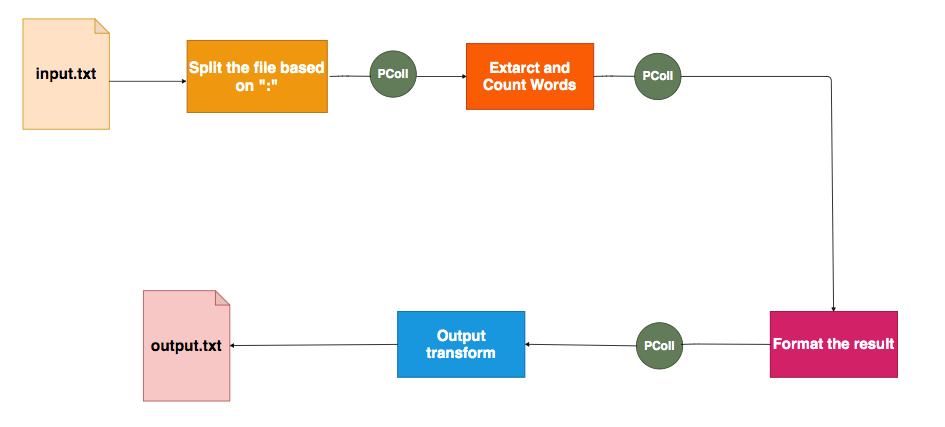
As shown above, we split the text file based on the “:” and then extract and count words, format the result, and output to the output.txt file. This pipeline produces the below output. You might see three output files based on the processes running on your machine.
如上所示,我们根据“:”分割文本文件,然后提取单词并对其计数,对结果进行格式化,然后输出到output.txt文件。 该管道产生以下输出。 根据计算机上运行的进程,您可能会看到三个输出文件。
testing: 3
progress: 2
done: 1
completed: 1
in: 2
test: 3
Here is the Github link for this example project. You can clone it and run it on your machine. You can see the output files in this location /src/main/resources
这是此示例项目的Github链接。 您可以克隆它并在计算机上运行它。 您可以在此位置/ src / main / resources中看到输出文件
// clone the project
git clone https://github.com/bbachi/apache-beam-java-demo.git// change the directory
cd apache-beam-java-demo// clean and install
mvn clean install// Run the application
java -jar target/beamdemo-0.0.1-SNAPSHOT.jar
使用Spring Boot实施 (Implementation with Spring Boot)
Let’s implement this example project step by step with Java and Spring Boot. We will start by generating a Spring Boot application with the Spring Initializr. As you see in the below picture, You can select initial dependencies and generate the Maven project in a zip file.
让我们使用Java和Spring Boot逐步实现该示例项目。 我们将从使用Spring Initializr生成Spring Boot应用程序开始。 如下图所示,您可以选择初始依赖项并在zip文件中生成Maven项目。
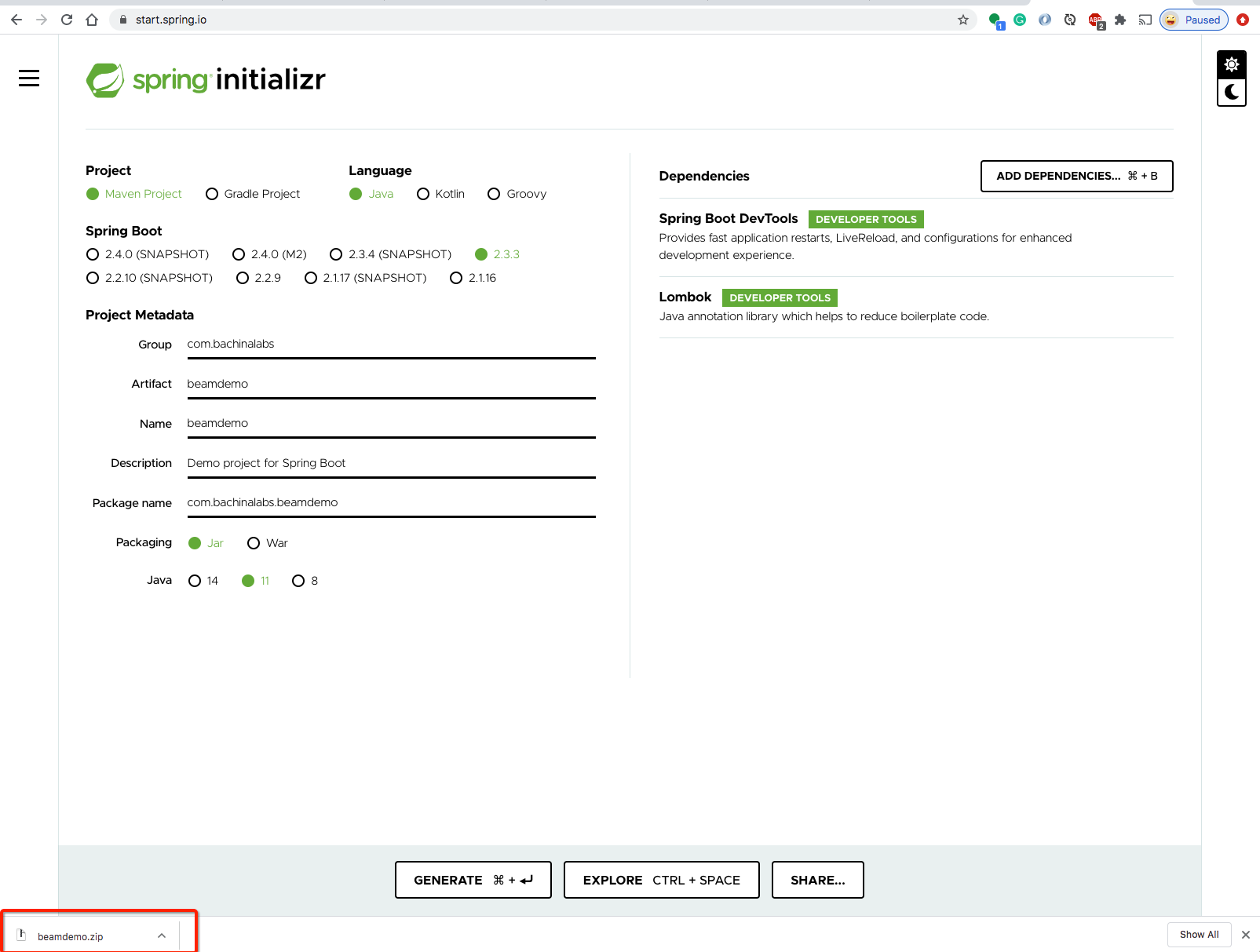
Let’s extract the zip and load the application in IntelliJ IDE as shown below.
让我们解压缩该zip并将其加载到IntelliJ IDE中,如下所示。
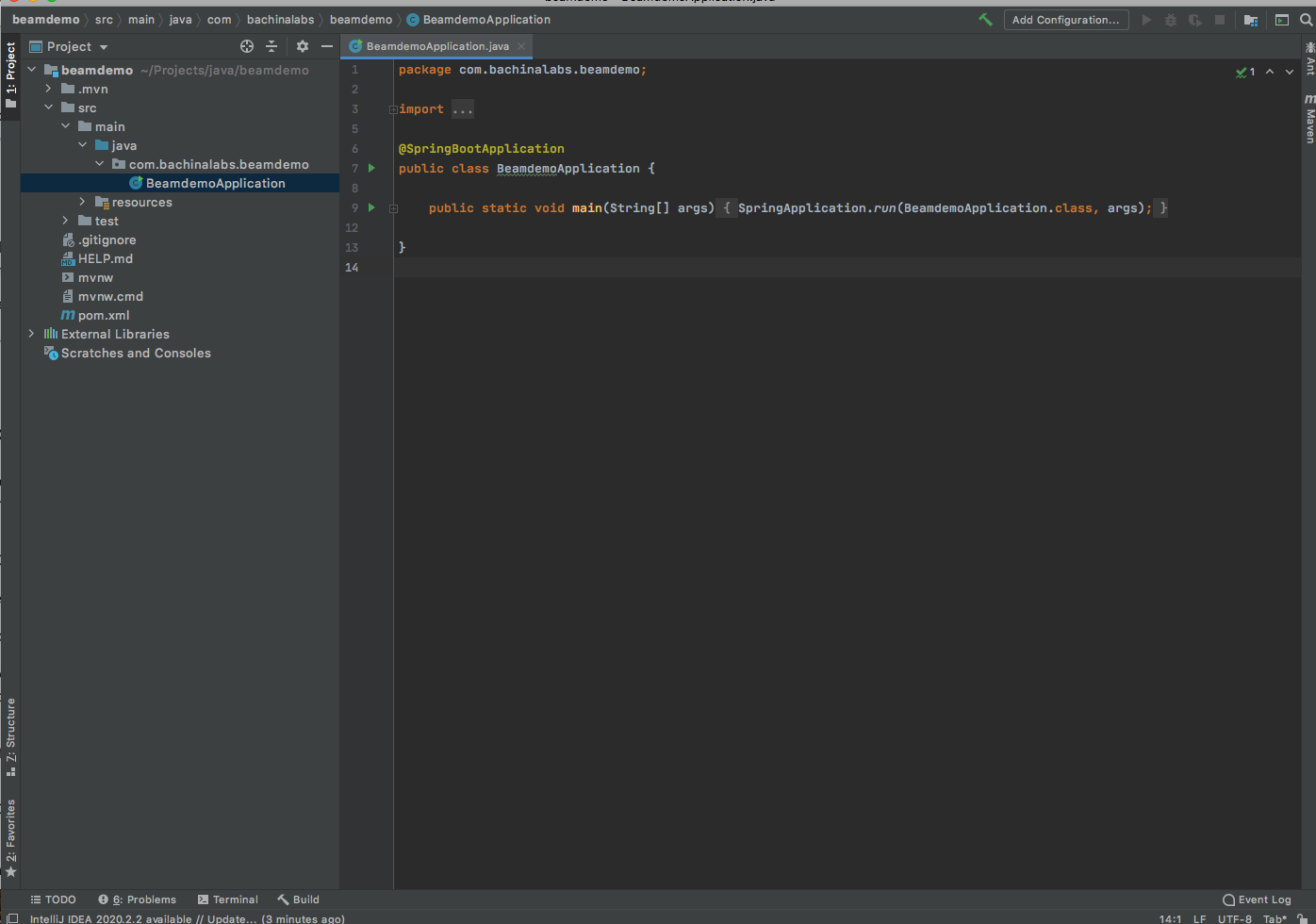
The first would be adding required dependencies to the spring boot applications. The below are the dependencies we should add to the pom.xml file. The first one is beam SDK and another is Direct Runner and we are using version 2.23.0.
首先是向Spring Boot应用程序添加所需的依赖项。 以下是我们应添加到pom.xml文件中的依赖项。 第一个是Beam SDK,另一个是Direct Runner,我们正在使用2.23.0版本。
<properties>
  <java.version>11</java.version>
  <beam.version>2.23.0</beam.version>
</properties>


<dependency>
  <groupId>org.apache.beam</groupId>
  <artifactId>beam-sdks-java-core</artifactId>
  <version>${beam.version}</version>
</dependency>
<dependency>
  <groupId>org.apache.beam</groupId>
  <artifactId>beam-runners-direct-java</artifactId>
  <version>${beam.version}</version>
  <scope>runtime</scope>
</dependency>主文件(Main File)
Here is the main file which is the starting point of your application.
这是主文件,它是您应用程序的起点。
package com.bachinalabs.beamdemo;


import org.springframework.boot.SpringApplication;
import org.springframework.boot.autoconfigure.SpringBootApplication;


@SpringBootApplication
public class BeamdemoApplication {


	public static void main(String[] args) {
		SpringApplication.run(BeamdemoApplication.class, args);
	}


}SplitWords转换(SplitWords Transform)
Once you read the input file from the location /src/main/resourcesall you need to do split the text by “:”. This is the transform file that takes the input and produced the output. In this case, input and output collections are PCollection<String>.
从/ src / main / resources位置读取输入文件后,只需用“:”分隔文本即可。 这是接受输入并产生输出的转换文件。 在这种情况下,输入和输出集合为PCollection <String> 。
package com.bachinalabs.beamdemo;


import org.apache.beam.sdk.transforms.PTransform;
import org.apache.beam.sdk.transforms.ParDo;
import org.apache.beam.sdk.values.PCollection;


public class SplitWords extends PTransform<PCollection<String>, PCollection<String>> {


    @Override
    public PCollection<String> expand(PCollection<String> line) {


        // Convert line of text into individual lines
        PCollection<String> lines = line.apply(
                ParDo.of(new SplitWordsFn()));


        return lines;
    }
}
The processing logic which is split logic here is defined in the following file. This is the processing function where takes each input from the collection and processes it and produces the output.
在下面的文件中定义了此处为分割逻辑的处理逻辑。 这是处理功能,从集合中获取每个输入并对其进行处理并生成输出。
package com.bachinalabs.beamdemo;


import org.apache.beam.sdk.transforms.DoFn;


public class SplitWordsFn extends DoFn<String, String> {


    public static final String SPLIT_PATTERN = ":";


    @ProcessElement
    public void processElement(ProcessContext c) {
        for(String word: c.element().split(SPLIT_PATTERN)) {
            if (!word.isEmpty()) {
                c.output(word);
            }
        }
    }
}CountWords转换(CountWords Transform)
After the first transform split, you need to transform these lines into words. This is the transform file that takes the input and produced the output. In this case, input and output collections are PCollection<String>andPCollection<PV<String, Long>>
在第一次转换拆分之后,您需要将这些行转换为单词。 这是接受输入并产生输出的转换文件。 在这种情况下,输入和输出集合为PCollection <String>和PCollection <PV <String,Long >>
package com.bachinalabs.beamdemo;


import org.apache.beam.sdk.transforms.Count;
import org.apache.beam.sdk.transforms.PTransform;
import org.apache.beam.sdk.transforms.ParDo;
import org.apache.beam.sdk.values.KV;
import org.apache.beam.sdk.values.PCollection;


public class CountWords extends PTransform<PCollection<String>, PCollection<KV<String, Long>>> {


    @Override
    public PCollection<KV<String, Long>> expand(PCollection<String> lines) {


        // Convert text into individual words
        PCollection<String> words = lines.apply(
                ParDo.of(new ExtractWordsFn()));


        // Count the words
        PCollection<KV<String, Long>> wordCounts =
                words.apply(Count.perElement());


        return wordCounts;
    }
}
The processing logic which is Extract logic here is defined in the following file. This is the processing function where takes each input from the collection and processes it and produces the output.
以下文件中定义了处理逻辑,即提取逻辑。 这是处理功能,从集合中获取每个输入并对其进行处理并生成输出。
package com.bachinalabs.beamdemo;


import org.apache.beam.sdk.transforms.DoFn;


public class ExtractWordsFn extends DoFn<String, String> {


    public static final String TOKENIZER_PATTERN = "[^\\p{L}]+";


    @ProcessElement
    public void processElement(ProcessContext c) {
        for(String word: c.element().split(TOKENIZER_PATTERN)) {
            if (!word.isEmpty()) {
                c.output(word);
            }
        }
    }
}
Below is the main file where you create and define a pipeline and run it synchronously. There are options file in which you can define paths to the input and output files. You have to pass these options as an argument when you create a pipeline.
以下是在其中创建和定义管道并同步运行它的主文件。 有一些选项文件,您可以在其中定义输入和输出文件的路径。 创建管道时,必须将这些选项作为参数传递。
package com.bachinalabs.beamdemo;


import org.apache.beam.sdk.options.Default;
import org.apache.beam.sdk.options.Description;
import org.apache.beam.sdk.options.PipelineOptions;


public interface WordCountOptions extends PipelineOptions {


    @Description("Path to the input file")
    @Default.String("./src/main/resources/input.txt")
    String getInputFile();
    void setInputFile(String value);


    @Description("Path to the output file")
    @Default.String("./src/main/resources/output.txt")
    String getOutputFile();
    void setOutputFile(String value);
}
Once the pipeline is created, you can apply a series of transformations with the apply function. You can use TextIO to read from and write to the appropriate files. Finally, you run the pipeline with this line p.run().waitUntilFinish();.
创建管道后,您可以使用apply函数应用一系列转换。 您可以使用TextIO读取和写入适当的文件。 最后,使用此行p.run().waitUntilFinish();.运行管道p.run().waitUntilFinish();.
演示版 (Demo)
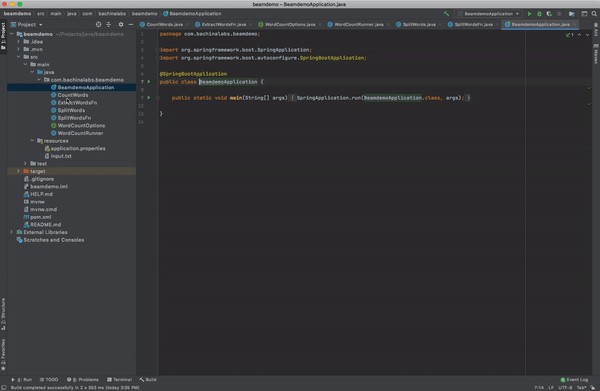
You have seen the basics and implementation with Apache Beam SDK. Let’s run it and see the output files created in the location /src/main/resources/.Here is the demo.
您已经了解了Apache Beam SDK的基础知识和实现。 让我们运行它,并查看在/ src / main / resources /位置中创建的输出文件。 这是演示。
概要(Summary)
- Apache Beam is an advanced unified programming model that implements batch and streaming data processing jobs that run on any execution engine.Apache Beam是一种高级的统一编程模型,该模型可实现在任何执行引擎上运行的批处理和流数据处理作业。
- At this time of writing, you can implement it in languages Java, Python, and Go.在撰写本文时,您可以使用Java,Python和Go语言来实现它。
- There are so many runners you can choose from, for example, If you want to run the whole thing on GCP you have Google Dataflow that you use as a runner.您可以选择许多运行程序,例如,如果要在GCP上运行整个程序,则可以使用Google Dataflow作为运行程序。
- There are some prerequisites for this project such as Apache Maven, Java SDK, and some IDE.此项目有一些先决条件,例如Apache Maven,Java SDK和某些IDE。
- You define the pipeline for data processing, The Apache Beam pipeline Runners translate this pipeline with your Beam program into API compatible with the distributed processing back-end of your choice.您定义了用于数据处理的管道,Apache Beam管道运行器将此Beam管道与您的Beam程序一起转换为与您选择的分布式处理后端兼容的API。
- It supports multiple Runners as shown in the above figure. You have to define an appropriate Runner when you run your Beam program so that the Runner executes your pipeline.如上图所示,它支持多个跑步者。 在运行Beam程序时,必须定义一个适当的Runner,以便Runner执行管道。
结论 (Conclusion)
This is very good example to get started with Apache Beam. Once you get started you find it easy to explore more on your own. In future posts, we will explore more on how to run the pipeline with GCP dataflow and other concepts such as Schemas, Windowing, Triggers, Metrics, and State and Timers, etc.
这是开始使用Apache Beam的很好的例子。 一旦开始,您会发现自己轻松探索更多内容很容易。 在以后的文章中,我们将探索更多有关如何使用GCP数据流和其他概念(例如架构,窗口,触发器,指标,状态和计时器等)运行管道的信息。
apache beam