1. 定义
State一般指一个具体的task的状态,而checkpoint则表示了一个Flink Job在一个特定时刻的一份全局状态快照,即对所有task的state进行持久化。Flink中有两种基本类型的State:Keyed State,Operator State。
2. 示例
下面一个有关定时器timer和Keyed State的代码示例,实现将10s内未出现的消息发往下游的功能,示例代码可以运行,有兴趣的同学不妨跑一下[github demo]
// 这是我们要存储在State中的结构
public class CountWithTimestamp {
    public String key;
    public long count;
    public long lastModified;
}
// 这是一个自定义flatMapFunction处理逻辑
public class Splitter implements FlatMapFunction<String, Tuple2<String, Integer>> {
    @Override
    public void flatMap(String s, Collector<Tuple2<String, Integer>> collector) throws Exception {

        if(StringUtils.isNullOrWhitespaceOnly(s)) {
            System.out.println("invalid line");
            return;
        }

        for(String word : s.split(" ")) {
            collector.collect(new Tuple2<String, Integer>(word, 1));
        }
    }
}
// 主类
public class ProcessTime {

    /**
     * KeyedProcessFunction的子类,作用是将每个单词最新出现时间记录到backend,并创建定时器,
     * 定时器触发的时候,检查这个单词距离上次出现是否已经达到10秒,如果是,就发射给下游算子
     */
    static class CountWithTimeoutFunction extends KeyedProcessFunction<Tuple, Tuple2<String, Integer>, Tuple2<String, Long>> {

        // 自定义状态
        private ValueState<CountWithTimestamp> state;

        @Override
        public void open(Configuration parameters) throws Exception {
            // 初始化状态,name是myState
            state = getRuntimeContext().getState(new ValueStateDescriptor<>("myState", CountWithTimestamp.class));
        }

        @Override
        public void processElement(
                Tuple2<String, Integer> value,
                Context ctx,
                Collector<Tuple2<String, Long>> out) throws Exception {

            // 取得当前是哪个单词
            Tuple currentKey = ctx.getCurrentKey();

            // 从backend取得当前单词的myState状态
            CountWithTimestamp current = state.value();

            // 如果myState还从未没有赋值过,就在此初始化
            if (current == null) {
                current = new CountWithTimestamp();
                current.key = value.f0;
            }

            // 单词数量加一
            current.count++;

            // 取当前元素的时间戳,作为该单词最后一次出现的时间
            current.lastModified = ctx.timestamp();

            // 重新保存到backend,包括该单词出现的次数,以及最后一次出现的时间
            state.update(current);

            // 为当前单词创建定时器,十秒后后触发
            long timer = current.lastModified + 10000;

            ctx.timerService().registerProcessingTimeTimer(timer);

            // 打印所有信息,用于核对数据正确性
            System.out.println(String.format("process, %s, %d, lastModified : %d (%s), timer : %d (%s)\n\n",
                    currentKey.getField(0),
                    current.count,
                    current.lastModified,
                    time(current.lastModified),
                    timer,
                    time(timer)));

        }

        /**
         * 定时器触发后执行的方法
         * @param timestamp 这个时间戳代表的是该定时器的触发时间
         * @param ctx
         * @param out
         * @throws Exception
         */
        @Override
        public void onTimer(
                long timestamp,
                OnTimerContext ctx,
                Collector<Tuple2<String, Long>> out) throws Exception {

            // 取得当前单词
            Tuple currentKey = ctx.getCurrentKey();

            // 取得该单词的myState状态
            CountWithTimestamp result = state.value();

            // 当前元素是否已经连续10秒未出现的标志
            boolean isTimeout = false;

            // timestamp是定时器触发时间,如果等于最后一次更新时间+10秒,就表示这十秒内已经收到过该单词了,
            // 这种连续十秒没有出现的元素,被发送到下游算子
            if (timestamp == result.lastModified + 10000) {
                // 发送
                out.collect(new Tuple2<String, Long>(result.key, result.count));

                isTimeout = true;
            }

            // 打印数据,用于核对是否符合预期
            System.out.println(String.format("ontimer, %s, %d, lastModified : %d (%s), stamp : %d (%s), isTimeout : %s\n\n",
                    currentKey.getField(0),
                    result.count,
                    result.lastModified,
                    time(result.lastModified),
                    timestamp,
                    time(timestamp),
                    String.valueOf(isTimeout)));
        }
    }


    public static void main(String[] args) throws Exception {
        final StreamExecutionEnvironment env = StreamExecutionEnvironment.getExecutionEnvironment();

        // 并行度1
        env.setParallelism(1);

        // 处理时间
        env.setStreamTimeCharacteristic(TimeCharacteristic.ProcessingTime);

        // 监听本地9999端口,读取字符串
        DataStream<String> socketDataStream = env.socketTextStream("localhost", 9999);

        // 所有输入的单词,如果超过10秒没有再次出现,都可以通过CountWithTimeoutFunction得到
        DataStream<Tuple2<String, Long>> timeOutWord = socketDataStream
                // 对收到的字符串用空格做分割,得到多个单词
                .flatMap(new Splitter())
                // 设置时间戳分配器,用当前时间作为时间戳
                .assignTimestampsAndWatermarks(new AssignerWithPeriodicWatermarks<Tuple2<String, Integer>>() {

                    @Override
                    public long extractTimestamp(Tuple2<String, Integer> element, long previousElementTimestamp) {
                        // 使用当前系统时间作为时间戳
                        return System.currentTimeMillis();
                    }

                    @Override
                    public Watermark getCurrentWatermark() {
                        // 本例不需要watermark,返回null
                        return null;
                    }
                })
                // 将单词作为key分区
                .keyBy(0)
                // 按单词分区后的数据,交给自定义KeyedProcessFunction处理
                .process(new CountWithTimeoutFunction());

        // 所有输入的单词,如果超过10秒没有再次出现,就在此打印出来
        timeOutWord.print();

        env.execute("ProcessFunction demo : KeyedProcessFunction");
    }

    public static String time(long timeStamp) {
        return new SimpleDateFormat("yyyy-MM-dd hh:mm:ss").format(new Date(timeStamp));
    }
}
输入:
djgdeMacBook-Pro:Downloads djg$ nc -l 9999
x
x
x
y
结果:
process, x, 1, lastModified : 1605326767214 (2020-11-14 12:06:07), timer : 1605326777214 (2020-11-14 12:06:17)
process, x, 2, lastModified : 1605326774005 (2020-11-14 12:06:14), timer : 1605326784005 (2020-11-14 12:06:24)
process, x, 3, lastModified : 1605326775657 (2020-11-14 12:06:15), timer : 1605326785657 (2020-11-14 12:06:25)
process, y, 1, lastModified : 1605326777796 (2020-11-14 12:06:17), timer : 1605326787796 (2020-11-14 12:06:27)
忽略关于定时器的逻辑,你是否也有以下疑问“明明只实例化了一个State,为什么却能将不同Key的值都存入State中?”,大致翻阅ValueState源码,也并未发现类似HashMap的容器来针对不同的Key存储相应的值。因此,决定从ValueState的update和value方法入手,进行源码分析。
3. 源码
3.1 Update方法
class HeapValueState<K, N, V>
	extends AbstractHeapState<K, N, V>
	implements InternalValueState<K, N, V> {

	/** The current namespace, which the access methods will refer to. */
	protected N currentNamespace;
	/** Map containing the actual key/value pairs. */
	protected final StateTable<K, N, SV> stateTable;

	@Override
	public void update(V value) {
		if (value == null) {
			clear();
			return;
		}
		// 向state中传值,namespace从上下文获取
		stateTable.put(currentNamespace, value);
	}
}
public abstract class StateTable<K, N, S>
	implements StateSnapshotRestore, Iterable<StateEntry<K, N, S>> {

	// Maps the composite of active key and given namespace to the specified state.
	// 根据key+namespace找到对应的state
	// 其中,key从上下文中获取,入参中的state是用户需要保存的值
	public void put(N namespace, S state) {
		put(keyContext.getCurrentKey(), keyContext.getCurrentKeyGroupIndex(), namespace, state);
	}

	public void put(K key, int keyGroup, N namespace, S state) {
		checkKeyNamespacePreconditions(key, namespace);

		StateMap<K, N, S> stateMap = getMapForKeyGroup(keyGroup);
		stateMap.put(key, namespace, state);
	}
}
public class CopyOnWriteStateMap<K, N, S> extends StateMap<K, N, S> {
	@Override
	public void put(K key, N namespace, S value) {
		// 获取当前key对应的StateMapEntry结构
		final StateMapEntry<K, N, S> e = putEntry(key, namespace);
		// 获取到key+namespace对应的StateMapEntry对象之后,将value赋值进去
		e.state = value;
		e.stateVersion = stateMapVersion;
	}

	private StateMapEntry<K, N, S> putEntry(K key, N namespace) {
		// 根据key+namespace求hash值,然后再通过hash值得到位于数组tab中的StateMapEntry结构的准确下标
		final int hash = computeHashForOperationAndDoIncrementalRehash(key, namespace);
		final StateMapEntry<K, N, S>[] tab = selectActiveTable(hash);
		// 这里的位与运算与hashmap中的寻址方法一模一样,位与运算可以保证得到的index值小于数组长度
		int index = hash & (tab.length - 1);

		for (StateMapEntry<K, N, S> e = tab[index]; e != null; e = e.next) {
		    // StateMapEntry结构以链表的形式串联,因此找到index之后,还需要遍历链表,通过key+namespace找到目标StateMapEntry,是不是跟hashmap很像?
			if (e.hash == hash && key.equals(e.key) && namespace.equals(e.namespace)) {

				// copy-on-write check for entry
				if (e.entryVersion < highestRequiredSnapshotVersion) {
					e = handleChainedEntryCopyOnWrite(tab, index, e);
				}

				return e;
			}
		}

		++modCount;
		if (size() > threshold) {
			doubleCapacity();
		}

		return addNewStateMapEntry(tab, key, namespace, hash);
	}
}
保存key+namespace+value的最终结构是StateMapEntry,定义如下:
protected static class StateMapEntry<K, N, S> implements StateEntry<K, N, S> {
	/**
		 * The key. Assumed to be immumap and not null.
		 */
		@Nonnull
		final K key;

		/**
		 * The namespace. Assumed to be immumap and not null.
		 */
		@Nonnull
		final N namespace;

		/**
		 * The state. This is not final to allow exchanging the object for copy-on-write. Can be null.
		 */
		@Nullable
		// 用户自定义类型
		S state;

		/**
		 * Link to another {@link StateMapEntry}. This is used to resolve collisions in the
		 * {@link CopyOnWriteStateMap} through chaining.
		 */
		@Nullable
		// 链表
		StateMapEntry<K, N, S> next;

		/**
		 * The version of this {@link StateMapEntry}. This is meta data for copy-on-write of the map structure.
		 */
		int entryVersion;

		/**
		 * The version of the state object in this entry. This is meta data for copy-on-write of the state object itself.
		 */
		int stateVersion;

		/**
		 * The computed secondary hash for the composite of key and namespace.
		 */
		final int hash;
}
UML图如下: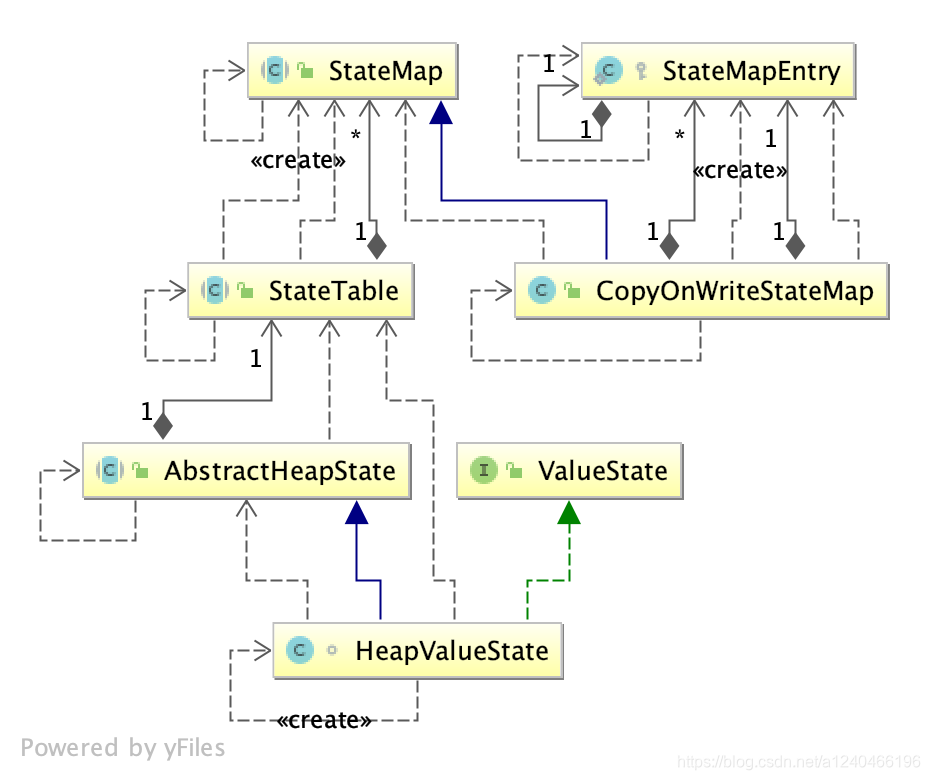
核心的数据结构如下图: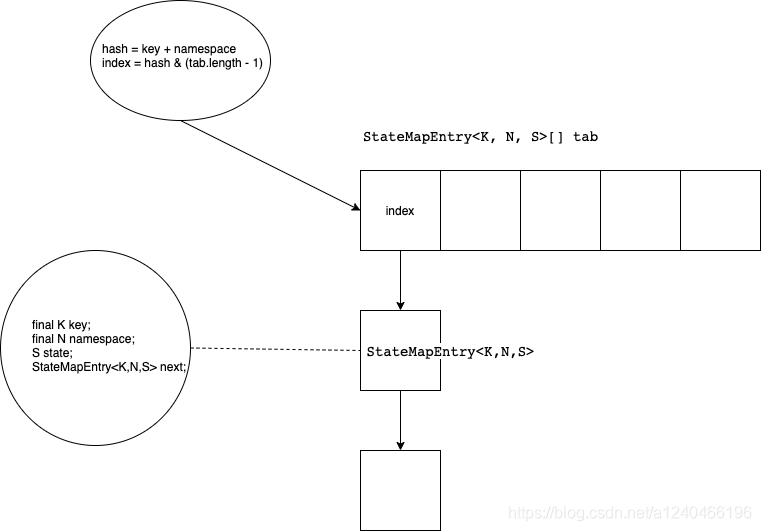
3.2 Value方法
分析ValueState#update方法后,再理解ValueState#value方法就轻松很多了
class HeapValueState<K, N, V>
	extends AbstractHeapState<K, N, V>
	implements InternalValueState<K, N, V> {

	/** The current namespace, which the access methods will refer to. */
	protected N currentNamespace;

	@Override
	public V value() {
	    // 上下文中获取namespace
		final V result = stateTable.get(currentNamespace);

		if (result == null) {
			return getDefaultValue();
		}

		return result;
	}
}
public abstract class StateTable<K, N, S>
	implements StateSnapshotRestore, Iterable<StateEntry<K, N, S>> {
	public S get(N namespace) {
		return get(keyContext.getCurrentKey(), keyContext.getCurrentKeyGroupIndex(), namespace);
	}

	private S get(K key, int keyGroupIndex, N namespace) {
		checkKeyNamespacePreconditions(key, namespace);

		StateMap<K, N, S> stateMap = getMapForKeyGroup(keyGroupIndex);

		if (stateMap == null) {
			return null;
		}

		return stateMap.get(key, namespace);
	}
}
public class CopyOnWriteStateMap<K, N, S> extends StateMap<K, N, S> {
	@Override
	public S get(K key, N namespace) {
        // 根据key+namespace计算hash
		final int hash = computeHashForOperationAndDoIncrementalRehash(key, namespace);
		final int requiredVersion = highestRequiredSnapshotVersion;
		// 最终存储StateMapEntry对象的数组
		final StateMapEntry<K, N, S>[] tab = selectActiveTable(hash);
		int index = hash & (tab.length - 1);
		// 遍历链表,然后根据key+namespace+hash寻找StateMapEntry对象,可以理解为hashmap中的重写eqauls方法
		for (StateMapEntry<K, N, S> e = tab[index]; e != null; e = e.next) {
			final K eKey = e.key;
			final N eNamespace = e.namespace;
			if ((e.hash == hash && key.equals(eKey) && namespace.equals(eNamespace))) {

				// copy-on-write check for state
				if (e.stateVersion < requiredVersion) {
					// copy-on-write check for entry
					if (e.entryVersion < requiredVersion) {
						e = handleChainedEntryCopyOnWrite(tab, hash & (tab.length - 1), e);
					}
					e.stateVersion = stateMapVersion;
					e.state = getStateSerializer().copy(e.state);
				}

				return e.state;
			}
		}
		return null;
	}
}
由此可见,哈希表/散列表在计算机世界的应用,真是无处不在。
版权声明:本文为a1240466196原创文章,遵循CC 4.0 BY-SA版权协议,转载请附上原文出处链接和本声明。