1、adb shell
(1)进入到shell,可以进行设备信息管理、查看等操作。
(2)有些命令的执行需要root权限,所以如果执行失败请确认设备是否执行了root操作。
# - -root
$ -- 普通用户
2、adb remount
将设备修改为可读可写。
3、adb pull 源路径 目的路径
(1)将文件从设备copy 到电脑
(2)使用前最好先执行adb remount
(3)使用举例:
	adb pull system/lib64/libwakeup_engine_jni.so C:\Users\z00017938\Desktop\qcom_wakeeup_so
4、adb push 源路径 目的路径
(1)将文件从电脑copy 到设备
(2)使用前最好先执行adb remount操作
(3)使用举例:
	adb push  C:\Users\z00017938\Desktop\qcom_wakeeup_so system/lib64/
5、adb reboot
重启设备
adb shell reboot -p ---->关机命令
6、adb -s device1 reboot
如果一台电脑连接多台手机,具体指定哪台手机重启需要指定设备号,device1--设备号
7、查看android版本:
adb shell getprop ro.build.version.release
8、查看sdk版本:
adb shell getprop ro.build.version.sdk
9、打印 apk 的路径
adb shell pm path <package>
10、清除应用缓存
adb shell pm clear <package>
11、adb logcat
adb logcat [options] [filter-specs]
//将log信息直接输出到屏幕
当然可以像 Android Studio 一样只打印固定的日志
adb logcat *:V    lowest priority, filter to only show Verbose level
adb logcat *:D    filter to only show Debug level
adb logcat *:I     filter to only show Info level
adb logcat *:W   filter to only show Warning level
adb logcat *:E    filter to only show Error level
adb logcat *:F    filter to only show Fatal level
adb logcat *:S   Silent, highest priority, on which nothing is ever printed

//将log输出到特定的文件中
adb logcat *:I >C:\Users\z00017938\Desktop\log\log_I.log

adb logcat -b <Buffer>
adb logcat -b radio View the buffer that contains radio/telephony related messages.
adb logcat -b event View the buffer containing events-related messages.
adb logcat -b main default
adb logcat -c Clears the entire log and exits.
adb logcat -d Dumps the log to the screen and exits.
adb logcat -f test.logs Writes log message output to test.logs .
adb logcat -g Prints the size of the specified log buffer and exits.
adb logcat -n <count> *Sets the maximum number of rotated logs to <count>. *
12、adb shell getprop
获取 Android 系统服务属性
13、adb shell setprop
设置服务属性
14、adb install 命令,安装apk
adb install D:\7263_KUTO_VPN_v2.1.8.apk
15、getprop命令
adb shell getprop 属性名
adb shell getprop ro.build.model
adb shell getprop ro.build.brand
adb shell getprop ro.build.board
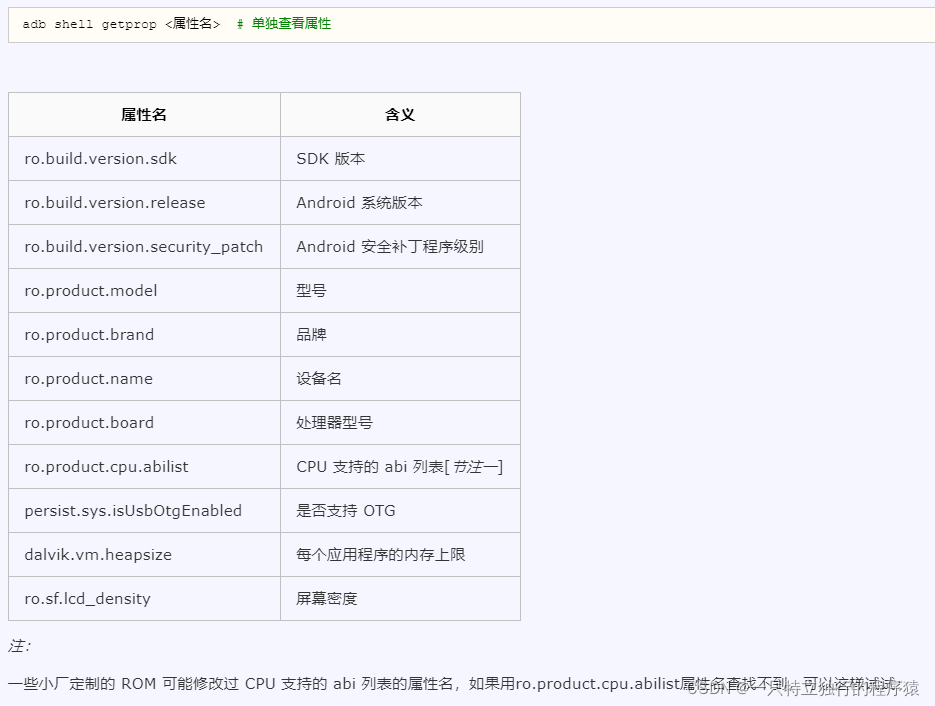
16、查询指定文件所在路径 : pm
pm path com.huawei.vassistant
17、adb shell watchprops
在Android系统中,使用watchprops命令来监听系统属性的变化,在此期间,如果系统的属性发生变化则将变化的值显示出来。
注:后续开发过程中,如果遇到其他新的adb命令,会及时在这更新!