1. 防火墙: 关闭 – 禁止自启 – 查看状态
[root@hadoop01 ~]# systemctl stop firewalld
[root@hadoop01 ~]# systemctl disable firewalld
[root@hadoop01 ~]# systemctl status firewalld
  firewalld.service - firewalld - dynamic firewall daemon
   Loaded: loaded (/usr/lib/systemd/system/firewalld.service; disabled; vendor preset: enabled)
   Active: inactive (dead)
     Docs: man:firewalld(1)
2. 禁用 selinux
打开文件,设置 SELINUX = disabled
[root@hadoop01 ~]# vim /etc/selinux/config

[root@hadoop01 ~]# cat /etc/selinux/config

# This file controls the state of SELinux on the system.
# SELINUX= can take one of these three values:
#     enforcing - SELinux security policy is enforced.
#     permissive - SELinux prints warnings instead of enforcing.
#     disabled - No SELinux policy is loaded.
SELINUX=disabled
# SELINUXTYPE= can take one of three values:
#     targeted - Targeted processes are protected,
#     minimum - Modification of targeted policy. Only selected processes are protected.
#     mls - Multi Level Security protection.
SELINUXTYPE=targeted
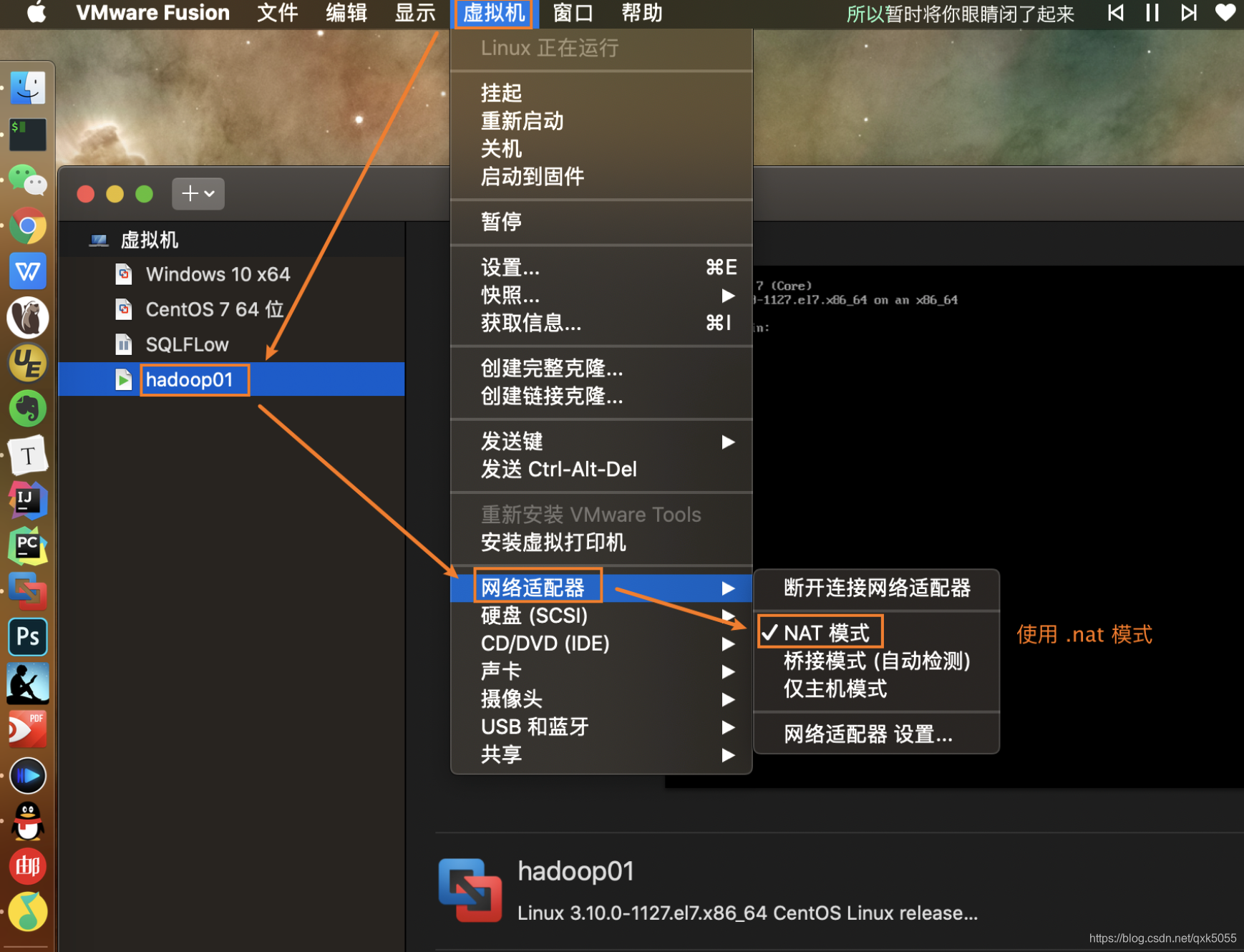
3. VM 虚拟机使用 .nat 模式
4. Mac 本地查找 dhcpd.conf 可得到静态 ip 可设置范围:
range 192.168.229.128 192.168.229.254;
这是虚拟机允许选择的静态ip地址范围, 自定义的静态ip地址必须要在这个范围内!
➜  ~ cd /Library/Preferences/VMware\ Fusion/vmnet8
➜  vmnet8 ls
dhcpd.conf     dhcpd.conf.bak     nat.conf       nat.conf.bak   nat.mac
➜  vmnet8 cat dhcpd.conf
# Configuration file for ISC 2.0 vmnet-dhcpd operating on vmnet8.
#
# This file was automatically generated by the VMware configuration program.
# See Instructions below if you want to modify it.
#
# We set domain-name-servers to make some DHCP clients happy
# (dhclient as configured in SuSE, TurboLinux, etc.).
# We also supply a domain name to make pump (Red Hat 6.x) happy.
#

###### VMNET DHCP Configuration. Start of "DO NOT MODIFY SECTION" #####
# Modification Instructions: This section of the configuration file contains
# information generated by the configuration program. Do not modify this
# section.
# You are free to modify everything else. Also, this section must start
# on a new line
# This file will get backed up with a different name in the same directory
# if this section is edited and you try to configure DHCP again.

# Written at: 10/25/2020 17:05:08
allow unknown-clients;
default-lease-time 1800;                # default is 30 minutes
max-lease-time 7200;                    # default is 2 hours

subnet 192.168.229.0 netmask 255.255.255.0 {
	range 192.168.229.128 192.168.229.254;
	option broadcast-address 192.168.229.255;
	option domain-name-servers 192.168.229.2;
	option domain-name localdomain;
	default-lease-time 1800;                # default is 30 minutes
	max-lease-time 7200;                    # default is 2 hours
	option netbios-name-servers 192.168.229.2;
	option routers 192.168.229.2;
}
host vmnet8 {
	hardware ethernet 00:50:56:C0:00:08;
	fixed-address 192.168.229.1;
	option domain-name-servers 0.0.0.0;
	option domain-name "";
	option routers 0.0.0.0;
}
####### VMNET DHCP Configuration. End of "DO NOT MODIFY SECTION" #######
5. Mac 本地查找 nat.conf 获得 VMnet8 的 ip 和 netmask
VMnet8 ip: 本机网关地址 ip = 192.168.229.2
VMnet8 netmask: 子网掩码 netmask = 255.255.255.0
➜  vmnet8 cat nat.conf
# VMware NAT configuration file
# Manual editing of this file is not recommended. Using UI is preferred.

[host]

# Use MacOS network virtualization API
useMacosVmnetVirtApi = 0

# NAT gateway address
ip = 192.168.229.2
netmask = 255.255.255.0

# Last DHCP address
lastDhcpAddress =

# VMnet device if not specified on command line
device = vmnet8

# Allow PORT/EPRT FTP commands (they need incoming TCP stream ...)
activeFTP = 1

# Allows the source to have any OUI.  Turn this on if you change the OUI
# in the MAC address of your virtual machines.
allowAnyOUI = 1

# Controls if (TCP) connections should be reset when the adapter they are
# bound to goes down
resetConnectionOnLinkDown = 1

# Controls if (TCP) connection should be reset when guest packet's destination
# is NAT's IP address
resetConnectionOnDestLocalHost = 1

# Controls if enable nat ipv6
natIp6Enable = 0

# Controls if enable nat ipv6
natIp6Prefix = fd15:4ba5:5a2b:1008::/64

[tcp]

# Value of timeout in TCP TIME_WAIT state, in seconds
timeWaitTimeout = 30

[udp]

# Timeout in seconds. Dynamically-created UDP mappings will purged if
# idle for this duration of time 0 = no timeout, default = 60; real
# value might be up to 100% longer
timeout = 60

[netbios]
# Timeout for NBNS queries.
nbnsTimeout = 2

# Number of retries for each NBNS query.
nbnsRetries = 3

# Timeout for NBDS queries.
nbdsTimeout = 3

[incomingtcp]

# Use these with care - anyone can enter into your VM through these...
# The format and example are as follows:
#<external port number> = <VM's IP address>:<VM's port number>
#8080 = 172.16.3.128:80

[incomingudp]

# UDP port forwarding example
#6000 = 172.16.3.0:6001
6. 打开 centos 7 服务器, 修改网络配置文件
[root@hadoop01 ~]# vim /etc/sysconfig/network-scripts/ifcfg-ens33

TYPE="Ethernet"
PROXY_METHOD="none"
BROWSER_ONLY="no"
BOOTPROTO="static"
DEFROUTE="yes"
IPV4_FAILURE_FATAL="no"
IPV6INIT="yes"
IPV6_AUTOCONF="yes"
IPV6_DEFROUTE="yes"
IPV6_FAILURE_FATAL="no"
IPV6_ADDR_GEN_MODE="stable-privacy"
NAME="ens33"
UUID="1f5342e9-4232-4ba7-ae39-f51f5bf212b7"
DEVICE="ens33"
ONBOOT="yes"
IPADDR="192.168.229.151"
NETMASK="255.255.255.0"
GATEWAY="192.168.229.2"
DNS1="8.8.8.8"
DNS2="114.114.114.114"
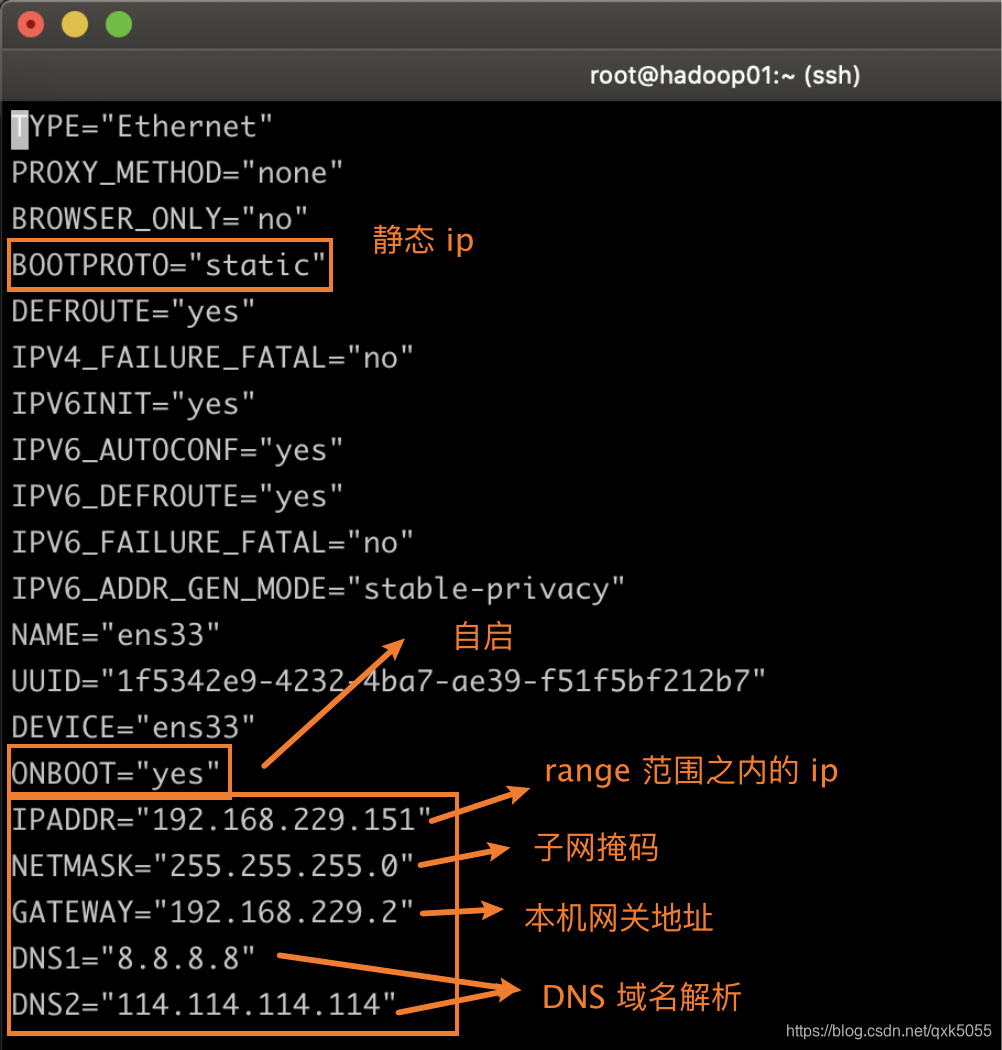
完成后重启网络服务即可
systemctl restart network
版权声明:本文为qxk5055原创文章,遵循CC 4.0 BY-SA版权协议,转载请附上原文出处链接和本声明。