1、背景:Spring配置文件需要通过context:property-placeholder标签或者PropertyPlaceholderConfigurer类来引入classpath路径下的properties文件,示例如下:
<context:property-placeholder location="classpath:jdbc.properties" /><bean class="org.springframework.beans.factory.config.PropertyPlaceholderConfigurer">
<property name="locations" value="classpath:jdbc.properties"/>
</bean>但像数据库配置这种随环境变化的文件我们并不想打到war中,而是希望引入war包外的文件。
2、方案:context:property-placeholder标签的location属性还提供了file:、http:和ftp:三种前缀,分别通过文件路径、HTTP资源和FTP资源引入文件,详见Spring官方文档。同时Spring支持#{systemProperties['config.location']}EL表达式,来引入自定义的系统变量config.location,详见Spring官方文档。
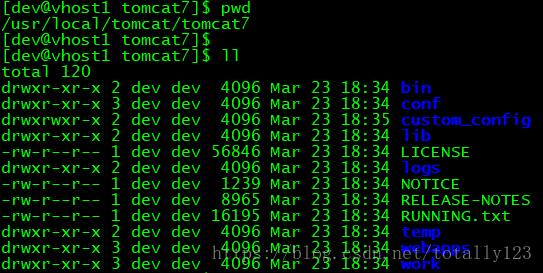
3、示例:我的数据库配置放到了Tomcat工作目录的自定义目录custom_config下,名为jdbc.properties,通过自定义Listener将custom_config的绝对路径写到系统变量中,然后在Spring配置文件通过file:前缀和#{systemProperties['config.location']}来找到jdbc.properties。
public class ConfigLocationListener implements ServletContextListener {
    private static Logger log = LoggerFactory.getLogger(ConfigLocationListener.class);

    @Override
    public void contextInitialized(ServletContextEvent arg0) {
        log.info("init begin");

        // 设置配置文件路径
        String configFilePath = System.getProperty("catalina.home") + "/custom_config/";

        // 设置配置文件路径的系统变量
        System.setProperty("config.location", configFilePath);

        log.info("init end");
    }

    @Override
    public void contextDestroyed(ServletContextEvent arg0) {
        log.info("destroy begin");
        log.info("destroy end");
    }

}
<beans xmlns="http://www.springframework.org/schema/beans"
       xmlns:xsi="http://www.w3.org/2001/XMLSchema-instance"
       xmlns:context="http://www.springframework.org/schema/context"
       xsi:schemaLocation="http://www.springframework.org/schema/beans
    http://www.springframework.org/schema/beans/spring-beans-4.3.xsd
    http://www.springframework.org/schema/context
    http://www.springframework.org/schema/context/spring-context-4.3.xsd">

    <context:property-placeholder location="file:#{systemProperties['config.location']}jdbc.properties" />

    ... ...

</beans>版权声明:本文为totally123原创文章,遵循CC 4.0 BY-SA版权协议,转载请附上原文出处链接和本声明。