项目场景:
使用uniapp开发移动端小程序的时候,再安卓机上出现了一个小bug,用户在上传照片的时候,部分安卓机会自动旋转90度
注意事项,此项尤为重要!!!
在借助exif.js时,缩略图获取不到额外属性,也不会出现无故旋转的问题,安卓不勾选上传原图就不会出现此问题!若是非要上传原图将自动旋转复原,在测试时要注意自己的测试照片是否是缩略图,缩略图图片状态是unidefind!
可以在http://www.wetools.com/exif/上查看自己照片是否拥有额外属性
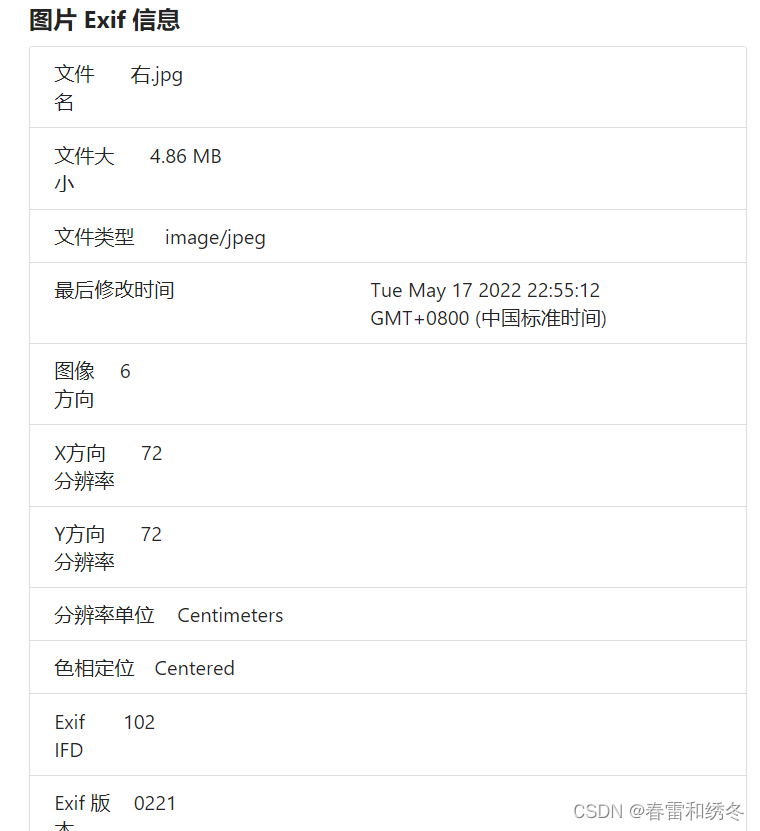
解决方案
借助exif.js来给他设定样式旋转回去-只针对于h5的情况来处理,app需要参考h5来旋转都是一样的
首先使用npm安装
npm install exif-js --save
建议单独写个js来引用,这里我没用canvas来渲染解决,直接拿到照片当前状态信息返回,利用css3的旋转transform:rotate()来解决
imageUtils.js 你自己的js引用文件这里我们return出去当前照片的状态
/**
 *  imageUtil.js
 *解决图片旋转的问题
 *使用同步方式来解决
 * **/

import EXIF from "exif-js"

async function compressImage(path) {
  console.log(path) // 上传图片返回的地址
  let imageInfo = await getImageInfo(path)
  let systemInfo = await getSystemInfo()
  console.log(imageInfo)
  return new Promise(function (resolve, reject) {
    // #ifdef APP-PLUS || APP-NVUE
    appCompressImage(path, imageInfo)
      .then((res) => {
        resolve(res)
      })
      .catch((e) => {
        reject(e)
      })
    // #endif

    // #ifdef H5
    let orientation = 1
    let img = document.createElement("img")
    img.src = path
    console.log(img)
    img.onload = function () {
      EXIF.getData(img, function () {
        orientation = EXIF.getTag(this, "Orientation")
        console.log(orientation) // 关键!将当前照片状态resolve出去
        resolve(orientation)
      })
    }
    img.onerror = function () {
      reject(path)
    }
    // #endif
  })
}
在你的上传文件组件使用
import compressImage from "@/api/imgageUtils.js"

// 写一个方法来根据你上传图片的返回来分别调用,有几张照片就调用几次,我是循环上传图片所以这里不是循环
async compressImages(path) {
// res就是你照片的状态,数字代表你所需要旋转的角度,newpathlist是我存放每张照片所需旋转角度的数组
      const res = await compressImage(path)
      if (res === 1) {
        this.newpathlist.push("rotate(0deg)")
      } else if (res === 3) {
        this.newpathlist.push("rotate(180deg)")
      } else if (res === 6) {
        this.newpathlist.push("rotate(90deg)")
      } else if (res === 8) {
        this.newpathlist.push("rotate(270deg)")
      }
    },
调用你的compressImages方法,在上传照片的回调当中
uni.uploadFile({
   url: apiUrl,
   file: PATH,
   name: "file",
   header: {
     userName: "123",
   },
   success: (uploadFileRes) => {
     console.log("上传成功返回", uploadFileRes)
     // debugger
     if (JSON.parse(uploadFileRes.data).success) {
       let path = JSON.parse(uploadFileRes.data).result
       // pathlist存放当前上传了多少照片
       this.pathlist.push(path.url)
       // 调用方法计算照片需要调整的角度
       this.compressImages(path.url)
       // 将上传的照片emit到父组件,提交表单使用
       this.$emit("imgUploads", path.url)
     }
   },
 })
在你的照片回显列表来一一取出照片地址跟所需旋转角度做展示
<view
   class="bg-img"
    v-for="(item, index) in pathlist"
    :key="index"
    @tap="ViewImage"
    :data-url="pathlist[index]"
  >
    <image
      :style="{
        transform: newpathlist[index], // 取出旋转角度来给每张照片设置旋转度数
      }"
      :src="imgList[index]" //设置照片url显示照片
    ></image>
    // 这里触发照片的删除事件
    <view
      class="cu-tag bg-red"
      @tap.stop="DelImg"
      :data-index="index"
      v-if="isDisable === 'N'"
    >
      <text class="cuIcon-close"></text>
    </view>
  </view>
删除某张照片,会自动一一对应
DelImg(e) {
   uni.showModal({
      title: "提示",
      content: "确认要删除吗",
      cancelText: "取消",
      confirmText: "确认",
      success: (res) => {
        if (res.confirm) {
        // 删除本身存储,旋转角度对应的index,传递给父级删除事件删除对应照片
          this.pathlist.splice(e.currentTarget.dataset.index, 1)
          this.newpathlist.splice(e.currentTarget.dataset.index, 1)
          this.$emit("delete", e.currentTarget.dataset.index)
        }
      },
    })
  },
总结:
移动端还是有部分坑的,经过研究发现,ios会自动帮你转回照片,所以ios只有6/8两种照片状态,安卓不会,所以在写移动端上传照片之类的要多测,原图跟缩略图也有很大的区别
版权声明:本文为weixin_54772932原创文章,遵循CC 4.0 BY-SA版权协议,转载请附上原文出处链接和本声明。