1.父子组件之间通信的3种方式
- 属性绑定
用于父组件向子组件指定属性设置数据,仅能设置json兼容的数据
- 事件绑定
用于子组件向父组件传递数据,可以传递任意数据
- 获取组件实例
父组件还可以通过this.selecteComponent()获取子组件实例对象
这样就可以直接访问子组件中的任意数据和方法
2.属性绑定
属性绑定用于实现父向子传值,而且只能传递普通类型的数据,无法将方法传递给子组件。
//父组件的data节点
 data: {
        count:9
    },

//父组件的wxml结构
<test2  count="{{count}}">
<button size="mini" slot="before">点击</button>
<input type="text" slot="after" style="background-color:rgb(112, 211, 211);"/>
</test2>

//使用
//子组件的properties节点
 properties: {
        count:{
            type:Number,
            value:0
        }
    },

//子组件的wxml结构
<view>
<slot name="before"></slot>
<view>这是分割线——————————————————******</view>
<slot name="after"></slot>
<view>{{count}}</view>//使用
</view>
3.事件绑定
事件绑定用于实现子向父传值,可以传递任何类型的数据,使用步骤如下:

//步骤一
 syncCount(){
        console.log(' syncCount')
    },

//步骤二:
<test2  count="{{count}}" bind:sync="syncCount">
<button size="mini" slot="before">点击</button>
<input type="text" slot="after" style="background-color:rgb(112, 211, 211);"/>
</test2>


//步骤三
//组件wxml
<button type="primary" bindtap="addCount">+1</button>

//组件js
addCount(){
            this.setData({
                count:this.properties.count+1
            })
            this.triggerEvent('sync',{value:this.properties.count})
        }
    }

//步骤四
  syncCount(e){
        this.setData({
            count:e.detail.value
        })
    },
4.获取组件实例
可在父组件里调用this.selectComponent("class或id选择器"),获取子组件的实例对象,从而直接访问子组件的任意数据和方法。调用时需要传入一个选择器,例如 this.selectComponent(".my-component")
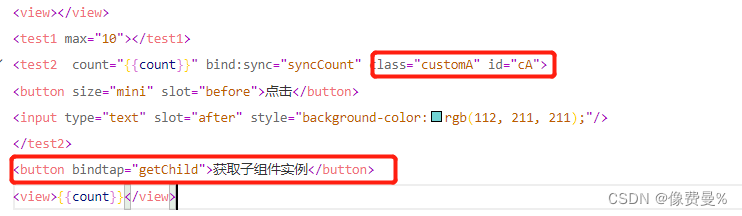
//父组件js
  getChild(){
        const child = this.selectComponent('.customA')
        // console.log(child)
        child.setData({
            count:child.properties.count+1//调用子组件的setData方法
        })
        child.addCount()//调用子组件的addCount方法
    },
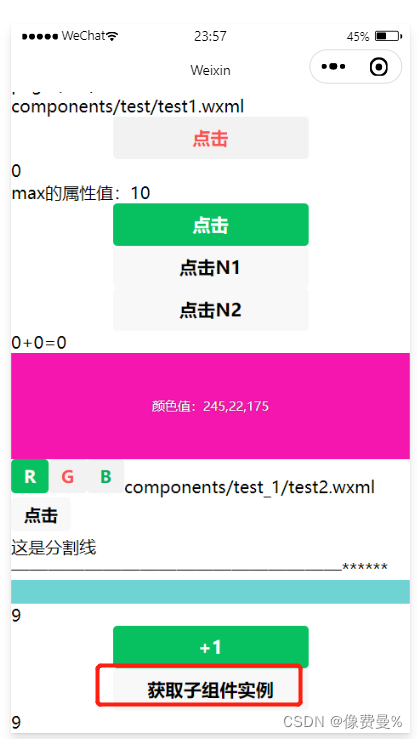
代码结果:
版权声明:本文为weixin_53052268原创文章,遵循CC 4.0 BY-SA版权协议,转载请附上原文出处链接和本声明。