Sentinel 介绍
随着微服务的流行,服务和服务之间的稳定性变得越来越重要。 Sentinel 以流量为切入点,从流量控制、熔断降级、系统负载保护等多个维度保护服务的稳定性。
Sentinel 具有以下特征:
丰富的应用场景: Sentinel 承接了阿里巴巴近 10 年的双十一大促流量的核心场景,例如秒杀(即突发流量控制在系统容量可以承受的范围)、消息削峰填谷、实时熔断下游不可用应用等。
完备的实时监控: Sentinel 同时提供实时的监控功能。您可以在控制台中看到接入应用的单台机器秒级数据,甚至 500 台以下规模的集群的汇总运行情况。
广泛的开源生态: Sentinel 提供开箱即用的与其它开源框架/库的整合模块,例如与 Spring Cloud、Dubbo、gRPC 的整合。您只需要引入相应的依赖并进行简单的配置即可快速地接入 Sentinel。
完善的 SPI 扩展点: Sentinel 提供简单易用、完善的 SPI 扩展点。您可以通过实现扩展点,快速的定制逻辑。例如定制规则管理、适配数据源等。
1、下载Sentinel服务端jar
访问:https://github.com/alibaba/Sentinel/releases 下载 sentinel-dashboard-1.6.0.jar
2、启动Sentinel服务端后台管理
执行命令:java -Dserver.port=8082 -jar sentinel-dashboard-1.6.0.jar 默认8080端口3、访问 localhost:8082
默认登录用户:sentinel
       pwd:sentinel
4、创建项目springboot-sentinel添加sentinel的pom依赖
<?xml version="1.0" encoding="UTF-8"?>
<project xmlns="http://maven.apache.org/POM/4.0.0" xmlns:xsi="http://www.w3.org/2001/XMLSchema-instance"
         xsi:schemaLocation="http://maven.apache.org/POM/4.0.0 http://maven.apache.org/xsd/maven-4.0.0.xsd">
    <modelVersion>4.0.0</modelVersion>
    <parent>
        <groupId>org.springframework.boot</groupId>
        <artifactId>spring-boot-starter-parent</artifactId>
        <version>2.1.4.RELEASE</version>
        <relativePath/> <!-- lookup parent from repository -->
    </parent>
    <groupId>com.willow</groupId>
    <artifactId>springboot-sentinel</artifactId>
    <version>0.0.1-SNAPSHOT</version>
    <name>springboot-sentinel</name>
    <description>springboot-sentinel</description>

    <properties>
        <java.version>1.8</java.version>
    </properties>

    <dependencies>
        <dependency>
            <groupId>org.springframework.boot</groupId>
            <artifactId>spring-boot-starter</artifactId>
        </dependency>


        <dependency>
            <groupId>org.springframework.cloud</groupId>
            <artifactId>spring-cloud-starter-alibaba-sentinel</artifactId>
            <version>0.2.0.RELEASE</version>
        </dependency>

        <dependency>
            <groupId>org.springframework.boot</groupId>
            <artifactId>spring-boot-starter-web</artifactId>
        </dependency>
    </dependencies>

    <build>
        <plugins>
            <plugin>
                <groupId>org.springframework.boot</groupId>
                <artifactId>spring-boot-maven-plugin</artifactId>
            </plugin>
        </plugins>
    </build>

</project>
5、springboot-sentinel项目中properties添加配置
  server.port=8081
  spring.application.name=sentine
  # sentinel-dashboard-1.6.0 的访问路径 ,启动方式java -jar sentinel-dashboard-1.6.0.jar
  spring.cloud.sentinel.transport.dashboard=localhost:8082
  #取消Sentinel控制台懒加载
  spring.cloud.sentinel.eager=true
6、springboot-sentinel项目添加controller测试限流
   /**
     * @Auther: willow
     * @Date: 2019/5/7 17:42
     * @Description:
     */
    @Controller
    public class SentinelController {
        @RequestMapping("/sentinel")
        @ResponseBody
        public String sentinel(){
            return "sentinel ....";
        }
    }
7、启动创建的springboot-sentinel项目
访问项目路径 http://localhost:8081/sentinel
访问sentinel管理后台 http://localhost:8082/ 如图 ,可以看到已经记录/sentinel路径访问一次了
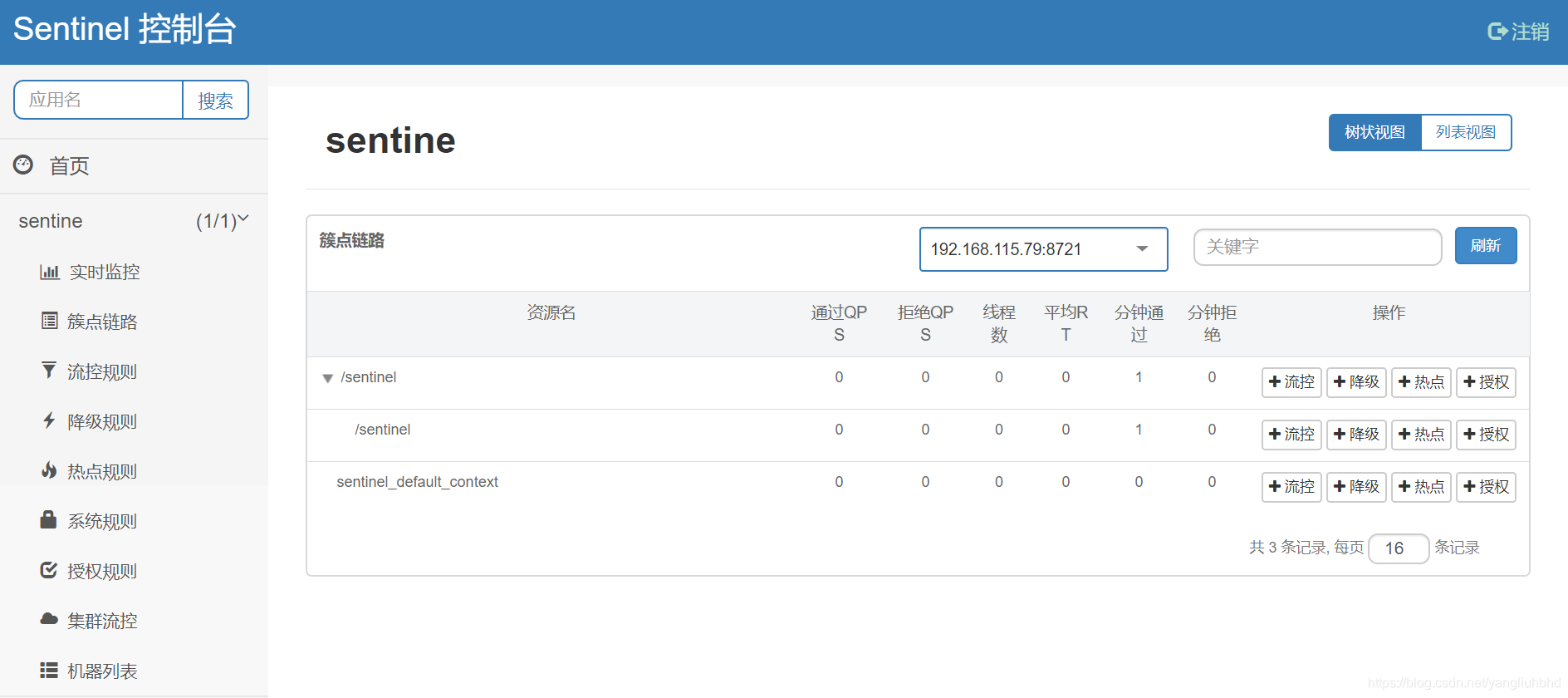
点击流控设置QPS为2
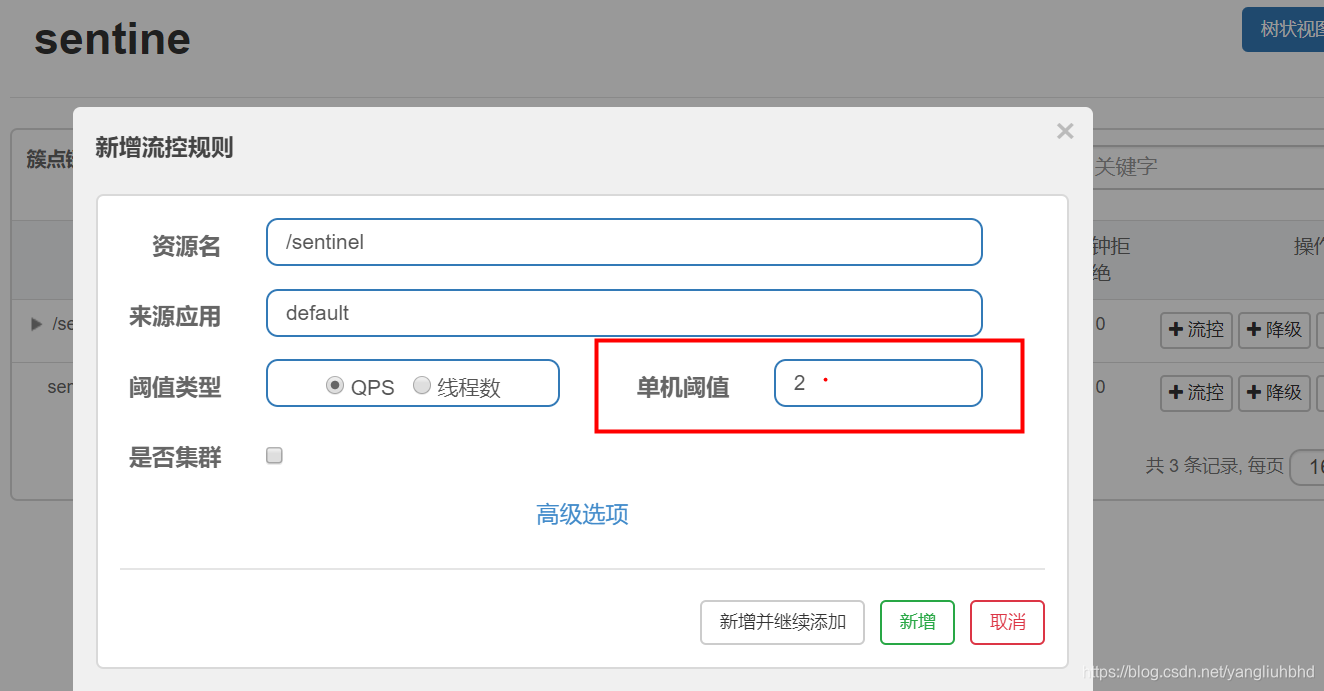
多次连续点击访问:http://localhost:8081/sentinel
每秒的前2次返回数据正常,后面可以看到浏览器返回:
Blocked by Sentinel (flow limiting)版权声明:本文为yangliuhbhd原创文章,遵循CC 4.0 BY-SA版权协议,转载请附上原文出处链接和本声明。