参考:https://kubernetes.github.io/
典型使用方式http和https
apiVersion: networking.k8s.io/v1beta1
kind: Ingress
metadata:
  annotations:
    nginx.ingress.kubernetes.io/proxy-body-size: "0"
    nginx.ingress.kubernetes.io/proxy-read-timeout: "600"
    nginx.ingress.kubernetes.io/proxy-send-timeout: "600"
  name: docker-registry
  namespace: docker-registry
spec:
  rules:
  - host: registry.<your domain>
    http:
      paths:
      - backend:
          serviceName: docker-registry
          servicePort: 5000
        path: /
---
apiVersion: networking.k8s.io/v1beta1
kind: Ingress
metadata:
  annotations:
    nginx.ingress.kubernetes.io/proxy-body-size: "0"
    nginx.ingress.kubernetes.io/proxy-read-timeout: "600"
    nginx.ingress.kubernetes.io/proxy-send-timeout: "600"
    kubernetes.io/tls-acme: 'true'
  name: docker-registry
  namespace: docker-registry
spec:
  tls:
  - hosts:
    - registry.<your domain>
    secretName: registry-tls
  rules:
  - host: registry.<your domain>
    http:
      paths:
      - backend:
          serviceName: docker-registry
          servicePort: 5000
        path: /
后端服务为https
相关的注解说明
Backend Certificate Authentication
It is possible to authenticate to a proxied HTTPS backend with certificate using additional annotations in Ingress Rule.
nginx.ingress.kubernetes.io/proxy-ssl-secret: secretName: Specifies a Secret with the certificatetls.crt, keytls.keyin PEM format used for authentication to a proxied HTTPS server. It should also contain trusted CA certificatesca.crtin PEM format used to verify the certificate of the proxied HTTPS server. This annotation expects the Secret name in the form "namespace/secretName".nginx.ingress.kubernetes.io/proxy-ssl-verify: Enables or disables verification of the proxied HTTPS server certificate. (default: off)nginx.ingress.kubernetes.io/proxy-ssl-verify-depth: Sets the verification depth in the proxied HTTPS server certificates chain. (default: 1)nginx.ingress.kubernetes.io/proxy-ssl-ciphers: Specifies the enabled ciphers for requests to a proxied HTTPS server. The ciphers are specified in the format understood by the OpenSSL library.nginx.ingress.kubernetes.io/proxy-ssl-name: Allows to set proxy_ssl_name. This allows overriding the server name used to verify the certificate of the proxied HTTPS server. This value is also passed through SNI when a connection is established to the proxied HTTPS server.nginx.ingress.kubernetes.io/proxy-ssl-protocols: Enables the specified protocols for requests to a proxied HTTPS server.nginx.ingress.kubernetes.io/proxy-ssl-server-name: Enables passing of the server name through TLS Server Name Indication extension (SNI, RFC 6066) when establishing a connection with the proxied HTTPS server.
Backend Protocol
Using backend-protocol annotations is possible to indicate how NGINX should communicate with the backend service. (Replaces secure-backends in older versions) Valid Values: HTTP, HTTPS, GRPC, GRPCS, AJP and FCGI
By default NGINX uses HTTP.
Example:
- nginx.ingress.kubernetes.io/backend-protocol: "HTTPS"
- nginx.ingress.kubernetes.io/backend-protocol: "GRPC"
# 通过ingress暴露kubernetes-dashboard服务
---
apiVersion: extensions/v1beta1
kind: Ingress
metadata:
  name: ingress-kube-dashboard
  annotations:
    nginx.ingress.kubernetes.io/backend-protocol: "HTTPS"
spec:
  tls:
    - hosts:
        - dashboard.xx.cn
      secretName: ssl-dashboard
  rules:
    - host: dashboard.xx.cn
      http:
        paths:
          - path: /
            backend:
              serviceName: kubernetes-dashboard
              servicePort: 443
路由grpc
nginx.ingress.kubernetes.io/backend-protocol: "GRPC"
代理tcp和udp
默认ingress是不支持tcp和udp服务的,但可以通过configmap文件配置ingress-nginx代理tcp和udp服务
其中tcp使用名称为tcp-services的configmap,对应udp为udp-services,启动参数有具体的定义:
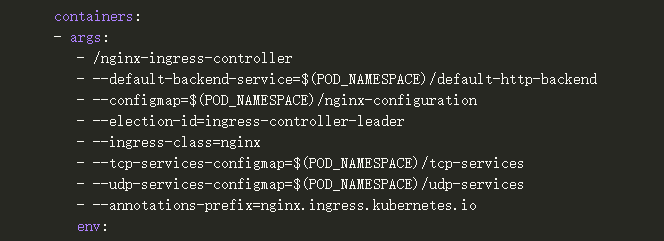
内容定义格式为:<namespace/service name>:<service port>:[PROXY]:[PROXY]
注意:只能定义到ingress-nginx部署的命名空间下
apiVersion: v1
kind: ConfigMap
metadata:
  name: tcp-services                                            # 代理tcp服务
  namespace: ingress-nginx
data:
  9000: "default/example-go:8080"         # 使用ingress-nginx 9000端口代理default命名空间下端口为8080的服务example-go
---
apiVersion: v1
kind: ConfigMap
metadata:
  name: udp-services                                            # 代理udp服务
  namespace: ingress-nginx
data:
  53: "kube-system/kube-dns:53"                     # 使用ingress-nginx53端口代理kube-system命名空间下端口为53的服务kube-dns
当配置了tcp或者udp服务后,需要更新ingress-nginx的service,添加对应使用的端口
注意:如果ingress-nginx部署网络模式为hostnetwork模式下,则不需要配置,将自动监听宿主机端口
apiVersion: v1
kind: Service
metadata:
  name: ingress-nginx
  namespace: ingress-nginx
  labels:
    app.kubernetes.io/name: ingress-nginx
    app.kubernetes.io/part-of: ingress-nginx
spec:
  type: LoadBalancer
  ports:
    - name: http
      port: 80
      targetPort: 80
      protocol: TCP
    - name: https
      port: 443
      targetPort: 443
      protocol: TCP
    - name: proxied-tcp-9000
      port: 9000
      targetPort: 9000
      protocol: TCP
  selector:
    app.kubernetes.io/name: ingress-nginx
    app.kubernetes.io/part-of: ingress-nginx
重写请求rewrite
使用以下注释可控制重写:
| 名字 | 描述 | 值 |
| nginx.ingress.kubernetes.io/rewrite-target | 必须重定向流量的目标 URI | 字符串 |
| nginx.ingress.kubernetes.io/ssl-redirect | 仅指示位置部分是否仅可访问SSL(当入口包含证书时默认为真) | 布尔 |
| nginx.ingress.kubernetes.io/force-ssl-redirect | 即使入口未启用 TLS,也强制重定向到 HTTPS | 布尔 |
| nginx.ingress.kubernetes.io/app-root | 定义控制器在"/"上下文中必须重定向的应用根 | 字符串 |
| nginx.ingress.kubernetes.io/use-regex | 指示在入口上定义的路径是否使用常规表达式 | 布尔 |
# 使用重写注释创建入口规则:
apiVersion: networking.k8s.io/v1beta1
kind: Ingress
metadata:
  annotations:
    nginx.ingress.kubernetes.io/rewrite-target: /$2
  name: rewrite
  namespace: default
spec:
  rules:
  - host: rewrite.bar.com
    http:
      paths:
      - backend:
          serviceName: http-svc
          servicePort: 80
        path: /something(/|$)(.*)

# 在此入口定义中,捕获的任何字符将被分配给占位符,然后作为注释中的参数使用。
# (.*)$2rewrite-target
# 例如,上述入口定义将导致以下重写:
# rewrite.bar.com/something重写到rewrite.bar.com/
# rewrite.bar.com/something/重写到rewrite.bar.com/
# rewrite.bar.com/something/new重写到rewrite.bar.com/new
---
# 使用应用根注释创建入口规则:
apiVersion: networking.k8s.io/v1beta1
kind: Ingress
metadata:
  annotations:
    nginx.ingress.kubernetes.io/app-root: /app1
  name: approot
  namespace: default
spec:
  rules:
  - host: approot.bar.com
    http:
      paths:
      - backend:
          serviceName: http-svc
          servicePort: 80
        path: /
# 上述入口定义导致访问approot.bar.com/时,自动定向到approot.bar.com/app1/
正则表达式支持
作用域:spec.rules.http.paths.path
开启配置(默认为"false"):
annotations:
nginx.ingress.kubernetes.io/use-regex: "true"
apiVersion: networking.k8s.io/v1beta1
kind: Ingress
metadata:
  name: test-ingress
  annotations:
    nginx.ingress.kubernetes.io/use-regex: "true"
spec:
  rules:
  - host: test.com
    http:
      paths:
      - path: /foo/.*
        backend:
          serviceName: test
          servicePort: 80

# 等效于nginx下配置
location ~* "^/foo/.*" {
  ...
}
路径优先级,下面配置最终的匹配规则为:
test.com/foo/bar/1matches~* ^/foo/bar/.+and will go to service 3.test.com/foo/bar/matches~* ^/foo/bar/and will go to service 2.test.com/foo/barmatches~* ^/foo/barand will go to service 1.
apiVersion: networking.k8s.io/v1beta1
kind: Ingress
metadata:
  name: test-ingress-1
  annotations:
    nginx.ingress.kubernetes.io/use-regex: "true"
spec:
  rules:
  - host: test.com
    http:
      paths:
      - path: /foo/bar
        backend:
          serviceName: service1
          servicePort: 80
      - path: /foo/bar/
        backend:
          serviceName: service2
          servicePort: 80
---
apiVersion: networking.k8s.io/v1beta1
kind: Ingress
metadata:
  name: test-ingress-2
  annotations:
    nginx.ingress.kubernetes.io/rewrite-target: /$1
    nginx.ingress.kubernetes.io/use-regex: "true"
spec:
  rules:
  - host: test.com
    http:
      paths:
      - path: /foo/bar/(.+)
        backend:
          serviceName: service3
          servicePort: 80
# 等效于nginx下配置
location ~* ^/foo/bar/.+ {
  ...
}

location ~* "^/foo/bar/" {
  ...
}

location ~* "^/foo/bar" {
  ...
}
客户端地址
默认情况下NGINX使用报头X-Forwarded-For的内容作为获取客户端IP地址信息的真实来源
如果使用use-proxy-protocol: "true"配置开启代理协议,则不会使用头内容作为客户端IP地址,适合于ingress-nginx被4层代理
配置多个ingress-controller
正如通过storagecalss可以为pvc选择不同的存储,也可以通过ingressclass为ingress选择不同的ingress-controller
通过注解定义:kubernetes.io/ingress.class: "nginx"
metadata:
  name: foo
  annotations:
    kubernetes.io/ingress.class: "nginx"
---
metadata:
  name: foo
  annotations:
    kubernetes.io/ingress.class: "traefik"
SSL透传
通过配置--enable-ssl-passthrough命令选项开启SSl透传,默认禁用
注意:开启透传后将出现性能损失问题,以及一系列未知的其它问题。
This feature is implemented by intercepting all traffic on the configured HTTPS port (default: 443) and handing it over to a local TCP proxy. This bypasses NGINX completely and introduces a non-negligible performance penalty.
Session亲和力
Session affinity 通过如下注解的方式配置:
| Name | Description | Value |
| nginx.ingress.kubernetes.io/affinity | Type of the affinity, set this to cookie to enable session affinity | string (NGINX only supports cookie) |
| nginx.ingress.kubernetes.io/affinity-mode | The affinity mode defines how sticky a session is. Use balanced to redistribute some sessions when scaling pods or persistent for maximum stickiness. | balanced (default) or persistent |
| nginx.ingress.kubernetes.io/session-cookie-name | Name of the cookie that will be created | string (defaults to INGRESSCOOKIE) |
| nginx.ingress.kubernetes.io/session-cookie-path | Path that will be set on the cookie (required if your Ingress paths use regular expressions) | string (defaults to the currently matched path) |
| nginx.ingress.kubernetes.io/session-cookie-samesite | SameSite attribute to apply to the cookie | Browser accepted values are None, Lax, and Strict |
| nginx.ingress.kubernetes.io/session-cookie-conditional-samesite-none | Will omit SameSite=None attribute for older browsers which reject the more-recently defined SameSite=None value | "true" or "false" |
| nginx.ingress.kubernetes.io/session-cookie-max-age | Time until the cookie expires, corresponds to the Max-Age cookie directive | number of seconds |
| nginx.ingress.kubernetes.io/session-cookie-expires | Legacy version of the previous annotation for compatibility with older browsers, generates an Expires cookie directive by adding the seconds to the current date | number of seconds |
| nginx.ingress.kubernetes.io/session-cookie-change-on-failure | When set to false nginx ingress will send request to upstream pointed by sticky cookie even if previous attempt failed. When set to true and previous attempt failed, sticky cookie will be changed to point to another upstream. | true or false (defaults to false) |
apiVersion: networking.k8s.io/v1beta1
kind: Ingress
metadata:
  name: nginx-test
  annotations:
    nginx.ingress.kubernetes.io/affinity: "cookie"
    nginx.ingress.kubernetes.io/session-cookie-name: "route"
    nginx.ingress.kubernetes.io/session-cookie-expires: "172800"
    nginx.ingress.kubernetes.io/session-cookie-max-age: "172800"

spec:
  rules:
  - host: stickyingress.example.com
    http:
      paths:
      - backend:
          serviceName: http-svc
          servicePort: 80
        path: /
---

$ kubectl describe ing nginx-test
Name:           nginx-test
Namespace:      default
Address:
Default backend:    default-http-backend:80 (10.180.0.4:8080,10.240.0.2:8080)
Rules:
  Host                          Path    Backends
  ----                          ----    --------
  stickyingress.example.com
                                /        nginx-service:80 (<none>)
Annotations:
  affinity: cookie
  session-cookie-name:      INGRESSCOOKIE
  session-cookie-expires: 172800
  session-cookie-max-age: 172800
Events:
  FirstSeen LastSeen    Count   From                SubObjectPath   Type        Reason  Message
  --------- --------    -----   ----                -------------   --------    ------  -------
  7s        7s      1   {nginx-ingress-controller }         Normal      CREATE  default/nginx-test


$ curl -I http://stickyingress.example.com
HTTP/1.1 200 OK
Server: nginx/1.11.9
Date: Fri, 10 Feb 2017 14:11:12 GMT
Content-Type: text/html
Content-Length: 612
Connection: keep-alive
Set-Cookie: INGRESSCOOKIE=a9907b79b248140b56bb13723f72b67697baac3d; Expires=Sun, 12-Feb-17 14:11:12 GMT; Max-Age=172800; Path=/; HttpOnly
Last-Modified: Tue, 24 Jan 2017 14:02:19 GMT
ETag: "58875e6b-264"
Accept-Ranges: bytes
上述请求中可以看到,响应中包含一个在ingress配置中定义的"Set-Cookie"header,这个header是由ingress-nginx定义的,它包含了一个用于该请求的对上游服务的随机密钥"INGRESSCOOKIE"和一个过期期限"Expires"。
如果用户修改了此Cookie,ingress-nginx会创建新的Cookie并重新选择上游服务中的服务。
认证
Basic认证
# 通过htpasswd生成认证文件
$ htpasswd -c auth foo
New password: <bar>
New password:
Re-type new password:
Adding password for user foo
---

# 通过认证文件创建secret
$ kubectl create secret generic basic-auth --from-file=auth
secret "basic-auth" created

$ kubectl get secret basic-auth -o yaml
apiVersion: v1
data:
  auth: Zm9vOiRhcHIxJE9GRzNYeWJwJGNrTDBGSERBa29YWUlsSDkuY3lzVDAK
kind: Secret
metadata:
  name: basic-auth
  namespace: default
type: Opaque

---
# 创建带basci认证的ingress
apiVersion: networking.k8s.io/v1beta1
kind: Ingress
metadata:
  name: ingress-with-auth
  annotations:
    # type of authentication
    nginx.ingress.kubernetes.io/auth-type: basic
    # name of the secret that contains the user/password definitions
    nginx.ingress.kubernetes.io/auth-secret: basic-auth
    # message to display with an appropriate context why the authentication is required
    nginx.ingress.kubernetes.io/auth-realm: 'Authentication Required - foo'
spec:
  rules:
  - host: foo.bar.com
    http:
      paths:
      - path: /
        backend:
          serviceName: http-svc
          servicePort: 80
外部Basic认证
通过外部认证文件认证
apiVersion: networking.k8s.io/v1beta1
kind: Ingress
metadata:
  annotations:
    # 使用http服务中的passwd认证
    nginx.ingress.kubernetes.io/auth-url: https://httpbin.org/basic-auth/user/passwd
  name: external-auth
  namespace: default
spec:
  rules:
  - host: external-auth-01.sample.com
    http:
      paths:
      - backend:
          serviceName: http-svc
          servicePort: 80
        path: /
客户端证书认证
主要是通过ca证书来校验客户端证书
注意:证书加密要高于1024位,否则会报错
# 创建基于ca证书的secret
kubectl create secret generic ca-secret --from-file=ca.crt=ca.crt

---
# 创建ingress
apiVersion: networking.k8s.io/v1beta1
kind: Ingress
metadata:
  annotations:
    # Enable client certificate authentication
    nginx.ingress.kubernetes.io/auth-tls-verify-client: "on"
    # Create the secret containing the trusted ca certificates
    nginx.ingress.kubernetes.io/auth-tls-secret: "default/ca-secret"
    # Specify the verification depth in the client certificates chain
    nginx.ingress.kubernetes.io/auth-tls-verify-depth: "1"
    # Specify an error page to be redirected to verification errors
    nginx.ingress.kubernetes.io/auth-tls-error-page: "http://www.mysite.com/error-cert.html"
    # Specify if certificates are passed to upstream server
    nginx.ingress.kubernetes.io/auth-tls-pass-certificate-to-upstream: "true"
  name: nginx-test
  namespace: default
spec:
  rules:
  - host: mydomain.com
    http:
      paths:
      - backend:
          serviceName: http-svc
          servicePort: 80
        path: /
  tls:
  - hosts:
    - mydomain.com
    secretName: tls-secret
外部OAUTH认证
为服务添加oauth认证
下面以github的oauth为例,为dashboard服务创建认证,使用github账户登录访问dashboard
github上注册一个oauth应用认证,应用地址为应用的ingress地址,认证回调地址为auth代理服务ingress地址:
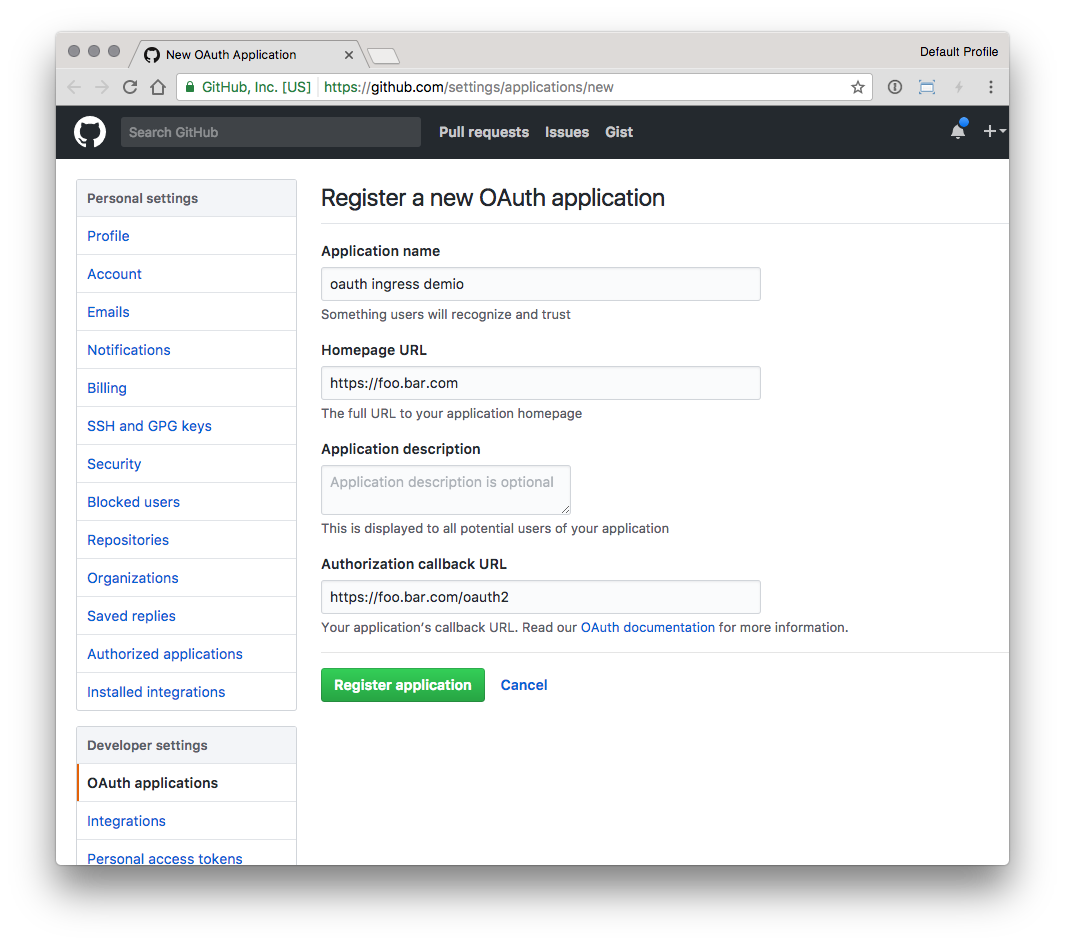
部署oauth-proxy服务:
注:替换下面两个变量的value为github中注册oauth应用
OAUTH2_PROXY_CLIENT_ID
OAUTH2_PROXY_CLIENT_SECRET
apiVersion: apps/v1
kind: Deployment
metadata:
  labels:
    k8s-app: oauth2-proxy
  name: oauth2-proxy
  namespace: kube-system
spec:
  replicas: 1
  selector:
    matchLabels:
      k8s-app: oauth2-proxy
  template:
    metadata:
      labels:
        k8s-app: oauth2-proxy
    spec:
      containers:
      - args:
        - --provider=github
        - --email-domain=*
        - --upstream=file:///dev/null
        - --http-address=0.0.0.0:4180
        # Register a new application
        # https://github.com/settings/applications/new
        env:
        - name: OAUTH2_PROXY_CLIENT_ID
          value: <Client ID>
        - name: OAUTH2_PROXY_CLIENT_SECRET
          value: <Client Secret>
        # docker run -ti --rm python:3-alpine python -c 'import secrets,base64; print(base64.b64encode(base64.b64encode(secrets.token_bytes(16))));'
        # 通过上面的命令,需要手动生成下cookie_secret
        - name: OAUTH2_PROXY_COOKIE_SECRET
          value: SECRET
        image: quay.io/oauth2-proxy/oauth2-proxy:latest
        imagePullPolicy: Always
        name: oauth2-proxy
        ports:
        - containerPort: 4180
          protocol: TCP

---
apiVersion: v1
kind: Service
metadata:
  labels:
    k8s-app: oauth2-proxy
  name: oauth2-proxy
  namespace: kube-system
spec:
  ports:
  - name: http
    port: 4180
    protocol: TCP
    targetPort: 4180
  selector:
    k8s-app: oauth2-proxy
创建服务ingress
apiVersion: networking.k8s.io/v1beta1
kind: Ingress
metadata:
  annotations:
    nginx.ingress.kubernetes.io/auth-url: "https://foo.bar.com/oauth2/auth"
    nginx.ingress.kubernetes.io/auth-signin: "https://foo.bar.com/oauth2/start?rd=$escaped_request_uri"
  name: external-auth-oauth2
  namespace: kube-system
spec:
  rules:
  - host: foo.bar.com
    http:
      paths:
      - backend:
          serviceName: kubernetes-dashboard
          servicePort: 80
        path: /
  tls:
  - hosts:
    - foo.bar.com
    secretName: secret-name
---

apiVersion: networking.k8s.io/v1beta1
kind: Ingress
metadata:
  name: oauth2-proxy
  namespace: kube-system
spec:
  rules:
  - host: foo.bar.com
    http:
      paths:
      - backend:
          serviceName: oauth2-proxy
          servicePort: 4180
        path: /oauth2
  tls:
  - hosts:
    - foo.bar.com
    secretName: secret-name
浏览器访问https://foo.bar.com,自动跳转到https://foo.bar.com/oauth2/sign_in
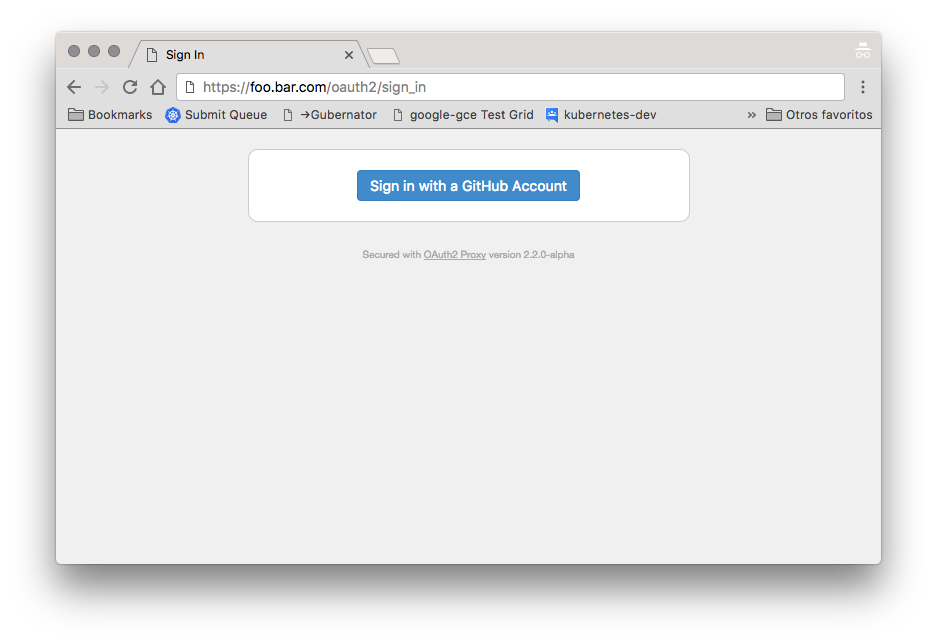
点击进入github认证,认证通过后即可进入dashboard服务。