题记:
文章内容输出来源:拉勾教育大数据开发高薪训练营
本篇文章是java学习课程中的一部分笔记。
本博文主要是记录一些基础的知识点,通过实操更容易理解
这章主要讲的是前端进阶知识,
jQuery基本概念
jQuery 基本概念jQuery是一个javascript库,jQuery凭借着简洁的语法和跨平台的兼容性,极大的简化了js操作DOM、处理事件、执行动画等操作。jQuery强调的理念是:'write less, do more'(写的少,做的多)。
官网下载地址:http://jquery.com/download
进不去可以去http://www.jq22.com/jquery-info122
jQuery 初体验jQuery 对象 和 DOM 对象1)DOM对象
DOM(Document Object Model,文档对象模型),每一份DOM都可以表示成一棵树。
在 js 中,通过 getElementByTagName 或者 getElementById 来获取元素节点。像这样得到的 DOM 元素就是 DOM 对象。而且 DOM 对象可以使用 js 中的方法,如: innerHTML。
var domObj = document.getElementById('id'); // 获得DOM对象 var objHTML = domObj.innerHTML; // 使用Javascript中的属性-innerHTML2)jQuery对象
jQuery对象,是通过jQuery包装DOM对象后产生的对象,jQuery对象是jQuery独有的,它可以使用 jQuery里面的方法。
// 获取id为test的元素内的html代码 $('#test').html(); // .html()是jQ里面的方法 上面的代码等同于: document.getElementById('test').innerHTML;3)注意事项
- 在jQuery中,无法使用任何DOM对象的方法,例如:$('id').innerHTML,这是错误的写法。
- 在js中也无法使用jQ对象里面的方法,例如:document.getElementById('id').html(),这样也是错误的。
jQuery 对象与 DOM 对象转换jQ对象转成DOM对象:
方法一(常用):[index]
var $test = $("#test"); // jQ获取到的对象 var node = $test[0]; // 转成DOM对象 node.innerHTML = "你好啊"; // 使用DOM对象的方法方法二:get(index)
var $test = $('#test'); // jQ获取到的对象 var test = $test.get(0); // 转成DOM对象 test.innerHTML = "我来了"; // 使用DOM对象的方法dom对象转成jQuery对象:
用$()把DOM对象包裹起来就是一个jQ对象了
var test = document.getElementById("test"); // 获取的DOM对象
var $test = $(test); // 转成jQ对象
jQuery的函数与事件
1. 页面加载Js页面加载方式 Window.onload=function(){ }
jQuery页面加载方式
格式1: $(function(){ })
格式2: $(document).ready(function(){ })
结论: javaScript的页面加载只执行一次,最后一次加载的执行; jQuery的页面加载执行多次,每次都执行
2. 事件绑定与事件派发1)jQuery中常用事件
jQuery中的事件与javaScript中的事件用法一样,但是名称都去掉了on.
鼠标事件 键盘事件 表单事件 文档/窗口事件 click keypress submit load dblclick keydown change resize mouseenter keyup focus scroll mouseleave blur unload hover 2)元素绑定事件
<input type="button" value="点我试试" id="btn1" onclick="fn()"> function fn(){ alert("试试就试试!!"); }3)元素派发事件
<head>
    <script>
        $(function(){
            $("#btn2").click(function(){
                alert("jQuery想试试");
            })
        })
    </script>
</head>

<input type="button" value="点我试试" id="btn2">
轮播图练习用jquery
<!DOCTYPE html>
<html lang="en">
<head>
    <meta charset="UTF-8">
    <title>Title</title>
    <script src="../js/jquery-3.5.1.min.js"></script>
    <script>
        //图片列表
        var imgURL=new Array("https://www.lgstatic.com/thumbnail_1200x0/i/image/M00/36/A2/CgqCHl8X4zOAaICdAAJfXRNcCcA894.PNG",
            "https://www.lgstatic.com/thumbnail_1200x0/i/image/M00/41/F9/CgqCHl82hsuAUjqyAAOTmcXDgU073.JPEG",
            "https://www.lgstatic.com/thumbnail_1200x0/i/image/M00/40/F7/CgqCHl8zy_SAS3l9AAMk3KBxwJw901.JPG",
            "https://www.lgstatic.com/thumbnail_1200x0/i/image/M00/3E/7B/Ciqc1F8sw3SAcafEAAGax2W7CVA37.JPEG");
        //当前图片索引
        var indexImg=0;

        function changeImgl(i) {
            //设置图片
            // document.getElementsByClassName("img")[0].setAttribute("src",imgURL[i]);
            $(".img").prop("src",imgURL[i]);
        }

        //上一张
        function l() {
            indexImg=indexImg<1?imgURL.length-1:indexImg-1;
            changeImgl(indexImg);
        }
        //下一张
        function r() {
            indexImg=indexImg==imgURL.length-1?indexImg=0:indexImg+1;
            changeImgl(indexImg);
        }

        $(function () {
            //周期函数 执行下一张
            var imgflag=setInterval(r,1000);
            $(".l").click(l)
        })
    </script>
</head>
<body>
    <div class="box">
        <div class="l" >←</div>
        <div class="center">
            <img src="#" class="img" />
        </div>
        <div class="r" onclick="r()">→</div>

    </div>
</body>
<style>
    .box{
        width: 800px;
        height:300px;
        margin: 0 auto;
    }
    .l,.r{
        float: left;
        margin-top:60px;
        font-size: 20px;
        background-color: darkgray;
        width:50px;
        height: 100px;
        line-height: 100px;
        text-align: center;
    }
    .center{
        float: left;
        width: 700px;
    }
    .center .img{
        width: 100%;
    }
</style>

</html>
jQuery选择器
选择器 实例 选取 * $("*") 所有元素 #id $("#lastname") id="lastname" 的元素 .class $(".intro") 所有 class="intro" 的元素 element $("p") 所有 <p> 元素 .class.class $(".intro.demo") 所有 class="intro" 且 class="demo" 的元素 :first $("p:first") 第一个 <p> 元素 :last $("p:last") 最后一个 <p> 元素 :even $("tr:even") 所有偶数 <tr> 元素 :odd $("tr:odd") 所有奇数 <tr> 元素 索引选择器 :eq(index) $("ul li:eq(3)") 列表中的第四个元素(index 从 0 开始) :gt(no) $("ul li:gt(3)") 列出 index 大于 3 的元素 :lt(no) $("ul li:lt(3)") 列出 index 小于 3 的元素 :not(selector) $("input:not(:empty)") 所有不为空的 input 元素 :header $(":header") 所有标题元素 <h1> - <h6> :animated 所有动画元素 :contains(text) $(":contains('W3School')") 包含指定字符串的所有元素 :empty $(":empty") 无子(元素)节点的所有元素 :hidden $("p:hidden") 所有隐藏的 <p> 元素 :visible $("table:visible") 所有可见的表格 多匹配 s1,s2,s3 $("th,td,.intro") 所有带有匹配选择的元素 [attribute] $("[href]") 所有带有 href 属性的元素 [attribute=value] $("[href='#']") 所有 href 属性的值等于 "#" 的元素 [attribute!=value] $("[href!='#']") 所有 href 属性的值不等于 "#" 的元素 [attribute$=value] $("[href$='.jpg']") 所有 href 属性的值包含以 ".jpg" 结尾的元素 :input $(":input") 所有 <input> 元素 :text $(":text") 所有 type="text" 的 <input> 元素 :password $(":password") 所有 type="password" 的 <input> 元素 :radio $(":radio") 所有 type="radio" 的 <input> 元素 :checkbox $(":checkbox") 所有 type="checkbox" 的 <input> 元素 :submit $(":submit") 所有 type="submit" 的 <input> 元素 :reset $(":reset") 所有 type="reset" 的 <input> 元素 :button $(":button") 所有 type="button" 的 <input> 元素 :image $(":image") 所有 type="image" 的 <input> 元素 :file $(":file") 所有 type="file" 的 <input> 元素 :enabled $(":enabled") 所有激活的 input 元素 :disabled $(":disabled") 所有禁用的 input 元素 :selected $(":selected") 所有被选取的 input 元素 :checked $(":checked") 所有被选中的 input 元素
jQuery的DOM操作
1 jQuery 对 DOM 树中的文本和值进行操作语法
解释 val([value]) 获得/设置元素value属性相应的值 text([value]) 获得/设置元素的文本内容 html([value]) 获得/设置元素的标签体内容 <!DOCTYPE html PUBLIC "-//W3C//DTD XHTML 1.0 Transitional//EN" "http://www.w3.org/TR/xhtml1/DTD/xhtml1-transitional.dtd"> <html> <head> <meta http-equiv="Content-Type" content="text/html; charset=utf-8"/> <title>3-10-1</title> <style type="text/css"> .test { font-weight: bold; color: red; } .add { font-style: italic; } </style> <!-- 引入jQuery --> <script src="../js/jquery-3.5.1.js"></script> <script type="text/javascript"> function fn1() { alert($("p").html()); } function fn2() { alert($("p").text()); } function fn3() { $("p").html("<font>这是一个行内元素<font>"); } function fn4() { $("p").text("<span>这是一个行内元素</span>"); } function fn5() { alert($("#btn1").val()); } function fn6() { $("#btn2").val(777777); } function fn7(e) { alert($(e).val()); console.log(e) } </script> </head> <body> <input type="button" value="获取P元素的HTML代码" onclick="fn1()"/> <input type="button" value="获取P元素的文本" onclick="fn2()"/> <input type="button" value="设置P元素的HTML代码" onclick="fn3()"/> <input type="button" value="设置P元素的文本" onclick="fn4()"/> <input id="btn1" type="button" value="获取按钮的value值" onclick="fn5()"/> <input id="btn2" type="button" value="设置按钮的value值" onclick="fn6()"/> <input id="btn3" type="button" value="获取当前按钮对象" onclick="fn7(this)"/> <hr/> <p title="demo"><strong>你好啊,我来了,别跑啊</strong></p> </body> </html>2 jQuery 对 DOM 树中的属性进行操作语法
解释 attr(name[,value]) 获得/设置属性的值 prop(name[,value]) 获得/设置属性的值(checked,selected) removeAttr(name) 删除属性值 <html> <head> <meta http-equiv="Content-Type" content="text/html; charset=utf-8"/> <title>3-8</title> <!-- 引入jQuery --> <script src="../js/jquery-3.5.1.js"></script> <script type="text/javascript"> function fn1() { alert($("h1").attr("title")); } function fn2() { $("h1").attr("title","疯子一样的少年"); } function fn3() { $("h1").removeAttr("title"); } </script> </head> <body> <input type="button" value="设置h1元素的属性'title'" onclick="fn1()"/> <input type="button" value="获取h1元素的属性'title'" onclick="fn2()"/> <input type="button" value="删除h1元素的属性'title'" onclick="fn3()"/> <h1 title="风一样的少年"><strong>我是风一样的少年</strong></h1></body> </html>attr与prop的注意问题
- attr与prop是以1.6为界限
- checked和selected使用prop获取
- 其他使用attr获取 获取不到换成prop
3 jQuery 对 class 进行操作 ( 了解 )语法
解释 css(name[,value]) 获取/设置指定的CSS样式 addClass(value) addClass(类样式名)给指定的对象添加新的类样式,指定类样式名字即可 removeClass(value) removeClass(类样式名)删除指定的类样式 toggleClass(value) toggleClass(类样式名) 切换样式,如果没有类样式,则添加,如果有类样式,则删除 <!DOCTYPE html PUBLIC "-//W3C//DTD XHTML 1.0 Transitional//EN" "http://www.w3.org/TR/xhtml1/DTD/xhtml1-transitional.dtd"> <html> <head> <meta http-equiv="Content-Type" content="text/html; charset=utf-8"/> <title>3-9-1</title> <style type="text/css"> .two { font-weight: bold; /* 粗体字 */ background: red; font-family: "楷体"; } .one { font-style: italic; color: green; } </style> <!-- 引入jQuery --> <script src="../js/jquery-3.5.1.js"></script> <script type="text/javascript"> function fn1() { alert($("h2").css("font-family")); } function fn2() { $("h2").css("font-family","Arial"); } function fn3() { $("h2").addClass("two"); } function fn4() { $("h2").removeClass(); } function fn5() { $("h2").removeClass("two"); } function fn6() { $("h2").toggleClass("two"); } </script> </head> <body> <input type="button" value="获取字体样式" onclick="fn1()"/> <input type="button" value="设置字体样式" onclick="fn2()"/> <input type="button" value="追加class类" onclick="fn3()"/> <input type="button" value="删除全部class类" onclick="fn4()"/> <input type="button" value="删除指定class类" onclick="fn5()"/> <input type="button" value="重复切换class类" onclick="fn6()"/> <h2 class="one" title="你最喜欢的英雄是?">你最喜欢的英雄是?</h2> </body> </html>4 jQuery创建插入对象
语法
解释 $("") 例$("<div>abc</div>") 创建A元素对象 父元素.append(element) 添加成最后一个子元素,两者之间是父子关系 父元素.prepend(element) 添加成第一个子元素,两者之间是父子关系 兄弟元素.before(element) 添加到当前元素的前面,两者之间是兄弟关系 兄弟元素.after(element) 添加到当前元素的后面,两者之间是兄弟关系 5 jQuery 删除对象语法
解释 remove() 删除指定元素 empty() 清空指定元素的所有子元素 <!DOCTYPE html PUBLIC "-//W3C//DTD XHTML 1.0 Transitional//EN" "http://www.w3.org/TR/xhtml1/DTD/xhtml1-transitional.dtd"> <html> <head> <meta http-equiv="Content-Type" content="text/html; charset=utf-8"/> <!-- 引入jQuery --> <script src="../js/jquery-3.5.1.js"></script> <script> /* * 1.创建2个带文本和title属性的li节点 * 2.获取ul父节点 * 3.获取第2个li节点 * 4.将第1个li节点添加为ul父节点的最后一个子节点 * 5.将第2个li节点追加为ul父节点的第一个子节点 * 6 最后一个元素之后添加$li_3 */ function fnold() { var li1 = $("<li title='sunshangxiang'>孙尚香</li>"); var li2 = $("<li title='diaochan'>貂蝉</li>"); var li3 = $("<li title='zhugeliang'>诸葛亮</li>"); var parent = $("ul"); alert($("li:eq(1)").attr("title")); parent.append(li1); parent.prepend(li2); $("li:last").after(li3); } function fn() { $("li:first").empty(); } function fn1() { $("li:eq(1)").remove(); } function fn2() { $("li").parent().empty(); } </script> </head> <body> <p title="王者荣耀">你喜欢的英雄是?</p> <ul> <li title='zhaoyun'>赵云</li> <li title='xiaoqiao'>小乔</li> <li title='luban'>鲁班</li> </ul> <button onclick="fnold()">操作</button> <button onclick="fn()">清空第一个节点,但不删除节点</button> <button onclick="fn1()">删除第二个元素</button> <button onclick="fn2()">使用父节点清空所有子节点</button> </body> </html>
jQuery的遍历
1 原始方式遍历语法
for(var i=0;i<元素数组.length;i++){
    元素数组[i];
}
2 jquery 对象方法遍历语法
jquery对象.each(function(index,element){});
其中,
index:就是元素在集合中的索引
element:就是集合中的每一个元素对象

<body>
<script type="text/javascript">
    $(function(){
        var $lis = $("#city li");
        $lis.each(function(index,element){
            alert(index+"--"+$(element).html());
        });
    });
</script>

<ul id="city">
    <li>北京</li>
    <li>上海</li>
    <li>天津</li>
    <li>重庆</li>
</ul>
</body>
3 jquery 的全局方法遍历语法
$.each(jquery对象,function(index,element){});
其中, index:就是元素在集合中的索引
element:就是集合中的每一个元素对象

var $lis = $("#city li");
$.each($lis,function(index,element){
     alert(index+"--"+$(element).html());
});
4 jQuery3.0 新特性 for of 语句遍历语法
for(变量 of jquery对象){
    变量;
}
其中, 变量:定义变量依次接受jquery数组中的每一个元素
jquery对象:要被遍历的jquery对象


var $lis = $("#city li");
for(li of $lis){
    alert($(li).html());
}
jQuery动画
jQuery 可以通过方法对 HTML元素进行效果设置: 隐藏,显示,切换,滑动,淡入淡出,动画等设置1隐藏和显示
解释 show([speed,[easing],[fn]]) 显示元素方法 hide([speed,[easing],[fn]]) 隐藏元素方法 toggle([speed],[easing],[fn]) 切换元素方法,显示的使之隐藏,隐藏的使之显示 参数
解释 speed 三种预定速度之一的字符串("slow","normal", or "fast")或表示动画时长的毫秒数值(如:1000) easing 用来指定切换效果,默认是"swing",可用参数"linear" fn
解释 slideDown([speed,[easing],[fn]]) 向下滑动方法, ( 划入 ) 展现slideUp([speed,[easing],[fn]]) 向上滑动方法 ( 划出 ) 消失slideToggle([speed],[easing],[fn]) 切换元素方法,显示的使之隐藏,隐藏的使之显示 3 链式编程链是允许我们在同一个元素上在一条语句中运行多个jQuery方法,可以把动作/方法链接在 一起 ;这样的话,浏览 器就不必多次查找相同的元素。如需链接一个动作, 只需简单地把该动作追加到之前的动作上。 下面的例子把 css()、slideUp()和slideDown()链接在一起。"p1"元素首先会变为红 色,然后向上滑动,再然后向下滑动:
$("#p1").css("background","red").slideUp(1000).slideDown(1000);4.animate 自定义动画animate()方法用于创建自定义动画。
语法:
$(selector).animate({params},speed,callback);
必需的params参数定义形成动画的CSS属性。 可选的speed 参数规定效果的时长 。它可以取以下 值:"slow"、"fast"或毫秒。 可选的callback参数是动画完成后所执行的函数名称。 需求:使用animate实现div高度变为300px ,透明度opacity 0.4,宽度变为400px,透明度opacity 0.6 ,向右移动300px, 再向下移动300px,弹出框提示动画演示结束.
<body>
<script type="text/javascript">
    $(function(){
        /*需求:使用animate实现div高度变为300px ,透明度opacity 0.4, 宽度变为400px,透明度opacity 0.6 , 向右移动300px, 再向下移动300px,弹出框提示动画演示结束.*/
        $("div").animate(
            {
                height:"300px",
                opacity:"0.4"
            },3000
        ).animate(
            {
                width:"400px",
                opacity:"0.6"
            },2000
        ).animate({left:"300px"},1000).animate({left:"300px"},1000).animate({top:"300px"},800)

    });

</script>
<div style="width: 50px;height: 50px;background: blue;position:absolute">这是一个div</div>
</body>
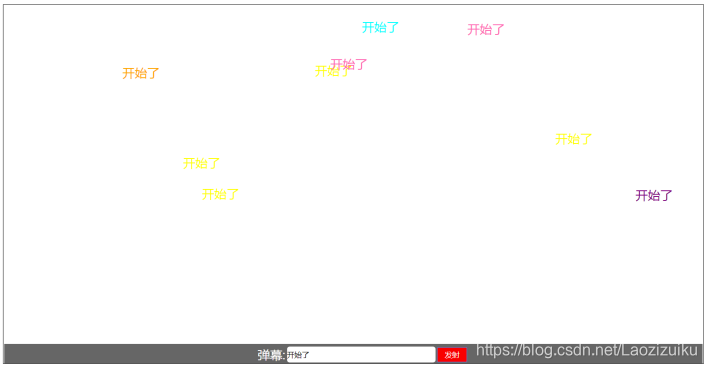
弹幕案例
<!DOCTYPE html> <html> <head> <meta charset="UTF-8"> <title>弹幕案例</title> <script src="../js/jquery-3.5.1.min.js" type="text/javascript" charset="utf-8"></script> <style> html, body { margin: 0px; padding: 0px; width: 100%; height: 100%; font-family: "微软雅黑"; font-size: 62.5%; } .boxDom { width: 100%; height: 100%; position: relative; overflow: hidden; } .idDom { width: 100%; height: 50px; background: #666; position: fixed; bottom: 0px; } .content { display: inline-block; width: 430px; height: 40px; position: absolute; left: 0px; right: 0px; top: 0px; bottom: 0px; margin: auto; } .title { display: inline; font-size: 4em; vertical-align: bottom; color: #fff; } .text { border: none; width: 300px; height: 30px; border-radius: 5px; font-size: 2.4em; } .btn { width: 60px; height: 30px; background: #f90000; border: none; color: #fff; font-size: 2.4em; } span { width: 300px; height: 40px; position: absolute; overflow: hidden; color: #000; font-size: 4em; line-height: 1.5em; cursor: pointer; white-space: nowrap; } </style> </head> <body> <script type="text/javascript"> $(function(){ $(".btn").click(submit); $(".text").keyup(function (e) { if(e.keyCode==13){ submit(); } }) }); function submit() { var colors=["red","blue","green","yellow"]; var divE=$("<span></span>").text($(".text").val()).css("color",colors[parseInt(Math.random()*4)]).css("left","1400px").css("top",parseInt(Math.random()*600)+"px").animate({left:"-100px"},5000) $("#boxDom").append(divE) $(".text").val(""); } </script> <body> <div class="boxDom" id="boxDom"> <div class="idDom" id="idDom"> <div class="content"> <p class="title">弹幕:</p> <input type="text" class="text" id="text" onkeypress="fnn(this)" /> <button type="button" class="btn" id="btn">发射</button> </div> </div> </div> </body> </html> <!DOCTYPE html> <html> <head> <meta charset="UTF-8"> <title>弹幕案例</title> <script src="../js/jquery-3.5.1.min.js" type="text/javascript" charset="utf-8"></script> <style> html, body { margin: 0px; padding: 0px; width: 100%; height: 100%; font-family: "微软雅黑"; font-size: 62.5%; } .boxDom { width: 100%; height: 100%; position: relative; overflow: hidden; } .idDom { width: 100%; height: 50px; background: #666; position: fixed; bottom: 0px; } .content { display: inline-block; width: 430px; height: 40px; position: absolute; left: 0px; right: 0px; top: 0px; bottom: 0px; margin: auto; } .title { display: inline; font-size: 4em; vertical-align: bottom; color: #fff; } .text { border: none; width: 300px; height: 30px; border-radius: 5px; font-size: 2.4em; } .btn { width: 60px; height: 30px; background: #f90000; border: none; color: #fff; font-size: 2.4em; } span { width: 300px; height: 40px; position: absolute; overflow: hidden; color: #000; font-size: 4em; line-height: 1.5em; cursor: pointer; white-space: nowrap; } </style> </head> <body> <script type="text/javascript"> $(function(){ $(".btn").click(submit); $(".text").keyup(function (e) { if(e.keyCode==13){ submit(); } }) }); function submit() { var colors=["red","blue","green","yellow"]; var divE=$("<span></span>").text($(".text").val()).css("color",colors[parseInt(Math.random()*4)]).css("left","1400px").css("top",parseInt(Math.random()*600)+"px").animate({left:"-100px"},5000) $("#boxDom").append(divE) $(".text").val(""); } </script> <body> <div class="boxDom" id="boxDom"> <div class="idDom" id="idDom"> <div class="content"> <p class="title">弹幕:</p> <input type="text" class="text" id="text" onkeypress="fnn(this)" /> <button type="button" class="btn" id="btn">发射</button> </div> </div> </div> </body> </html>
ajax概述
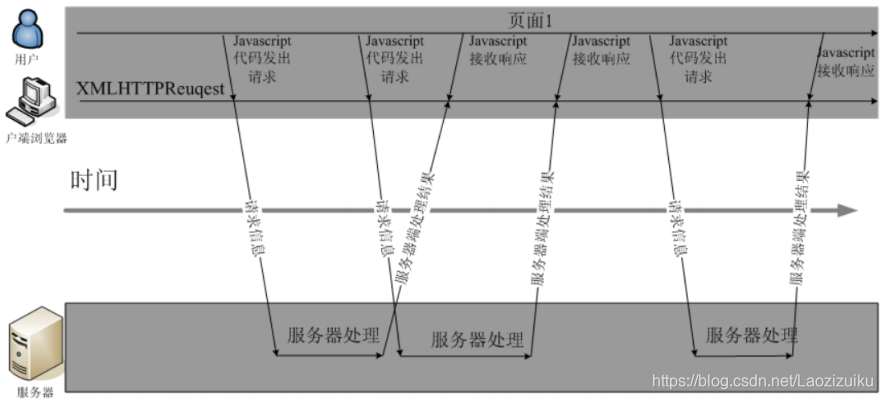
1. ajax 概念Ajax即"Asynchronous Javascript And XML"(异步JavaScript和XML),是指一种创建交互式网页应用的网页开发技术。
2. ajax 功能Ajax 是一种在无需重新加载整个网页的情况下,能够更新部分网页的技术。通过在后台与服务器进行少量数据交换,Ajax 可以使网页实现异步更新。这意味着可以在不重新加载整个网页的情况下,对网页的某部分进行更新。传统的网页(不使用Ajax)如果需要更新内容,必须重载整个网页页面。提升用户的体验。
3. AJAX 的应用场景数据校验
按照需求获取数据
自动更新页面内容
4. 同步与异步两种方式的区别主要体现在客户端和服务器端相互通信的基础上。
- 同步方式:客户端必须等待服务器端的响应,在等待的期间客户端不能做其他操作。
- 异步方式:客户端不需要等待服务器端的响应,在服务器处理请求的过程中,客户端可以进行其他的操作。
js原生的ajax
1. 原生的 ajax 的开发步骤1)创建Ajax引擎对象
2)为Ajax引擎对象绑定监听(监听服务器已将数据响应给引擎)
3)绑定提交地址
4)发送请求
5)接受响应数据
2 js原生的ajax的代码实现
IDEA配置tomcat https://www.cnblogs.com/Knowledge-has-no-limit/p/7240585.html
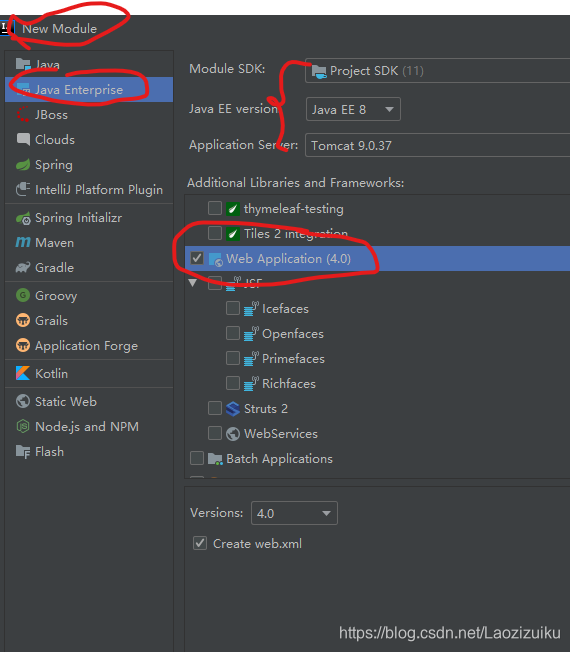
新建一个模块,javaee的,勾选web application
<html>
<head>
    <meta http-equiv="Content-Type" content="text/html; charset=UTF-8">
    <title>Insert title here</title>
    <script type="text/javascript">
        function sendRequest() {
//js的ajax访问
//1)创建Ajax引擎对象
            var xmlhttp = new XMLHttpRequest();
//2)为Ajax引擎对象绑定监听(监听服务器已将数据响应给引擎)
            xmlhttp.onreadystatechange = function () {//引擎状态一改变就触发该事件
                if (xmlhttp.readyState == 4 && xmlhttp.status == 200) {
//5)接受响应数据
//获得服务器端返回给引擎对象的数据
                    alert(xmlhttp.responseText);
                }
            }
//3)绑定提交地址
            /*
            GET:请求方式
            url地址
            true是否异步 代表异步 false代表同步
            */
            xmlhttp.open("GET", "/AjaxDemo/ajaxServlet", true);
//4)发送请求
            xmlhttp.send();
        }
    </script>
</head>
<body>
<input type="button" value="ajax异步访问服务器端" onclick="sendRequest()">
</body>
</html>
@WebServlet("/ajaxServlet") public class AjaxServlet extends HttpServlet { protected void doGet(HttpServletRequest request, HttpServletResponse response) throws ServletException, IOException { response.getWriter().write("ajax response data ..."); } protected void doPost(HttpServletRequest request, HttpServletResponse response) throws ServletException, IOException { doGet(request, response); } }
jQuery方式的ajax
1 jQuery 方式 ajax 简介jquery是一个优秀的js类库,自然对js原生的ajax进行了封装,封装后的ajax的操 作方法更简洁,功能更强大,与ajax操作相关的jquery方法有如下几种,但开发中 经常使用的有三种:
语法 GET请求 $.get(url,[data],[callback],[type]) POST请求 $.post(url,[data],[callback],[type]) AJAX请求 $.ajax([settings]) 2 GET 请求方式概述
通过远程HTTP GET请求载入信息。这是一个简单的GET请求功能,如需复杂的ajax参数设置请使用$.ajax。
语法
$.get(url, [data], [callback], [type])
其中,参数说明如下:
解释 url 请求的服务器端url地址 data 发送给服务器端的请求参数,格式可以是key=value,也可以是js对象 callback 当请求成功后的回掉函数,可以在函数体中编写我们的逻辑代码 type 预期的返回数据的类型,取值可以是xml, html, script, json, text, _defaul等 html
    <script>
        function sendJqueryRequest() {
            $.get("/javaServer/ajaxServlet","name=bigload&age=12",function (res) {
                alert(res);
            },"text")
        }
    </script>

    <input type="button" value="jquery,ajax异步访问服务器端" onclick="sendJqueryRequest()">
server
@WebServlet("/ajaxServlet")
public class serverAJAX extends HttpServlet {
    protected void doGet(HttpServletRequest request, HttpServletResponse response) throws
            ServletException, IOException {
        String name=request.getParameter("name");
        String age=request.getParameter("age");
        response.getWriter().write("ajax response data ..."+"name:"+name+"...age:"+age);
    }
    protected void doPost(HttpServletRequest request, HttpServletResponse response) throws
            ServletException, IOException {
        doGet(request, response);
    }
}
3 POST 请求方式概述
通过远程HTTP POST请求载入信息。这是一个简单的POST请求功能,如需复杂的ajax参数设置请使用$.ajax。
语法
$.post(url, [data], [callback], [type])
其中,参数说明如下:
解释 url 请求的服务器端url地址 data 发送给服务器端的请求参数,格式可以是key=value,也可以是js对象 callback 当请求成功后的回掉函数,可以在函数体中编写我们的逻辑代码 type 预期的返回数据的类型,取值可以是xml, html, script, json, text, _defaul等 <script type="text/javascript"> function sendRequest(){ $.post( "/AjaxDemo/ajaxServlet", "name=haohao&age=33", function(data){ alert(data); }, "text" ); } </script>4 AJAX 请求方式概述
通过HTTP请求加载远程数据。jQuery底层AJAX实现。简单易用的高层实现见get和post方法。$.ajax()方法可以更加详细的设置底层的参数。
语法
$.ajax([settings])
其中,settings是一个js字面量形式的对象,格式是{name:value,name:value... ...},常用的name属性名如下:
解释 url 请求的服务器端url地址 async (默认: true) 默认设置下,所有请求均为异步请求。如果需要发送同步请求,请将此选项设置为false data type (默认: "GET")请求方式("POST"或"GET") dataType 预期的返回数据的类型,取值可以是xml, html, script, json, text, _defaul等 success 请求成功后的回调函数 error 请求失败时调用此函数 function sendRequest(){ $.ajax({ url:"/AjaxDemo/ajaxServlet", async:true, data:"name=haohao&age=33", type:"GET", dataType:"text", success:function(data){ alert(data); }, error:function(){ alert("数据没有成功返回!") } }); }
json数据格式
1. json的概念
json的全称叫做:JavaScript object Notation,JavaScript对象表示法。
json现在主要的功能是:用于存储和交换文本信息的语法,进行数据的传输。
json的主要优点:JSON比XML更小、更快、更易解析。
2.json的转换工具
1 ) json转换工具的概述
json的转换工具是通过java封装好的一些jar工具包,直接将java对象或集合转换成json格式的字符串。
2 )常见的json转换工具
介绍 Jsonlib Java类库,需要导入的jar包较多 Gson google提供的一个简单的json转换工具 Fastjson alibaba技术团队提供的一个高性能的json转换工具 Jackson 开源免费的json转换工具,springmvc转换默认使用jackson 3 ) jackson工具使用
1)导入json相关jar包
https://www.cnblogs.com/yinghuapiaoluo/p/12593389.html
- jackson-annotations-2.2.3.jar
- jackson-core-2.2.3.jar
- jackson-databind-2.2.3.jar
2)创建java对象或集合
3)使用jackson的ObjectMapper对象的writeValueAsString方法进行转换
4 )注解使用
@JsonIgnore:排除属性。
@JsonFormat:属性值的格式化,例如,针对日期格式:@JsonFormat(pattern = "yyyy-MM-dd")
5)转换代码实现
public class jsonTest {
    public static void main(String[] args) throws JsonProcessingException {
        //创建User对象
        User user = new User("100","bigload",33);

        //创建List集合
        List<String> arr = new ArrayList<>();
        arr.add("aaa");
        arr.add("bbbb");
        arr.add("ccccc");
        //创建Map集合
        Map<String,User> map = new HashMap<>();
        map.put("user", user);
        //转换
        ObjectMapper om = new ObjectMapper();
        String userJson = om.writeValueAsString(user);
        String arrJson = om.writeValueAsString(arr);
        String mapJson = om.writeValueAsString(map);
        System.out.println(userJson);
        System.out.println(arrJson);
        System.out.println(mapJson);

    }
}

class User implements Serializable {

    private String id;
    private String name;
    private int age;

    public User(String id, String name, int age) {
        this.id = id;
        this.name = name;
        this.age = age;
    }

    public String getId() {
        return id;
    }

    public void setId(String id) {
        this.id = id;
    }

    public String getName() {
        return name;
    }

    public void setName(String name) {
        this.name = name;
    }

    public int getAge() {
        return age;
    }

    public void setAge(int age) {
        this.age = age;
    }


}
综合案例 检测用户名是否已经被注册
需求在用户注册页面,输入用户名,当用户名输入框失去焦点时,发送异步请求,将输入框的用户名传递给服务器端进行是否存在的校验。
使用技术前台: html jQuery ajax
后台: Servlet JDBCDruid QueryRunner
数据库: mysq
出现的问题
使用druid可能会出现java.lang.NoClassDefFoundError: org/apache/commons/dbutils/ResultSetHandler
需要把jar包WEB-INF/lib下面,可以参考https://blog.csdn.net/hdn_kb/article/details/86476836
代码实现1. 数据库 SQL#创建user表 CREATE TABLE USER ( id INT PRIMARY KEY AUTO_INCREMENT, username VARCHAR(32), PASSWORD VARCHAR(32) ); #添加数据 INSERT INTO USER VALUES(NULL,'zhangsan','123'); INSERT INTO USER VALUES(NULL,'lisi','123'); INSERT INTO USER VALUES(NULL,'wangwu','123');2.druid工具类
import com.alibaba.druid.pool.DruidDataSourceFactory;

import javax.sql.DataSource;
import java.io.InputStream;
import java.sql.Connection;
import java.sql.ResultSet;
import java.sql.SQLException;
import java.sql.Statement;
import java.util.Properties;

public class DruidUtils {
    //1.定义成员变量
    public static DataSource dataSource;
    //2.静态代码块
    static{
        try {
            //3.创建属性集对象
            Properties p = new Properties();
            //4.加载配置文件 Druid 连接池不能够主动加载配置文件 ,需要指定文件
            InputStream inputStream = DruidUtils.class.getClassLoader().getResourceAsStream("mysql_druid.properties");
            //5. 使用Properties对象的 load方法 从字节流中读取配置信息
            p.load(inputStream);
            //6. 通过工厂类获取连接池对象
            dataSource = DruidDataSourceFactory.createDataSource(p);
        } catch (Exception e) {
            e.printStackTrace();
        }
    }
    //获取连接的方法
    public static Connection getConnection(){
        try {
            return dataSource.getConnection();
        } catch (SQLException e) {
            e.printStackTrace();
            return null;
        }
    }
    //获取连接池的方法
    public static DataSource getDataSource(){
        return dataSource;
    }
    //释放资源
    public static void close(Connection con, Statement statement){
        if(con != null && statement != null){
            try {
                statement.close();
                //归还连接
                con.close();
            } catch (SQLException e) {
                e.printStackTrace();
            }
        }
    }
    public static void close(Connection con, Statement statement, ResultSet resultSet){
        if(con != null && statement != null && resultSet != null){
            try {
                resultSet.close();
                statement.close();
                //归还连接
                con.close();
            } catch (SQLException e) {
                e.printStackTrace();
            }
        }
    }
}
3.数据库处理类
package com.bigload.server;

import org.apache.commons.dbutils.QueryRunner;
import org.apache.commons.dbutils.handlers.ScalarHandler;

import java.sql.SQLException;

public class dbQueryRunner {
    private static QueryRunner qr=new QueryRunner(DruidUtils.getDataSource());
    private static String sql = "select id from user where username=?";
    private static String addSql="insert into user values(NULL,?,?)";

    //查找用户
    public static boolean findUser(String name){
        Object[] param={name};
        try {
            if(null==qr.query(sql,new ScalarHandler(),param)){
                return false;
            }
            return true;
        } catch (SQLException e) {
            e.printStackTrace();
            return false;
        }
    }
    //添加用户
    public static boolean addUser(String name,String password) {
        Object[] param = {name, password};
        try {
            qr.update(addSql,param);
            return true;
        } catch (SQLException e) {
            e.printStackTrace();
            return false;
        }
    }

    public static void main(String[] args) {
        System.out.println(findUser("lii"));
//        addUser("bigload","123");
    }

}
4.服务器,两个文件
@WebServlet("/finduser")
public class findUser extends HttpServlet {
    protected void doGet(HttpServletRequest request, HttpServletResponse response) throws
            ServletException, IOException {
        doPost(request, response);
    }
    protected void doPost(HttpServletRequest request, HttpServletResponse response) throws
            ServletException, IOException {

        request.setCharacterEncoding("UTF-8");
        response.setContentType("text/html;charset=utf-8");
        String name=request.getParameter("username");
        response.getWriter().print(dbQueryRunner.findUser(name));
    }
}

@WebServlet("/adduser")
public class addUser extends HttpServlet {
    protected void doGet(HttpServletRequest request, HttpServletResponse response) throws
            ServletException, IOException {

        doPost(request, response);
    }
    protected void doPost(HttpServletRequest request, HttpServletResponse response) throws
            ServletException, IOException {
        String name=request.getParameter("username");
        String password=request.getParameter("password");
        response.getWriter().print(dbQueryRunner.addUser(name,password));
    }
}
5.前端
<head>
    <meta http-equiv="Content-Type" content="text/html; charset=UTF-8">
    <title>用户注册</title>
    <script src="../js/jquery-3.5.1.min.js"></script>
    <script type="text/javascript">
        $(function () {
            //调用查询用户名接口
            $("#name").blur(function () {
                var name=$("#name").val();
                $.post("/javaServer/finduser","username="+name,function (res) {
                    res=(res === "true");
                    $("#msg").html("<font color="+(res?"red":"green")+">"+(res?"用户名已经存在":"真是个好名字")+"</font>");
                    if(res){
                        $("#btn").attr("disabled","false");
                    }else{
                        $("#btn").removeAttr("disabled");
                    }

                },"text")
            })

            //调用添加用户接口
            $("#btn").click(function () {
                var name=$("#name").val();
                var password=$("#pwd").val();

                $.post("/javaServer/adduser",{"username":name,"password":password},function (res) {
                    alert(res?"注册成功":"注册失败,请稍后重试");
                    console.log(res);
                },"json")
            })
        })
    </script>
</head>
<body>
<h1>会员注册</h1>
用户名<input type="text" name="username" id="name" /><span id="msg"></span><br/>
密码<input type="password" name="password" id="pwd" /><br/>
<input type="button" id="btn" disabled="false" value="注册"/>
</body>
</html>
Vue
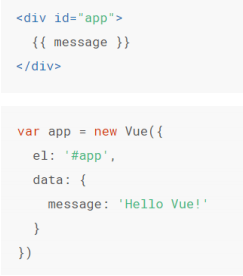
1 )入门案例一共三个步骤
1.引入vue.js库
2.创建Vue对象设置el属性和data属性
3.使用插值表达式将数据渲染到html页面
2 )插值表达式数据绑定最常见的形式就是使用“Mustache”语法(双大括号)的文本插值,Mustache 标签将会被替代为对应数据对象上属性的值。无论何时,绑定的数据对象上属性发生了改变,插值处的内容都会更新。Vue.js 都提供了完全的JavaScript表达式支持。
这些表达式会在所属 Vue 实例的数据作用域下作为 JavaScript 被解析。有个限制就是,每个绑定都只能包含单个 表达式,所以下面的例子都不会生效。{{ dataNum + 1 }} {{ true ? 'YES' : 'NO' }}<!-- 这是语句,不是表达式 --> {{ var a = 1 }} <!-- 流控制也不会生效,请使用三元表达式 --> {{ if (ok) { return message } }}3 ) el 挂载message中的内容会替代插值表达式{{message}}中的内容.
注意事项:1.Vue管理的el选项命中元素及其子元素都有作用。 比如: id为app的div外使用{{message}}不能解析,但在内部使用{{message}}可以解析。
2.除了id选择器其他的选择器也可以使用
3.html和body标签上不能挂使用el挂在。
4) data 数据对象当一个Vue实例被创建时,它将data对象中的所有的property加入到Vue的响应式系统中。当这些 property 的值发生改变时,视图将会产生“响应”,即匹配更新为新的值
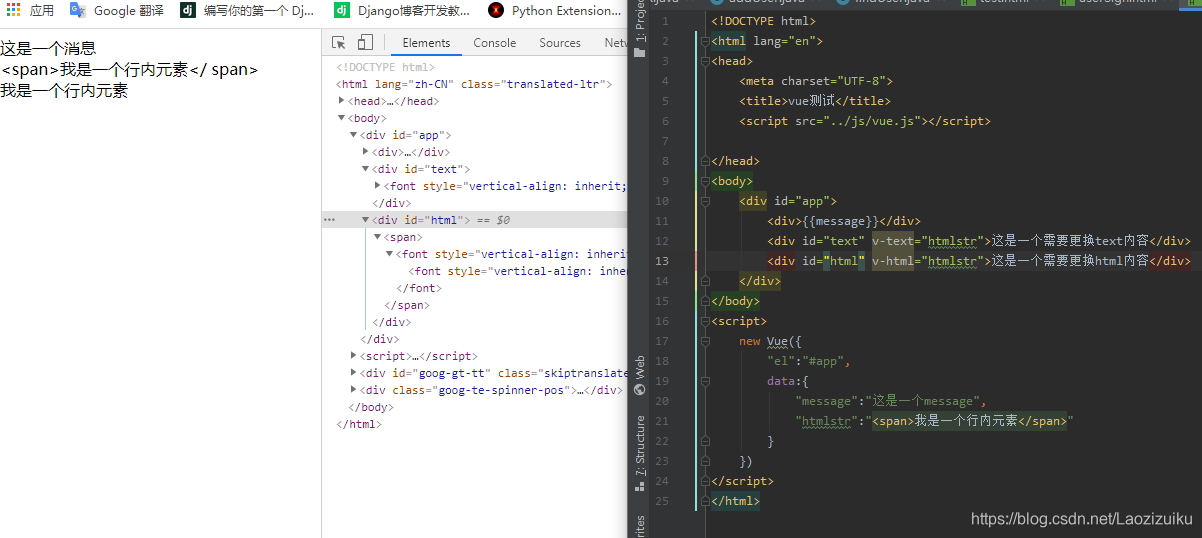
Vue 常用指令v-text 和 v-html很像innerText和innerHTML
v-text:更新标签中的内容
- v-text和插值表达式的区别
v-text更新整个标签中的内容
插值表达式:更新标签中局部的内容
v-html:更新标签中的内容/标签
- 可以渲染内容中的HTML标签
- 注意:尽量避免使用,容易造成危险(XSS跨站脚本攻击)
v-if 和 v-show
- 作用:根据表达式的bool值进行判断是否渲染该元素
<div id="app"> <!-- 如果isShow的值是true ,就显示p标签 --> <p v-if="isShow">我是p标签中的内容</p> <p v-show="isShow">我是p标签中的内容</p> <!-- 如果标签显示与隐藏切换频繁, 就使用v-show v-show本质是通过修改标签的display值 --> </div> <script src="./vue.js"></script> <script> new Vue({ el: '#app', data: { isShow: false } }); </script>v-if有更高的切换开销,而v-show有更高的初始渲染开销。
因此,如果需要非常频繁地切换,则使用v-show较好;
如果在运行时条件很少改变,则使用v-if较好。
v-on作用:使用v-on指令绑定DOM事件,并在事件被触发时执行一些JavaScript代码。
语法:@事件名.修饰符 = "methods中的方法名"
注意: $event可以传形参
<body> <!--

1.获取元素,操作元素点击按钮一 count值增加

点击按钮二 count值减少2.参数传递

传递count

传递$event : 如果有一个输入框,键盘按下,只能输入数字,不能输入其他内容.

需求:有一个文本输入框,只可以输入数字0-9 ,其他内容不能输入.

-->

<div id="app">

    <button v-on:click="add">按钮一count增加</button>
    <button @click="sub">按钮二count减少</button>
    <hr>

    <button v-on:click="count += 1">按钮一count增加-方式2</button>
    <button @click="count -= 1">按钮二count减少-方式2</button>
    <hr>

    <button @click="fun(count)">获取元素count</button>
    <hr>

    <button @click="fun1($event)">传递事件对象</button>
    <hr>

    <input type="text" name="name" id="id" @keydown="fun2($event)">
    <h2>{{count}}</h2>

</div>

</body>

<script>

    var app = new Vue({
        el: "#app",
        data: {
            count: 1
        },
        methods: {
            add: function () {
                this.count += 1
            }, sub: function () {
                this.count -= 1
            }, fun: function (c) {
                alert(c)
            }, fun1: function (e) {
                alert(e);
            }, fun2: function (e) {

                //获取到键盘事件,可以获取到具体的案件 keyCode
                //alert(e.keyCode)
                //如果按钮大于57 或者按钮小于48 ,阻止事件发生 preventDefault()
                if(e.keyCode > 57 || e.keyCode < 48) {
                    //阻止事件发生
                    e.preventDefault();
                }

            }

        }
    })

</script>
修饰符
语法:
格式1: v-on:事件名称.修饰符 = "函数名称"
简写: @事件名.修饰符 = "methods中的方法名"
按键别名:.enter
.tab
.delete
.esc
.space
.up
.down
.left
.right
.ctrl
.alt
.shift
v-for根据一组数组或对象的选项列表进行渲染。
v-for指令需要使用item in items形式的特殊语法,
items是源数据数组/对象
当要渲染相似的标签结构时用v-for
<!-- 对象 --> <!-- (v,k,i)in 对象 v:值 k:键 i:对象中每对key-value的索引 从0开始 注意: v,k,i是参数名,见名知意即可! --> <p v-for="value in per">{{value}}</p> <hr> <p v-for="(value,key) in per">{{value}}----{{key}}</p> <hr> <p v-for="(value,key,i) in per">{{value}}----{{key}}--{{i}}</p>注意:在使用v-for时,要把一个唯一值赋值给:key属性(通常是数组的index或者数据的id)
<!-- v-for key属性: 值通常是一个唯一的标识 key是一个可选属性 养成好习惯:建议在写v-for时 设置:key="唯一值" --> <ul> <li v-for="(item,index) in list" :key="index">{{item}}---{{index}}</li> </ul>v-bind作用:可以绑定标签上的任何属性。
绑定src和alt属性
<div id="app">
    <img :src="imgUrl" v-bind:alt="alt" >
</div>
<script src="./vue.js"></script>
<script>
var vm = new Vue({
    el: '#app',
    data: {
        imgUrl:"img/3.jpg",
        alt:"拉勾图片",
    }
});
</script>
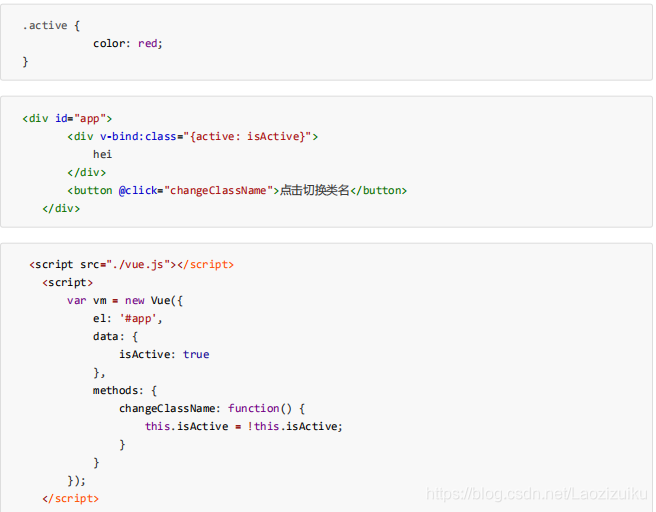
绑定 class 类名对象语法和数组语法
对象语法
如果isActive为true,则返回的结果为<div class="active"></div>
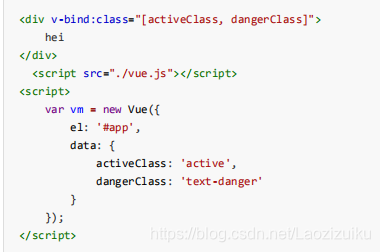
数组语法
渲染的结果<div class="active text-danger"></div>
<!--可以简化为:,简化语法更常用-->
<div:class="{active: isActive}">
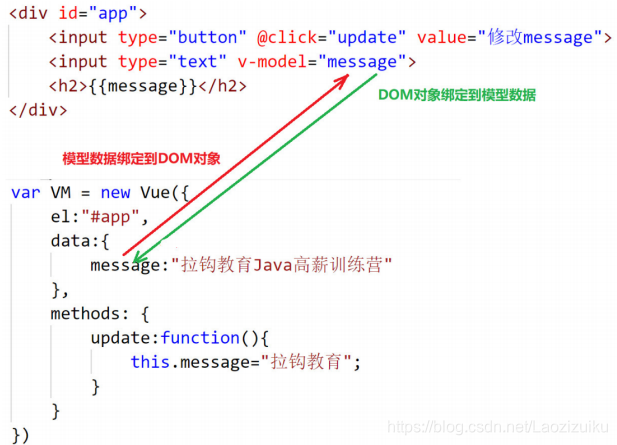
v-model作用:获取和设置表单元素的值(双向数据绑定)
特点:双向数据绑定
数据发生变化可以更新到界面
通过界面可以更改数据
案例:获取和设置表单元素的值(双向数据绑定)
<body>
<div id="app">
    <input type="button" @click="update" value="修改message">
    <input type="text" v-model="message">
    <h2>{{message}}</h2>
</div>
</body>
<script src="./vue.min.js"></script>
<script>
    var VM = new Vue({
        el:"#app",
        data:{
            message:"拉勾教育大数据训练营"
        },
        methods: {
            update:function(){
                this.message="拉钩教育";
            }
        }
    })
</script>
案例 - 表格展示功能分析
渲染表格
删除商品
添加商品
<!DOCTYPE html>
<html lang="en" xmlns:v-on="http://www.w3.org/1999/xhtml">
<head>
    <meta charset="UTF-8">
    <title>vue测试</title>
    <script src="../js/vue.js"></script>

</head>
<body>
<div id="app">
    <input type="button" @click="update" value="修改message">
    <input type="text" v-model="message">
    <h2>{{message}}</h2>
    <table border="1px" cellspacing="0">
        <tr v-for="(item,index) in items">
<!--            <td>{{key}}</td>-->
            <td>{{index+1}}</td>
            <td>{{item.name}}</td>
            <td>{{item.date}}</td>
            <td><a :id="'id'+index" href="#" @click="delItem(index)">删除</a></td>
        </tr>
        <tr v-if="items==null || items.length===0">
            <td colspan="4">没有品牌数据</td>
        </tr>
    </table>
    <div class="add"> 品牌名称:
        <input type="text" v-model="name">
        <input type="button" value="添加" @click="addItem">
    </div>
</div>
</body>
<script src="./vue.min.js"></script>
<script>
    var VM = new Vue({
        el:"#app",
        data:{
            message:"拉勾教育大数据训练营",
            // items:[],
            name:"",
            items: [{name: 'LV', date: '2020-4-1' }, {name: 'Lenovo', date: '2020-5-1' }, {name: 'TCL', date: '2020-6-1' } ]
        },
        methods: {
            update:function(){
                this.message="拉钩教育";
            },
            delItem:function (index) {
                if(confirm("是否删除")){
                    this.items.splice(index,1);
                }

            },
            addItem:function () {
                if(this.name){
                    this.items.push({
                        name:this.name,
                        date:new Date()
                    });
                    this.name="";
                }else{
                    alert("名字不能为空");
                }
            }
        }
    })
</script>
</html>
vue生命周期
1. 什么是 vue 的生命周期vue的生命周期是指从Vue实例创建、运行到销毁期间伴随的这些事件,这些事件对应的函数记录着vue对象的整个生命周期。
2.Vue 实例的产生过程1. beforeCreate在实例初始化之后,数据观测和事件配置之前被调用。
2. created在实例创建完成后被立即调用。
3. beforeMount在挂载开始之前被调用。
4. mounted el被新创建的vm.$el替换,并挂载到实例上去之后调用该钩子。
5. beforeUpdate数据更新时调用,发生在虚拟DOM打补丁之前。
6. updated由于数据更改导致的虚拟DOM重新渲染和打补丁,在这之后会调用该钩子。
7. beforeDestroy实例销毁之前调用。
8. destroyed实例销毁后调用。
3.Vue 对象的生命周期流程图
axios异步访问
1.axios 介绍VUE中结合网络数据进行应用的开发
目前十分流行网络请求库,专门用来发送请求,其内部还是ajax,进行封装之后使用更加方便
axios作用:在浏览器中可以帮助我们完成ajax异步请求的发送.
2 axios 入门使用步骤:1.导包
<!--官网提供的axios在线地址-->
<scriptsrc="https://unpkg.com/axios/dist/axios.min.js"></script>
或者去github中下载源码
https://github.com/axios/axios
2.请求方式,以GET和POST举例
GET
格式1:axios.get(地址?key=value&key2=value2).then(function(response){},function(error){});
格式2:axios.get(地址,{params:{key1:value1...}}).then(function(response){},function(error){});
POST
axios.post(地址,{key:value,key2:value2}).then(function(response){},function(error){})
接口1:随机笑话
请求地址:https://autumnfish.cn/api/joke/list
请求方法:get
请求参数:num(笑话条数,数字)
响应内容:随机笑话
showSmile:function(){ var t=this; axios.get("https://autumnfish.cn/api/joke/list",{params:{num:1}}).then( function (response) { console.log(response); t.smiles=response.data.jokes; } ) },接口2:用户注册
请求地址:https://autumnfish.cn/api/user/reg
请求方法:post
请求参数:username(用户名,字符串)
响应内容:注册成功或失败
            sigin:function(){
              var t=this;
              axios.post("https://autumnfish.cn/api/user/reg",{username:"bigload3333"}).then(function (response) {
                console.log(response);
                alert(response.data);
              })
            },
3.axios 总结1.axios必须导包才能使用
2.使用get或者post方法,就可以发送请求
3.then方法中的回调函数,会在请求成功或者请求失败的时候触发
4.通过回调函数的形参可以获取响应的内容,或者错误信息
4. 其他请求类型axios.request(confifig)
axios.get(url[, confifig])
axios.delete(url[, confifig])
axios.head(url[, confifig])
axios.post(url[, data[, confifig]])
axios.put(url[, data[, confifig]])
axios.patch(url[, data[, confifig]])

vue综合练习
天气查询案例1 需求分析
输入指定城市点击回车或点击查询,展示从今天开始的四天的天气情况
2接口文档
请求地址:http://wthrcdn.etouch.cn/weather_mini
请求方法:get
请求参数:city (要查询的城市名称)
响应内容:天气信息
3案例演示
    <div>
        <input type="text" v-model="city" @keyup.enter="selectWeather" placeholder="请输入想查询的城市">
        <table border="1px" cellspacing="0">
            <tr v-for="weather in weathers">
                <td>{{weather.date}}</td>
                <td>{{weather.fengli}}</td>
                <td>{{weather.fengxiang}}</td>
                <td>{{weather.high}}</td>
                <td>{{weather.low}}</td>
                <td>{{weather.type}}</td>
            </tr>
        </table>
    </div>
<script> var VM = new Vue({ el:"#app", data:{ city:"", weathers:[], }, methods: { selectWeather:function(){ var t=this; axios.get("http://wthrcdn.etouch.cn/weather_mini",{params: {city:t.city}}).then( function (response) { console.log(response); t.weathers=response.data.data.forecast; } ) } } }) </script>4案例总结
1.应用的逻辑代码,建议与页面进行分离,使用单独的JS编写
2. axios回调函数中的this的指向改变,无法正常使用,需要另外保存一份
3.服务器返回的数据比较的复杂时,获取数据时要注意层级结构