二 富文本编辑器
虽然网上有不少关于富文本编辑器的文章,但是针对react的富文本编辑器的介绍确实不够详细。而我要在ant design pro的使用富文本编辑的案例也不是很多。在ant design里有推荐的社区精选组件有
react-quillbraft-editor,此二款虽然有点先天优势,但我目前的水平还不太够驾驭。没办法只能再寻找他款,我把目光投向tinymce-react,一番使用,感觉确实不错。同时我觉得TypeScript挺好。不再赘言,直奔主题。
相关文档资源
TinyMCE中文文档 —感谢作者 莫若卿 提供翻译及网站
TinyMCE React integration quick start guide——TinyMCE官方指导文档
Ant Design——v4版本,感觉AntDesign真是越来越好用了。
效果图
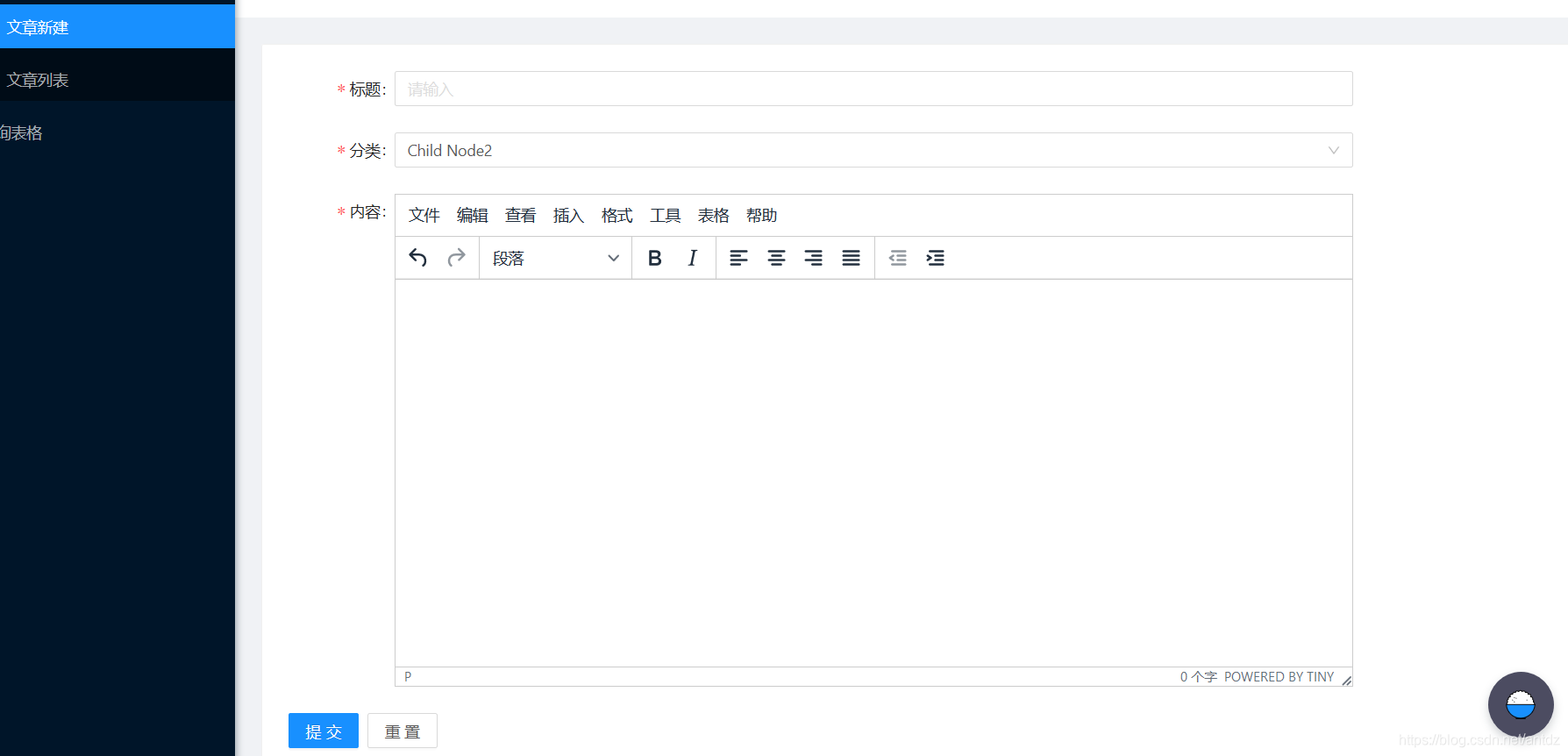
相关代码片段
直接放码
import React, { useState } from 'react';
import { Editor } from '@tinymce/tinymce-react';
import  request from '../../utils/request';

interface DpEditorValueState {
  html: string | '';
}

interface DpEditorProps {
  EditorValue: DpEditorValueState;
  onChange?: (EditorValue: DpEditorValueState) => void;
  DpServiesUrl:string;
}

const DpEditor: React.FC<DpEditorProps> = ({ EditorValue = {}, onChange,DpServiesUrl }) => {
  const [html, setContent] = useState();
  const triggerChange = (changedValue: DpEditorValueState) => {
    if (onChange) {
      onChange({ html, ...changedValue });
    }
  };

  const onEditorChange = (newContent: string) => {
    setContent(newContent);
    triggerChange({ html: newContent });
  };

  return (
    <Editor
      value={EditorValue.html}
      onEditorChange={onEditorChange}
      init={{
        plugins: [
          'lists link image paste help wordcount table '
        ],
        language_url: '/tinymce/langs/zh_CN.js',
        language: 'zh_CN',
        font_formats: '微软雅黑=Microsoft YaHei,Helvetica Neue,PingFang SC,sans-serif;苹果苹方=PingFang SC,Microsoft YaHei,sans-serif;宋体=simsun,serif',
        min_height: 450,
        images_upload_handler: (blobInfo:any, success:any, failure:any) => {
            const formData = new FormData();
            formData.append('file', blobInfo.blob(), blobInfo.filename());
            request(DpServiesUrl, { method:'post', data: formData }).then(res=>success(res.location)).catch(err=>failure(err.status));
        }
      }}
    />
  );
};

export default DpEditor;
在这里直接吧,图片上传功能给做上了。
如何使用国内cdn
还要多说一点,我使用了tinymce-react的官方组件,但是我进行了稍稍的改动。因为没有将tinymce的代码下到本地,直接采用clound模式(CDN)。
使用官方props修改CDN [20200305补充]
因为tiny的cdn有点慢,所以最好使用国内cdn。之前官方没有相关props,所以我在官方包中进行修改。见后面作废的小片段
现在可以直接使用props进行修改地址,
 return (
    <Editor
      value={EditorValue.html}
      onEditorChange={onEditorChange}
      tinymceScriptSrc='https://cdn.bootcss.com/tinymce/5.2.0/tinymce.min.js'
      init={{
        plugins: [
          'lists link image paste help wordcount table '
        ],
        language_url: '/tinymce/langs/zh_CN.js',
        language: 'zh_CN',
        font_formats: '微软雅黑=Microsoft YaHei,Helvetica Neue,PingFang SC,sans-serif;苹果苹方=PingFang SC,Microsoft YaHei,sans-serif;宋体=simsun,serif',
        min_height: 450,
        convert_urls: false,// 不要自动转图片路径
        images_upload_handler: (blobInfo:any, success:any, failure:any) => {
            const formData = new FormData();
            formData.append('file', blobInfo.blob(), blobInfo.filename());
            request(DpServiesUrl, { method:'post', data: formData }).then(res=>success(res.location)).catch(err=>failure(err.status));
        }
      }}


    />
  );
直接在代码里修改cdn
从下内容作废了,因为官方更新了。
但是tinymce提供的cdn,太慢了,链接不上~~。我便把tinymce-react进行了修改。
见下代码
tinymce\tinymce-react\lib\lib\es2015\main\ts\components\Editor.js第83行
Editor.prototype.componentDidMount = function () {
        if (getTinymce() !== null) {
            this.initialise();
        }
        else if (this.elementRef.current && this.elementRef.current.ownerDocument) {
            var doc = this.elementRef.current.ownerDocument;
            var channel = this.props.cloudChannel;
            var apiKey = this.props.apiKey ? this.props.apiKey : 'no-api-key';
            ScriptLoader.load(scriptState, doc, "https://cdn.bootcss.com/tinymce/5.2.0/tinymce.min.js", this.initialise);
        }
    };
国内的cdn,加载速度,杠杠滴。
版权声明:本文为antdz原创文章,遵循CC 4.0 BY-SA版权协议,转载请附上原文出处链接和本声明。