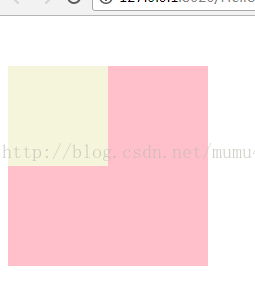
设置子元素的margin,父元素也具有与子元素相同的margin值,称之为塌陷现象。这种现象我们称之为margin的塌陷现象。具体说就是子类标签设置margin-top:50px;时,不是子类标签距离父类标签上边框50像素。而是子类标签和父类标签距离上级标签50个像素。比如下图代码就会导致塌陷现象:
<style type="text/css">
div.father{
width: 200px;
height: 200px;
background: #FFC0CB;
}
div.son{
width: 100px;
height: 100px;
background: beige;
margin-top:50px;
}
</style>
<div class="father">
<div class="son"></div>
</div>
效果图:
而解决margin塌陷现象有两种方法:
方法一:在父类标签设置overflow:hidden;属性
代码:
<style type="text/css">
div.father{
width: 200px;
height: 200px;
background: #FFC0CB;
overflow: hidden;
}
div.son{
width: 100px;
height: 100px;
background: beige;
margin-top:50px;
}
</style>
<div class="father">
<div class="son"></div>
</div>
效果图:

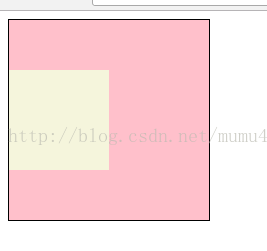
方法二:给父类标签设置border属性即可。
代码:
<style type="text/css">
div.father{
width: 200px;
height: 200px;
background: #FFC0CB;
border: 1px solid #000000;/*不需要边框的时候可以将背景颜色设为透明或者与背景颜色相同的颜色*/
}
div.son{
width: 100px;
height: 100px;
background: beige;
margin-top:50px;
}
</style>
<div class="father">
<div class="son"></div>
</div>
效果图: