1.官方文档:springbootadmin
2.码云地址:springbootadmin码云
3.新建springboot应用
startspring地址:startspring
4.添加pom
admin版本注意事项,如果springboot版本为2.1.x版本,则admin也选择2.1.x版本,很多admin服务报错都是由于版本不兼容导致的
admin主服务添加:
<properties>
        <spring-boot-admin.version>2.1.6</spring-boot-admin.version>
    </properties>
	<dependency>
            <groupId>de.codecentric</groupId>
            <artifactId>spring-boot-admin-starter-server</artifactId>
     </dependency>
	 <dependencyManagement>
        <dependencies>
            <dependency>
                <groupId>de.codecentric</groupId>
                <artifactId>spring-boot-admin-dependencies</artifactId>
                <version>${spring-boot-admin.version}</version>
                <type>pom</type>
                <scope>import</scope>
            </dependency>
        </dependencies>
    </dependencyManagement>
被监视的springboot应用添加:
<properties>
        <spring-boot-admin.version>2.1.6</spring-boot-admin.version>
    </properties>
	<dependency>
            <groupId>de.codecentric</groupId>
            <artifactId>spring-boot-admin-starter-client</artifactId>
        </dependency>
	 <dependencyManagement>
        <dependencies>
            <dependency>
                <groupId>de.codecentric</groupId>
                <artifactId>spring-boot-admin-dependencies</artifactId>
                <version>${spring-boot-admin.version}</version>
                <type>pom</type>
                <scope>import</scope>
            </dependency>
        </dependencies>
    </dependencyManagement>
5.添加服务启动注解
spring boot admin启动类添加
@Configuration
@EnableAdminServer
如果为spring cloud 应该,则将admin注册到注册中心即可,如果未注册到注册中心,则需要每个被监测应用配置spring boot admin 服务url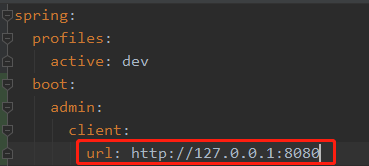
注意:如果spring boot admin注册到了注册中心,且被监测应用又做了如上的配置,则spring监测面板将出现两个同样的被监测服务。
6.添加配置文件
所有被监视应用yml文件添加如下配置
management:
  endpoints:
    web:
      exposure:
        include: "*"
  endpoint:
    health:
      show-details: always
7.集成阿里钉钉群提醒
钉钉群提醒参考博客:
springbootadmin钉钉群提醒
版权声明:本文为u013078871原创文章,遵循CC 4.0 BY-SA版权协议,转载请附上原文出处链接和本声明。