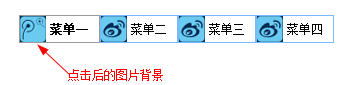
首先给菜单设置默认的图片背景(background: url(icon1.png) no-repeat;),然后编写点击后的样式,包括修改图片背景(background: url(icon2.png) no-repeat;),最后根据jquery的toggleClass()方法为点击的菜单项添加或者删除改变图片背景的样式。
具体代码如下:
.items li{
float: left;
padding: 0 10px 0 30px;
height: 26px;
line-height: 26px;
font-size: 12px;
background: url(icon1.png) no-repeat;
vertical-align: middle;
border: 1px solid #79b7ff;
list-style: none;
cursor: pointer;
}
.items li.changePic {
font-weight: bold;
border: 1px solid #999;
background: url(icon2.png) no-repeat;
}
- 菜单一
- 菜单二
- 菜单三
- 菜单四
$(".items li").click(function(){
$(this).toggleClass("changePic");
});
icon1.png

icon2.png

总体效果如下: