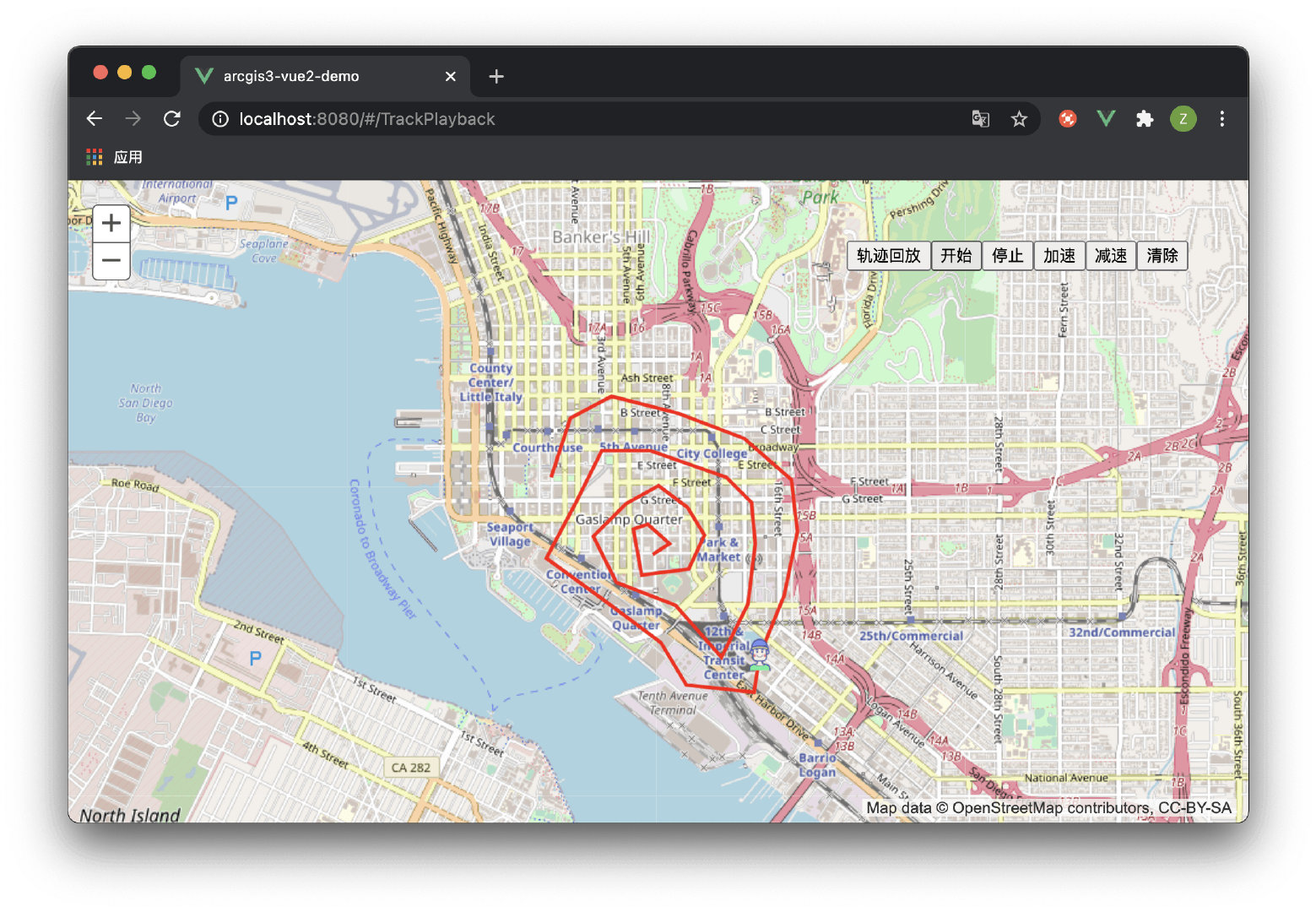
轨迹回放功能
<template>
  <div id="map-container"
       style="width:100%;height:100%;">
    <div
         style="position:absolute;right:50px;top:50px;z-index:999;">
      <button
              @click="trackPlayBackInit()">轨迹回放</button>
      <button
              @click="trackPlayBackControl('开始')">开始</button>
      <button
              @click="trackPlayBackControl('停止')">停止</button>
      <button
              @click="trackPlayBackControl('加速')">加速</button>
      <button
              @click="trackPlayBackControl('减速')">减速</button>
      <button
              @click="trackPlayBackClear()">清除</button>
    </div>
  </div>
</template>
<script>
import { loadCss, loadModules } from 'esri-loader'
export default {
  name: 'TrackPlayback',
  data() {
    return {
      customSymbolsLayer: null,
      moveLayer: null,
      trackPlayBackOption: {
        interval: null, // 轨迹运动定时器
        count: 0, // 计数器
        path: [], // 路径
        speed: 1, // 速度
      },
      map: '',
      gisConstructor: {}, // gis 构造函数
      gisModules: [
        'esri/SpatialReference',
        'esri/Color',
        'esri/symbols/TextSymbol',
        'esri/symbols/SimpleMarkerSymbol',
        'esri/symbols/SimpleLineSymbol',
        'esri/symbols/SimpleFillSymbol',
        'esri/symbols/PictureMarkerSymbol',
        'esri/symbols/TextSymbol',
        'esri/symbols/Font',
        'esri/geometry/Extent',
        'esri/geometry/Point',
        'esri/geometry/Polyline',
        'esri/geometry/Polygon',
        'esri/geometry/geometryEngine',
        'esri/layers/GraphicsLayer',
        'esri/graphic',
        'esri/map',
      ],
    }
  },
  mounted() {
    this.init()
  },
  methods: {
    /**
     * @name: 清除轨迹回放
     */
    trackPlayBackClear() {
      clearInterval(this.trackPlayBackOption.interval)
      this.trackPlayBackOption.interval = null
      this.customSymbolsLayer ? this.customSymbolsLayer.clear() : void (0)
      this.moveLayer ? this.moveLayer.clear() : void (0)
      this.trackPlayBackOption.count = 0
      this.trackPlayBackOption.speed = 1
    },

    /**
     * @name: 轨迹回放控制
     * @param {String} type
     */
    trackPlayBackControl(type) {
      clearInterval(this.trackPlayBackOption.interval)
      this.trackPlayBackOption.interval = null
      if (type === '开始') {
        let data = this.trackPlayBackOption.path
        this.trackPlayBackOption.interval = setInterval(() => {
          this.trackPlayBackOption.count++
          if (this.trackPlayBackOption.count < data.length) {
            this.moveLayer ? this.moveLayer.clear() : void (0)
            let _point = new this.gisConstructor.Point(
              data[this.trackPlayBackOption.count],
              new this.gisConstructor.SpatialReference(this.map.spatialReference)
            )
            let symbol = new this.gisConstructor.PictureMarkerSymbol({
              url: require('@/assets/images/ico03.png'),
              height: 20,
              width: 20,
            })
            // eslint-disable-next-line new-cap
            let pointSymbolGraphic = new this.gisConstructor.graphic(
              _point,
              symbol,
            )
            this.moveLayer.add(pointSymbolGraphic)
          } else {
            clearInterval(this.trackPlayBackOption.interval)
            this.trackPlayBackOption.interval = null
          }
        }, this.trackPlayBackOption.speed * 1000)
      } else if (type === '停止') {
        clearInterval(this.trackPlayBackOption.interval)
        this.trackPlayBackOption.interval = null
      } else if (type === '加速') {
        this.trackPlayBackOption.speed = this.trackPlayBackOption.speed <= 0 ? 1 : this.trackPlayBackOption.speed -= 1
      } else if (type === '减速') {
        this.trackPlayBackOption.speed = this.trackPlayBackOption.speed >= 10 ? 10 : this.trackPlayBackOption.speed += 1
      }
    },

    /**
     * @name: 轨迹回放准备
     * @msg: 绘制轨迹路径
     */
    trackPlayBackInit() {
      this.trackPlayBackClear()
      let paths = [[[- 13042820.124984166, 3857392.08594559], [- 13042667.250927592, 3857865.040058117], [- 13042337.616243104, 3858037.023371763], [- 13041816.888987897, 3857903.2585722604], [- 13041291.384418422, 3857697.8340587383], [- 13040913.976591254, 3857372.9766885177], [- 13040870.980762841, 3856966.904975742], [- 13040971.304362468, 3856460.5096633397], [- 13041167.174247455, 3855992.3328650803], [- 13041214.947390134, 3855691.3620661995], [- 13041750.006588144, 3855753.467151683], [- 13041945.87647313, 3856083.1018361715], [- 13042433.16252846, 3856450.9550348036], [- 13042853.566184042, 3856751.9258336844], [- 13042624.25509918, 3857181.8841178], [- 13042414.05327139, 3857607.0650876476], [- 13042031.868129954, 3857602.2877733796], [- 13041434.70384646, 3857396.8632598575], [- 13041234.056647206, 3857196.216060604], [- 13041205.3927616, 3856871.3586903834], [- 13041262.720532814, 3856388.8499493203], [- 13041468.145046337, 3855973.2236080086], [- 13041831.2209307, 3856384.0726350523], [- 13042304.175043227, 3856560.8332629665], [- 13042485.71298541, 3856923.9091473306], [- 13042227.73801494, 3857186.661432068], [- 13041969.76304447, 3857329.980860106], [- 13041735.67464534, 3857153.2202321924], [- 13041606.687160106, 3856933.4637758667], [- 13041726.120016806, 3856665.9341768613], [- 13042098.750529705, 3856622.9383484498], [- 13042165.632929455, 3856986.014232814], [- 13042055.754701294, 3857019.4554326897], [- 13041878.99407338, 3856871.3586903834], [- 13042012.758872882, 3856780.5897192922]]]
      this.trackPlayBackOption.path = paths[0]
      let polylineSymbol = new this.gisConstructor.SimpleLineSymbol(
        this.gisConstructor.SimpleLineSymbol.STYLE_SOLID,
        new this.gisConstructor.Color([255, 0, 0, 1]),
        3
      )
      let polylineGeometry = new this.gisConstructor.Polyline({
        paths: paths,
        spatialReference: this.map.spatialReference
      })
      let polylineGraphic = new this.gisConstructor.graphic(
        polylineGeometry,
        polylineSymbol
      )
      this.customSymbolsLayer.add(polylineGraphic)
    },

    /**
     * @name: 添加自定义图层
     * @msg: 地图初始化完成之后添加自定义图层或服务
     */
    addCustomLayer() {
      this.customSymbolsLayer = new this.gisConstructor.GraphicsLayer({
        id: '自定义标注图层',
      })
      this.map.addLayer(this.customSymbolsLayer)

      this.moveLayer = new this.gisConstructor.GraphicsLayer({
        id: '标注运动图层'
      })
      this.map.addLayer(this.moveLayer)

    },

    mapClickFun() {
      this.map.on('click', e => {
        console.log(e)
      })
    },

    /**
     * @name: 初始化地图
     */
    init() {
      // 加载 css
      loadCss('https://js.arcgis.com/3.32/esri/css/esri.css')
      // 加载模块
      loadModules(this.gisModules, {
        url: 'https://js.arcgis.com/3.32/',
      })
        .then(this.initMap)
        .then(this.mapClickFun)
        .then(this.addCustomLayer)
    },
    initMap(args) {
      // 将 ArcGIS 的每个功能模块都存放到 gisConstructor 中
      for (let k in args) {
        let name = this.gisModules[k].split('/').pop()
        this.gisConstructor[name] = args[k]
      }
      this.map = new this.gisConstructor.map('map-container', {
        basemap: 'osm',
        logo: false,
        slider: true,
      })
      // 设置初始化范围
      let extent = {
        xmin: -117.1839455,
        ymin: 32.68087830000002,
        xmax: -117.15035189999998,
        ymax: 32.732100979999984,
      }
      this.map.setExtent(
        new this.gisConstructor.Extent(
          extent.xmin,
          extent.ymin,
          extent.xmax,
          extent.ymax
        )
      )
    },
  },
}
</script>
版权声明:本文为qq_37236395原创文章,遵循CC 4.0 BY-SA版权协议,转载请附上原文出处链接和本声明。