前提:保证系统已经装好了 git 和 python
1. 打开 Git Bash,用 git 克隆源代码仓库
git clone https://android.googlesource.com/platform/manifest.git
//没有梯子使用清华源
git clone https://aosp.tuna.tsinghua.edu.cn/platform/manifest.git
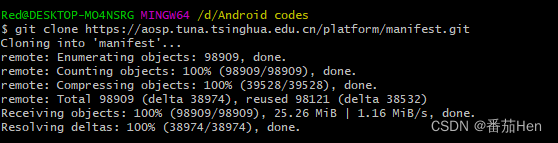
此时 D:\Android codes 目录下多了一个名为 manifest的文件,其中由3个文件如下图:

2. 切换到想要的源码版本分支
去这里 https://source.android.com/source/build-numbers.html#source-code-tags-and-builds
找到想要的版本分支,并复制。
cd manifest
//没有梯子,使用 git branch -a 查看所有分支,找到想要的分支
git branch -a
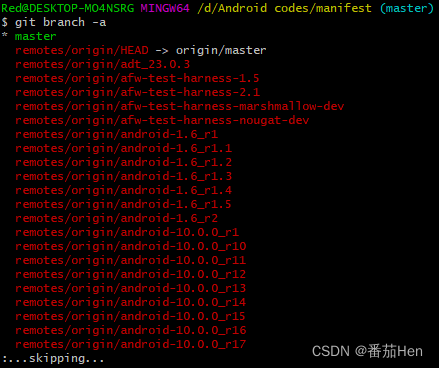
git checkout android-11.0.0_r22 //这里以 11.0 最后一个版本下载
3. 使用 Python 执行脚本进行源代码下载
将下面的代码复制,创建文件 python_download.py并执行。脚本执行时间有点长请静静等候。
# -*- coding: utf-8 -*-
# @Time : 2022/7/12 19:54
# @Author : Red
# @FileName: down.py
# @Software: PyCharm

import xml.dom.minidom
import os
from subprocess import call

# 1. 修改为源码要保存的路径
rootdir = "D:/Android codes/manifest/android-11.0.0_r2"

# 2. 设置 git 安装的路径
git = "D:/Git-2.32.0-64-bit/Git/bin/git.exe"

# 3. 修改为第一步中 manifest 中 default.xml 保存的路径
dom = xml.dom.minidom.parse("D:/Android codes/manifest/default.xml")
root = dom.documentElement

# prefix = git + " clone https://android.googlesource.com/"
# 4. 没有梯子使用清华源下载
prefix = git + " clone https://aosp.tuna.tsinghua.edu.cn/"
suffix = ".git"

if not os.path.exists(rootdir):
    os.mkdir(rootdir)

for node in root.getElementsByTagName("project"):
    os.chdir(rootdir)
    d = node.getAttribute("path")
    last = d.rfind("/")
    if last != -1:
        d = rootdir + "/" + d[:last]
        if not os.path.exists(d):
            os.makedirs(d)
        os.chdir(d)
    cmd = prefix + node.getAttribute("name") + suffix
call(cmd)版权声明:本文为weixin_53763209原创文章,遵循CC 4.0 BY-SA版权协议,转载请附上原文出处链接和本声明。