一、先看看效果
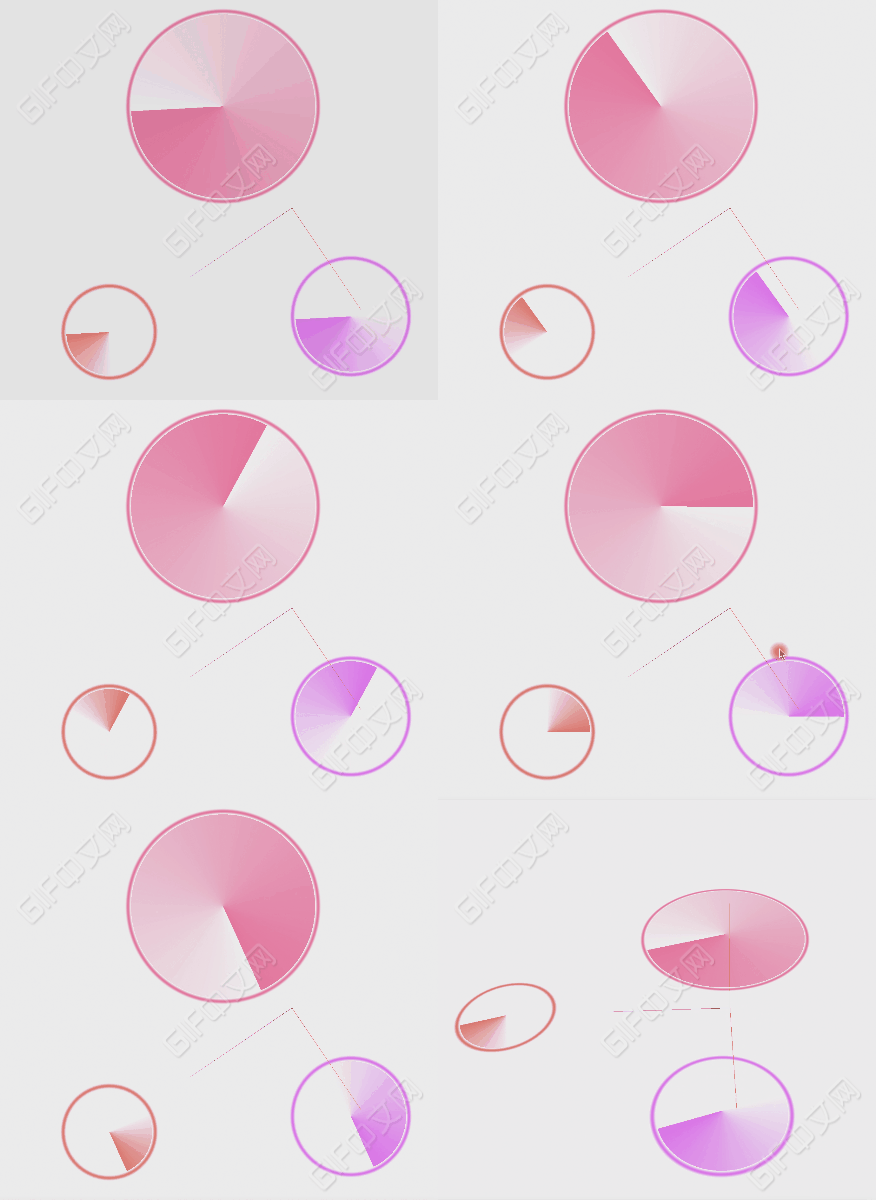
二、实现方法:
1.雷达扫描的相关配置数据准备
// 数组形式的数据,可以绘制多个
const radarData = [{
     position: { // 位置
         x: -100,
         y: 0,
         z: 0
     },
     radius: 80, // 半径大小
     color: '#ff0062', // 颜色
     opacity: 0.5, // 颜色最深的地方的透明度
     angle: Math.PI * 2, // 扫描区域大小的弧度值
     speed: 2 // 旋转的速度
 },{
     position: {
         x: 100,
         y: 0,
         z: 10
     },
     radius: 50,
     color: '#f000f2',
     opacity: 0.5,
     angle: Math.PI,
     speed: 2
 }];
2. 创建雷达的函数
function initRadar(options) {
	// 接受传入的参数
     const {
         position,
         radius,
         color,
         opacity,
         speed,
         angle,
     } = options;

	// 计算创建的矩形的大小,等于雷达扫描半径的2倍
     const size = radius * 2;
	// 创建一个矩形
     let plane = new THREE.PlaneGeometry(size, size);
     // 创建shader材质
     let material_1 = new THREE.ShaderMaterial({
         transparent: true,
         depthWrite: false,
         side: THREE.DoubleSide,
         uniforms: {
             uTime: ratio, // 时间
             u_radius: {  // 半径
                 value: radius
             },
             u_speed: { // 旋转速度
                 value: speed
             },
             u_opacity: { // 默认透明度
                 value: opacity
             },
             u_width: { // 扫描区域的大小
                 value: angle
             },
             u_color: { // 颜色
                 value: new THREE.Color(color)
             },

         },
         vertexShader,  // 顶点着色器代码源
         fragmentShader // 片源着色器代码源
     })
     // 创建mesh并添加到场景中
     let planeMesh = new THREE.Mesh(plane, material_1);
     scene.add(planeMesh);

     planeMesh.rotation.x = -0.5 * Math.PI
     // 设置位置为传入的位置
     planeMesh.position.copy(position);
 }
3、调用方法,创建雷达扫描
// 创建雷达扫描
 radarData.forEach(item => {
     initRadar(item);
 });
4、render函数中更新time
let next = 0;
render();
function render () {
    next += 0.01
    ratio.value = next;

    requestAnimationFrame(render);
    renderer.render(scene, camera);
}
5、着色器部分(核心代码)
// 顶点着色器
const vertexShader =  `
     precision mediump float;
     precision highp int;

     varying vec2 vPosition;
     void main () {
     	// 把当前像素点的x和y专递给片元着色器,这里我们在xy轴所在平面上画图,不考虑z轴
         vPosition = vec2(position.x, position.y);
         gl_Position = projectionMatrix * modelViewMatrix * vec4(position, 1.0);
 }`;
 const fragmentShader =  `
     precision mediump float;
     precision highp int;

	// 接收从js中传入的uniform数据
     uniform float uTime;
     uniform float u_radius;
     uniform float u_speed;
     uniform float u_opacity;
     uniform float u_width;
     uniform vec3 u_color;

     varying vec2 vPosition;
     #define PI 3.14159265359

     void main () {
         // 计算当前扫描旋转的弧度值总数
         float currentRadius = u_speed * uTime;

         // 计算当前像素点与原点连线和x轴构成的夹角的弧度值
         // atan 接受两个参数(y,x)时 等同于 atan2,返回的是atan(y/x);
         // 但比后者更稳定,返回值区间[-PI, PI]
         float angle = atan(vPosition.y, vPosition.x) + PI;

         // 计算当前像素低旋转后的弧度值,值固定在[0, PI * 2]之间
         float angleT = mod(currentRadius + angle, PI * 2.0);

         // 计算当前位置距离中心点距离
         float dist = distance(vec2(0.0, 0.0), vPosition);

         float tempOpacity = 0.0;

         // 设置雷达外层圆环的宽度
         float circleWidth = 5.0;
         // 如果当前点在外层圆环上, 设置一个透明度
         if (dist < u_radius && dist > u_radius - circleWidth) {
             // 做一个虚化渐变效果
             float pct = smoothstep(u_radius - circleWidth, u_radius, dist);
             tempOpacity = sin(pct * PI);
         }

         // 设置雷达扫描圈的效果 (-5.0是给外层圆环和内层圆之间设置一点空白间距)
         if (dist < (u_radius - 5.0)) {
             tempOpacity = 1.0 - angleT / u_width;
         }
		// 设置颜色
         gl_FragColor = vec4(u_color, u_opacity * tempOpacity);
 }
 `;
三、实例代码
<!DOCTYPE html>
<html lang="en">
<head>
    <meta charset="UTF-8">
    <meta http-equiv="X-UA-Compatible" content="IE=edge">
    <meta name="viewport" content="width=device-width, initial-scale=1.0">
    <title>雷达扫描</title>
    <style>
        body {
            height: 100vh;
            overflow: hidden;
        }
    </style>

    <script src="./lib/three.js"></script>
    <script src="./lib/OrbitControls.js"></script>
</head>
<body>
<script>
    let scene, camera, renderer, controls, mixer, tubeCurve, AgvCar;
    let width = window.innerWidth;
    let height = window.innerHeight

    let ratio = {
        value: 0
    }

    // 雷达扫描的相关配置数据
    const radarData = [{
        position: {
            x: -100,
            y: 0,
            z: 0
        },
        radius: 80,
        color: '#ff0062',
        opacity: 0.5,
        angle: Math.PI * 2,
        speed: 2
    },{
        position: {
            x: 100,
            y: 0,
            z: 10
        },
        radius: 50,
        color: '#f000f2',
        opacity: 0.5,
        angle: Math.PI,
        speed: 2
    }];

    function init () {
        // 场景
        scene = new THREE.Scene();
        let helper = new THREE.AxesHelper(100, 100);
        scene.add(helper);

        // 环境光
        let light = new THREE.AmbientLight(0xadadad); // soft white light
        scene.add(light);

        // 平行光源
        const directionalLight = new THREE.DirectionalLight(0xffffff, 0.5);
        directionalLight.position.set(100, 100, 0);
        scene.add(directionalLight);

        // 相机
        camera = new THREE.PerspectiveCamera(45, width / height, 1, 10000)
        camera.position.set(300, 320, 60)
        scene.add(camera)

        // 渲染器
        renderer = new THREE.WebGLRenderer();
        renderer.setSize(width, height)
        renderer.setPixelRatio(Math.min(window.devicePixelRatio, 2));
        renderer.setClearColor(new THREE.Color('#eeeeee'), 1);
        document.body.appendChild(renderer.domElement);

        const vertexShader =  `
            precision mediump float;
            precision highp int;

            varying vec2 vPosition;

            void main () {
                vPosition = vec2(position.x, position.y);
                gl_Position = projectionMatrix * modelViewMatrix * vec4(position, 1.0);
        }`;
        const fragmentShader =  `
            precision mediump float;
            precision highp int;

            uniform float uTime;
            uniform float u_radius;
            uniform float u_speed;
            uniform float u_opacity;
            uniform float u_width;
            uniform vec3 u_color;

            varying vec2 vPosition;
            #define PI 3.14159265359

            void main () {
                // 计算当前扫描旋转的弧度值总数
                float currentRadius = u_speed * uTime;

                // 计算当前像素点与原点连线和x轴构成的夹角的弧度值
                // atan 接受两个参数(y,x)时 等同于 atan2,返回的是atan(y/x);
                // 但比后者更稳定,返回值区间[-PI, PI]
                float angle = atan(vPosition.y, vPosition.x) + PI;

                // 计算当前像素低旋转后的弧度值,值固定在[0, PI * 2]之间
                float angleT = mod(currentRadius + angle, PI * 2.0);

                // 计算当前位置距离中心点距离
                float dist = distance(vec2(0.0, 0.0), vPosition);

                float tempOpacity = 0.0;

                // 设置雷达外层圆环的宽度
                float circleWidth = 5.0;
                // 如果当前点在外层圆环上, 设置一个透明度
                if (dist < u_radius && dist > u_radius - circleWidth) {
                    // 做一个虚化渐变效果
                    float pct = smoothstep(u_radius - circleWidth, u_radius, dist);
                    tempOpacity = sin(pct * PI);
                }

                // 设置雷达扫描圈的效果 (-5.0是给外层圆环和内层圆之间设置一点空白间距)
                if (dist < (u_radius - 5.0)) {
                    tempOpacity = 1.0 - angleT / u_width;
                }


                gl_FragColor = vec4(u_color, u_opacity * tempOpacity);
        }
        `;

        // 创建雷达扫描
        radarData.forEach(item => {
            initRadar(item);
        });

        function initRadar(options) {
            const {
                position,
                radius,
                color,
                opacity,
                speed,
                angle,
            } = options;

            const size = radius * 2;

            let plane = new THREE.PlaneGeometry(size, size);
            let material_1 = new THREE.ShaderMaterial({
                transparent: true,
                depthWrite: false,
                side: THREE.DoubleSide,
                uniforms: {
                    uTime: ratio,
                    u_radius: {
                        value: radius
                    },
                    u_speed: {
                        value: speed
                    },
                    u_opacity: {
                        value: opacity
                    },
                    u_width: {
                        value: angle
                    },
                    u_color: {
                        value: new THREE.Color(color)
                    },

                },
                vertexShader,
                fragmentShader
            })
            let planeMesh = new THREE.Mesh(plane, material_1);
            scene.add(planeMesh);

            planeMesh.rotation.x = -0.5 * Math.PI
            planeMesh.position.copy(position);
        }


        let next = 0;
        render();
        function render () {
            next += 0.01
            ratio.value = next;

            requestAnimationFrame(render);
            renderer.render(scene, camera);
        }
        controls = new THREE.OrbitControls(camera, renderer.domElement);
    }
    window.onload = init
</script>

</body>
</html>
版权声明:本文为weixin_40856652原创文章,遵循CC 4.0 BY-SA版权协议,转载请附上原文出处链接和本声明。