在Spring Boot项目中,代码出现异常后会跳转到/error进行错误展示,对终端用户和前端开发人员很不友好,所以本文介绍下Spring Boot项目中统一异常处理的解决方案。
本文目录
一、Spring Boot默认错误页二、添加全局异常处理三、注解说明
一、Spring Boot默认错误页
先新建一个Spring Boot项目,具体可以参考文章我之前的文章《Spring Boot入门-快速搭建web项目》;
新建好项目后,新建一个controller,编写如下代码:
@Controller
public class DemoController {

    /**
     * 异常情况
     */
    @ResponseBody
    @RequestMapping(value = "/testException")
    public Result testException() {
        Result result = new Result(Result.RESULT_SUCCESS, "SUCCESS");
        //异常
        Integer.parseInt("abc");
        return result;
    }

    /**
     *正常情况
     */
    @ResponseBody
    @RequestMapping(value = "/testRight")
    public Result testRight() {
        Result result = new Result(Result.RESULT_SUCCESS, "SUCCESS");
        return result;
    }

}
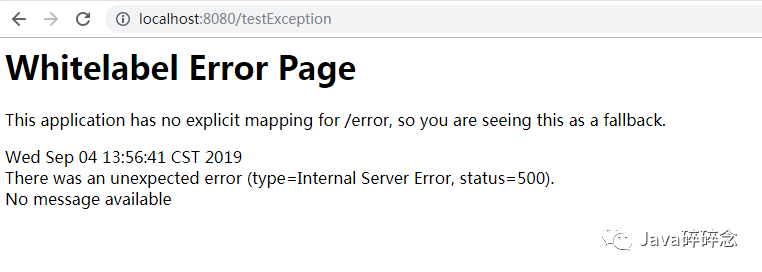
打开本地浏览器,访问http://localhost:8080/testException,出现默认错误页面
二、添加全局异常处理
添加异常全局处理类GlobleExceptionHandler.java,代码如下:
/**
 * 异常全局处理类
 *
 * @author
 **/
@Slf4j
@ControllerAdvice
public class GlobleExceptionHandler {

    @ExceptionHandler(Exception.class)
    @ResponseBody
    public Result handlerException(HttpServletResponse response, Exception e) throws Exception {
        log.info("异常信息", e);
        Result result = new Result(Result.RESULT_FAIL, "error :" + e.getMessage());
        return result;
    }
}
封装返回类Result.java,代码如下:
/**
 * 封装返回类
 */
@Data
public class Result implements Serializable {

    private static final long serialVersionUID = 1L;

    public static final int RESULT_FAIL = 0;
    public static final int RESULT_SUCCESS = 1;

    //返回代码
    private Integer  code;

    //返回消息
    private String message;

    //返回对象
    private  Object data;

    public Result(Integer code, String message) {
        this.code = code;
        this.message = message;
    }

    public Result(Integer code, String message, Object object) {
        this.code = code;
        this.message = message;
        this.data = object;
    }
}
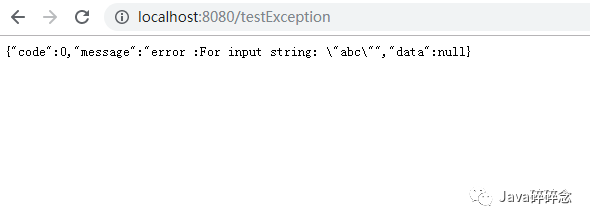
添加上面两个类后,重启项目,再次访问http://localhost:8080/testException,可以看到异常信息已经进行了处理,截图如下:
三、注解说明
@ControllerAdvice:是控制器增强。
@ExceptionHandler({InsertException.class,DeleteException.class})
到此Spring Boot统一异常处理功能全部实现,有问题欢迎留言沟通哦!https://github.com/suisui2019/springboot-study
推荐阅读
1.从技术的角度分析下为什么不要在网上发“原图”2.利用Spring Boot+zxing,生成二维码还能这么简单3.Spring Boot之Profile--快速搞定多环境使用与切换4.Spring Boot 2.X整合Spring-cache,让你的网站速度飞起来5.利用Spring Boot+WxJava实现网站集成微信登录功能
限时领取免费Java相关资料,涵盖了Java、Redis、MongoDB、MySQL、Zookeeper、Spring Cloud、Dubbo/Kafka、Hadoop、Hbase、Flink等高并发分布式、大数据、机器学习等技术。