前言
MapReduce的优缺点
优点
易于编程
它简单的实现一些接口,就可以完成一个分布式程序,这个分布式程序可以分布到大量的PC机器上运行。良好的扩展性
当你的计算资源不能得到满足的时候,你可以通过简单的增加机器来拓展他的计算能力。高容错性
MapReduce设计的初衷就是使程序能够部署在廉价的PC机器上,这就要求它具有很高的容错性。比如一台机器挂了,他可以把上面的计算任务转移到另外一个节点上,不至于任务运行失败。适合PB级以上海量数据的离线处理
缺点
不擅长实时计算
MapReduce无法像Mysql一样,在毫秒或者秒级内返回结果。不擅长流式计算
流式计算的输入数据是动态的,而MapReduce的输入数据集是静态的,不能动态变化。这是因为MapReduce自身的设计特点决定了数据源必须是静态的不擅长DAG(有向图)计算
多个应用程序存在依赖关系,后一个应用程序的输入为前一个的输出。在这种情况下,MapReduce并不是不能做,而是使用后,每个MapReduce作业的输出结果都会写入到磁盘,会造成大量的磁盘IO,导致性能非常的低下。
常用数据序列化类型
| Java类型 | Hadoop Writable 类型 |
|---|---|
| Boolean | BooleanWritable |
| Byte | ByteWritable |
| Int | IntWritable |
| Float | FloatWritable |
| Long | LongWritable |
| Double | DoubleWritable |
| String | Text |
| Map | MapWritable |
| Array | ArrayWritable |
一、MapReduce
用户编写的程序分成三个部分:Mapper、Reducer和Driver。
Mapper阶段
- 用户自定义的Mapper要继承自己的父类
- Mapper的输入数据是Key:value的形式(key,value的类型可以自定义)
- Mapper中的业务逻辑写在map()方法中
- Mapper的输出数据是Key:value的形式(key,value的类型可以自定义)
- map()方法(MapTask进程)对每一个<K,V>调用一次
Reducer阶段
- 用户自定义的Reducer要继承自己的父类
- Reducer的输入数据类型对应Mapper的输出数据类型,也是key-value
- Reducer的业务逻辑写在reduce()方法中
- ReduceTask进程对每一组相同的key的<k,v>组调用一次reduce()方法
Driver阶段
- 相当于YARN集群的客户端,用户提交我们整个程序到YARN集群,提交的是封装了MapReduce程序相关运行参数的job对象
二、代码实现
1.Pom
代码如下(示例):
    <dependencies>
        <dependency>
            <groupId>junit</groupId>
            <artifactId>junit</artifactId>
            <version>RELEASE</version>
        </dependency>
        <dependency>
            <groupId>org.apache.logging.log4j</groupId>
            <artifactId>log4j-core</artifactId>
            <version>2.8.2</version>
        </dependency>
        <dependency>
            <groupId>org.apache.hadoop</groupId>
            <artifactId>hadoop-common</artifactId>
            <version>2.7.2</version>
        </dependency>
        <dependency>
            <groupId>org.apache.hadoop</groupId>
            <artifactId>hadoop-client</artifactId>
            <version>2.7.2</version>
        </dependency>
        <dependency>
            <groupId>org.apache.hadoop</groupId>
            <artifactId>hadoop-hdfs</artifactId>
            <version>2.7.2</version>
        </dependency>

    </dependencies>
2.Mapper
数据集如下: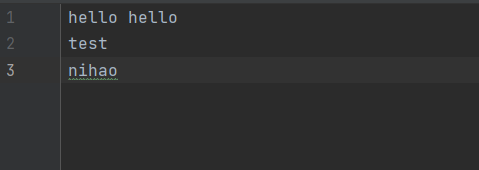
按行号获取每一行数据,共有3行。首先,按行号(LongWritable key)获取第一行数据,然后将数据类型转成String方便对该行的数据进行操作。然后以空格分隔第一行的字符串,获得了hello 和 hello两个单词,写入2个<“hello”:1>。第二行第三行一样。
/**
 * 采用泛型,参数为输入key类型,输入value类型,输出key类型,输出value类型
 */

public class WordCountMapper extends Mapper<LongWritable,Text,Text,IntWritable>{

    /**
     * 将单词映射成(xxx,1)的形式
     */
    private static final IntWritable one = new IntWritable(1);
    private static Text text = new Text();
    /**
     * @param key 代表行号,第一次开始循环时,key = 1
     * @param value 代表行内容,每一行的数据(字符串)
     * @param context
     * @throws IOException
     * @throws InterruptedException
     */

    @Override
    protected void map(LongWritable key, Text value, Context context) throws IOException, InterruptedException {
        //将一行的内容转成字符串
        String line = value.toString();
        //拆分单词
        String []words = line.split(" ");
        for (String word: words) {
            text.set(word);
            context.write(text,one);
        }
    }

}
3.Reducer
按照相同key来获取values,将key对应的values累加就是一个单词出现的次数,然后用context.write(key,result)返回即可。
public class WordReducer extends Reducer<Text, IntWritable, Text, IntWritable>{

    //统计结果
    private IntWritable result = new IntWritable();

    /**
     *
     * @param key 单词
     * @param values 1
     * @param context
     * @throws IOException
     * @throws InterruptedException
     */
    @Override
    protected void reduce(Text key, Iterable<IntWritable> values, Context context) throws IOException, InterruptedException {
        int sum = 0;
        for (IntWritable it: values) {
            sum += it.get();
        }
        result.set(sum);
        context.write(key,result);
//        super.reduce(key, values, context);
    }
}
4.Driver
public class WordCountDriver {
    public static void main(String[] args) throws IOException, ClassNotFoundException, InterruptedException {
        //通过加载配置文件对象创建job任务
        Job job = Job.getInstance(new Configuration());
        //命名job
        job.setJobName("MyWordCount");
        job.setJarByClass(WordCountDriver.class);
        job.setMapperClass(WordCountMapper.class);
        job.setReducerClass(WordReducer.class);
        //设置map的输入输出类型
        job.setMapOutputKeyClass(Text.class);
        job.setMapOutputValueClass(IntWritable.class);
        //设置reduce的输出类型
        job.setOutputKeyClass(Text.class);
        job.setOutputValueClass(IntWritable.class);
        //设置文件的输入输出文件
        if(args.length != 2){
            System.out.println("the number of param is wrong");
            return;
        }
        FileInputFormat.setInputPaths(job,new Path(args[0]));
        FileOutputFormat.setOutputPath(job,new Path(args[1]));

        //判断任务是否正常完成
        Boolean done = job.waitForCompletion(true);
        //判断退出
        System.exit(done ? 0:1);
    }
}
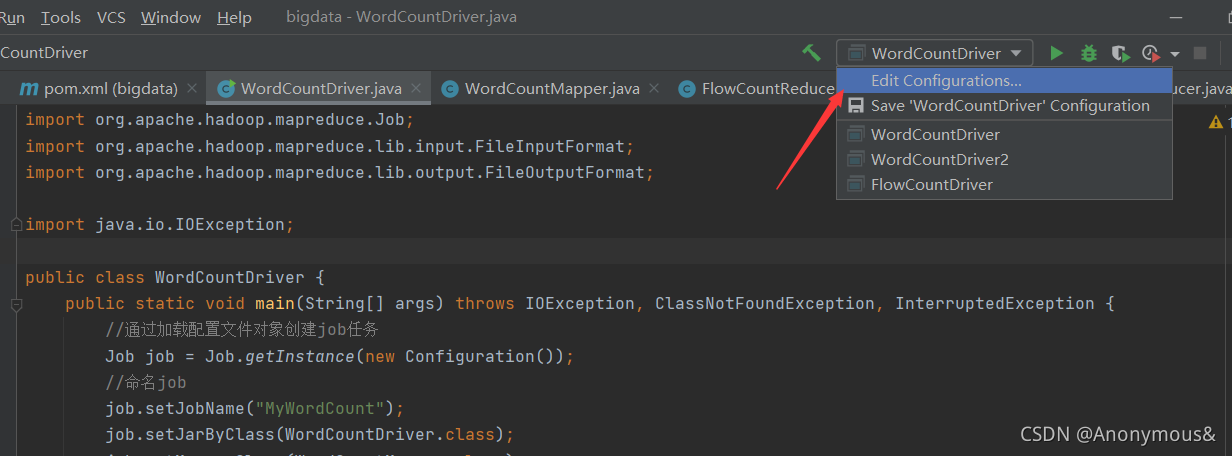
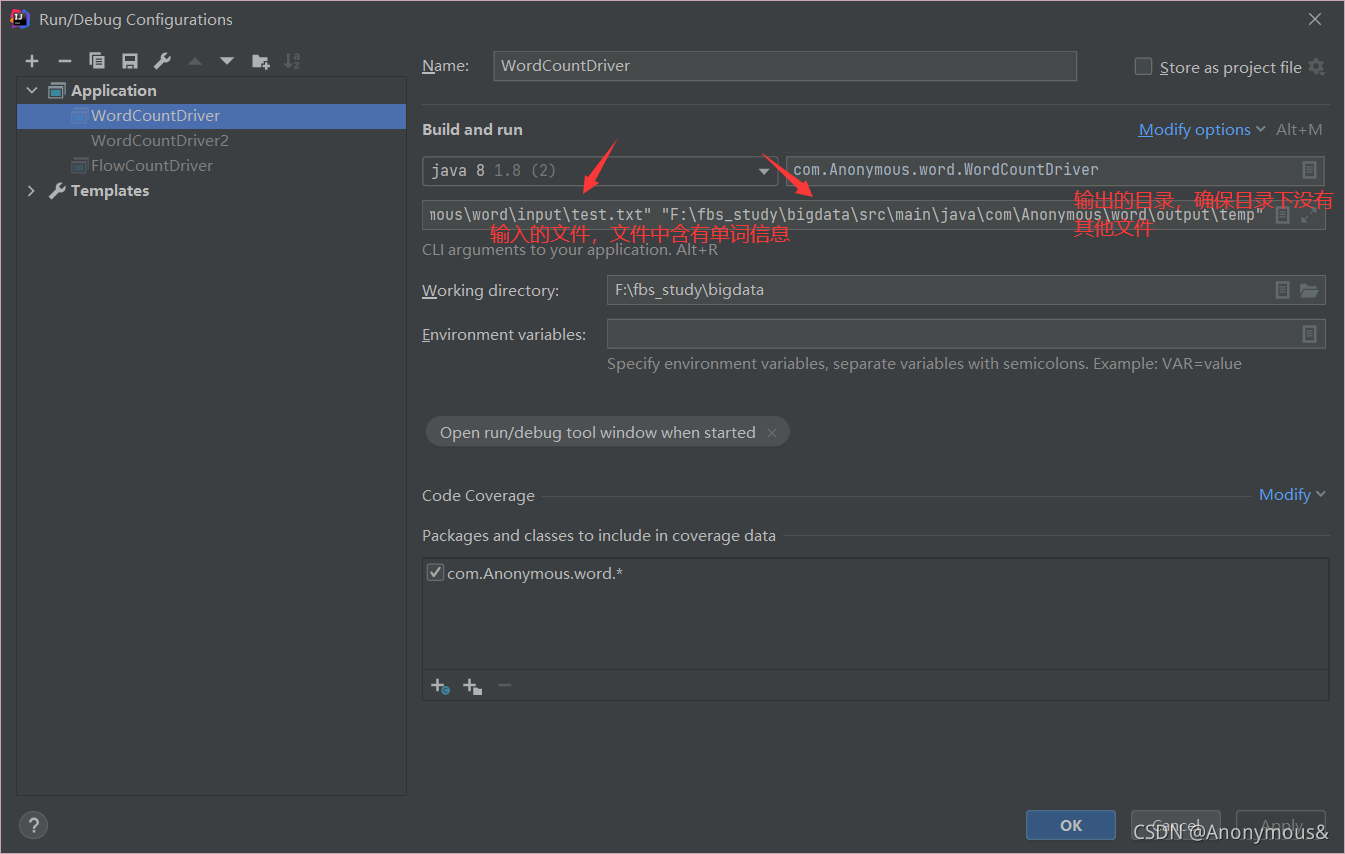
点击ok后运行即可
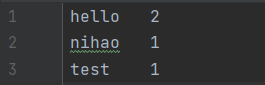
结果如下