一、Velocity是什么
Velocity是一个基于java的模板引擎。Velocity将Java代码从web页面中分离出来,使web站点在其生命周期中更具可维护性,并为Java Server pages (jsp)或PHP提供了一种可行的替代方案。
它可以用来从模板生成SQL、PostScript和XML。
Velocity组成结构分为App模块,Context模块,Runtime模块,RuntimeInstance模块。
二、快速开始
1.引入依赖
		<!--Velocity-->
        <dependency>
            <groupId>org.apache.velocity</groupId>
            <artifactId>velocity-engine-core</artifactId>
            <version>2.2</version>
        </dependency>
2.定义模板
在resource目录下创建一个HTML文件修改后缀名为.vm
<!DOCTYPE html>
<html lang="en">
<head>
    <meta charset="UTF-8">
    <title>Title</title>
</head>
<body>
	hello,${name}!
</body>
</html>
3.测试
@Test
	public void test01() throws Exception {
		//1.设置velocity资源加载器
		Properties properties = new Properties();
		//固定写法
		properties.put("file.resource.loader.class", "org.apache.velocity.runtime.resource.loader.ClasspathResourceLoader");
		//2.初始化velocity引擎
		Velocity.init(properties);
		//3.创建velocity容器
		VelocityContext context = new VelocityContext();
		context.put("name", "lisi");
		//4.加载velocity模板文件
		Template template = Velocity.getTemplate("vms/01-quickstart.vm", "UTF-8");
		//5.合并数据到模板
		FileWriter fw = new FileWriter("D:\\projectdemo\\java8\\src\\main\\resources\\html\\01-quickstart.html");
		template.merge(context, fw);
		//6.释放资源
		fw.close();
	}
三、语法
1、VTL是velocity提供的一种模板语言,分为四大类注释、非解析内容、引用。
a、注释
单行注释:#单行注释#
多行注释:#*多行注释*#
文档注释:#**文档注释*#
b、非解析内容: #[[非解析内容]]#
c、引用
	1.变量引用
		语法:$属性或者${属性}
		$!属性或者$!{属性}:如果没有值就显示空字符
	2.属性引用
		$变量名.属性或者${变量名.属性}
		$!变量名.属性或者$!{变量名.属性}:如果没有值就显示空字符
	3.方法引用
		$变量名.方法()
		${变量名.方法()}
四、指令
1.流程控制
		1)#set
			#set($变量=值)
		eg:#set($str="hello world ")
		2)#if/#else if
			#if(条件)
			#else if(条件)
			#end
		3)#foreach
		普通数组:
			#foreach($item in $item)
				$foreach.index----$item
				$foreach.count----$item
				[#break]
			#end
		对象集合:
			#foreach($item in $item)
				$item.对象属性
			#end
		map:
			#foreach($entry in $map.entrySet())
				$entry.key-----$entry.value
			#end

2.引入资源
		1)#include 引入外部资源,引入的资源不会被引擎解析
			#include(resource)resource:可以为单引号或者双引号,也可以为$变量,内容为外部资源路径
		2)#parse   引入外部资源,引入的资源会被引擎解析
			#parse(resource)resource:可以为单引号或者双引号,也可以为$变量,内容为外部资源路径
		3)#define 定义重用模块(不带参数)
			#define($模块名称)
				模块内容
			#end

			$模块名称调用
		4)#evalute 动态计算出我们在字符串中使用的变量
			#evalute("计算语句")
3.宏指令
		定义重用模块(可以带参数)
			#macro(宏名 [$arg])
			……
			#end
			#宏名(参数)调用
五、代码生成器
1.定义vm文件
Controller.java.vm
package ${package}.controller;

import ${package}.domain.${className};
import ${package}.service.${className}Service;
import org.springframework.beans.factory.annotation.Autowired;
import org.springframework.stereotype.Controller;
import org.springframework.web.bind.annotation.RequestMapping;
import org.springframework.web.servlet.ModelAndView;
import java.util.List;

@Controller
@RequestMapping("${classname}" )
public class ${className}Controller {
    @Autowired
    private ${className}Service service;
    @RequestMapping("/save${className}" )
    public String test2(${className} ${classname}) {
        service.save${className}(${classname});
        return "redirect:findAll";
    }
}
Dao.java.vm
package ${package}.dao;
import ${package}.domain.${className};
import org.apache.ibatis.annotations.Insert;
import org.apache.ibatis.annotations.Select;
import java.util.List;

public interface ${className}Dao {
    void saveUser(${className} ${classname});
}
Service.java.vm
package ${package}.service;

import ${package}.dao.${className}Dao;
import ${package}.domain.${className};
import org.springframework.beans.factory.annotation.Autowired;
import org.springframework.stereotype.Service;

import java.util.List;

@Service
public class ${className}Service {
    @Autowired
    private ${className}Dao ${classname}Dao;

    public void save${className}(${className} ${classname}) {
        ${classname}Dao.save${className}(${classname});
    }
}
2.GeneratorUtil
package com.zzk.utils;
import org.apache.commons.io.IOUtils;
import org.apache.commons.lang3.StringUtils;
import org.apache.velocity.Template;
import org.apache.velocity.VelocityContext;
import org.apache.velocity.app.Velocity;
import java.io.File;
import java.io.IOException;
import java.io.StringWriter;
import java.util.List;
import java.util.Map;
import java.util.Properties;
import java.util.zip.ZipEntry;
import java.util.zip.ZipOutputStream;

/**
 * @Description: velocity模板工具类
 * @ClassName: GeneratorUtil
 * @author: zzk
 * @date: 2022.04.06 16:01
 */
public class GeneratorUtil {
    /**
     * 根据模板名,类名,包名
     *
     * @param template
     * @param className
     * @param packageName
     * @return main/java/com/zzk/controller/
     */
    public static String getFileName(String template, String className, String packageName) {
        String packagePath = "main" + File.separator + "java" + File.separator;
        if (StringUtils.isNoneEmpty(packageName)) {
            packagePath += packageName.replace("." , File.separator) + File.separator;
        }
        if (template.contains("Controller.java.vm" )) {
            return packagePath + "controller" + File.separator + className + "Controller.java";
        }
        if (template.contains("Dao.java.vm" )) {
            return packagePath + "dao" + File.separator + className + "Dao.java";
        }
        if (template.contains("Service.java.vm" )) {
            return packagePath + "service" + File.separator + className + "Service.java";
        }
        return null;
    }

    /**
     * 代码生成器
     *
     * @param data      填充到模板上的数据
     * @param templates 模板名称
     * @param zip       zip输出流
     */
    public static void codeGenerator(Map<String, Object> data, List<String> templates, ZipOutputStream zip) {
        //1.设置velocity资源加载器
        Properties properties = new Properties();
        properties.put("file.resource.loader.class", "org.apache.velocity.runtime.resource.loader.ClasspathResourceLoader");
        //2.初始化velocity引擎
        Velocity.init(properties);
        //3.创建velocity容器
        VelocityContext context = new VelocityContext(data);
        //4.加载velocity模板文件
        for (String template : templates) {
            Template tp = Velocity.getTemplate(template, "UTF-8" );
            StringWriter sw = new StringWriter();
            //合并数据
            tp.merge(context,sw);
            try {
                zip.putNextEntry(new ZipEntry(getFileName(template,data.get("className").toString(),data.get("package").toString())));
                IOUtils.write(sw.toString(),zip,"UTF-8");
            } catch (IOException e) {
                e.printStackTrace();
            }
        }
    }

    public static void main(String[] args) {
        String fileName1 = getFileName("Controller.java.vm" , "Account" , "com.zzk" );
        String fileName2 = getFileName("Dao.java.vm" , "Account" , "com.zzk" );
        String fileName3 = getFileName("Service.java.vm" , "Account" , "com.zzk" );
        System.out.println("fileName1 = " + fileName1);
        System.out.println("fileName2 = " + fileName2);
        System.out.println("fileName3 = " + fileName3);
    }
}
3.测试
package com.zzk;
import com.zzk.utils.GeneratorUtil;
import org.junit.Test;
import java.io.File;
import java.io.FileNotFoundException;
import java.io.FileOutputStream;
import java.io.IOException;
import java.util.ArrayList;
import java.util.HashMap;
import java.util.List;
import java.util.Map;
import java.util.zip.ZipOutputStream;

/**
 * @Description: velocity测试类
 * @ClassName: VelocityTest
 * @author: zzk
 * @date: 2022.04.06 16:00
 */
public class CodeGeneratorTest {
    @Test
    public void test01() {
        //1.构建数据
        Map<String, Object> map = new HashMap<String, Object>();
        map.put("package" , "com.zzk" );
        map.put("className" , "Account" );
        map.put("classname" , "account" );
        //2.构建模板列表
        List<String> tempList = new ArrayList<String>();
        tempList.add("vms/Controller.java.vm" );
        tempList.add("vms/Dao.java.vm" );
        tempList.add("vms/Service.java.vm" );
        //3.
        File file = new File("D:\\projectdemo\\ssm\\code-generator\\src\\main\\resources\\" + map.get("className" ) + ".zip" );
        ZipOutputStream zip = null;
        try {
            FileOutputStream outputStream = new FileOutputStream(file);
            zip = new ZipOutputStream(outputStream);
            GeneratorUtil.codeGenerator(map, tempList, zip);
        } catch (FileNotFoundException e) {
            e.printStackTrace();
        } catch (IOException e) {
            e.printStackTrace();
        }finally {
            try {
                if (zip!=null){
                    //必须释放资源,否则会出现文件损坏情况
                    zip.close();
                }
            } catch (IOException e) {
                e.printStackTrace();
            }
        }
    }
}
六、VelocityTools
1.VelocityTools是velocity模板引擎的一个子项目,用于将velocity和web开发环境集成的工具包。 由GenericTools和velocityview组成。
2.GenericTools
2.1引入依赖
		<dependency>
            <groupId>org.apache.velocity.tools</groupId>
            <artifactId>velocity-tools-generic</artifactId>
            <version>3.0</version>
        </dependency>
测试类,可以结合官方文档学习
@Test
	public void test01() throws IOException {
		//1.创建velocity引擎对象
		VelocityEngine engine = new VelocityEngine();
		//2.设置模板加载路径
		engine.setProperty(Velocity.RESOURCE_LOADER,"class");
		engine.setProperty("class.resource.loader.class", "org.apache.velocity.runtime.resource.loader.ClasspathResourceLoader");
		//3.初始化velocity引擎
		engine.init();
		//4.加载tools.xml,resource目录下配置
		ToolManager toolManager=new ToolManager();
		toolManager.configure("tools.xml");
		//5.加载模板
		Template template = engine.getTemplate("模板名","字符编码");
		//6.设置数据
		ToolContext context = toolManager.createContext();
		context.put("数据key","数据value");
		//7.合并数据
		FileWriter fw = new FileWriter("输出路径");
		template.merge(context,fw);
		//8.释放资源
		fw.close();
	}
七、SpingMvc中使用velocity
1.引入依赖
		<dependency>
            <groupId>org.apache.velocity</groupId>
            <artifactId>velocity-engine-core</artifactId>
            <version>2.2</version>
        </dependency>
        <dependency>
            <groupId>org.apache.velocity.tools</groupId>
            <artifactId>velocity-tools-generic</artifactId>
            <version>3.0</version>
        </dependency>
        <dependency>
            <groupId>org.apache.velocity.tools</groupId>
            <artifactId>velocity-tools-view</artifactId>
            <version>3.0</version>
        </dependency>
2.配置Tools.xml,根据官方文档配置你需要的工具
<?xml version="1.0" encoding="UTF-8"?>
<tools>
    <toolbox scope="application">
        <tool class="org.apache.velocity.tools.generic.ComparisonDateTool"
              format="yyyy-MM-dd" depth="1" skip="month,week,millisecond"
              bundle="org.apache.velocity.tools.generic.times"/>
    </toolbox>
</tools>
3.在web.xml中配置VelocityViewServlet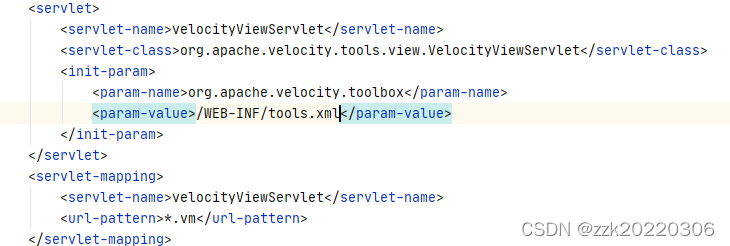
4.配置视图解析器
5.接下来就和web开发一样,数据查询,填充到模板上,使用VTL语法解析数据。
总结
版权声明:本文为m0_67729518原创文章,遵循CC 4.0 BY-SA版权协议,转载请附上原文出处链接和本声明。