目录
Java基础
Web前端:
页面结构:html
Servlet、jsp(Java Server Page)=html+java
页面样式:css(Cascading Style Sheet,层叠样式表)
页面交互:js(javascript)、jQuery、AJAX
XML文件
MySQL数据库
JDBC(Java DataBase Connectivty)
JavaWeb项目:
一、EL表达式:
EL:Expression Language,表达式语言
1.1 作用:
Jsp表达式:<%=u.getName() %>
Jsp开发的原则:尽量在jsp中少写甚至不写java代码。
使用EL表达式代替。
语法:${变量或表达式}
1.2 用法:
1、输出基本数据类型变量:
${3+8}
${name}:去域对象中找(pageScope->requestScope->sessionScope->applicationScope)
pageScope.name 相当于pageContext.getAttrbute(name)
${xxxxScope.name}:指明去某个特定的Scope中找name的值。
2、输出对象的属性值:
${u.name} u是User类的对象
3、输出集合对象:
List集合:
${users[0].name}
二、jsp标签:
2.1 作用:
替换jsp脚本
条件判断:if-else
循环遍历:for循环
页面跳转:重定向、转发
......
2.2 jsp标签的分类:
内置标签:动作标签,不需要在jsp中引入标签库
Jstl标签:需要在jsp页面导入
自定义标签:支持开发者自定义,需要在jsp引入标签库
2.3 动作标签:
1、包含标签:<jsp:include page=”xx.jsp”/>(动态包含)
动态包含与静态包含的区别?
(1)语法不同:
动态包含:<jsp:include page=”xx.jsp”/>
静态包含:<%@include file=”xxxx.jsp”%>(include指令)
(2)参数传递不同:
动态包含可以向被包含的页面传递参数。
静态包含不能向被包含的页面传递参数。
(3)原理不同:
动态包含:先分开翻译、编译,再运行时再合并在一起
静态包含:先合并再翻译、编译
2、参数标签:
<jsp:param name="name" value="zhangsan"/>
3、转发标签:
<jsp:forward page=”xxx.jsp”/>
2.4 jstl标签:
2.4.1 定义:
Java Standard Tags Libarary:java标准标签库
2.4.2 主要内容:
核心标签库:c标签
格式化标签库:fmt标签
EL函数库:fn标签
Xml标签库:x标签
Sql标签库:sql标签
2.4.3 使用jstl标签的步骤:
1、导入jstl的jar包(包含了标签库文件)
使用MyEclipse开发时,已经选择了使用J2EE6.0,自动导入相关包,不需要手动做。
2、在使用jstl标签的页面导入标签库:
<%@taglib uri=”tag文件的uri名称” prefix=”简写”%>
3、在jsp中使用标签:
循环:<c:forEach></c:forEach>
条件判断:<c:if test=””></c:if> <c:else></c:else>
多条件:<c:choose></c:choose>
<c:when test=””></c:when>
<c:otherwise></c:otherwise>
<%@page import="com.bwhuili.entity.User"%> <%@ page language="java" import="java.util.*" pageEncoding="UTF-8"%> <!--导入c标签库 --> <%@taglib uri="http://java.sun.com/jsp/jstl/core" prefix="c"%> <% String path = request.getContextPath(); String basePath = request.getScheme()+"://"+request.getServerName()+":"+request.getServerPort()+path+"/"; %> <!DOCTYPE HTML PUBLIC "-//W3C//DTD HTML 4.01 Transitional//EN"> <html> <head> <base href="<%=basePath%>">
<title>My JSP 'user_list.jsp' starting page</title>
<meta http-equiv="pragma" content="no-cache"> <meta http-equiv="cache-control" content="no-cache"> <meta http-equiv="expires" content="0"> <meta http-equiv="keywords" content="keyword1,keyword2,keyword3"> <meta http-equiv="description" content="This is my page"> </head> <body> <p>亲爱的${sessionScope.account}用户,欢迎您登录本系统!</p> <table border="1" cellspacing="0" cellpadding="10" align="center"> <tr> <th>编号</th> <th>姓名</th> <th>账号</th> <th>密码</th> <th>籍贯</th> <th>操作</th> </tr> <c:choose> <c:when test="${not emptyusers }"> <!--判断users集合不为空 --> <!-- items代表是一个集合对象,var代表集合中某一个元素(User对象) --> <c:forEach items="${users }" var="u" varStatus="status"> <tr> <td>${status.index + 1}</td> <td><c:out value="${u.name}"/></td><!--此处属性名应该与User类成员变量对应 --> <td><c:out value="${u.account}"/></td> <td><c:out value="${u.password}"/></td> <td><c:out value="${u.address}"/></td> <td><a href="delete.do?name=${u.name }">删除</a></td> </tr> </c:forEach> </c:when> <c:otherwise> <tr> <td colspan="5">对不起,未查询到数据!</td> </tr> </c:otherwise> </c:choose> </table> </body> </html> |
三、传统的web请求:
getTime.jsp |
<%@ page language="java" import="java.util.*" pageEncoding="UTF-8"%> <% String path = request.getContextPath(); String basePath = request.getScheme()+"://"+request.getServerName()+":"+request.getServerPort()+path+"/"; %> <!DOCTYPE HTML PUBLIC "-//W3C//DTD HTML 4.01 Transitional//EN"> <html> <head> <base href="<%=basePath%>">
<title>My JSP 'getTime.jsp' starting page</title>
<meta http-equiv="pragma" content="no-cache"> <meta http-equiv="cache-control" content="no-cache"> <meta http-equiv="expires" content="0"> <meta http-equiv="keywords" content="keyword1,keyword2,keyword3"> <meta http-equiv="description" content="This is my page"> <script type="text/javascript"> functiongetTime(){ //向服务器发送Servlet请求 window.location.href ="getTime.do"; } </script> </head> <body> <p>服务器当前时间为:${requestScope.time}</p> <input type="button" value="获取时间" onclick="javascript:getTime();"/> </body> </html> |
GetTimeServlet.java |
public classGetTimeServletextends HttpServlet{ public voiddoGet(HttpServletRequest request, HttpServletResponse response) throwsServletException, IOException { //获取到服务器的时间,然后通过request域对象传给浏览器。 SimpleDateFormat sdf =newSimpleDateFormat("yyyy年MM月dd日 HH:mm:ss"); String time = sdf.format(newDate()); request.setAttribute("time", time); //转发 request.getServletContext().getRequestDispatcher("/getTime.jsp") .forward(request, response); } public voiddoPost(HttpServletRequest request, HttpServletResponse response) throwsServletException, IOException { doGet(request, response); } } |
3.1 请求request:
浏览器以HTTP协议提交请求到服务器。
请求行、请求头、请求体
3.2 响应response:
服务器以HTTP协议返回结果到浏览器。
响应头、响应行、响应体
3.3 状态栏:
当前请求的执行过程信息。(过程)
3.4 历史栏:
记录历史访问记录,并进行缓存。
缺点:如果数据量大,全局刷新页面给服务器和浏览器造成很大的负担,使浏览器变慢,甚至卡死,使用体验差。
改进:使用局部刷新,对于不需要变化的部分,不用缓存到历史栏。
四、AJAX技术:
4.1 同步:
请求1->响应1->请求2->响应2->请求3->响应3
4.2 异步:
请求1->请求2->请求3->响应1->响应2->响应3
Web1.0 仅支持全局刷新
Web2.0 支持异步的方法实现局部刷新
4.3 AJAX的定义:
异步的js和xml技术(Asynchronous JavaScript And XML):应用在浏览器和服务器之间,可以在不刷新整个浏览器的情况下,与服务器进行异步通信的技术。
AJAX是一种技术,不是语言,2005年Google提出的。
4.4 AJAX的原理:
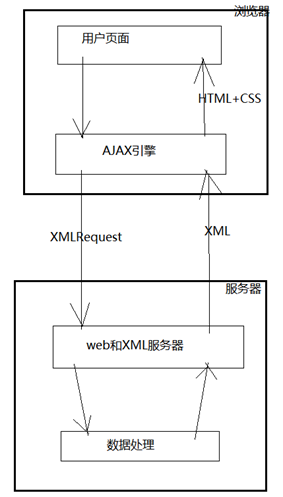
4.5 开发流程:
1、创建一个AJAX对象:
2、准备发送:设置url、method、async,调用open()方法
3、发送请求,调用send()方法
如果使用get方式,不需要设置请求头。
如果使用post方法,需要设置请求头。
4、监听:
onreadystatuchange 存储函数(函数名),每当readyState属性发生变化时,就会调用该函数。
readyState 存储XMLHttpRequest的状态,从0到4变化:
0:请求未初始化
1:服务器链接已经建立
2:请求已经接收到
3:请求处理中
4:请求已经完成,且响应已经就绪
status 200:“OK”执行成功
404:请求资源找不到
500:服务器发生错误。
getTime2.jsp |
<%@ page language="java" import="java.util.*" pageEncoding="UTF-8"%> <% String path = request.getContextPath(); String basePath = request.getScheme()+"://"+request.getServerName()+":"+request.getServerPort()+path+"/"; %> <!DOCTYPE HTML PUBLIC "-//W3C//DTD HTML 4.01 Transitional//EN"> <html> <head> <base href="<%=basePath%>">
<title>My JSP 'getTime2.jsp' starting page</title>
<meta http-equiv="pragma" content="no-cache"> <meta http-equiv="cache-control" content="no-cache"> <meta http-equiv="expires" content="0"> <meta http-equiv="keywords" content="keyword1,keyword2,keyword3"> <meta http-equiv="description" content="This is my page"> <script type="text/javascript"> functioncreateAjax(){ varajax =null; //针对不同的浏览器,创建方式不同 if(window.XMLHttpRequest){ ajax =newXMLHttpRequest(); }else{ ajax =newActiveXObject("Microsoft.XMLHTTP"); } returnajax; } </script>
<script type="text/javascript"> //1.创建一个Ajax对象 varajax = createAjax(); //2.准备发送 //basePath-实际上就是整个项目在服务器上的发布路径的根目录 //url后面跟上浏览器时间的目的是,防止重复提交 varurl ="<%=basePath%>getTime2.do?time="+new Date().getTime(); //绝对路径 varmethod ="GET"; ajax.open(method,url,true); //第三个参数是“是否异步” //3.发送 ajax.send(null); //不需要传递参数 //4.监听 ajax.onreadystatechange =function(){ //ajax请求的状态发生变化 if(ajax.readyState == 4){//请求执行完毕 if(ajax.status == 200){ //ajax请求执行成功 //5.获取服务器返回的系统时间 vartime = ajax.responseText; document.getElementById("t").innerHTML = time; } } }; </script> </head> <body> <p>服务器当前时间为:<span id="t"></span></p> </body> </html> |
GetServerTimeServlet.java (getTime2.do) |
public classGetServerTimeServletextends HttpServlet{ public voiddoGet(HttpServletRequest request, HttpServletResponse response) throwsServletException, IOException { //获取到服务器的时间,然后通过request域对象传给浏览器。 SimpleDateFormat sdf =newSimpleDateFormat("yyyy年MM月dd日 HH:mm:ss"); String time = sdf.format(newDate()); response.setContentType("text/html;charset=UTF-8"); PrintWriter pw = response.getWriter(); pw.write(time); pw.flush(); pw.close(); } public voiddoPost(HttpServletRequest request, HttpServletResponse response) throwsServletException, IOException { doGet(request, response); } } |
4.6 AJAX的应用案例:
4.6.1 案例1:注册用户时判断用户是否存在
register.jsp |
<%@ page language="java" import="java.util.*" pageEncoding="UTF-8"%> <% String path = request.getContextPath(); String basePath = request.getScheme()+"://"+request.getServerName()+":"+request.getServerPort()+path+"/"; %> <!DOCTYPE HTML> <html> <head> <base href="<%=basePath%>">
<title>案例1:注册时判用户是否存在</title>
<meta http-equiv="pragma" content="no-cache"> <meta http-equiv="cache-control" content="no-cache"> <meta http-equiv="expires" content="0"> <meta http-equiv="keywords" content="keyword1,keyword2,keyword3"> <meta http-equiv="description" content="This is my page"> <script type="text/javascript" src="js/register.js"></script> </head> <body> <form> <table border="1" cellspacing="0" cellpadding="10" align="center"> <tr> <td>账号:</td> <td> <input type="text" name="account" id="account" onblur="javascript:check();"/> <br/> <i id="msg"></i> </td> </tr> <tr> <td>密码:</td> <td><input type="password" name="password"/></td> </tr> <tr> <td>邮箱:</td> <td><input type="email" name="email"/></td> </tr> </table> </form> </body> </html> |
register.js |
functioncheck(){ //使用ajax技术判断该与用户是否存在 varaccountEle = document.getElementById("account"); varaccount = accountEle.value.trim(); if(account !=null&& account !=""){ //AJAX //1.获取ajax对象(XMLHttpRequest) varajax = createAjax(); //2.准备发送 varurl ="../Day31_Demo2/checkUser.do?time="+newDate().getTime(); ajax.open("POST",url,true); //使用异步 //3.发送请求,如果使用post请求,需要设置请求头 ajax.setRequestHeader("Content-Type","application/x-www-form-urlencoded"); vardata ="account="+account; //参数如果有多个,使用&连接 ajax.send(data); //4.监听 ajax.onreadystatechange =function(){ if(ajax.readyState == 4){ if(ajax.status == 200){ //5.从服务器获取返回的结果 varmsg = ajax.responseText; document.getElementById("msg").innerHTML = msg; } } }; }else{ document.getElementById("msg").innerHTML =""; accountEle.focus(); } } functioncreateAjax(){ varajax =null; //针对不同的浏览器,创建方式不同 if(window.XMLHttpRequest){ ajax =newXMLHttpRequest(); }else{ ajax =newActiveXObject("Microsoft.XMLHTTP"); } returnajax; } |
CheckUserServlet.java(对应checkUser.do) |
public classCheckUserServletextends HttpServlet{ public voiddoGet(HttpServletRequest request, HttpServletResponse response) throwsServletException, IOException { doPost(request, response); } public voiddoPost(HttpServletRequest request, HttpServletResponse response) throwsServletException, IOException { //先获取从浏览器传过来的参数account,然后去数据库中查询该账户, //看用户是否存在;根据判断的结果返回提示信息给浏览器 String account = request.getParameter("account").trim(); List<String> users =newArrayList<String>(); users.add("lijunjie"); users.add("ouyangjie"); users.add("chenxiaoliang"); users.add("xukehong"); Boolean flag =false; for(String acc : users) { if(acc.equals(account)) { flag =true; break; } } response.setContentType("text/html;charset=UTF-8"); PrintWriter pw = response.getWriter(); if(flag) { pw.write("<font color='red'>该账号已经存在!</font>"); }else{ pw.write("<font color='green'>该账号可以使用!</font>"); } pw.flush(); pw.close(); } } |
4.6.2 案例2:省市两级联动:
map.jsp |
<%@ page language="java" import="java.util.*" pageEncoding="UTF-8"%> <% String path = request.getContextPath(); String basePath = request.getScheme()+"://"+request.getServerName()+":"+request.getServerPort()+path+"/"; %> <!DOCTYPE HTML PUBLIC "-//W3C//DTD HTML 4.01 Transitional//EN"> <html> <head> <base href="<%=basePath%>">
<title>省市联动</title>
<meta http-equiv="pragma" content="no-cache"> <meta http-equiv="cache-control" content="no-cache"> <meta http-equiv="expires" content="0"> <meta http-equiv="keywords" content="keyword1,keyword2,keyword3"> <meta http-equiv="description" content="This is my page"> </head> <body> <select id="province"> <option value="0">省、直辖市、自治区...</option> <option value="1">北京</option> <option value="2">江西</option> <option value="3">安徽</option> <option value="4">广东</option> </select>省
<select id="city"> <option id="0">地级市、地区、盟...</option> </select>市
<script type="text/javascript"> functioncreateAjax(){ varajax =null; //针对不同的浏览器,创建方式不同 if(window.XMLHttpRequest){ ajax =newXMLHttpRequest(); }else{ ajax =newActiveXObject("Microsoft.XMLHTTP"); } returnajax; }
document.getElementById("province").onchange =function(){ //先获取“省”下拉框中的value值 varprovinceValue =this.value; //this代表document.getElementById("province") varcitySelect = document.getElementById("city"); citySelect.options.length = 1; //只留citySelect中的第一个option if(provinceValue !="0"){ //具体的省,需要向服务器发送请求,查询该省下面的全部市,写到citySelect中 //以下是AJAX部分 varajax = createAjax(); varurl ="getCity.do?time="+newDate().getTime(); ajax.open("POST",url,true);//准备发送 ajax.setRequestHeader("Content-Type","application/x-www-form-urlencoded"); ajax.send("provinceValue="+provinceValue); //发送 //监听 ajax.onreadystatechange =function(){ if(ajax.readyState == 4){ if(ajax.status == 200){ //从服务器获取数据 //假设从服务器返回的数据是xml形式的城市列表 /* * <city>南昌</city> * <city>宜春</city> * <city>新余</city> */ varxml = ajax.responseXML; //按照DOM规则解析XML varcityElements = xml.getElementsByTagName("city"); //数组 for(vari=0;i<cityElements.length;i++){ varcity = cityElements[i].firstChild.nodeValue; //城市名称 //创建<option>...</option>的html标签 varcityOption = document.createElement("option"); cityOption.innerHTML = city; //往citySelect元素中增加子节点 citySelect.appendChild(cityOption); } } } }; }else{ citySelect.options.length = 1; //只留citySelect中的第一个option } }; </script> </body> </html> |
GetCityServlet.java(对应getCity.do) |
public classGetCityServletextends HttpServlet{ public voiddoGet(HttpServletRequest request, HttpServletResponse response) throwsServletException, IOException { doPost(request, response); } public voiddoPost(HttpServletRequest request, HttpServletResponse response) throwsServletException, IOException { String provinceValue = request.getParameter("provinceValue"); //返回一个xml文件 response.setContentType("text/xml;charset=UTF-8"); PrintWriter pw = response.getWriter(); pw.write("<?xml version=\"1.0\" encoding=\"UTF-8\"?>"); pw.write("<cities>"); if("1".equals(provinceValue)) { //北京 pw.write("<city>北京市</city>"); }else if("2".equals(provinceValue)) { pw.write("<city>南昌</city>"); pw.write("<city>宜春</city>"); pw.write("<city>新余</city>"); }else if("3".equals(provinceValue)) { pw.write("<city>合肥</city>"); pw.write("<city>安庆</city>"); }else if("4".equals(provinceValue)) { pw.write("<city>广州</city>"); pw.write("<city>深圳</city>"); pw.write("<city>惠州</city>"); } pw.write("</cities>"); pw.flush(); pw.close(); } } |