java中使用itextPdf向PDF文件写入 文字和图片
pdf作为一种阅读体验性非常好的文件格式,那么在实际项目中也经常会涉及到PDF文件的操作,
在公司中,我遇到实现签署文件的这样一个功能,用itextPdf 实现,在网上看了一些文章,总结了一下,写了个工具类
官方地址:https://itextpdf.com,这里使用的是iText-5.0.6版本。
需求:
向pdf文件中的单元格写入文字,和在申请人签名中写入签名图片
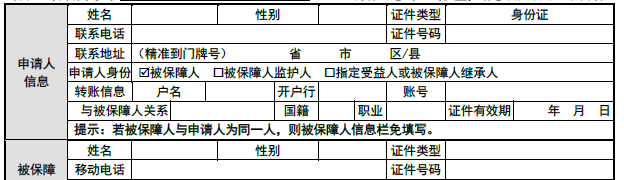
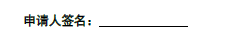
一、 我们创建好项目后,先导入这次需要的 maven依赖
    <dependencies>
        <dependency>
            <groupId>org.springframework.boot</groupId>
            <artifactId>spring-boot-starter-web</artifactId>
            <version>2.0.2.RELEASE</version>
        </dependency>
        <dependency>
            <groupId>com.itextpdf</groupId>
            <artifactId>itextpdf</artifactId>
            <version>5.4.3</version>
        </dependency>
        <dependency>
            <groupId>com.itextpdf</groupId>
            <artifactId>itext-asian</artifactId>
            <version>5.2.0</version>
        </dependency>
        <dependency>
            <groupId>junit</groupId>
            <artifactId>junit</artifactId>
            <version>4.12</version>
            <scope>compile</scope>
        </dependency>
    </dependencies>
二、了解iText
使用iText 需要知道文字写入的位置怎么确定的,iText是以pdf 文件的左下角为原点的 xy 坐标

package com.meditrusthealth.fast.ep.core;

import com.itextpdf.awt.geom.Rectangle2D;
import com.itextpdf.awt.geom.RectangularShape;
import com.itextpdf.text.pdf.parser.ImageRenderInfo;
import com.itextpdf.text.pdf.parser.RenderListener;
import com.itextpdf.text.pdf.parser.TextRenderInfo;

import java.util.ArrayList;
import java.util.HashMap;
import java.util.List;
import java.util.Map;

public class TestRenderListener implements RenderListener {
    //用来存放文字的矩形
    List<Rectangle2D.Float> rectText = new ArrayList<Rectangle2D.Float>();
    //用来存放文字
    List<String> textList = new ArrayList<String>();
    //用来存放文字的y坐标
    List<Float> listY = new ArrayList<Float>();
    //用来存放每一行文字的坐标位置
    List<Map<String, Rectangle2D.Float>> rows_text_rect = new ArrayList<>();
    //PDF文件的路径
    protected String filepath = null;

    public TestRenderListener() {
    }

    //step 2,遇到"BT"执行
    @Override
    public void beginTextBlock() {
        // TODO Auto-generated method stub
    }

    //step 3

    /**
     * 文字主要处理方法
     */
    @Override
    public void renderText(TextRenderInfo renderInfo) {
        //获取文字的下面的矩形
        //Rectangle2D.Float rectBase = renderInfo.getBaseline().getBoundingRectange();
        String text = renderInfo.getText();
        if (text.length() > 0) {
            RectangularShape rectBase = renderInfo.getBaseline().getBoundingRectange();
            //获取文字下面的矩形
            Rectangle2D.Float rectAscen = renderInfo.getAscentLine().getBoundingRectange();
            //计算出文字的边框矩形
            float leftX = (float) rectBase.getMinX();
            float leftY = (float) rectBase.getMinY() - 1;
            float rightX = (float) rectAscen.getMaxX();
            float rightY = (float) rectAscen.getMaxY() + 1;

            Rectangle2D.Float rect = new Rectangle2D.Float(leftX, leftY, rightX - leftX, rightY - leftY);

            System.out.println("text:" + text + "--x:" + rect.x + "--y:" + rect.y + "--width:" + rect.width + "--height:" + rect.height);

            if (listY.contains(rect.y)) {
                int index = listY.indexOf(rect.y);
                float tempx = rect.x > rectText.get(index).x ? rectText.get(index).x : rect.x;
                rectText.set(index, new Rectangle2D.Float(tempx, rect.y, rect.width + rectText.get(index).width, rect.height));
                textList.set(index, textList.get(index) + text);
            } else {
                rectText.add(rect);
                textList.add(text);
                listY.add(rect.y);
            }

            Map<String, Rectangle2D.Float> map = new HashMap<>();
            map.put(text, rect);
            rows_text_rect.add(map);
        }
    }

    //step 4(最后执行的,只执行一次),遇到“ET”执行
    @Override
    public void endTextBlock() {
        // TODO Auto-generated method stub
    }

    //step 1(图片处理方法)
    @Override
    public void renderImage(ImageRenderInfo renderInfo) {

    }
}
package com.meditrusthealth.fast.ep.core;

import com.itextpdf.awt.geom.Rectangle2D;
import com.itextpdf.text.pdf.PdfReader;
import com.itextpdf.text.pdf.parser.PdfReaderContentParser;
import org.junit.Test;

import java.util.List;
import java.util.Map;

public class PrintTextLocations {
    @Test
    public void test() throws Exception {
        PdfReader reader = new PdfReader("D:\\work\\11\\支付申请书.pdf");
        //新建一个PDF解析对象
        PdfReaderContentParser parser = new PdfReaderContentParser(reader);
        //包含了PDF页面的信息,作为处理的对象
        //PdfStamper stamper = new PdfStamper(reader, new FileOutputStream("d:/test.pdf"));
        for (int i = 1; i <= reader.getNumberOfPages(); i++) {
            //新建一个ImageRenderListener对象,该对象实现了RenderListener接口,作为处理PDF的主要类
            TestRenderListener listener = new TestRenderListener();
            //解析PDF,并处理里面的文字
            parser.processContent(i, listener);
            //获取文字的矩形边框
            List<Rectangle2D.Float> rectText = listener.rectText;
            List<String> textList = listener.textList;
            List<Float> listY = listener.listY;
            List<Map<String, Rectangle2D.Float>> list_text = listener.rows_text_rect;
            for (int k = 0; k < list_text.size(); k++) {
                Map<String, Rectangle2D.Float> map = list_text.get(k);
                for (Map.Entry<String, Rectangle2D.Float> entry : map.entrySet()) {
                    System.out.println(entry.getKey() + "---" + entry.getValue());
                }
            }
        }
    }
}
在 PrintTextLocations的test()中给出要解析位置的pdf的路径之后,运行程序,在控制台可以看到结果
控制台打印了pdf中文字的坐标
这个时候,我们选择 箭头的位置, 生成的 文字就会正好是 姓名右边的框框中间的位置,
三、使用java程序向pdf文件写入数据
package com.xsqwe.test;

public class PdfPro {
    private String text;  // 文本
    private float x; //x 坐标
    private float y; //y 坐标

    public PdfPro() {
    }

    public PdfPro(float x, float y, String text) {
        this.text = text;
        this.x = x;
        this.y = y;
    }

    public String getText() {
        return text;
    }

    public void setText(String text) {
        this.text = text;
    }

    public float getX() {
        return x;
    }

    public void setX(float x) {
        this.x = x;
    }

    public float getY() {
        return y;
    }

    public void setY(float y) {
        this.y = y;
    }
}
package com.xsqwe.test;

public class ImagePro {
    private float x; //x 坐标
    private float y; //y 坐标
    private float scalePercent;  //缩放百分比
    private String imgPath; //路径

    public ImagePro() {
    }

    public ImagePro(float x, float y, float scalePercent, String imgPath) {
        this.x = x;
        this.y = y;
        this.scalePercent = scalePercent;
        this.imgPath = imgPath;
    }

    public float getX() {
        return x;
    }

    public void setX(float x) {
        this.x = x;
    }

    public float getY() {
        return y;
    }

    public void setY(float y) {
        this.y = y;
    }

    public float getScalePercent() {
        return scalePercent;
    }

    public void setScalePercent(float scalePercent) {
        this.scalePercent = scalePercent;
    }

    public String getImgPath() {
        return imgPath;
    }

    public void setImgPath(String imgPath) {
        this.imgPath = imgPath;
    }
}
package com.xsqwe.utils;

import java.io.BufferedOutputStream;
import java.io.File;
import java.io.FileOutputStream;
import java.util.List;

import com.itextpdf.text.Element;
import com.itextpdf.text.Image;
import com.itextpdf.text.pdf.BaseFont;
import com.itextpdf.text.pdf.PdfContentByte;
import com.itextpdf.text.pdf.PdfGState;
import com.itextpdf.text.pdf.PdfReader;
import com.itextpdf.text.pdf.PdfStamper;
import com.xsqwe.test.ImagePro;
import com.xsqwe.test.PdfPro;

/**
 * @author gaojiabao
 * @date 2020年9月20日 18:14:06
 * @version 1.0.0
 */
public class EditorPDF {

    /**
     * @param inputPDFFilePath  要写入的pdf文件路径
     * @param outPutPDFFilePath 输出的pdf文件路径
     * @param imagePros         要写入的图片的list,包含图片坐标等
     * @param pdfList           要写入的文字的list,包含坐标等
     * @throws Exception
     */
    public static void writeToPdf(String inputPDFFilePath, String outPutPDFFilePath, List<ImagePro> imagePros, List<PdfPro> pdfList)
            throws Exception {
        //append 追加
        BufferedOutputStream bos = new BufferedOutputStream(new FileOutputStream(new File(outPutPDFFilePath), false));
        PdfReader reader = new PdfReader(inputPDFFilePath);
        PdfStamper stamper = new PdfStamper(reader, bos);
        int total = reader.getNumberOfPages() + 1;
        PdfContentByte content;
        // BaseFont base = BaseFont.createFont("STSong-Light", "UniGB-UCS2-H", BaseFont.EMBEDDED);
        // "c:\\windows\\fonts\\SIMHEI.TTF" 使用windows系统的黑体
        BaseFont base = BaseFont.createFont("c:\\windows\\fonts\\SIMHEI.TTF", BaseFont.IDENTITY_H, BaseFont.NOT_EMBEDDED);
        PdfGState gs = new PdfGState();
        for (int i = 1; i < total; i++) {
            //content = stamper.getOverContent(i);// 在内容上方加水印
            content = stamper.getUnderContent(i);//在内容下方加水印
            gs.setFillOpacity(0.2f);
            content.beginText();
            //字体大小
            content.setFontAndSize(base, 10.5F);
            //content.setTextMatrix(390, 810);
            //内容居中,横纵坐标,偏移量
            for (PdfPro pdfPro : pdfList) {
                content.showTextAligned(Element.ALIGN_CENTER, pdfPro.getText(), pdfPro.getX(), pdfPro.getY(), 0);
            }
            for (ImagePro imagePro : imagePros) {
                //添加图片
                Image image = Image.getInstance(imagePro.getImgPath());
            /*
              img.setAlignment(Image.LEFT | Image.TEXTWRAP);
              img.setBorder(Image.BOX); img.setBorderWidth(10);
              img.setBorderColor(BaseColor.WHITE); img.scaleToFit(100072);//大小
              img.setRotationDegrees(-30);//旋转
             */
                //图片的位置(坐标)
                image.setAbsolutePosition(imagePro.getX(), imagePro.getY());
                // image of the absolute
                image.scaleToFit(200, 200);
                image.scalePercent(imagePro.getScalePercent());//依照比例缩放. 调整缩放,控制图片大小
                content.addImage(image);
            }
            content.setFontAndSize(base, 8);
            content.endText();
        }
        stamper.close();
        //关闭打开的原来PDF文件,不执行reader.close()删除不了(必须先执行stamper.close(),否则会报错)
        reader.close();
        //删除原来的PDF文件
        /*File targetTemplePDF = new File(inputPDFFilePath);
        targetTemplePDF.delete();*/
    }
}
执行完 main 方法后, 可以看到效果
 public static void main(String[] args) throws Exception {
        List<PdfPro> pdfList = new ArrayList<>();
        //患者姓名
        //text: --x:179.54--y:604.86--width:5.279999--height:11.071045
        pdfList.add(new PdfPro(179.54f, 718.62f, "张三"));
        //性别
        //text: --x:328.27--y:539.43--width:5.279999--height:11.071045
        pdfList.add(new PdfPro(328.27f, 718.62f, "男"));
        //患者电话
        pdfList.add(new PdfPro(250.25f, 702.42f, "13637222876"));
        //身份证号
        pdfList.add(new PdfPro(476.86f, 702.42f, "410122190910130294"));
        //户名
        pdfList.add(new PdfPro(476.74f, 654.18f, "6217477777888888214"));
        ArrayList<ImagePro> imgList = new ArrayList();
        // scalePercent 缩放比例
        imgList.add(new ImagePro(130, 48, 15, "D:\\work\\11\\新建位图图像.bmp"));
        writeToPdf("D:\\work\\11\\支付申请书.pdf", "D:\\work\\11\\测试PDF01.pdf", imgList, pdfList);
    }
这里传入的文字坐标,一般为解析坐标之后,打印的后两个
text: --x:179.54--y:604.86--width:5.279999--height:11.071045
写入文字和图片后
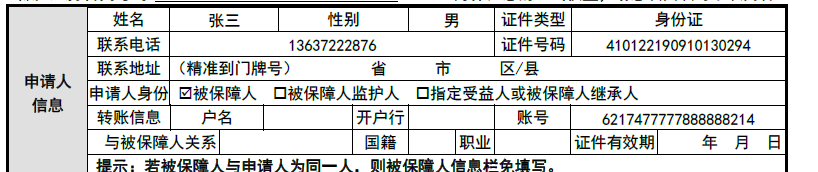

可以看到文字,正好居中在后面的单元格,图片也正好在横线上
完成
版权声明:本文为weixin_44197039原创文章,遵循CC 4.0 BY-SA版权协议,转载请附上原文出处链接和本声明。