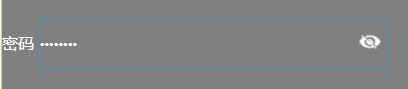
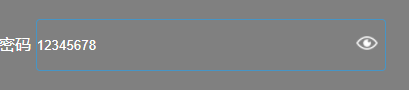
先来看效果图:
密文效果:
明文效果:
实现步骤
1.首先定义一个按钮标签,来显示我们的睁眼闭眼图标
<label for="password" id="for_userpassword" style="color: #fff;">密码</label>
<input class="input" type="password" name="password" id="password" value="" />
<input type="button" class="fa-eye" onclick="showhide()" id="eye"></input>
2.定义两个样式,用来展示明文、密文
/* 密码明密文样式 */
.fa-eye-slash {
	border: 0px;
	margin-bottom: -4px;
	margin-left: -35px;
	width: 24px;
	height: 20px;
	background-image: url(images/eye_open.png);
	background-repeat: no-repeat;
	background-size: 24px 24px;
	background-color: rgba(0, 0, 0, 0)
}

.fa-eye {
	border: 0px;
	margin-bottom: -4px;
	margin-left: -35px;
	width: 24px;
	height: 20px;
	background-image: url(images/eye_close.png);
	background-repeat: no-repeat;
	background-size: 24px 24px;
	background-color: rgba(0, 0, 0, 0)
}
3.定义一个方法,用来切换明密文的状态
//密码明密文显示
function showhide() {
	if (document.getElementById("password").type == "password") {
		document.getElementById("password").type = "text";
		document.getElementById("eye").className = 'fa-eye-slash'
	} else {
		document.getElementById("password").type = "password";
		document.getElementById("eye").className = 'fa-eye'
	}
}
4.到此就大功告成了
版权声明:本文为cy1041125543原创文章,遵循CC 4.0 BY-SA版权协议,转载请附上原文出处链接和本声明。