
前言:文章来自我的CSDN博客,有兴趣的朋友可以自己去博客看,因为知乎始终是一个回答问题的地方,写文章的很少。也可以关注一下我的博客。谢谢大家。如果文章有什么问题可以直接提出来我修改。
本文链接:
https://blog.csdn.net/weixin_43405101/article/details/102569043blog.csdn.net实现效果
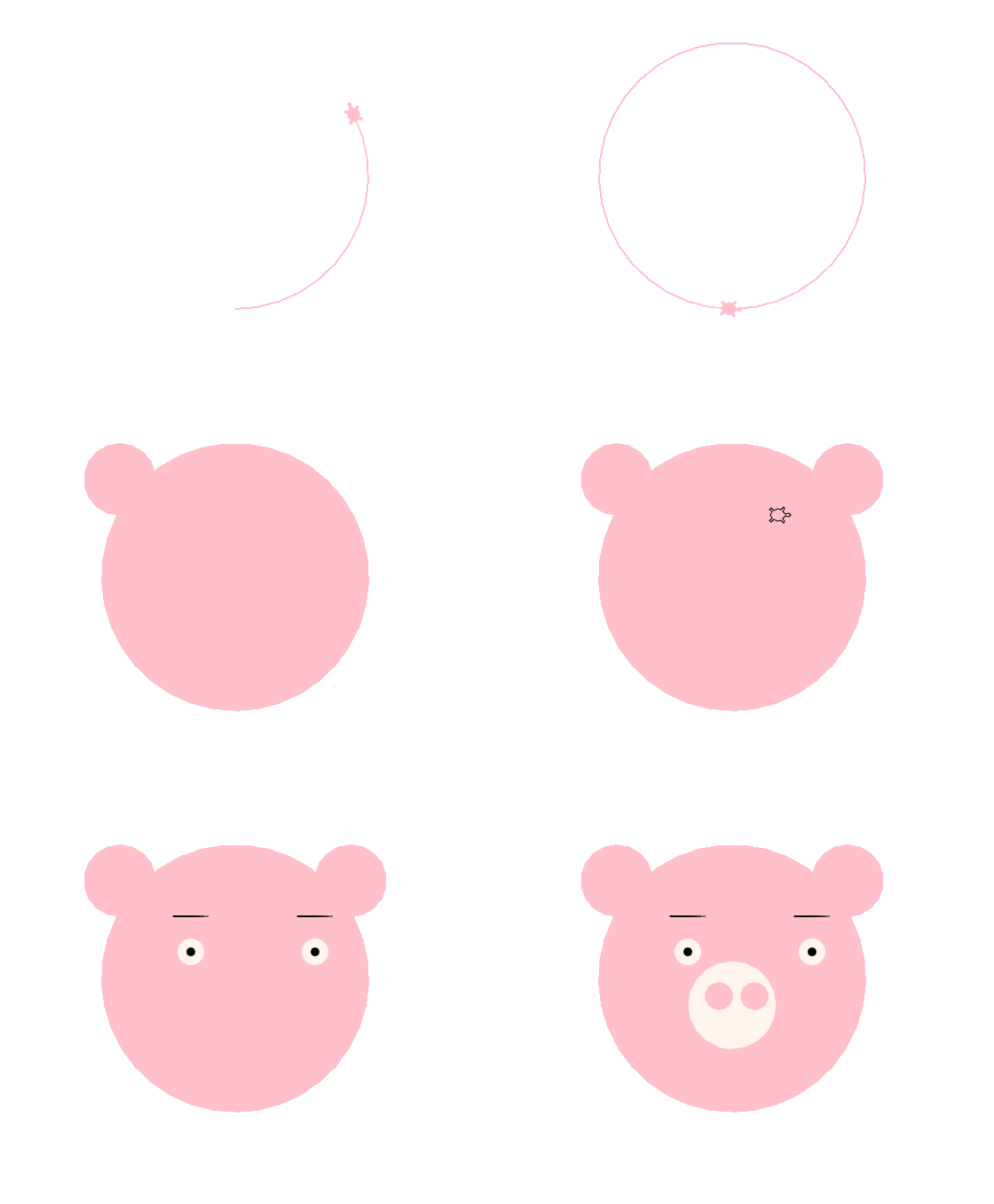
代码如下
#导入turtle库
import turtle
#导入turtle画笔
turtle.shape('turtle')
# turtle.speed(0)
turtle.pencolor('pink')#线条的颜色
length = 150;#定义变量
x = 70;
y = 220;
#面部
turtle.fillcolor('pink')#填充颜色为粉色
turtle.begin_fill()#代码开始填充的地方

#绘制一个length为150的圆。也就是圆的半径为150
turtle.circle(length)

turtle.end_fill()# 代码结束填充的地方
#耳朵
turtle.penup()
turtle.goto(-130,220)
turtle.pendown()
turtle.fillcolor('pink')
turtle.begin_fill()
turtle.circle(40)
turtle.end_fill()

turtle.penup()
turtle.goto(130,220)
turtle.pendown()
turtle.fillcolor('pink')
turtle.begin_fill()
turtle.circle(40)
turtle.end_fill()

#眉毛
turtle.pencolor('black')
turtle.penup()
turtle.goto(-x,y)
turtle.pendown()
turtle.forward(40)
turtle.penup()
turtle.goto(x,y)
turtle.pendown()
turtle.forward(40)
#眼睛
#右眼
turtle.penup()
turtle.goto(x+20,y-40)
turtle.pendown()
turtle.dot(15,'seashell')
#小眼睛
turtle.penup()
turtle.goto(x+20,y-40)
turtle.pendown()
turtle.dot(5,'black')
#左眼
turtle.penup()
turtle.goto(-x+20,y-40)
turtle.pendown()
turtle.dot(15,'seashell')
#小眼睛
turtle.penup()
turtle.goto(-x+20,y-40)
turtle.pendown()
turtle.dot(5,'black')

#猪鼻子大
turtle.pencolor('pink')
turtle.penup()
turtle.goto(0,70)
turtle.pendown()
turtle.fillcolor('seashell')
turtle.begin_fill()
turtle.circle(50)
turtle.end_fill()

#两个小猪鼻子
turtle.penup()
turtle.goto(-15,115)
turtle.pendown()
turtle.fillcolor('pink')
turtle.begin_fill()
turtle.circle(15)
turtle.end_fill()

turtle.penup()
turtle.goto(25,115)
turtle.pendown()
turtle.fillcolor('pink')
turtle.begin_fill()
turtle.circle(15)
turtle.end_fill()

turtle.hideturtle()
所涉及到的知识点如下:
1、导入
(1)、导入模块
在Python中使用模块的时候需要先导入,例如使用海龟绘图的时候就需要import turtle来进行导入
(2)、画圆
使用circle方法来命令小海龟绘制圆形
import turtle

turtle.shape('turtle')

turtle.circle(50)
2、turtle画布与坐标系
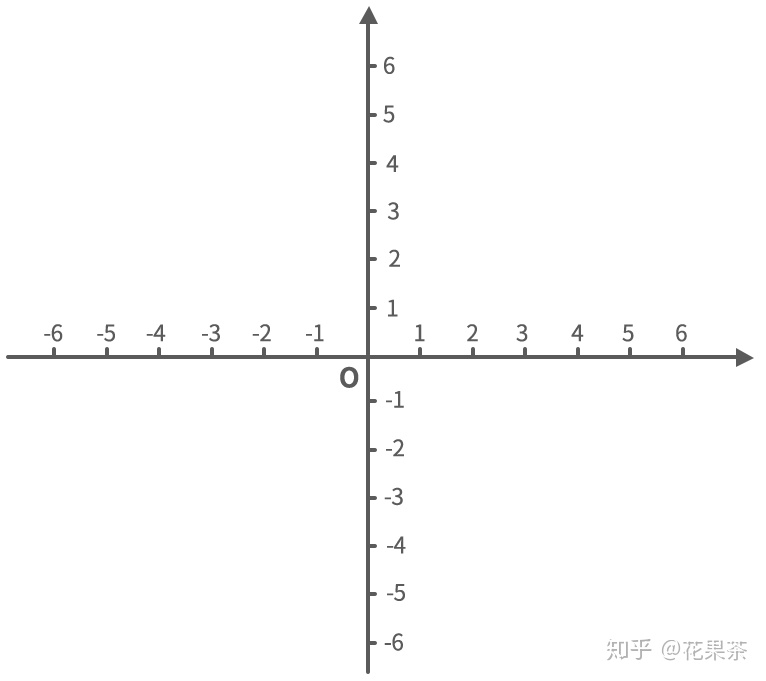
也就是x,y轴啦
(1)、goto()方法
也就是移动到坐标系的指定位置,指定坐标(x,y)
(2)、penup()方法
也就是画笔抬起。
(3)、pendown()方法
也就是画笔落下。
3、设置颜色的方法
(1)pencolor()
也就是设置画笔线条颜色。
pencolor()方法设置线条颜色:
例如:
turtle.pencolor('black')
#设置线条为黑色
(2)fillcolor()
fillcolor() 设置填充颜色
turtle.fillcolor('black')
#设置填充颜色为黑色
3)begin_fill() 和 end_fill()
turtle.begin_fill() 代码开始填充的地方
turtle.end_fill() 代码结束填充的地方
turtle.fillcolor('pink')
turtle.begin_fill()
turtle.circle(15)
turtle.end_fill()

#turtle.begin_fill()  代码开始填充的地方
#turtle.end_fill()  代码结束填充的地方
以上代码实现效果:

(4)dot()方法
turtle绘图模块的dot()方法可以绘制一个半径为d的实心圆。
可以直接在dot()方法里面添加颜色参数,例如:
import turtle

turtle.dot(15,'pink')
得到的就是一个半径为15,颜色为粉色的实心圆
THE END
现为少儿编程老师,有什么疑问可以私信我哦~~~~
如果你觉得这篇文章不错的话,请点个赞或者关注我啦,你的点赞是我持续写作的动力哦!(好吧,真的是想要关注呀,缺关注!!!)
版权声明:本文为weixin_42512441原创文章,遵循CC 4.0 BY-SA版权协议,转载请附上原文出处链接和本声明。